1.Obtain an SSL Certificate (Let's Encrypt)
1.1 Preparation
①Enable mod_ssl
If mod_ssl is not enabled, enable it.
# a2enmod ssl
Installing the Snappy Package Management System
Since the Let's Encrypt SSL certificate issuance tool "certbot" has recommended installation via "snap" since 2021, we will first install Snapd.
Add the snap repository for openSUSE 16
# zypper addrepo --refresh \
  https://download.opensuse.org/repositories/system:/snappy/openSUSE_Leap_16.0 \
  snappy
After adding the repository, import its GPG key.
# zypper --gpg-auto-import-keys refresh
Upgrade the package cache to include the new Snappy repository:
# zypper dup --from snappy
Install snapd
# zypper -n install snapd
Restart the system and add /snap/bin to the PATH.
Enable and start the snapd.apparmor service.
# systemctl enable --now snapd.apparmor
Enable and start snapd
# systemctl enable --now snapd
# systemctl start snapd
Check the version of snapd and the snap command-line tool
# snap version

snap           2.78
snapd          2.78
series         16
opensuse-leap  16.1
kernel         6.12.0-160100.9-default
architecture   amd64
1.2 Certbot installation
# ln -s /var/lib/snapd/snap /snap
# snap install --classic certbot
certbot 5.10.0 from Certbot Project (certbot-eff✓) installed
1.3 Certificate Acquisition
# zypper -n install python313-certbot
# certbot certonly --webroot -w /srv/www/htdocs/[FQDN] -d <FQDN>
# First-time users must register an email address and agree to the terms of use.
# Specify a valid email address
Saving debug log to /var/log/letsencrypt/letsencrypt.log
Enter email address (used for urgent renewal and security notices)
(Enter 'c' to cancel): [mail address]
Please read the Terms of Service at
https://letsencrypt.org/documents/LE-SA-v1.4-April-3-2024.pdf. You must agree in
order to register with the ACME server. Do you agree?
(Y)es/(N)o: y
Would you be willing, once your first certificate is successfully issued, to
share your email address with the Electronic Frontier Foundation, a founding
partner of the Let's Encrypt project and the non-profit organization that
develops Certbot? We'd like to send you email about our work encrypting the web,
EFF news, campaigns, and ways to support digital freedom.
(Y)es/(N)o: y
Account registered.
Requesting a certificate for [FQDN]
Successfully received certificate.
Certificate is saved at: /etc/letsencrypt/live/[FQDN]/fullchain.pem
Key is saved at: /etc/letsencrypt/live/[FQDN]/privkey.pem
This certificate expires on 2027-02-14.
These files will be updated when the certificate renews.
NEXT STEPS:
- The certificate will need to be renewed before it expires. Certbot can automatically renew the certificate in the background, but you may need to take steps to enable that functionality. See https://certbot.org/renewal-setup for instructions.
We were unable to subscribe you the EFF mailing list because your e-mail address appears to be invalid. You can try again later by visiting https://act.eff.org.
If you like Certbot, please consider supporting our work by:
- Donating to ISRG / Let's Encrypt: https://letsencrypt.org/donate
- Donating to EFF: https://eff.org/donate-le
If "Successfully received certificate." is displayed, it was successful.
# As stated in the message, the following certificates have been obtained under [/etc/letsencrypt/live/[FQDN]/]
# cert.pem ⇒ SSL server certificate (including public key)
# chain.pem ⇒ Interim Certificate
# fullchain.pem ⇒ A file combining cert.pem and chain.pem
# privkey.pem ⇒ Private key corresponding to the public key
2. Web Server SSL Implementation
2.1 SSL Configuration
# vi /etc/apache2/listen.conf

Line 17: Uncomment
Listen 443
SSL Virtual Host Configuration File New Creation
# vi /etc/apache2/vhosts.d/default-ssl.conf

Fill in the following
<VirtualHost *:443>
DocumentRoot "/srv/www/htdocs/[FQDN]"
SSLEngine on
SSLProtocol all -SSLv2 -SSLv3
SSLCertificateFile /etc/letsencrypt/live/[FQDN]/cert.pem
SSLCertificateKeyFile /etc/letsencrypt/live/[FQDN]/privkey.pem
SSLCertificateChainFile /etc/letsencrypt/live/[FQDN]/chain.pem
<FilesMatch "\.(cgi|shtml|phtml|php)$">
SSLOptions +StdEnvVars
</FilesMatch>
<Directory "/srv/www/cgi-bin">
SSLOptions +StdEnvVars
</Directory>
</VirtualHost>
# systemctl restart apache2
2.2 Redirect HTTP traffic to HTTPS
To redirect all HTTP traffic to HTTPS, add the following to virtual_host.conf:
# vi /etc/apache2/vhosts.d/virtual_host.conf

<VirtualHost *:80>
RewriteEngine On
RewriteCond %{HTTPS} off
RewriteRule ^(.*)$ https://%{HTTP_HOST}%{REQUEST_URI} [R=301,L]

ServerName [FQDN]
ServerAdmin Email address
DocumentRoot /srv/www/htdocs/[FQDN]
ErrorLog /var/log/apache2/[FQDN].error.log
CustomLog /var/log/apache2/[FQDN].access.log combined
LogLevel warn
</VirtualHost>
# a2enmod rewrite
# a2enmod -l
actions alias auth_basic authn_core authn_file authz_host authz_groupfile authz_core authz_user autoindex cgi dir env expires include log_config mime negotiation setenvif ssl socache_shmcb userdir reqtimeout cgid php8 proxy proxy_fcgi rewrite
# systemctl restart apache2
If Firewalld is enabled, you must allow HTTPS services. HTTPS uses port 443/TCP.
# firewall-cmd --add-service=https --permanent
# firewall-cmd --reload
3. Configuring SSL/TLS (Let's Encrypt) on the Mail Server
3.1 Obtaining a Certificate for the Mail Server
Stop the web server once and then do it
# systemctl stop httpd.service
# certbot certonly --standalone -d mail.[domain name]
Saving debug log to /var/log/letsencrypt/letsencrypt.log
Requesting a certificate for mail.[Domain]
Successfully received certificate.
Certificate is saved at: /etc/letsencrypt/live/mail.[Domain]/fullchain.pem
Key is saved at: /etc/letsencrypt/live/mail.[Domain]/privkey.pem
This certificate expires on 2027-02-14.
These files will be updated when the certificate renews.
Certbot has set up a scheduled task to automatically renew this certificate in the background.
----------------------------------------------------------------------------------------------------------
If you like Certbot, please consider supporting our work by:
Donating to ISRG / Let's Encrypt: https://letsencrypt.org/donate
Donating to EFF: https://eff.org/donate-le
----------------------------------------------------------------------------------------------------------
Restart Apache
# systemctl start apache2
3.2 Postfix Configuration
# vi /etc/postfix/main.cf

Addendum to the last line
smtpd_tls_cert_file = /etc/letsencrypt/live/mail.[domain name]/fullchain.pem
smtpd_tls_key_file = /etc/letsencrypt/live/mail.[domain name]/privkey.pem
smtpd_use_tls = yes
smtp_tls_mandatory_protocols = !SSLv2, !SSLv3
smtpd_tls_mandatory_protocols = !SSLv2, !SSLv3
smtpd_tls_session_cache_database = btree:/var/lib/postfix/smtpd_scache
# vi /etc/postfix/master.cf

Lines 19-23: Change as follows
submission inet n       -       n       -       -       smtpd
  -o syslog_name=postfix/submission
#  -o smtpd_forbid_unauth_pipelining=no
  -o smtpd_tls_security_level=encrypt
  -o smtpd_sasl_auth_enable=yes

Lines 40-44: Change as follows
submissions     inet  n       -       n       -       -       smtpd
  -o syslog_name=postfix/submissions
#  -o smtpd_forbid_unauth_pipelining=no
  -o smtpd_tls_wrappermode=yes
  -o smtpd_sasl_auth_enable=yes
3.3 Dovecot Configuration
# vi /etc/dovecot/dovecot.conf

Line 67 : Change
ssl = yes

Add to last line
ssl_server_cert_file = /etc/letsencrypt/live/mail.[domain name]/fullchain.pem
ssl_server_key_file = /etc/letsencrypt/live/mail.korodes.com/privkey.pem
Restart postfix,dovecot
# systemctl restart postfix dovecot
3.4 Thunderbird Settings
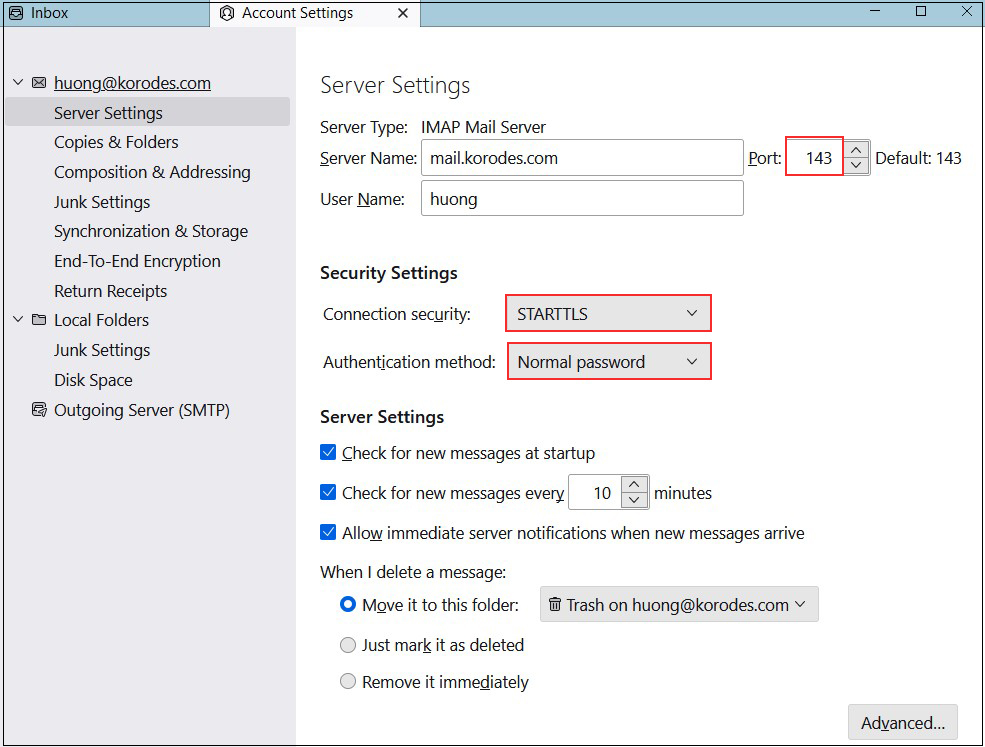
Incoming mail server
Port : 143
Connection security : STARTTLS
Authentication method : Normal password
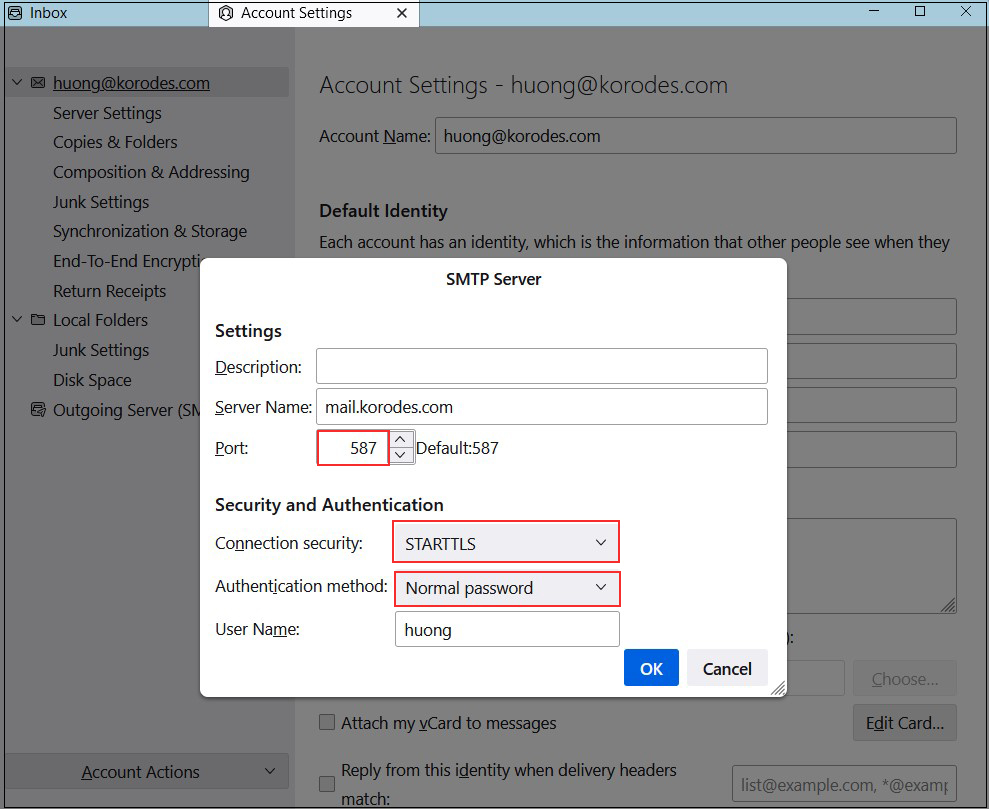
Outgoing mail server
Port : 587
Connection security : STARTTLS
Authentication method : Normal password