

Nagios Server : open-source integrated monitoring software
Nagios is an open source monitoring solution running on Linux.
Nagios is designed to periodically check critical network, application, or server parameters.
These parameters include microprocessor load, number of running processes, log files, disk and memory usage, as well as many other services such as SMTP (Simple Mail Transfer Protocol), HTTP (Hypertext Transfer Protocol), POP3 (Post Office Protocol 3), etc. can be checked.
These parameters require a microprocessor load, a database such as PHP or MySQL to run Nagois, and a web server such as Apache or Nginx. We will proceed under the assumption that all of these have already been configured.
1. Nagios Install
# dnf install -y nagios nagios-selinux
Normally a nagios user group is created, but if a package installation script or trigger is skipped for any reason, you can force generate a system user from the configuration file with the following command:
# systemd-sysusers
2. Install the Nagios plugin
②Install
# dnf install nagios-plugins-all
The following nagios-plugins are available
# ls /usr/lib64/nagios/plugins/
check_breeze    check_file_age   check_ircd      check_mysql_query  check_oracle   check_smtp          check_ups
check_by_ssh    check_flexlm     check_jabber    check_nagios       check_overcr   check_snmp          check_users
check_clamd     check_fping      check_ldap      check_nntp         check_pgsql    check_spop          check_wave
check_cluster   check_ftp        check_ldaps     check_nntps        check_ping     check_ssh           eventhandlers
check_dhcp      check_game       check_load      check_nt           check_pop      check_ssl_validity  negate
check_dig       check_hpjd       check_log       check_ntp          check_procs    check_ssmtp         urlize
check_disk      check_http       check_mailq     check_ntp_peer     check_real     check_swap          utils.pm
check_disk_smb  check_icmp       check_mrtg      check_ntp.pl       check_rpc      check_tcp           utils.sh
check_dns       check_ide_smart  check_mrtgtraf  check_ntp_time     check_sensors  check_time
check_dummy     check_imap       check_mysql     check_nwstat       check_simap    check_udp
3. Creating a Nagios Web User
Create a user account to access the Nagios web dashboard. This user account is used for authentication.
The default name for the user is nagiosadmin, which is defined as the preferred username in the /etc/nagios/cgi.cfg file.
# htpasswd -c /etc/nagios/htpasswd nagiosadmin
New password:  [password]
Re-type new password:  [again password]
Adding password for user nagiosadmin
Syntax check for configuration files
# nagios -v /etc/nagios/nagios.cfg
----------------------------------------------------------------------------------
Total Warnings: 0
Total Errors:   0

Things look okay - No serious problems were detected during the pre-flight check
Total Warnings: 0
Total Errors: 0
If it says "This is normal"
Enable Nagios service
# systemctl enable nagios --now
Check if the service is running
# systemctl status nagios
● nagios.service - Nagios Core 4.5.14
     Loaded: loaded (/usr/lib/systemd/system/nagios.service; enabled; preset: disabled)
    Drop-In: /usr/lib/systemd/system/service.d
             └─10-timeout-abort.conf
     Active: active (running) since Thu 2026-11-12 12:10:38 JST; 36s ago
 Invocation: 95ab1c4ffbad480b90ae096073da459b
       Docs: https://www.nagios.org/documentation
    Process: 3296 ExecStartPre=/usr/bin/nagios -v /etc/nagios/nagios.cfg (code=exited, status=0/SUCCESS)
    Process: 3297 ExecStart=/usr/bin/nagios -d /etc/nagios/nagios.cfg (code=exited, status=0/SUCCESS)
   Main PID: 3299 (nagios)
      Tasks: 8 (limit: 4564)
     Memory: 6.9M (peak: 7.8M)
        CPU: 46ms
     CGroup: /system.slice/nagios.service
             ├─3299 /usr/bin/nagios -d /etc/nagios/nagios.cfg
             ├─3301 /usr/bin/nagios --worker /var/spool/nagios/cmd/nagios.qh
             ├─3302 /usr/bin/nagios --worker /var/spool/nagios/cmd/nagios.qh
             ├─3303 /usr/bin/nagios --worker /var/spool/nagios/cmd/nagios.qh
             ├─3304 /usr/bin/nagios --worker /var/spool/nagios/cmd/nagios.qh
             ├─3305 /usr/bin/nagios --worker /var/spool/nagios/cmd/nagios.qh
             ├─3306 /usr/bin/nagios --worker /var/spool/nagios/cmd/nagios.qh
             └─3309 /usr/bin/nagios -d /etc/nagios/nagios.cfg

Nov 12 12:10:38 Lepard nagios[3299]: qh: help for the query handler registered
Nov 12 12:10:38 Lepard nagios[3299]: wproc: Successfully registered manager as @wproc with query handler
Nov 12 12:10:38 Lepard systemd[1]: Started nagios.service - Nagios Core 4.5.14.
Nov 12 12:10:38 Lepard nagios[3299]: wproc: Registry request: name=Core Worker 3301;pid=3301
Nov 12 12:10:38 Lepard nagios[3299]: wproc: Registry request: name=Core Worker 3302;pid=3302
Nov 12 12:10:38 Lepard nagios[3299]: wproc: Registry request: name=Core Worker 3304;pid=3304
Nov 12 12:10:38 Lepard nagios[3299]: wproc: Registry request: name=Core Worker 3305;pid=3305
Nov 12 12:10:38 Lepard nagios[3299]: wproc: Registry request: name=Core Worker 3303;pid=3303
5. Access the Nagios Web Interface
Access http://[FQDN]/nagios or http://[IP address]/nagios in any browser.
Username : nagoisadmin
Password : Password specified when the user was created above
[Sign in]
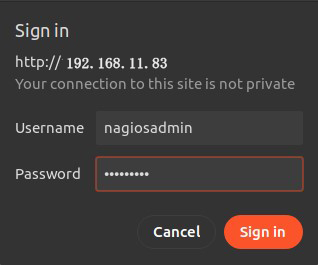
After successful login, the following dashboard will appear

Show host availability
Click on [Hosts] in the left menu

Click [Tactical Overview] on the left menu to view the monitoring data

Click [Current Status] [Services] on the left menu : The current monitoring service details are displayed.

※ If you have assigned SSH port 2244 with custom settings, change localhost.cfg as follows:
# vi /etc/nagios/objects/localhost.cfg
Per Line 143 :
check_command           check_ssh
↓
check_command           check_ssh!-p 2244
# systemctl restart nagios
6. Configuring the NRPE Plugin
To monitor the agent, install the following:
6.1 Install the nrpe plugin
# dnf install nrpe nagios-plugins-nrpe
Open the/etc/nagios/nrpe.cfg file and add the IP addresses of your localhost and Nagios monitoring server
# vi /etc/nagios/nrpe.cfg

Line 106 : Add
allowed_hosts=127.0.0.1,::1,192.168.11.83
Check Version
# /usr/bin/nrpe -V
NRPE - Nagios Remote Plugin Executor
Version: 4.2.0
Start the service and enable it
# systemctl enable nrpe
Created symlink '/etc/systemd/system/multi-user.target.wants/nrpe.service' → '/usr/lib/systemd/system/nrpe.service'.

# systemctl restart nrpe
Open the NRPE port in the firewall
NRPE uses TCP port 5666 by default. If you have a firewall in place, open this port to allow external checks from the Nagios monitoring server.
# firewall-cmd --add-port=5666/tcp --permanent
# firewall-cmd --reload
Check if port 5666/tcp is listening
# netstat -na | grep "5666"
tcp        0      0 0.0.0.0:5666            0.0.0.0:*               LISTEN
Run the "check_nrpe" command to verify that the NRPE daemon is running properly
The version of NRPE currently installed is displayed
/usr/lib64/nagios/plugins/
# /usr/lib64/nagios/plugins/check_nrpe -H 127.0.0.1
NRPE v4.2.0
7. Adding a monitored host
Add the following server to the host and configure it as a target for simple ping death/activity monitoring
OS : Fedora45
IPアドレス : 192.168.11.85
7.1 Configuration File Editing
# vi /etc/nagios/nagios.cfg
Line 51 : Uncomment
cfg_dir=/usr/local/nagios/etc/servers
7.2 Directory Create
# mkdir /etc/nagios/servers
# chgrp nagios /etc/nagios/servers
# chmod 750 /etc/nagios/servers
7.3 Create new definition file
The name "korodes.cfg" can be arbitrary.
# vi /etc/nagios/servers/korodes.cfg

define host {
    use                     linux-server
    host_name               korodes
    alias                   korodes
    address                 192.168.11.85
}
define service {
    use                     generic-service
    host_name               korodes
    service_description     PING
    check_command           check_ping!100.0,20%!500.0,60%
}
7.4 Restart Nagios server
# systemctl restart nagios.service
Log in to the Nagios server (http://[server IP address]/nagios) and look at Hosts, and the host is added.

8. Adding Monitoring Services
Add monitoring services to the hosts added above.
OS : Fedora45
IPアドレス : 192.168.11.85
8.1 Configuration on the server to be monitored
8.1.1 Agent installed on monitored hosts
Install NRPE and common service plugins
# dnf -y install nagios-nrpe nagios-plugins-all
8.1.2 Configuration File Editing
# vi /etc/nagios/nrpe.cfg
Line 106 : Add a host to allow connections (specify Nagios server)
allowed_hosts=127.0.0.1,::1,192.168.11.83
Line 122 : Allow command arguments
dont_blame_nrpe=1
Line 300-304 : Comment and add
# command[check_users]=/usr/lib/nagios/plugins/check_users -w 5 -c 10
# command[check_load]=/usr/lib/nagios/plugins/check_load -r -w .15,.10,.05 -c .30,.25,.20
# command[check_hda1]=/usr/lib/nagios/plugins/check_disk -w 20% -c 10% -p /dev/hda1
# command[check_zombie_procs]=/usr/lib/nagios/plugins/check_procs -w 5 -c 10 -s Z
# command[check_total_procs]=/usr/lib/nagios/plugins/check_procs -w 150 -c 200
Add part of the plugin
command[check_by_ssh]=/usr/lib/nagios/plugins/check_by_ssh $ARG1$
command[check_dhcp]=/usr/lib/nagios/plugins/check_dhcp $ARG1$
command[check_disk]=/usr/lib/nagios/plugins/check_disk $ARG1$
command[check_file_age]=/usr/lib/nagios/plugins/check_file_age $ARG1$
command[check_ftp]=/usr/lib/nagios/plugins/check_ftp $ARG1$
command[check_http]=/usr/lib/nagios/plugins/check_http $ARG1$
command[check_imap]=/usr/lib/nagios/plugins/check_imap $ARG1$
command[check_load]=/usr/lib/nagios/plugins/check_load $ARG1$
command[check_log]=/usr/lib/nagios/plugins/check_log $ARG1$
command[check_mysql]=/usr/lib/nagios/plugins/check_mysql $ARG1$
command[check_ntp]=/usr/lib/nagios/plugins/check_ntp $ARG1$
command[check_ntp_peer]=/usr/lib/nagios/plugins/check_ntp_peer $ARG1$
command[check_ntp_time]=/usr/lib/nagios/plugins/check_ntp_time $ARG1$
command[check_ping]=/usr/lib/nagios/plugins/check_ping $ARG1$
command[check_pop]=/usr/lib/nagios/plugins/check_pop $ARG1$
command[check_spop]=/usr/lib/nagios/plugins/check_spop $ARG1$
command[check_procs]=/usr/lib/nagios/plugins/check_procs $ARG1$
command[check_smtp]=/usr/lib/nagios/plugins/check_smtp $ARG1$
command[check_ssmtp]=/usr/lib/nagios/plugins/check_ssmtp $ARG1$
command[check_ssh]=/usr/lib/nagios/plugins/check_ssh $ARG1$
command[check_swap]=/usr/lib/nagios/plugins/check_swap $ARG1$
command[check_tcp]=/usr/lib/nagios/plugins/check_tcp $ARG1$
command[check_udp]=/usr/lib/nagios/plugins/check_udp $ARG1$
command[check_ups]=/usr/lib/nagios/plugins/check_ups $ARG1$
command[check_users]=/usr/lib/nagios/plugins/check_users $ARG1$
8.1.3 nrpe server activation and startup
# systemctl enable --now nrpe
Created symlink '/etc/systemd/system/multi-user.target.wants/nrpe.service' → '/usr/lib/systemd/system/nrpe.service'.

# systemctl start nrpe

# systemctl status nrpe
● nrpe.service - Nagios Remote Plugin Executor
     Loaded: loaded (/usr/lib/systemd/system/nrpe.service; enabled; preset: disabled)
    Drop-In: /usr/lib/systemd/system/service.d
             └─10-timeout-abort.conf
     Active: active (running) since Thu 2026-11-12 14:08:17 JST; 57s ago
 Invocation: df4bf3e9fcfd4f37b373e5be4491cc89
       Docs: http://www.nagios.org/documentation
   Main PID: 2334 (nrpe)
      Tasks: 1 (limit: 4558)
     Memory: 1.3M (peak: 1.6M)
        CPU: 12ms
     CGroup: /system.slice/nrpe.service
             └─2334 /usr/bin/nrpe -c /etc/nagios/nrpe.cfg -f

Nov 12 14:08:17 Lion systemd[1]: Started nrpe.service - Nagios Remote Plugin Executor.
Nov 12 14:08:17 Lion nrpe[2334]: WARN: Limiting SSL/TLS version to v1.2 to support ADH
Nov 12 14:08:17 Lion nrpe[2334]: Starting up daemon
Nov 12 14:08:17 Lion nrpe[2334]: Server listening on 0.0.0.0 port 5666.
Nov 12 14:08:17 Lion nrpe[2334]: Server listening on :: port 5666.
Nov 12 14:08:17 Lion nrpe[2334]: Warning: Daemon is configured to accept command arguments from clients!
Nov 12 14:08:17 Lion nrpe[2334]: Listening for connections on port 5666
Nov 12 14:08:17 Lion nrpe[2334]: Allowing connections from: 127.0.0.1,::1,192.168.11.83
8.1.4 Open NRPE ports 5666/tcp and 5666/udp on firewall
# firewall-cmd --permanent --add-port=5666/tcp
# firewall-cmd --permanent --add-port=5666/udp
# firewall-cmd --reload
8.2 Nagios Server Side Configuration
8.2.1 commands.cfg edit
# vi /etc/nagios/objects/commands.cfg

# Add to the last line
define command {
    command_name    check_nrpe
    command_line    $USER1$/check_nrpe -H $HOSTADDRESS$ -c $ARG1$
}
8.2.2 Edit and add korodes.cfg created when you added the host earlier
I'll add HTTP,SSH,FTP this time.
# vi /etc/nagios/servers/korodes.cfg

# Add the following:

# 'HTTP' command definition
define service{
        use                              local-service
        host_name                        korodes
        service_description              HTTP
        check_command                    check_http
        }
# 'SSH' command definition
define service{
        use                              local-service
        host_name                        korodes
        service_description              SSH
        check_command                    check_ssh
       }
# 'FTP' command definition
define service{
        use                              local-service
        host_name                        korodes
        service_description              FTP
        check_command                    check_ftp
        }
8.2.5 Restart Nagios
# systemctl restart nagios.service
8.2.6 Accsess http://[Nagios Server IP Address]/nagios
Newly added monitoring services are added as shown in the figure below
