

1. clamav ( anti-virus software )
1.1 Clamav Install
# zypper -n install clamav
1.2 virus definition file update
①Configuration File Editing
# vi /etc/freshclam.conf

Line 88 : comment out and add below
#DatabaseMirror database.clamav.net
DatabaseMirror db.jp.clamav.net
②virus definition file update
# freshclam

ClamAV update process started at Tue Jun 23 15:13:28 2026
daily database available for download (remote version: 28039)
Time:    0.3s, ETA:    0.0s [========================>]   22.33MiB/22.33MiB
Time:    0.8s, ETA:    0.0s [========================>]    8.87KiB/8.87KiB
Testing database: '/var/lib/clamav/tmp.ee8d9d1540/daily.cvd' ...
Database test passed.
daily.cvd updated (version: 28039, sigs: 355472, f-level: 90, builder: svc.clamav-publisher)
main database available for download (remote version: 63)
Time:    0.8s, ETA:    0.0s [========================>]   84.95MiB/84.95MiB
Time:    0.3s, ETA:    0.0s [========================>]    8.87KiB/8.87KiB
Testing database: '/var/lib/clamav/tmp.ee8d9d1540/main.cvd' ...
Database test passed.
main.cvd updated (version: 63, sigs: 3287027, f-level: 90, builder: tomjudge)
bytecode database available for download (remote version: 339)
Time:    0.2s, ETA:    0.0s [========================>]  275.10KiB/275.10KiB
Time:    0.5s, ETA:    0.0s [========================>]    8.87KiB/8.87KiB
Testing database: '/var/lib/clamav/tmp.ee8d9d1540/bytecode.cvd' ...
Database test passed.
bytecode.cvd updated (version: 339, sigs: 80, f-level: 90, builder: nrandolp)
WARNING: Clamd was NOT notified: Can't connect to clamd through /run/clamav/clamd.sock: No such file or directory
1.3 operation check
■Download a test virus and scan it
# cd /home
# wget https://secure.eicar.org/eicar.com.txt
# clamscan --infected --remove --recursive /home
/home/eicar.com.txt: Eicar-Test-Signature FOUND
/home/eicar.com.txt: Removed.

----------- SCAN SUMMARY -----------
Known viruses: 3627878
Engine version: 1.5.2
Scanned directories: 10
Scanned files: 10
Infected files: 1
Data scanned: 23.96 KiB
Data read: 12.15 KiB (ratio 1.97:1)
Time: 10.014 sec (0 m 10 s)
Start Date: 2026:06:23 15:18:38
End Date:   2026:06:23 15:18:49
1.4 Deployment of virus scan auto-execution scripts
①Create script storage directory
# mkdir -p /srv/www/system
②Creation of auto-execution scripts
# cd /srv/www/system

Create clamscan.sh in /srv/www/system with the following contents
# vi /srv/www/system/clamscan.sh

Describe the following
#!/bin/bash
PATH=/usr/bin:/bin
# excludeopt setup
excludelist=/srv/www/system/clamscan.exclude
if [ -s $excludelist ]; then
for i in `cat $excludelist`
do
if [ $(echo "$i"|grep \/$) ]; then
i=`echo $i|sed -e 's/^\([^ ]*\)\/$/\1/p' -e d`
excludeopt="${excludeopt} --exclude-dir=$i"
else
excludeopt="${excludeopt} --exclude=$i"
fi
done
fi
# signature update
freshclam
# virus scan
clamscan --recursive --remove ${excludeopt} /
Grant execute permissions to scripts
# chmod 700 clamscan.sh
The sys and proc directories are excluded from the scan because they cannot be scanned due to the specification.
OpenSUSE creates a large number of snapshots, so if necessary, set them in non-target directories.
# echo "/sys/" >> /srv/www/system/clamscan.exclude
# echo "/proc/" >> /srv/www/system/clamscan.exclude
# echo "/.snapshots/" >> /srv/www/system/clamscan.exclude
Set up periodic virus scan
# crontab -e
0 1 * * * /srv/www/system/clamscan.sh > /dev/null 2>&
Execute "/srv/www/system/clamscan.sh" to scan the entire system
# /srv/www/system/clamscan.sh
2. Mail server Install
2.1 Postfix Install
①Install Postfix and build an SMTP server
# zypper -n install postfix
②Postfix Settings
To prevent unauthorized mail relay, use the SASL function of Dovecot, described below, and configure Postfix to require authentication for sending as well.
# vi /etc/postfix/main.cf

Line 100:Hostname specification
myhostname = mail.[domain]

Line 107:Domain Name Specification
mydomain = [domain]

Line 122:Uncomment
myorigin = $mydomain

Line 136:Uncomment
inet_interfaces = all

Line 184: Uncomment
mydestination = $myhostname, localhost.$mydomain, localhost, $mydomain

Line 286:Unlock comments and add to your own network
mynetworks = 127.0.0.0/8, 192.168.11.0/24

Line 443:Unlock comments and switch to Maildir format
home_mailbox = Maildir/

# Add to the last line
# Limit mailbox size as needed (example below: 1 GB)
mailbox_size_limit = 1073741824
# Limit the size of sent and received emails as needed (example below: 10MB)
message_size_limit = 10485760
smtpd_sasl_auth_enable = yes
smtpd_sasl_type = dovecot
smtpd_sasl_path = private/auth
smtpd_sasl_security_options = noanonymous
smtpd_sasl_local_domain = $myhostname
smtpd_recipient_restrictions = permit_mynetworks, permit_auth_destination, permit_sasl_authenticated, reject
# systemctl start postfix
# systemctl enable postfix
③SMTP service permission is required if Firewalld is enabled; SMTP uses 25/TCP
# firewall-cmd --add-service=smtp --permanent
success
# firewall-cmd --reload
success
2.3 Dovecot
①Install
# zypper -n install dovecot
②Dovecot Settings
Configure Dovecot to provide SASL functionality for Postfix.
# vi /etc/dovecot/dovecot.conf

Per Line 25 : Additional (if not listening on IPv6)
listen = *

Per Line 46 : Comment
#  mail_inbox_path = ~/Maildir/.INBOX

# Add to the last line
service auth {
  unix_listener /var/spool/postfix/private/auth {
    mode = 0666
    user = postfix
    group = postfix
  }
}
③Dovecot startup and automatic execution
# systemctl start dovecot
# systemctl enable dovecot
Created symlink /etc/systemd/system/multi-user.target.wants/dovecot.service → /usr/lib/systemd/system/dovecot.service.
④POP/IMAP service permission required if Firewalld is enabled
POP uses 110/TCP, IMAP uses 143/TCP
# firewall-cmd --add-service={pop3,imap} --permanent
success
# firewall-cmd --reload
success
2.4 User Account Registration
①Preprocessing for new users
When a new user is added, set up the system to automatically send and receive mail.
# mkdir -p /etc/skel/Maildir/{new,cur,tmp}
# chmod -R 700 /etc/skel/Maildir/
# echo "~/Maildir/"> /etc/skel/.forward
# chmod 600 /etc/skel/.forward
②Mail environment pre-processing for existing users
Configure already created users(huong) to be able to send and receive mail.
# mkdir -p /home/huong/Maildir/{new,cur,tmp}
# chown -R huong:huong /home/huong/Maildir/
# chmod 700 /home/huong/Maildir
# chmod 700 /home/huong/Maildir/{new,cur,tmp}
➂Mail client installation
# zypper -n install mailx
④Mailboxes are set to refer to Maildir
# echo 'export MAIL=$HOME/Maildir' >> /etc/profile.d/mail.sh
2.5 Confirmation of operation
Set up an account in Thunderbird, a free email client, to check its operation.
However, depending on your provider, port 587 may be used for the outgoing server.
Please free up port 587 in your firewall settings.
# firewall-cmd --add-port=587/tcp --permanent
# firewall-cmd --reload
Set up and confirm your account in Mozilla Thunderbird (for OS user huong as mail user)
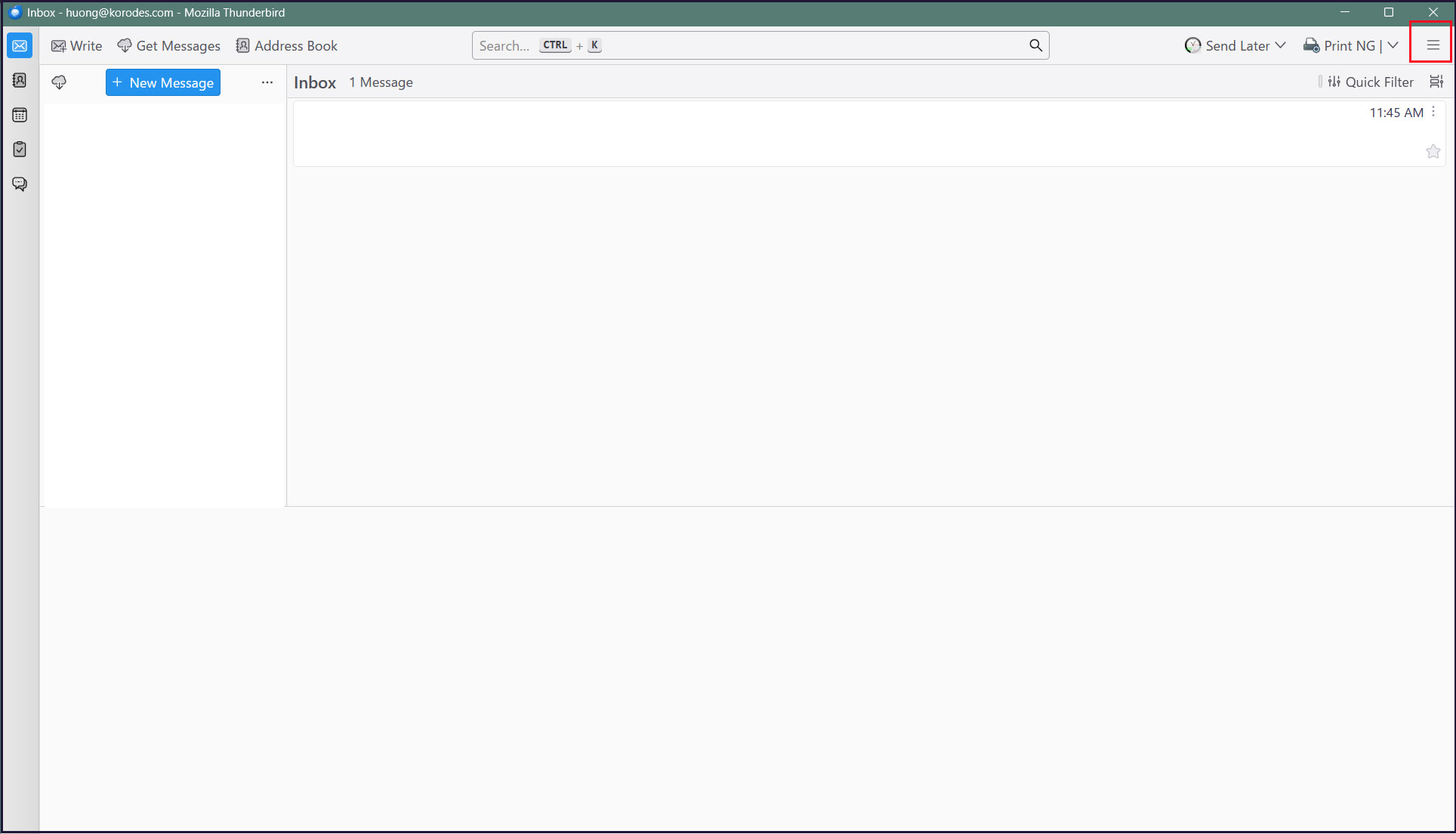
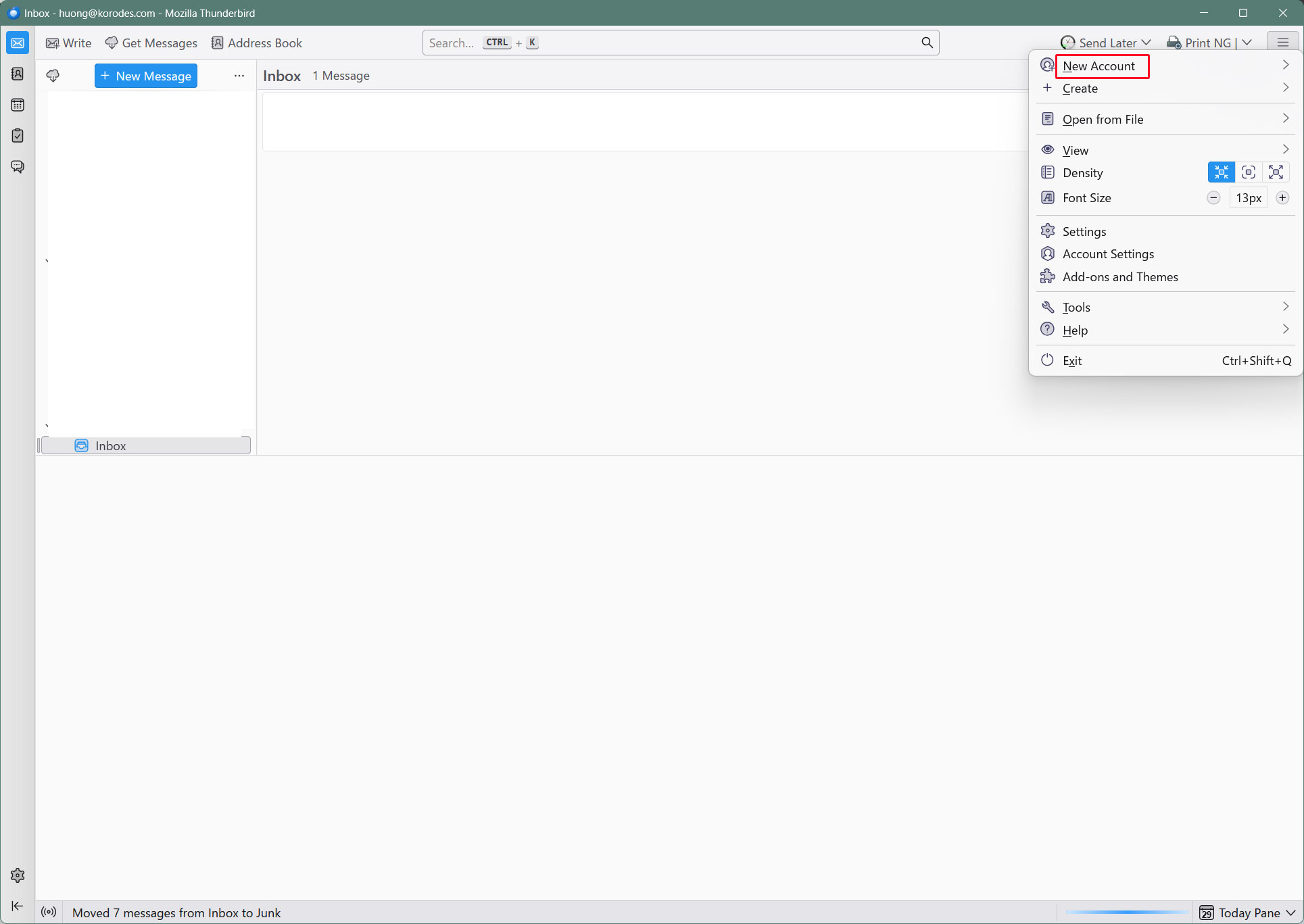
Start Thunderbird and click [New Account][Email] in the [Three] menu in the upper right corner.
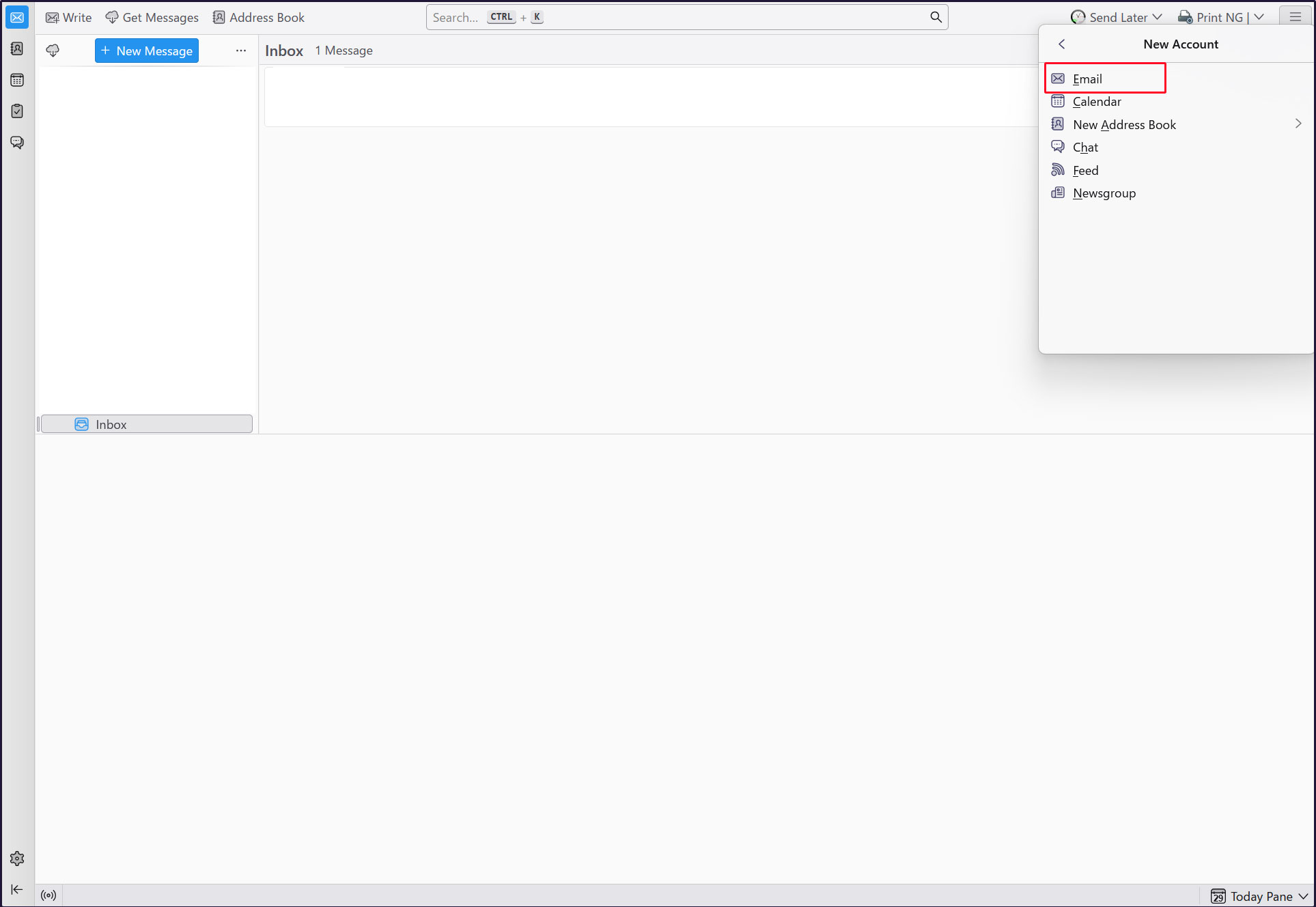
Full name : Arbitrary name
Email address : huong@<domain-name>
Enter each and click "Continue".
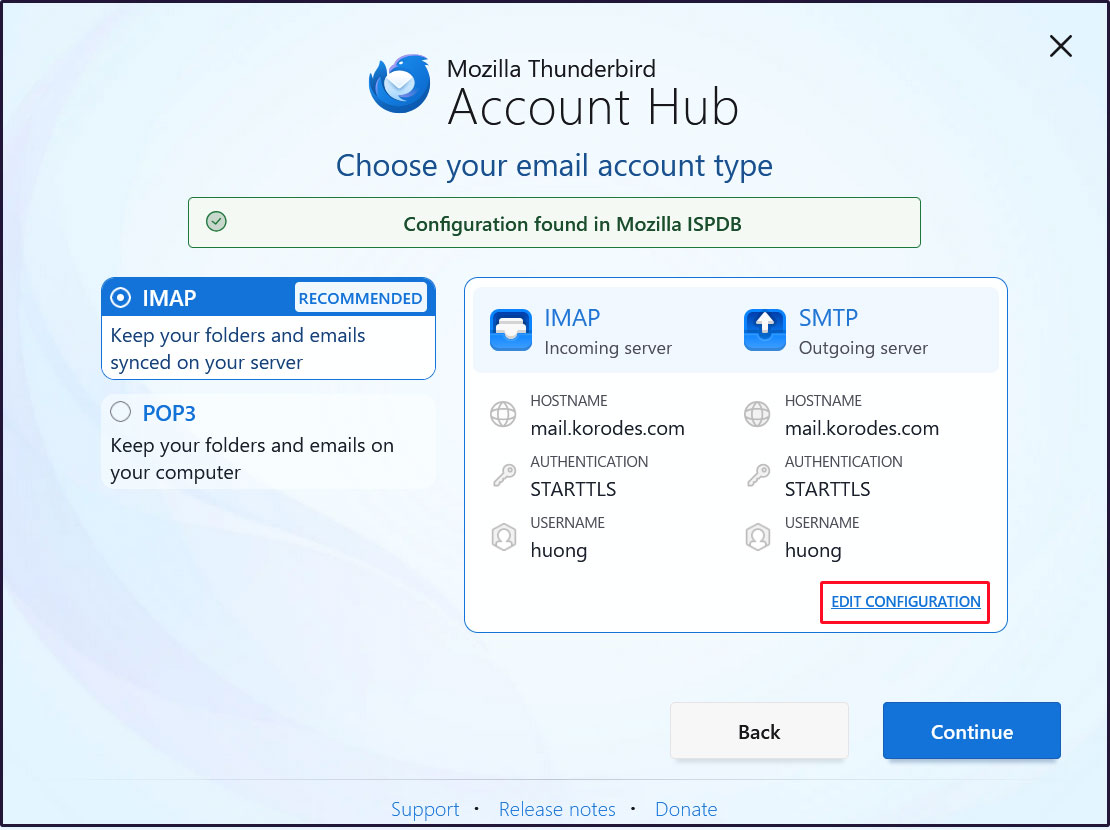
Click on "EDIT CONFIGURATION"
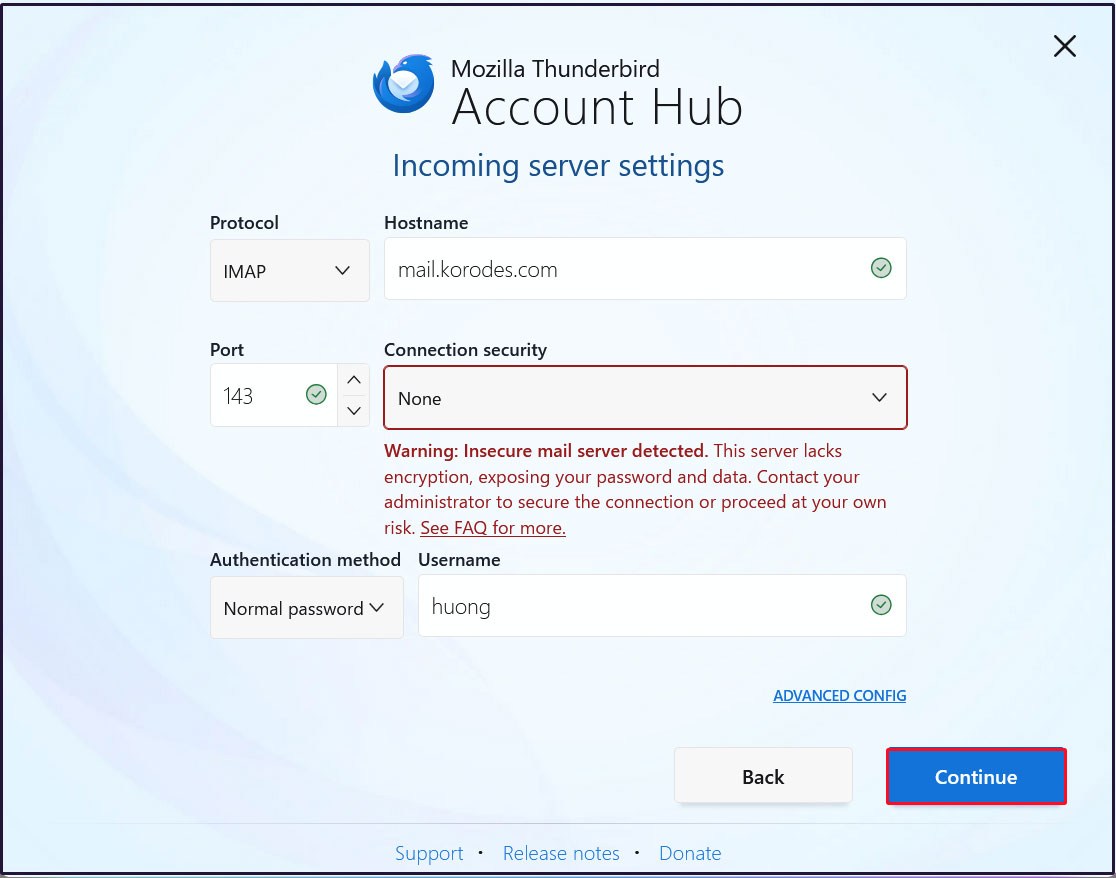
Incoming Server Settings
Set [Connection security] to [None] and click [Continue].
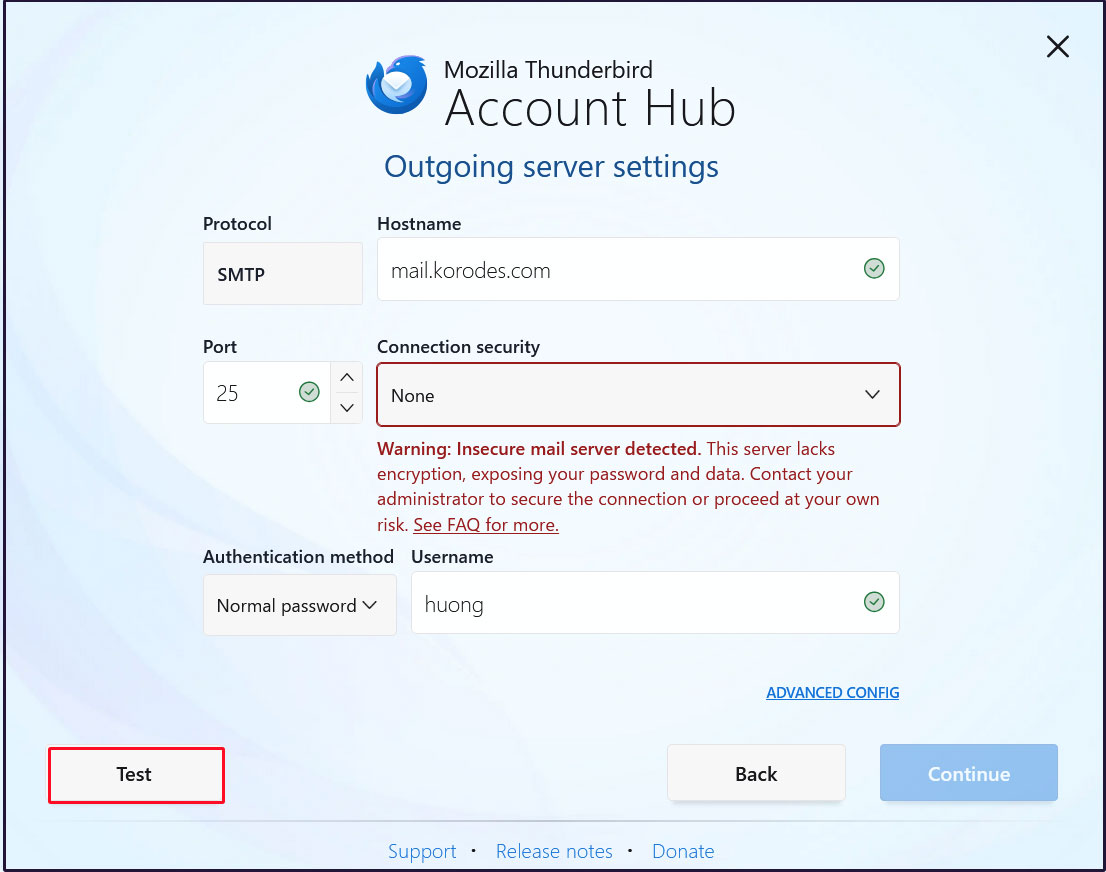
Configure the outgoing server
Set [Connection security] to [None] and click [Test].
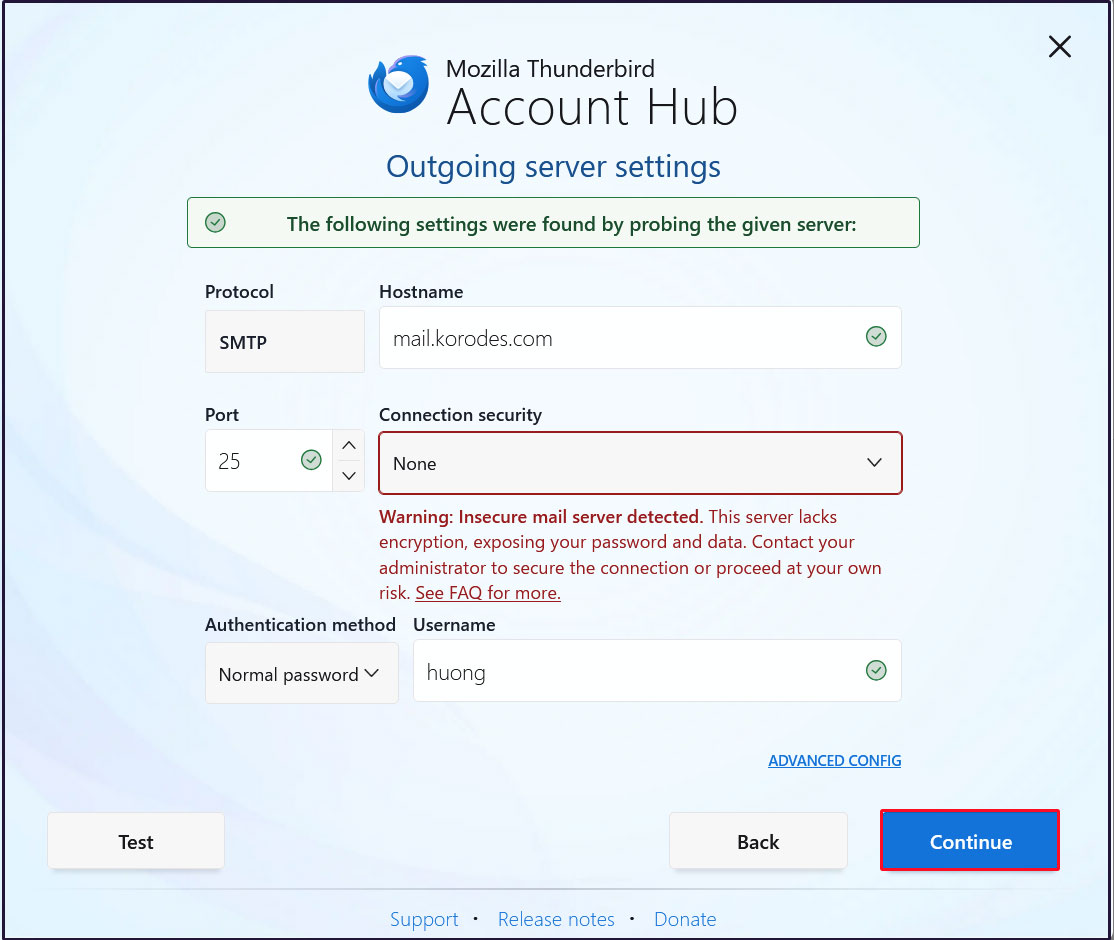
Click "Continue"
Enter the user's password in the "Password" field and click "Continue"
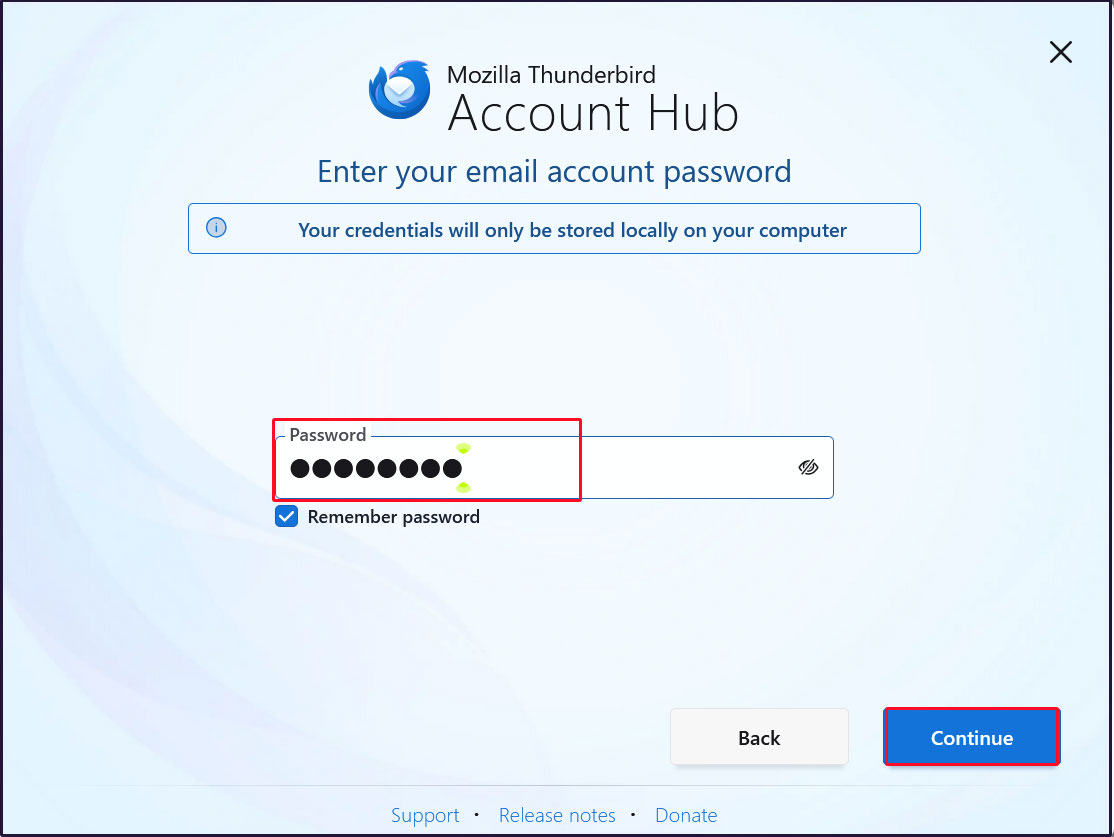
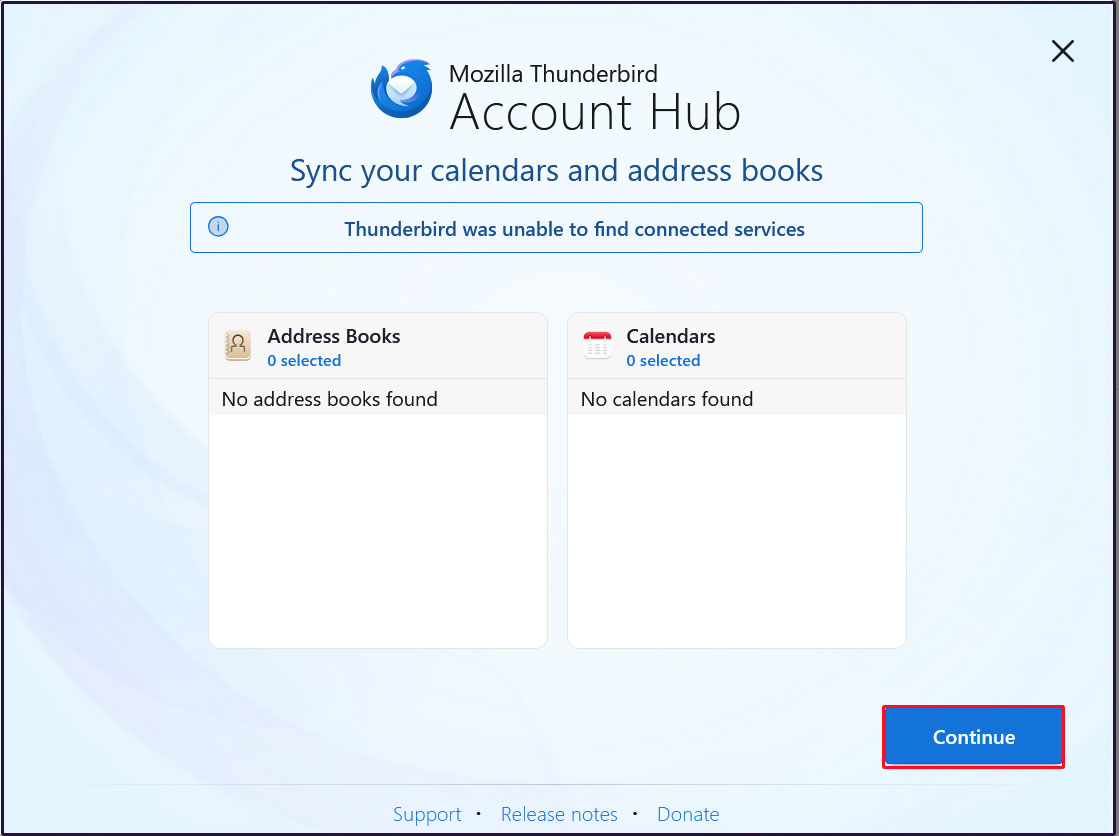
Click "Continue"
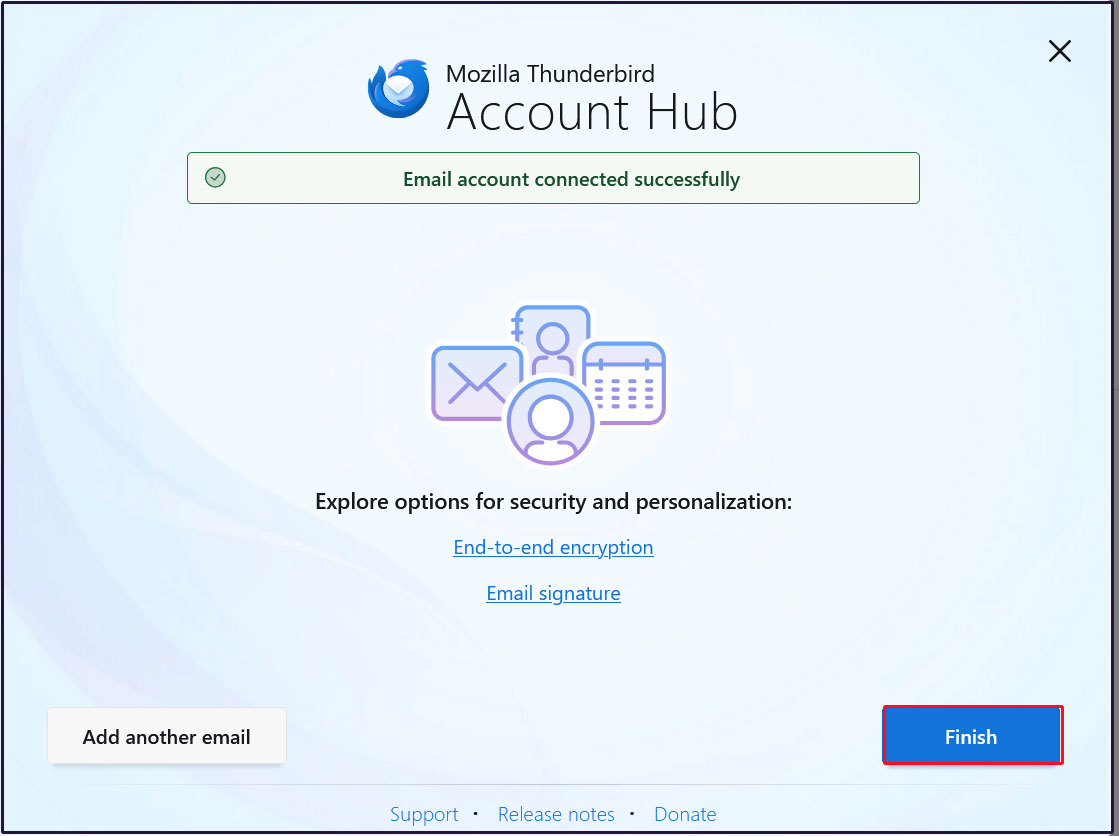
Click "Finish" when the email account has been successfully created.
3. Mail Server : Postfix + Clamav + clamav-milter+SpamAssassin
Set up Postfix and Clamav to work together to scan incoming and outgoing mail in real time.
3.1 clamav-milter Install
# zypper install https://www.rpmfind.net/linux/opensuse/tumbleweed/repo/oss/x86_64/clamav-milter-1.5.2-2.2.x86_64.rpm
# systemctl start clamd
# systemctl enable clamd
Created symlink '/etc/systemd/system/multi-user.target.wants/clamd.service' → '/usr/lib/systemd/system/clamd.service'.
3.2 Configure clamav-milter
①Configuration File Editing
# vi /etc/clamav-milter.conf

Line 19 : Add
MilterSocketMode 660


Line 37 : Add as a comment below
#User vscan
User postfix

Per Line 167 : Add
OnInfected Blackhole

Per Line 189 : Add
AddHeader Yes
②Startup and Auto-Run Settings
# systemctl start clamav-milter

# systemctl enable clamav-milter
Created symlink /etc/systemd/system/multi-user.target.wants/clamav-milter.service → /usr/lib/systemd/system/clamav-milter.service.
3.3 Postfix and clamav-milter integration settings
# vi /etc/postfix/main.cf

Add the following at the end
milter_default_action = tempfail
smtpd_milters = unix:/run/clamav/clamav-milter.sock
non_smtpd_milters = unix:/run/clamav/clamav-milter.sock
3.4 Add postfix user to clamilt group
# groupadd clamilt
# usermod -G clamilt -a postfix
# systemctl restart postfix
3.5 Check with Thunderbird
Send a blank email to yourself in Thunderbird and the following
"X-Virus-Scanned: clamav-milter 1.5.2 at Lepard" appears in the header display section of the received email.
X-Mozilla-Status: 0001
X-Mozilla-Status2: 00000000
Return-Path: xxxxx@xxxxxxx.com
X-Original-To:xxxxx@xxxxxxx.com
Delivered-To: xxxxx@xxxxxxx.com
Received: from [192.168.11.6] (buffalo.setup [192.168.11.1])
by mail.xxxxxxx.com (Postfix) with ESMTPA id 213AA61AD
for xxxxx@xxxxxxx.com; Tue, 23 Jun 2026 16:07:57 +0900 (JST)
Message-ID: 7c308509-66ec-4641-81fc-2f4777c010ec@xxxxxxx.com
Date: Tue, 23 Jun 2026 16:07:57 +0900
MIME-Version: 1.0
User-Agent: Mozilla Thunderbird
From: xxxxx xxxxx@xxxxxxx.com
Content-Language: en-US
To: xxxxx xxxxx@xxxxxxx.com
Content-Type: text/plain; charset=UTF-8; format=flowed
Content-Transfer-Encoding: 7bit
X-Virus-Scanned: clamav-milter 1.5.2 at Lepard
X-Virus-Status: Clean
4.virus scan script substitution
Set up a notification to a specified e-mail address after virus check scan.
① Create virus scan exclusion directory list
# cd /srv/www/system/
# vi clamscan.exclude
/sys/
/proc/
/.snapshots ← openSUSE is configured to take a large number of snapshots, so if you don't need them, set
②Disable existing script and create new virus scan script
# cd /srv/www/system/
# mv clamscan.sh clamscan.sh_bak
# vi clamscan.sh
Contents of new "clamscan.sh"
#!/bin/bash

PATH=/usr/bin:/bin

MAILTO="<Any email address>"

# excludeopt setup
excludelist=/srv/www/system/clamscan.exclude
if [ -s $excludelist ]; then
for i in `cat $excludelist`
do
if [ $(echo "$i"|grep \/$) ]; then
i=`echo $i|sed -e 's/^\([^ ]*\)\/$/\1/p' -e d`
excludeopt="${excludeopt} --exclude-dir=^$i"
else
excludeopt="${excludeopt} --exclude=^$i"
fi
done
fi

# signature update
freshclam 2>&1 > /dev/null

# virus scan
CLAMSCANTMP=`mktemp`
#clamscan --recursive --remove ${excludeopt} / > $CLAMSCANTMP 2>&1
clamscan --recursive ${excludeopt} / > $CLAMSCANTMP 2>&1
[ ! -z "$(grep FOUND$ $CLAMSCANTMP)" ] && \

# report mail send
grep FOUND$ $CLAMSCANTMP | mail -s "Virus Found in `hostname`" $MAILTO
rm -f $CLAMSCANTMP
# chmod 700 clamscan.sh
You will now be notified by email if there is a virus. If there is no virus, you will not be notified.
2.Email spam protection
2.1 SpamAssassin・spamass-milter・postfix setting
①SpamAssassin・spamass-milter Install
# zypper -n install spamassassin spamass-milter
➁Launch SpamAssassin
# systemctl start spamd
➂SpamAssassin Settings
# vi /etc/mail/spamassassin/v310.pre

Delete # at the beginning of the line per line 24
loadplugin Mail::SpamAssassin::Plugin::DCC
④Create script to update SpamAssassin configuration file
# cd /srv/www/system/

# vi spamassassin-update.sh
Describe the following
#!/bin/bash

cd /etc/mail/spamassassin
wget -q https://github.com/kittyfreak/spamassassin_user_prefs/archive/refs/heads/main.zip
[ $? -ne 0 ] && exit
unzip main.zip >/dev/null 2>&1
[ $? -ne 0 ] && exit
rm -f main.zip
mv spamassassin_user_prefs-main/user_prefs .
rm -rf spamassassin_user_prefs-main
diff user_prefs user_prefs.org > /dev/null 2>&1
if [ $? -ne 0 ]; then
cp user_prefs local.cf
echo "report_safe 0" >> local.cf
echo "rewrite_header Subject ***SPAM***" >> local.cf
# SpamAssassin restart
if [ -f /usr/bin/spamassassin ]; then
/usr/bin/spamassassin restart > /dev/null
else
systemctl restart spamd > /dev/null
fi
fi
cp user_prefs user_prefs.org
Grant execute permission to the spamassassin-update script and run it
# chmod 700 /srv/www/system/spamassassin-update.sh
# /srv/www/system/spamassassin-update.sh
Confirm that the SpamAssassin configuration file (local.cf) is created in the /etc/mail/spamassassin directory with the date of the day
# ls -l /etc/mail/spamassassin

total 1520
-rw-r--r-- 1 root root   1649 Jan 20  2025 init.pre
-rw-r--r-- 1 root root 500636 Jun 23 16:16 local.cf
-rw-r--r-- 1 root root 500588 Apr 30  2023 user_prefs
-rw-r--r-- 1 root root 500588 Jun 23 16:16 user_prefs.org
-rw-r--r-- 1 root root   2262 Jun 23 16:15 v310.pre
-rw-r--r-- 1 root root   1168 Jan 20  2025 v312.pre
-rw-r--r-- 1 root root   2416 Jan 20  2025 v320.pre
-rw-r--r-- 1 root root   1237 Jan 20  2025 v330.pre
-rw-r--r-- 1 root root   1020 Jan 20  2025 v340.pre
-rw-r--r-- 1 root root   1315 Jan 20  2025 v341.pre
-rw-r--r-- 1 root root   1519 Jan 20  2025 v342.pre
-rw-r--r-- 1 root root   1266 Jan 20  2025 v343.pre
-rw-r--r-- 1 root root   1482 Jan 20  2025 v400.pre
-rw-r--r-- 1 root root   1118 Jan 20  2025 v401.pre
Set up cron to automatically run a script daily that updates the SpamAssassin configuration file
# crontab -e
0 2 * * * /var/www/system/spamassassin-update.sh > /dev/null 2>&1
⑤spamass-milter startup and automatic startup settings
# systemctl start spamass-milter

# systemctl enable spamass-milter
Created symlink /etc/systemd/system/multi-user.target.wants/spamass-milter.service → /usr/lib/systemd/system/spamass-milter.service.
⑥Postfix and spamass-milter integration settings
# vi /etc/postfix/main.cf

Add the following
milter_default_action = tempfail
smtpd_milters = unix:/var/run/clamav-milter/clamav-milter.socket,unix:/run/spamass-milter/socket  ※If clamav-milter is already defined
non_smtpd_milters = unix:/var/run/clamav-milter/clamav-milter.socket,unix:/run/spamass-milter/socket  ※If clamav-milter is already defined
⑦postfix restart
# systemctl restart postfix
⑧Procmail configuration
procmail configuration file creation
# vi /etc/procmailrc

Describe the following
SHELL=/bin/bash
PATH=/usr/bin:/bin
DROPPRIVS=yes
MAILDIR=$HOME/Maildir
DEFAULT=$MAILDIR/
LOGFILE=$HOME/.procmail.log # Log Output Destination
VERBOSE=ON # Detailed Log Output
Create procmail log rotation configuration file
# vi /etc/logrotate.d/procmail

Describe the following
/home/*/.procmail.log {
    missingok
    nocreate
    notifempty
}
⑨Postfix and Procmail integration settings
# vi /etc/postfix/main.cf

Per line 473 : addition
#mailbox_command = /some/where/procmail
#mailbox_command = /some/where/procmail -a "$EXTENSION"
mailbox_command = /usr/bin/procmail ← Addition (to be linked to Procmail)
Postfix Settings Reflected
# systemctl restart postfix
2.2 Spam mail sorting settings
Mail marked as spam in the mail header by SpamAssassin will be delivered to a spam-only mailbox, while other mail will be delivered to a normal mailbox.
Create a dedicated spam mailbox
For existing users, a dedicated spam mailbox will be added to the mailbox.
For new users, a spam-only mailbox should be automatically created when a user is added.
①Created script to create spam-only mailboxes
# vi spamfolder-create

Describe the following
#!/bin/bash

for user in `ls /home`
do
    id -u $user > /dev/null 2>&1
    if [ $? -eq 0 ] && [ ! -d /home/$user/Maildir/.Spam/new ]; then
        mkdir -p /home/$user/Maildir/.Spam/new
        mkdir -p /home/$user/Maildir/.Spam/cur
        mkdir -p /home/$user/Maildir/.Spam/tmp
        chmod -R 700 /home/$user/Maildir/.Spam
        chown -R $user. /home/$user/Maildir/.Spam
        echo $user
    fi
done
Run script to create spam-only mailboxes
# bash spamfolder-create
huong
Measures for new users
Automatic spam-only mailbox creation when adding new users
# mkdir -p /etc/skel/Maildir/.Spam/{new,cur,tmp}
# chmod -R 700 /etc/skel/Maildir/.Spam
➁spam mail sorting
Emails identified as spam by SpamAssassin are delivered to a spam-only mailbox.
# vi /etc/procmailrc

Add the following to the end
# Emails identified as spam by SpamAssassin are delivered to a spam-only mailbox
:0
*^X-Spam-Flag: YES
$HOME/Maildir/.Spam/
➂spamass-milter confirmation
When you send a blank email to yourself, the following message is appended to the header of the received email
X-Spam-Checker-Version: SpamAssassin 4.0.1 (2024-03-26) on Lepard
X-Mozilla-Status: 0001
X-Mozilla-Status2: 00000000
Return-Path: xxxxx@xxxxxxx.com
X-Original-To: xxxxx@xxxxxxx.com
Delivered-To: xxxxx@xxxxxxx.com
Received: from [192.168.11.6] (buffalo.setup [192.168.11.1])
by mail.xxxxxxx.com (Postfix) with ESMTPA id ADE4062AD
for xxxxx@xxxxxxx.com; Tue, 23 Jun 2026 16:26:58 +0900 (JST)
Message-ID: 85766b9c-2924-42bd-aa8d-980df4e1a18e@korodes.com
Date: Tue, 23 Jun 2026 16:26:58 +0900
MIME-Version: 1.0
User-Agent: Mozilla Thunderbird
From: xxxxx xxxxx@xxxxxxx.com
Content-Language: en-US
To: xxxxx xxxxx@xxxxxxx.com
Content-Type: text/plain; charset=UTF-8; format=flowed
Content-Transfer-Encoding: 7bit
X-Virus-Scanned: clamav-milter 1.5.2 at Lepard
X-Virus-Status: Clean
X-Spam-Status: No, score=1.2 required=5.0 tests=ALL_TRUSTED,EMPTY_MESSAGE,
MISSING_SUBJECT autolearn=no autolearn_force=no version=4.0.1
X-Spam-Level: *
X-Spam-Checker-Version: SpamAssassin 4.0.1 (2024-03-26) on Lepard
④Spam check confirmation
Send yourself an email with the body of the email "XJSC4JDBQADN1.NSBN32IDNENGTUBE-STANDARD-ANTI-UBE-TEST-EMAILC.34X" and make sure the email is not delivered and is sorted into the Spam folder
The header states
Check the contents of /home/huong/Maildir/.Spam/new
X-Spam-Flag: YES
X-Spam-Status: Yes, score=1001.2 required=5.0 tests=ALL_TRUSTED,GTUBE,
HTML_MESSAGE,MPART_ALT_DIFF autolearn=no autolearn_force=no
version=4.0.1
X-Spam-Level: ********************************************
X-Spam-Checker-Version: SpamAssassin 4.0.1 (2024-03-26) on Lepard