

1.Anti-virus software Clamav installed
1.1 Install
|
1 |
# apt install clamav clamav-daemon |
The clamav-related configuration files are installed in the "/etc/clamav/" folder.
1.2 Virus definition updates
|
1 2 |
# systemctl stop clamav-freshclam # freshclam |
|
1 |
# systemctl start clamav-freshclam |
Change configuration file
|
1 2 3 4 5 6 |
# vi /etc/logrotate.d/clamav-freshclam Lin 7: create 640 clamav adm ↓ create 640 clamav clamav |
1.3 Virus Check Confirmation
①Running manual virus checks
|
1 2 3 4 5 6 7 8 9 10 11 12 13 |
# clamscan --infected --remove --recursive /home ----------- SCAN SUMMARY ----------- Known viruses: 3627220 Engine version: 1.4.3 Scanned directories: 5 Scanned files: 7 Infected files: 0 Data scanned: 0.00 MB Data read: 0.00 MB (ratio 0.00:1) Time: 11.910 sec (0 m 11 s) Start Date: 2026:01:10 14:18:16 End Date: 2026:01:10 14:18:28 |
Infected files: 0, so no virus
②Download a test virus to detect viruses
Download a trial harmless virus to test detection
|
1 2 3 4 5 6 7 8 9 10 11 12 13 14 15 16 17 |
# cd # wget https://secure.eicar.org/eicar.com.txt # clamscan --infected --remove --recursive /root/eicar.com.txt: Eicar-Test-Signature FOUND /root/eicar.com.txt: Removed. ----------- SCAN SUMMARY ----------- Known viruses: 3627220 Engine version: 1.4.3 Scanned directories: 2 Scanned files: 7 Infected files: 1 Data scanned: 0.02 MB Data read: 0.01 MB (ratio 2.00:1) Time: 8.436 sec (0 m 8 s) Start Date: 2026:01:10 14:19:13 End Date: 2026:01:10 14:19:22 |
The virus is notified with the message "FOUND" and "Infected files: 1". Also, since the "--remove" option is attached, the test virus has been removed.
1.4 Create a script file to do a full scan
|
1 2 3 |
# mkdir /opt/script (If /opt/script does not exist) # cd /opt/script # vi clam-full.sh |
①Contents of clam-full.sh (new)
|
1 2 3 4 5 6 7 8 9 10 11 12 13 14 15 16 17 18 19 |
#!/bin/sh echo ========================================= date hostname clamscan / \ --infected \ --recursive \ --log=/var/log/clamav/clamscan.log \ --move=/var/log/clamav/virus \ --exclude-dir=^/boot \ --exclude-dir=^/sys \ --exclude-dir=^/proc \ --exclude-dir=^/dev \ --exclude-dir=^/var/log/clamav/virus if [ $? = 0 ]; then echo "virus undetected" else echo "Virus detected!!" fi |
②grant execution authority
|
1 |
# chmod +x /opt/script/clam-full.sh |
③Create a folder for virus quarantine (if it already exists, it is OK, but if it does not, a runtime error will occur because it is specified as an excluded directory in the above script).
|
1 |
# mkdir /var/log/clamav/virus |
④try and run it.
|
1 2 3 4 5 6 7 8 9 10 11 12 13 14 |
# /opt/script/clam-full.sh ----------- SCAN SUMMARY ----------- Known viruses: 3627220 Engine version: 1.4.3 Scanned directories: 11814 Scanned files: 76173 Infected files: 0 Data scanned: 4325.84 MB Data read: 3882.09 MB (ratio 1.11:1) Time: 889.108 sec (14 m 49 s) Start Date: 2026:01:10 14:23:36 End Date: 2026:01:10 14:38:25 virus undetected |
⑤Scheduled virus scan execution with cron
|
1 2 |
# crontab -e 0 2 * * mon /opt/script/clam-full.sh >> /var/log/clamav/clamascan.log |
2. Mail Server
2.1 Postfix : Installation/Configuration
Install Postfix and build an SMTP server. 25/TCP is used for SMTP.
To prevent unauthorized mail relay, use the SASL function of Dovecot (see below), and configure Postfix so that authentication is required even for outgoing mail.
①Install
|
1 |
# apt -y install postfix sasl2-bin |
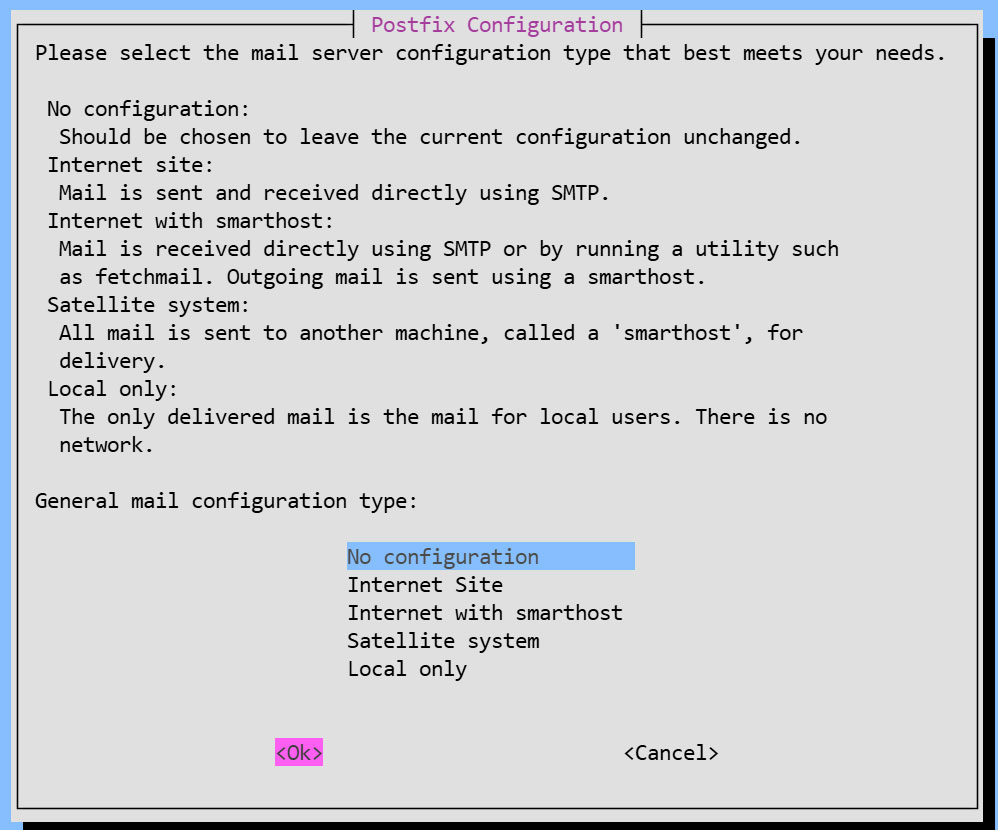
Installation Status Screen
You will be asked to select a general configuration setting, select "No Configuration" to set it manually later.
②Configuration File Edit
|
1 2 |
# cp /usr/share/postfix/main.cf.dist /etc/postfix/main.cf # vi /etc/postfix/main.cf |
Line 82:Uncomments
mail_owner = postfix
Line 108:Add hostname specification
myhostname = mail.[domain name]
Line 115:Domain Name Specification Addition
mydomain = [domain name]
Line 133 : Comments
#myorigin = /etc/mailname
Line 135:Uncomments
myorigin = $mydomain
Line 149:Uncomments
inet_interfaces = all
Line 197:Uncomments
mydestination = $myhostname, localhost.$mydomain, localhost, $mydomain
Line 240:Uncomments
local_recipient_maps = unix:passwd.byname $alias_maps
Line 285:Uncomments
mynetworks_style = subnet
Line 302:Self-Network Addendum
mynetworks = 127.0.0.0/8, 192.168.11.0/24
Line 423:Uncomments
alias_maps = hash:/etc/aliases
Line 434:Uncomments
alias_database = hash:/etc/aliases
Line 456:Uncomments
home_mailbox = Maildir/
Line 592:Add a comment and append it below
#smtpd_banner = $myhostname ESMTP $mail_name (Ubuntu)
smtpd_banner = $myhostname ESMTP
Line 666:Add
sendmail_path = /usr/sbin/postfix
Line 670:Uncomments
newaliases_path = /usr/bin/newaliases
Line 675:Uncomments
mailq_path = /usr/bin/mailq
Line 681:Uncomments
setgid_group = postdrop
#Add to the last line:
#Limit sent and received email size to 10MB
message_size_limit = 10485760
#Limit mailbox size to 1GB
mailbox_size_limit = 1073741824
#SMTP Authentication Settings
smtpd_sasl_type = dovecot
smtpd_sasl_path = private/auth
smtpd_sasl_auth_enable = yes
smtpd_sasl_security_options = noanonymous
smtpd_sasl_local_domain = $myhostname
smtpd_recipient_restrictions = permit_mynetworks, permit_auth_destination, permit_sasl_authenticated, reject
③master.cf edit
|
1 |
# vi /etc/postfix/master.cf |
Line 19,23 : Uncomments
submission inet n - y - - smtpd
# -o syslog_name=postfix/submission
# -o smtpd_forbid_unauth_pipelining=no
# -o smtpd_tls_security_level=encrypt
-o smtpd_sasl_auth_enable=yes
# -o smtpd_tls_auth_only=yes
④Reflecting settings
|
1 2 3 4 5 |
# touch /etc/aliases # vi /etc/aliases postmaster: root huong: huong |
|
1 2 |
# newaliases # systemctl restart postfix |
2.2 Dovecot : Installation/Configuration
Install Dovecot and build a POP/IMAP server, using 110/TCP for POP and 143/TCP for IMAP
|
1 |
# apt -y install dovecot-core dovecot-pop3d dovecot-imapd |
①Configure Dovecot to provide SASL functionality for Postfix
|
1 2 3 4 |
# vi /etc/dovecot/dovecot.conf Line 30:Uncomment listen = *, :: |
|
1 2 3 4 5 6 7 |
# vi /etc/dovecot/conf.d/10-auth.conf Line 12:Disable comments (also allow plain text authentication) auth_allow_cleartext = yes Line 95:Uncomments auth_mechanisms = plain login |
|
1 2 3 4 5 6 7 8 9 |
# vi /etc/dovecot/conf.d/10-mail.conf # Line 36-39 : Add a comment and append below it (Changed to Maildir format) #mail_driver = mbox #mail_home = /home/%{user|username} #mail_path = %{home}/mail #mail_inbox_path = /var/mail/%{user} mail_driver = maildir mail_path = ~/Maildir |
|
1 2 3 4 5 6 7 8 9 |
# vi /etc/dovecot/conf.d/10-master.conf Line 110-112:Uncomments and add a note # Postfix smtp-authi unix_listener /var/spool/postfix/private/auth { mode = 0666 user = postfix group = postfix } |
②Configuration Reflection
|
1 |
# systemctl restart dovecot |
2.3 Port Open
|
1 2 3 4 |
# ufw allow pop3 # ufw allow imap # ufw allow smtp # ufw reload |
2.4 Email User Account Registration
Register a user account for e-mail.
This setting is for when a user account on the OS is also used for e-mail.
If you want to use mail with a user account on the OS, you do not need to make any additional settings, only register an OS user.
①Mail Client Install
|
1 |
# apt -y install mailutils |
②Mailboxes are set to refer to Maildir
|
1 |
# echo 'export MAIL=$HOME/Maildir/' >> /etc/profile.d/mail.sh |
2.5 operation check ①
①Test sending mail
Send test mail to yourself [mail (user name)@(host name)].(This time, general user huong)
|
1 2 3 4 5 6 7 8 |
# su - [user name] $ mail [user name]@localhost # Cc Cc: # subject Subject: Test Mail # body This is the first mail. |
Ctrl + D key to exit the main text
➁Check incoming mail
|
1 2 3 4 5 6 7 8 9 10 11 12 13 14 15 16 17 18 19 20 |
$ mail "/home/huong/Maildir/": 1 message 1 new >N 1 huong Sat Jan 10 06:41 13/427 Test Mail ? 1 Return-Path: <huong@lepard> X-Original-To: huong@localhost Delivered-To: huong@localhost Received: by mail.korodes.com (Postfix, from userid 1000) id 5C490409AD; Sat, 10 Jan 2026 15:41:13 +0900 (JST) To: <huong@localhost> Subject: Test Mail User-Agent: mail (GNU Mailutils 3.20) Date: Sat, 10 Jan 2026 15:41:13 +0900 Message-Id: <20260110064113.5C490409AD@mail.korodes.com> From: huong <huong@lepard> This is the first mail. ? q Saved 1 message in /home/huong/mbox Held 0 messages in /home/huong/Maildir/ |
2.6 operation check ②
Set up and confirm your account in Mozilla Thunderbird. This time we will set it up with the general user "huong".
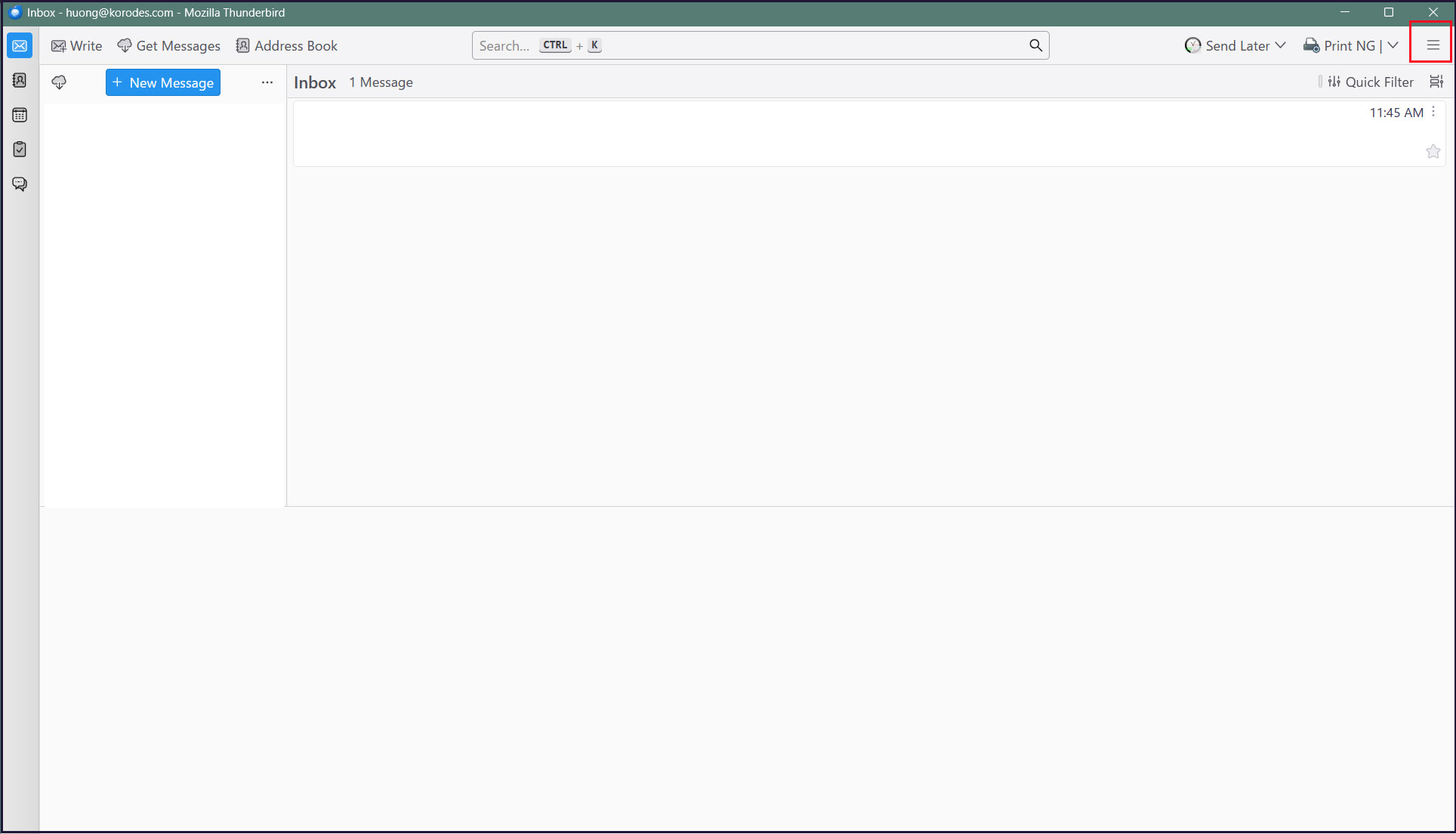
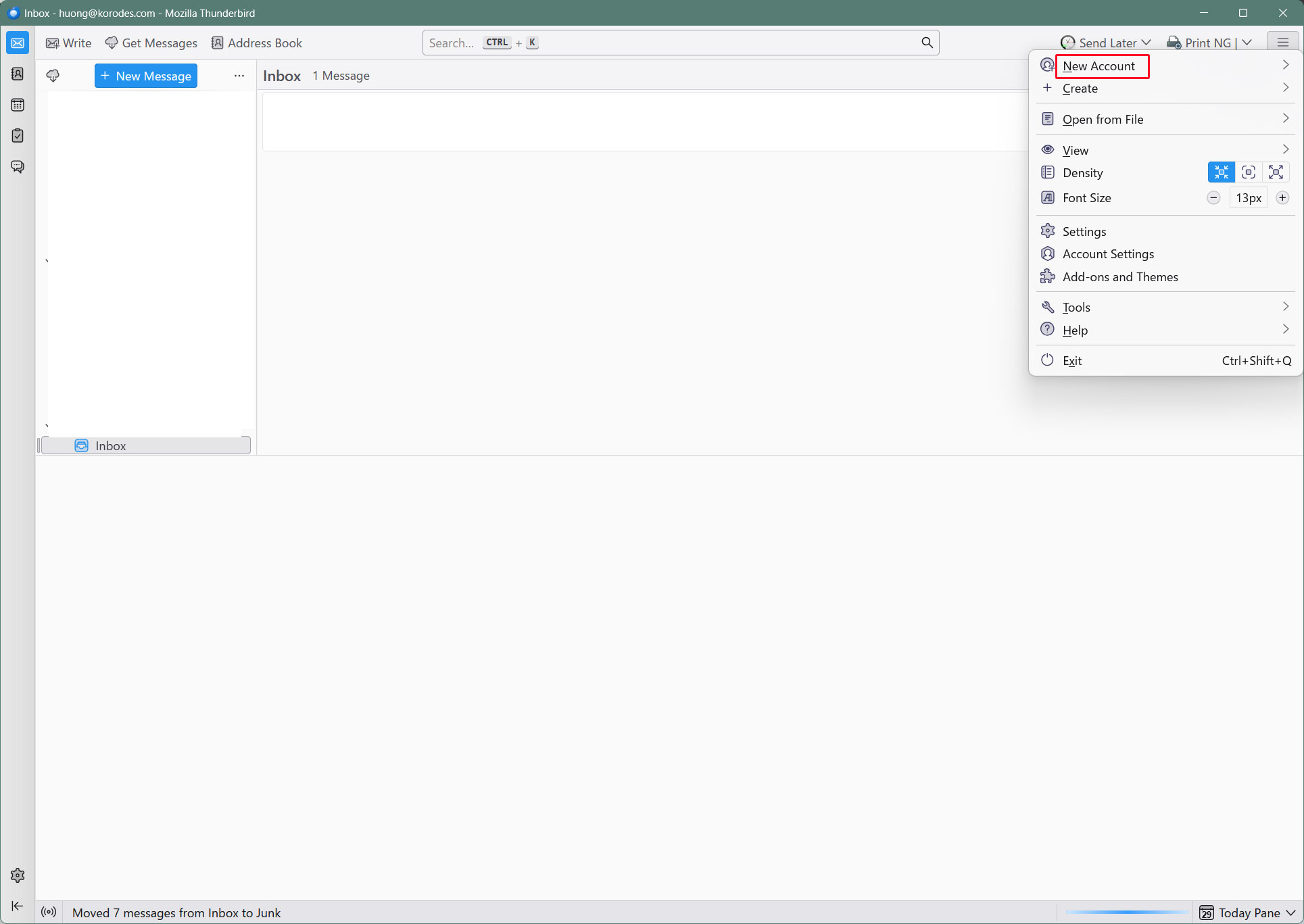
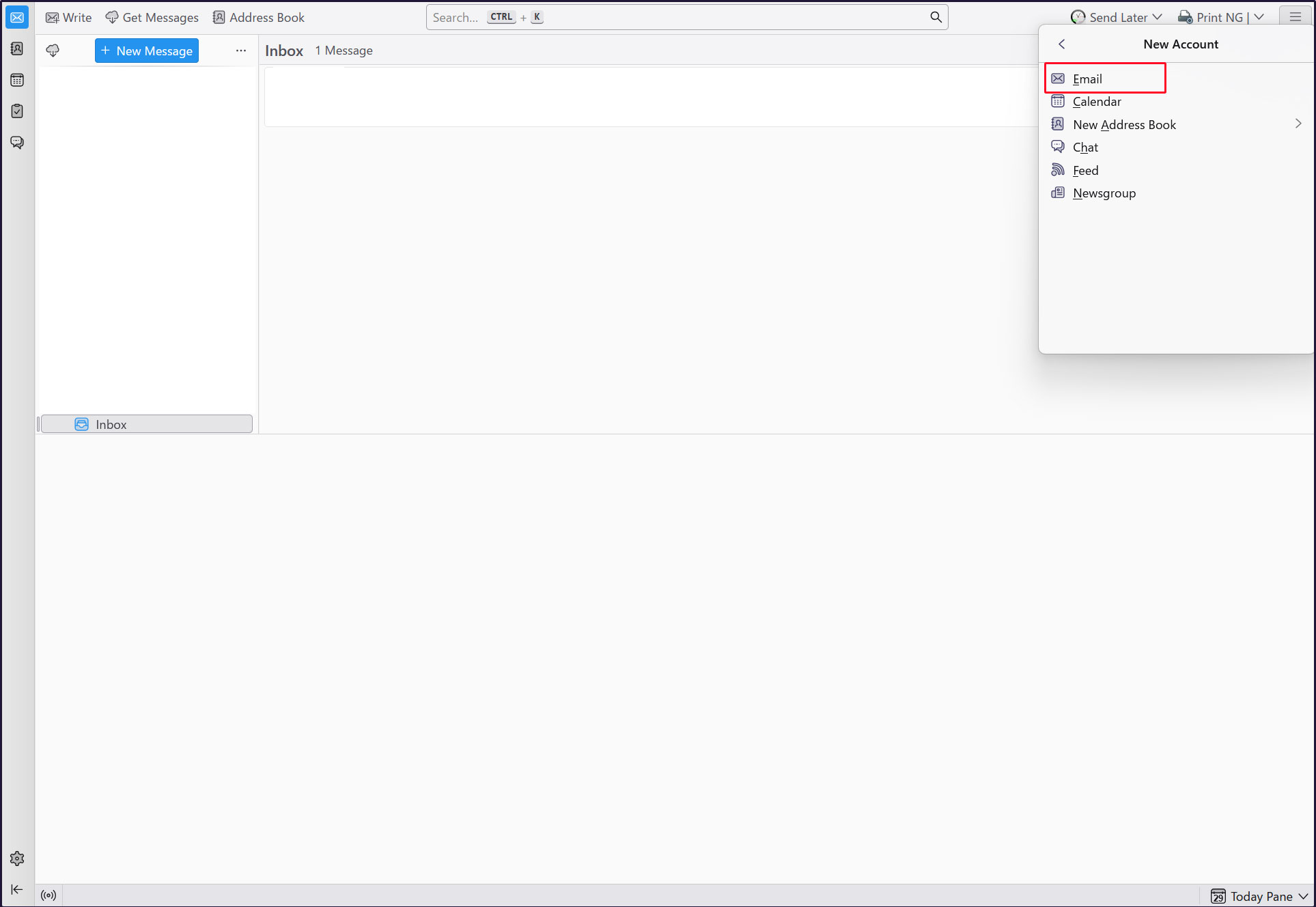
①Start Thunderbird and click [New Account][Email] in the [Three] Button-menu in the upper right corner.
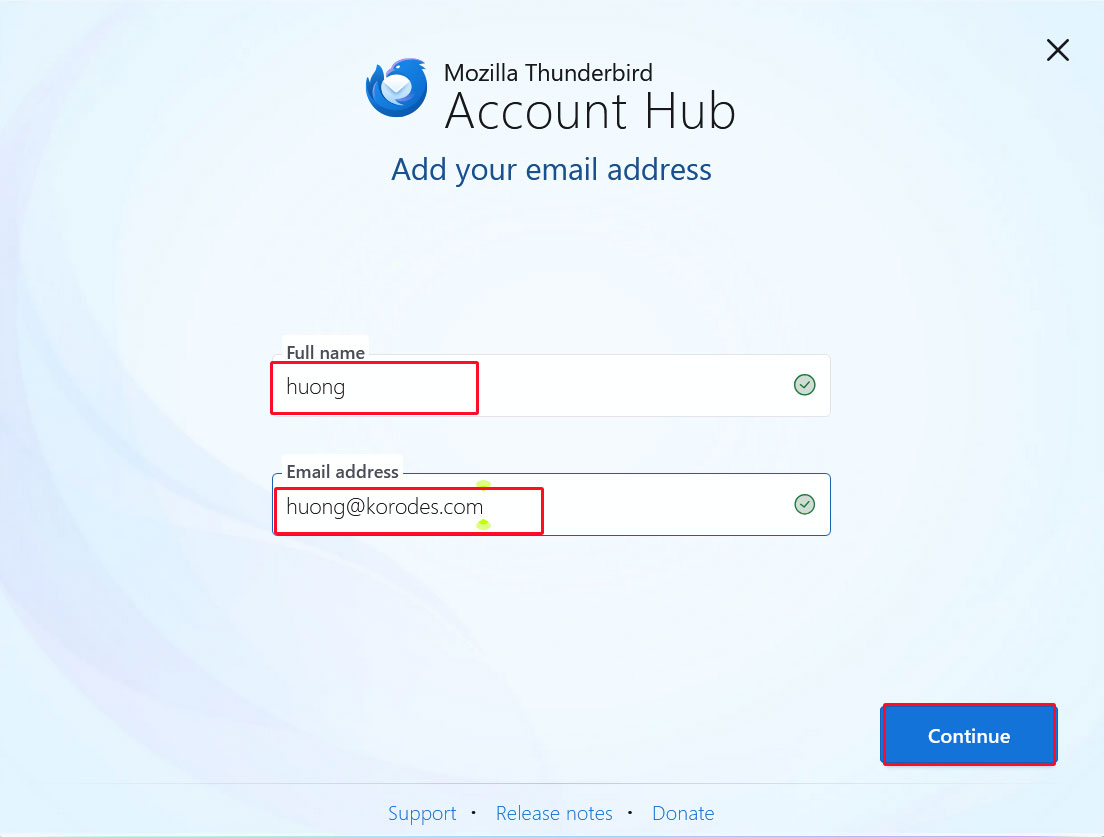
Full name : Any name
Email address : huong@<domain-name>
「Continue」click
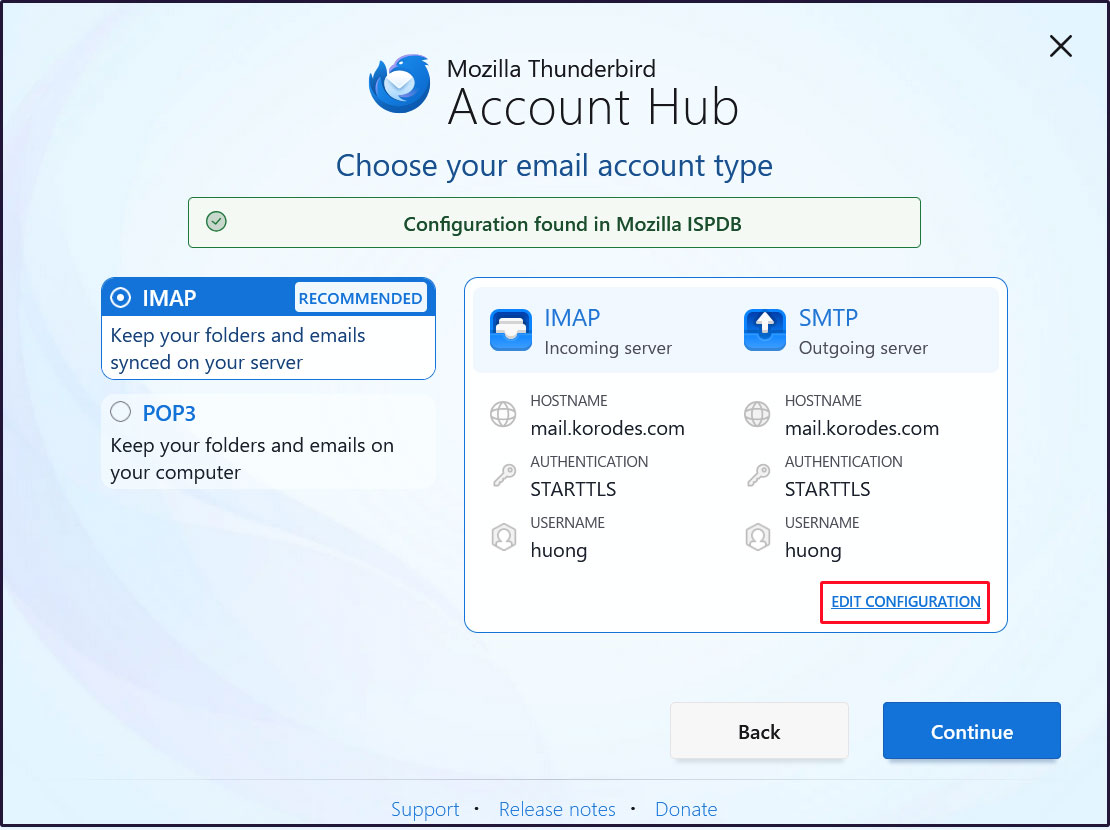
[EDIT CONFIGURATION] click
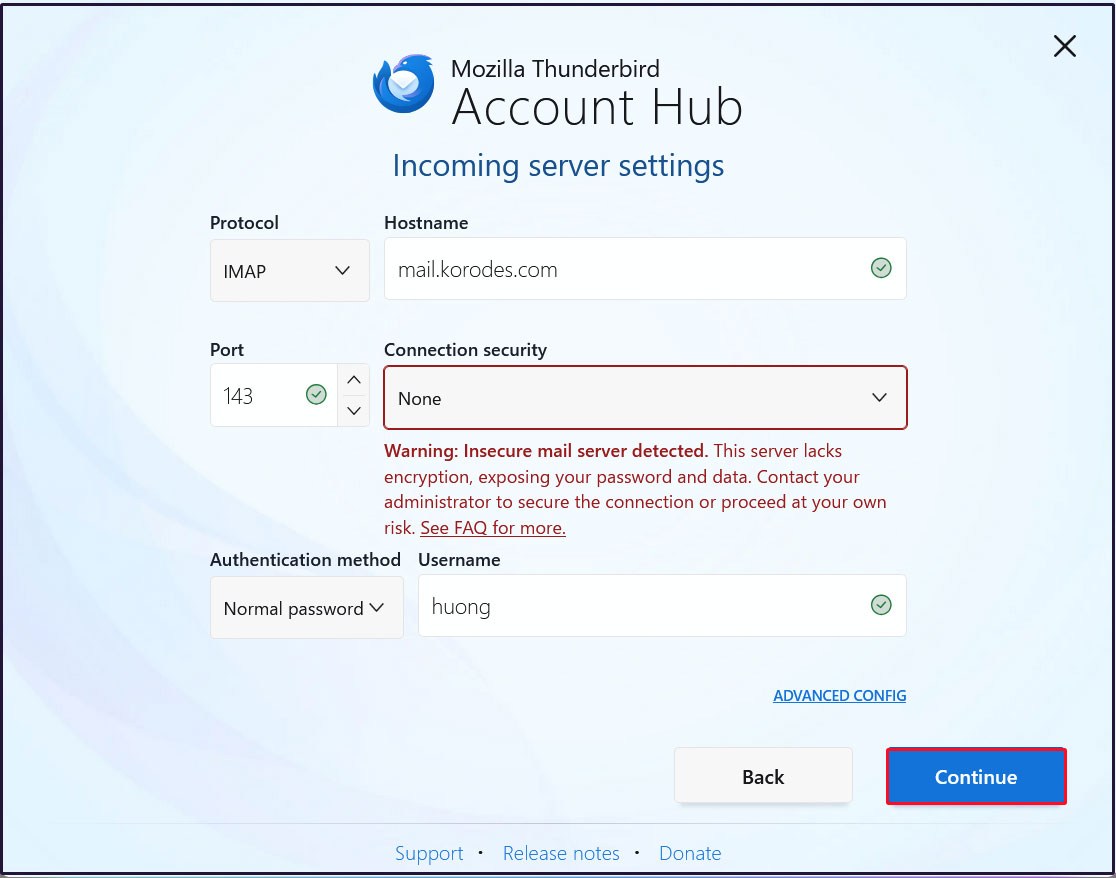
Incoming server settings
Set [Connection security] to [None] and click [Continue].
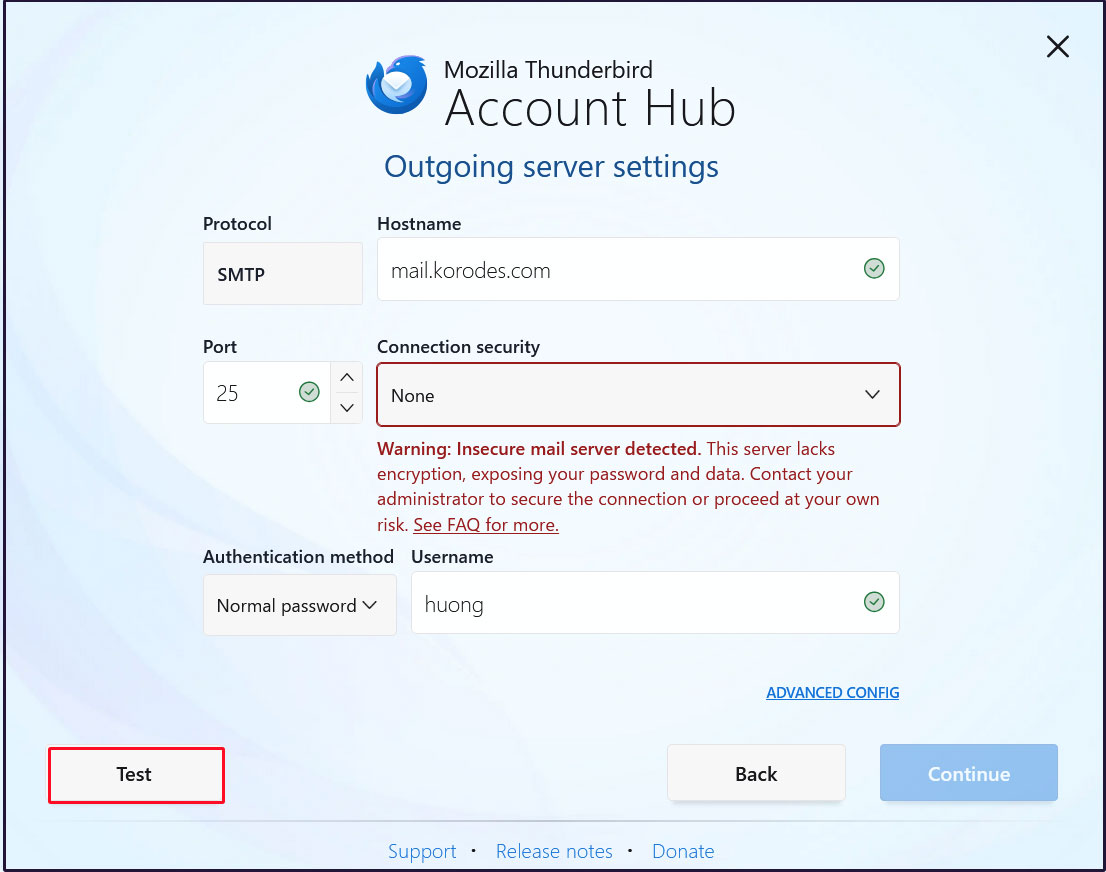
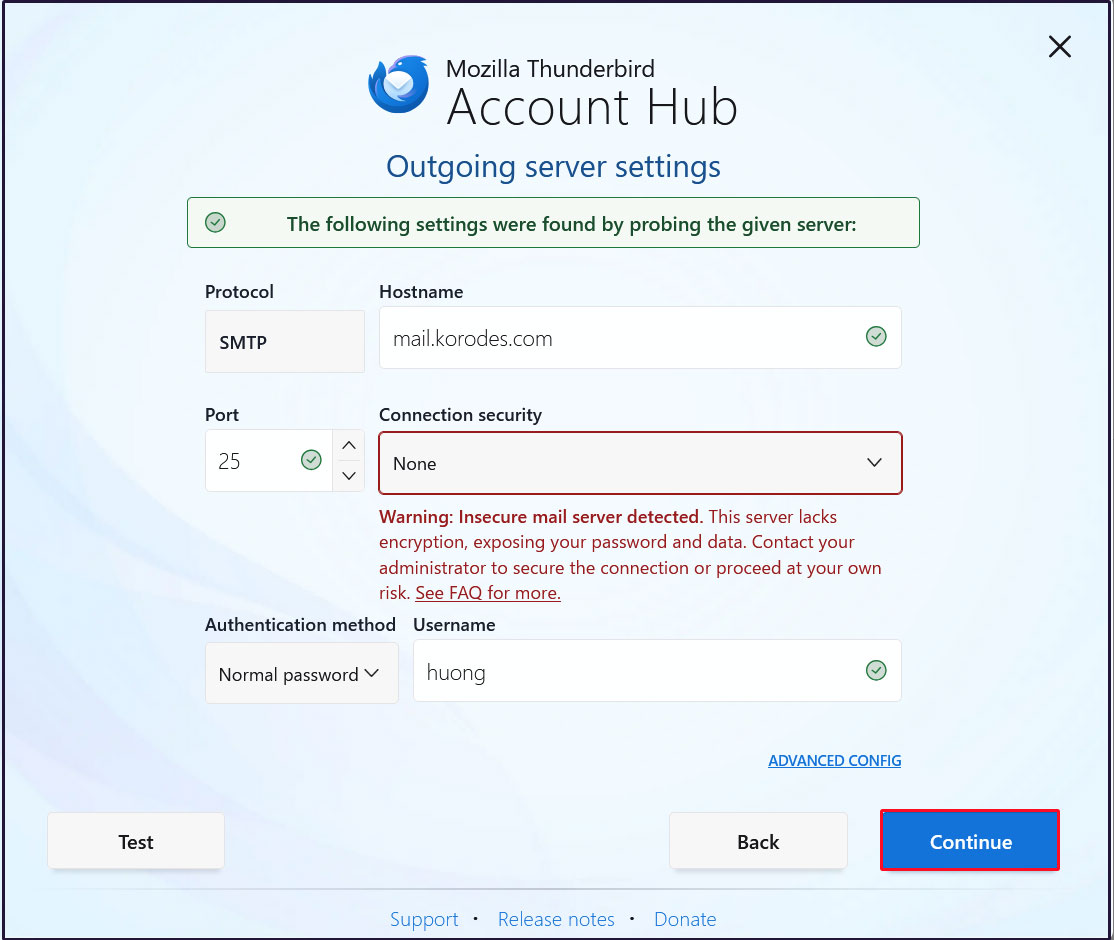
Sending Server Settings
Set [Connection security] to [None] and click [Test].
[Continue] click
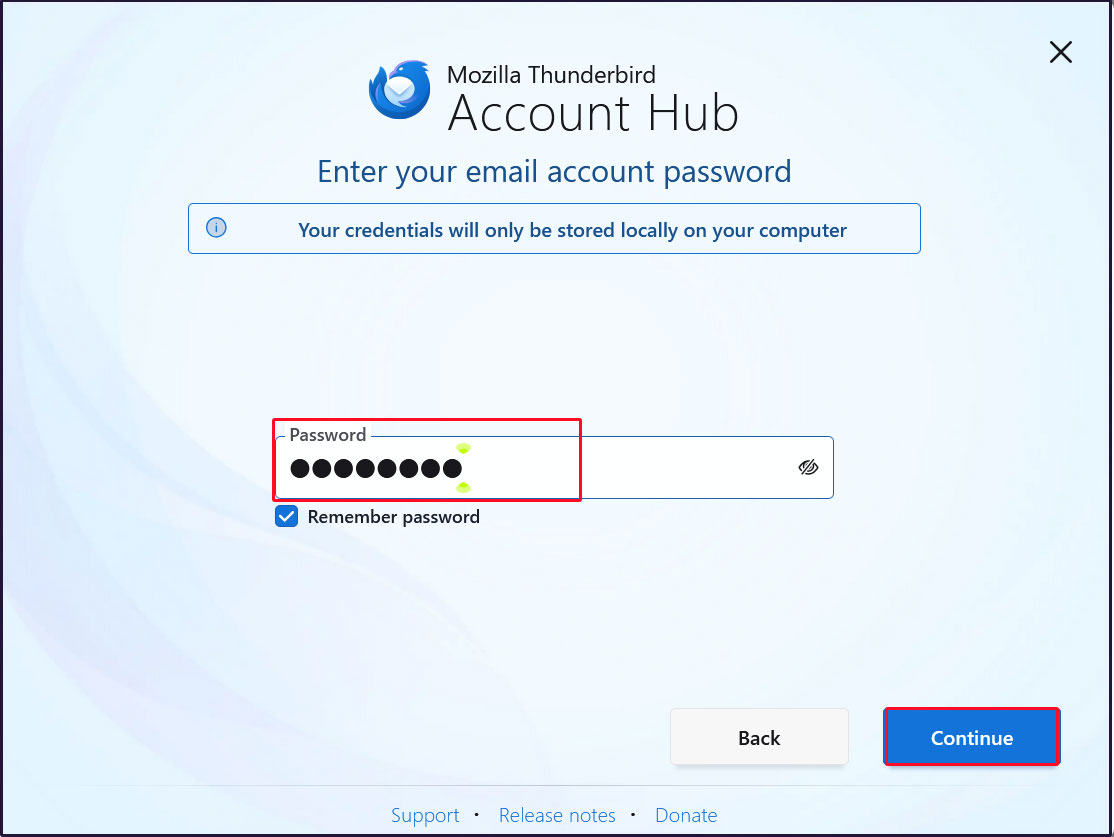
Enter the user's password in the “Password” field and click "Continue"
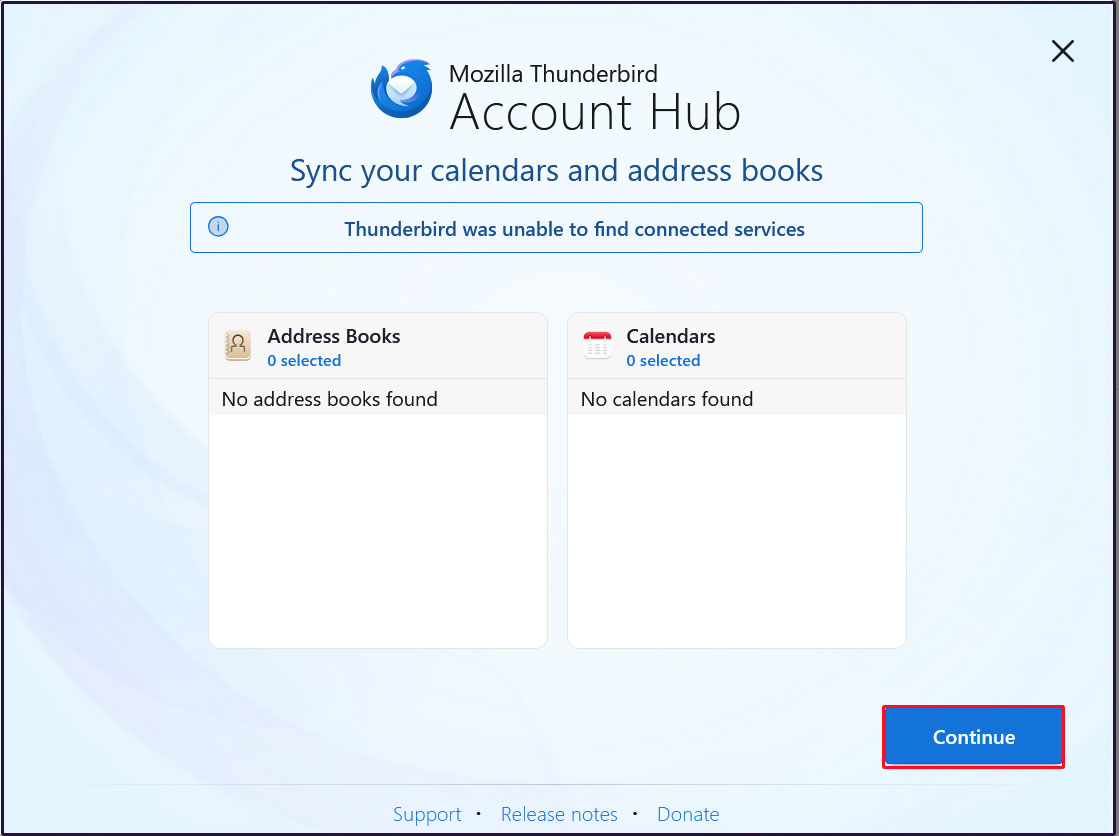
[Continue] click
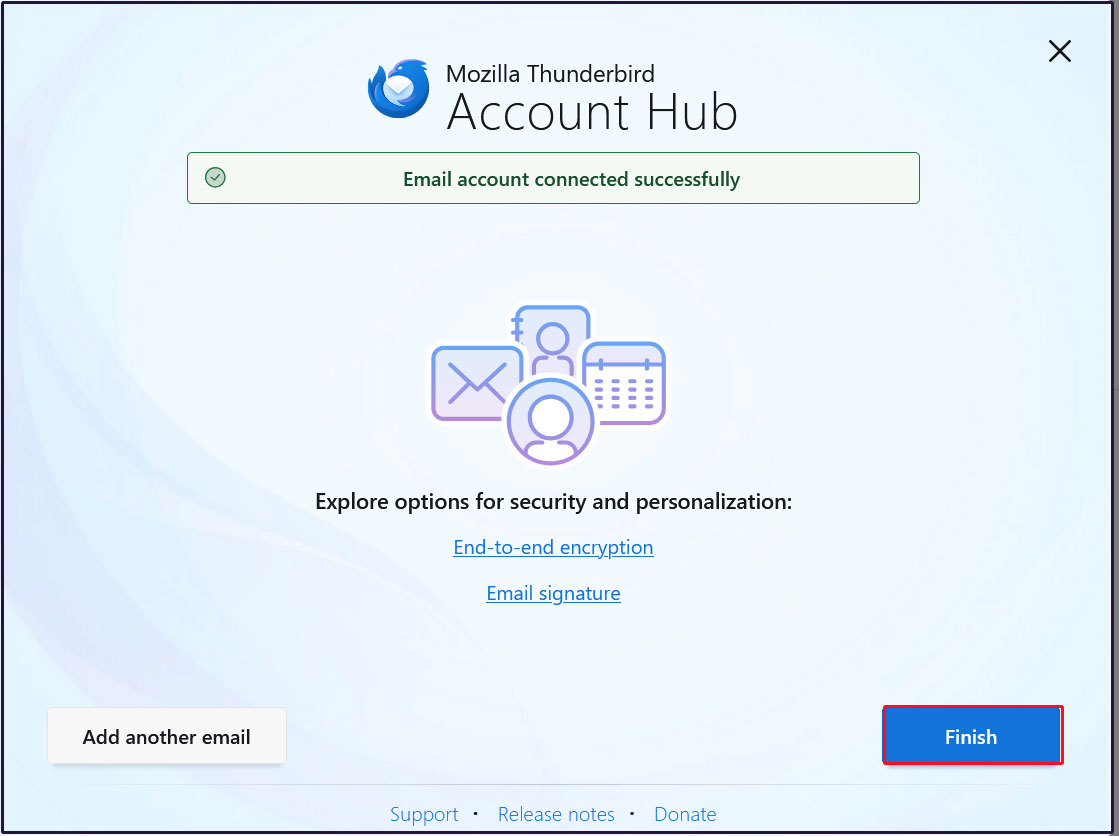
Click “Finish” when the email account has been successfully created.
2.7 Applying ClamAV to the Postfix mail server
Configure Postfix and ClamAV to enable real-time scanning of incoming and outgoing emails.
①Install Amavisd and Clamav Daemon, then start Clamav Daemon.
|
1 2 3 |
$ su - Password: # apt -y install clamav-daemon amavisd-new |
If the server does not use a fully qualified domain name (FQDN) as its hostname, Amavis may fail to start.
Additionally, since the hostname of the operating system may change, set a valid hostname directly in the Amavis configuration file.
|
1 2 3 4 5 6 7 8 9 10 11 12 13 14 15 16 |
# vi /etc/amavis/conf.d/05-node_id Line 11 : Uncomments and changes use strict; # $myhostname is used by amavisd-new for node identification, and it is # important to get it right (e.g. for ESMTP EHLO, loop detection, and so on). chomp($myhostname = `hostname --fqdn`); # To manually set $myhostname, edit the following line with the correct Fully # Qualified Domain Name (FQDN) and remove the # at the beginning of the line. # $myhostname = "mail.[domain name]"; 1; # ensure a defined return |
②Editing 15-content_filter_mode
|
1 2 3 4 |
# vi /etc/amavis/conf.d/15-content_filter_mode Uncomment lines 13 and 14 to enable virus scanning. @bypass_virus_checks_maps = ( \%bypass_virus_checks, \@bypass_virus_checks_acl, \$bypass_virus_checks_re); |
③Register your own domain name
|
1 |
# echo '<yourDomain>' > /etc/mailname |
④Main.cf Editing
|
1 2 3 4 |
# vi /etc/postfix/main.cf Add to the last line content_filter=smtp-amavis:[127.0.0.1]:10024 |
⑤Editing master.cf
|
1 2 3 4 5 6 7 8 9 10 11 12 13 14 15 16 17 18 19 20 21 |
# vi /etc/postfix/master.cf # Append all lines below to the end of the file. smtp-amavis unix - - n - 2 smtp -o smtp_data_done_timeout=1200 -o smtp_send_xforward_command=yes -o disable_dns_lookups=yes 127.0.0.1:10025 inet n - n - - smtpd -o content_filter= -o local_recipient_maps= -o relay_recipient_maps= -o smtpd_restriction_classes= -o smtpd_client_restrictions= -o smtpd_helo_restrictions= -o smtpd_sender_restrictions= -o smtpd_recipient_restrictions=permit_mynetworks,reject -o mynetworks=127.0.0.0/8 -o strict_rfc821_envelopes=yes -o smtpd_error_sleep_time=0 -o smtpd_soft_error_limit=1001 -o smtpd_hard_error_limit=1000 |
⑥Postfix Settings Reflected
|
1 2 3 |
# usermod -G clamav amavis # usermod -G amavis clamav # systemctl restart clamav-daemon amavis postfix |
⑦If you send an email to yourself using Thunderbird or similar software, you'll know it worked if the following message appears in the header of the received email.
X-Mozilla-Status: 0001
X-Mozilla-Status2: 00000000
Return-Path: xxxxx@xxxxxxx.com
X-Original-To: xxxxx@xxxxxxx.com
Delivered-To: xxxxx@xxxxxxx.com
Received: from localhost (localhost [127.0.0.1])
by mail.xxxxxxx.com (Postfix) with ESMTP id 88BD160EF5
for xxxxx@xxxxxxx.com; Sun, 11 Jan 2026 10:04:39 +0900 (JST)
X-Virus-Scanned: Debian amavis at xxxxxxx.com
Received: from mail.xxxxxxx.com ([127.0.0.1])
by localhost (mail.xxxxxxx.com [127.0.0.1]) (amavis, port 10024) with ESMTP
id vpD7gdZWgTMP for xxxxx@xxxxxxx.com;
Sun, 11 Jan 2026 10:04:39 +0900 (JST)
Received: from [192.168.11.8] (xxxxxxx.setup [192.168.11.1])
by mail.xxxxxxx.com (Postfix) with ESMTPA id 732CA60EF4
for xxxxx@xxxxxxx.com; Sun, 11 Jan 2026 10:04:39 +0900 (JST)
Message-ID: 39ea6861-71c6-429e-b84e-0435eea70093@xxxxxxx.com
Date: Mon, 21 Apr 2025 06:49:39 +0900
MIME-Version: 1.0
User-Agent: Mozilla Thunderbird
From: xxxxx xxxxx@xxxxxxx.com
Content-Language: en-US
To: xxxxx xxxxx@xxxxxxx.com
Content-Type: text/plain; charset=UTF-8; format=flowed
Content-Transfer-Encoding: 7bit
Try sending yourself an email with the body of the email "X5O!P%@AP[4\PZX54(P^)7CC)7}$EICAR-STANDARD-ANTIVIRUS-TEST-FILE!$H+H*" and confirm that the email is discarded and never received
2.8 Applying SpamAssassin to the Postfix mail server
2.5.1 spamassassin
①Install
|
1 2 3 |
# apt update # apt upgrade # apt -y install spamassassin spamass-milter |
②SpamAssassin Configuration
|
1 2 3 4 |
# vi /etc/mail/spamassassin/v310.pre Per Line 24 : Uncomments loadplugin Mail::SpamAssassin::Plugin::DCC |
➂SpamAssassin Configuration File Update Script
|
1 |
# vi /opt/script/spamassassin-update.sh |
#!/bin/bash
cd /etc/mail/spamassassin
wget -q https://github.com/kittyfreak/spamassassin_user_prefs/archive/refs/heads/main.zip
[ $? -ne 0 ] && exit
unzip main.zip >/dev/null 2>&1
[ $? -ne 0 ] && exit
rm -f main.zip
mv spamassassin_user_prefs-main/user_prefs .
rm -rf spamassassin_user_prefs-main
diff user_prefs user_prefs.org > /dev/null 2>&1
if [ $? -ne 0 ]; then
cp user_prefs local.cf
echo "report_safe 0" >> local.cf
echo "rewrite_header Subject SPAM" >> local.cf
if [ -f /etc/init.d/spamd ]; then
/etc/init.d/spamd restart > /dev/null
else
systemctl restart spamd > /dev/null
fi
fi
cp user_prefs user_prefs.org
Grant the spamassassin-update script execution permissions and run it.
|
1 2 |
# chmod 700 /opt/script/spamassassin-update.sh # /opt/script/spamassassin-update.sh |
Confirm that the SpamAssassin configuration file (local.cf) has been created in the /etc/mail/spamassassin directory with the date of the day
※ Install unzip beforehand
|
1 2 3 4 5 6 7 8 9 10 11 12 13 14 15 16 17 18 19 20 21 22 |
# ls -l /etc/mail/spamassassin/ total 1664 -rw-r--r-- 1 root root 1292 Feb 8 2025 65_debian.cf -rw-r--r-- 1 root root 1644 Aug 12 03:34 init.pre -rw-r--r-- 1 root root 500630 Jan 11 10:14 local.cf -rw-rw-r-- 1 root root 127072 Jan 11 10:14 main.zip.1 -rw-r--r-- 1 root root 118 Feb 8 2025 sa-compile.pre drwxr-xr-x 2 root root 4096 Jan 11 09:58 sa-update-hooks.d -rw-rw-r-- 1 root root 500588 Apr 30 2023 user_prefs -rw-rw-r-- 1 root root 500588 Jan 11 10:14 user_prefs.org -rw-r--r-- 1 root root 2257 Jan 11 10:09 v310.pre -rw-r--r-- 1 root root 1163 Aug 12 03:34 v312.pre -rw-r--r-- 1 root root 2411 Aug 12 03:34 v320.pre -rw-r--r-- 1 root root 1232 Aug 12 03:34 v330.pre -rw-r--r-- 1 root root 1015 Aug 12 03:34 v340.pre -rw-r--r-- 1 root root 1310 Aug 12 03:34 v341.pre -rw-r--r-- 1 root root 1514 Aug 12 03:34 v342.pre -rw-r--r-- 1 root root 1261 Aug 12 03:34 v343.pre -rw-r--r-- 1 root root 1477 Aug 12 03:34 v400.pre -rw-r--r-- 1 root root 1118 Aug 12 03:34 v401.pre -rw-r--r-- 1 root root 1145 Aug 12 03:34 v402.pre |
Set up cron to automatically run a script daily that updates the SpamAssassin configuration file
|
1 2 |
# crontab -e 0 2 * * * /opt/script/spamassassin-update.sh > /dev/null 2>&1 |
④spamass-milter startup and automatic startup settings
|
1 2 3 4 5 |
# systemctl start spamass-milter # systemctl enable spamass-milter spamass-milter.service is not a native service, redirecting to systemd-sysv-install. Executing: /usr/lib/systemd/systemd-sysv-install enable spamass-milter |
- Create a directory named ".Spam" in Maildir format for storing spam emails
- Creation must be performed by the target user.
|
1 2 3 4 5 6 7 |
# su - <user name> $ cd ~ Create a directory named ".Spam" $ cd Maildir $ /usr/bin/maildirmake.dovecot .Spam $ su - Password: |
2.5.2 Preparing Procmail
①Procmail Install
|
1 |
# apt -y install procmail |
If installed, the following result will be returned.
|
1 2 |
# which procmail /usr/bin/procmail |
②Procmail Settings
Entering settings in /etc/procmailrc, which governs all mail filters, applies them to all users.
Entering settings in /home/[user]/.procmailrc, which is each user's individual mail filter file, applies the filter only to that user.
This time, we will enter settings in /etc/procmailrc to apply them to all users.
|
1 |
# vi /etc/procmailrc |
#Set the path
PATH=/bin:/usr/bin:/usr/local/bin
#Mailbox Settings
MAILDIR=$HOME/Maildir
DEFAULT=$MAILDIR/
#Specify the output location for Procmail log files
LOGFILE=$MAILDIR/procmaillog
#Specify the path to the lock file
LOCKFILE=$HOME/.lockmail
#If the mail header does not contain an "X-Spam-***" entry, SpamAssassin will be launched.
:0fw
*!^X-Spam.*
|spamassassin
#If the email header contains "X-Spam-Status: Yes", the email will be stored in the ".Spam" directory.
:0
*^X-Spam-Status: Yes
$MAILDIR/.Spam/
2.5.3 Postfix Configuration
① Editing main.cf
|
1 2 3 4 |
# vi /etc/postfix/main.cf Line 484 : Uncomments mailbox_command = /usr/bin/procmail |
②Reflecting Settings and Launching
|
1 2 |
# systemctl start spamd # systemctl restart postfix |
2.5.4 Learning about spam emails
Teach the system to recognize all contents within every user's ".Spam" directory as spam email.
①Learning about spam emails
|
1 2 |
# /usr/bin/sa-learn --spam /home/*/Maildir/.Spam/cur Learned tokens from 0 message(s) (0 message(s) examined). |
②Learning regular emails
|
1 2 |
# /usr/bin/sa-learn --ham /home/*/Maildir/cur Learned tokens from 4 message(s) (4 message(s) examined). |
③Create a script and register it with Cron
Name the file something like "spam-learns.sh" and place it under /opt/scripts.
After saving the script, grant it executable permissions using chmod 750 spam-learns.sh.
|
1 |
# vi /opt/script/spam-learns.sh |
#! /bin/sh
#Learning about spam emails
/usr/bin/sa-learn --spam /home/*/Maildir/.Spam/cur
#Learning regular emails
/usr/bin/sa-learn --ham /home/*/Maildir/cur
#If you want to force the deletion of the contents of the spam email storage directory, add the following line:
/bin/rm -f /home/*/Maildir/.Spam/cur
|
1 |
# chmod 750 /opt/script/spam-learns.sh |
Once spam-learns.sh is created, create the definition file directly under /lib/systemd/system.
Name it so that it ends with .service, like spam-learns.service.
Define the Type as simple.
|
1 2 |
# cd /lib/systemd/system # vi spam-learns.service |
[Unit]
Description=demo sample node.js program
[Service]
Type=simple
ExecStart= /opt/script/spam-learns.sh
Restart=always
[Install]
WantedBy=multi-user.target
|
1 2 |
# crontab -e 0 4 * * * /opt/script/spam-learns.sh |
|
1 2 |
# systemctl enable spam-learns Created symlink '/etc/systemd/system/multi-user.target.wants/spam-learns.service' → '/usr/lib/systemd/system/spam-learns.service'. |
④If you send an empty email to yourself using Thunderbird or similar software and see a message like the following in the received email header, it means the process was successful.
X-Mozilla-Status: 0001
X-Mozilla-Status2: 00000000
Return-Path: xxxxx@xxxxxxx.com
X-Spam-Checker-Version: SpamAssassin 4.0.2-rc2 (2025-08-11) on Lepard
X-Spam-Level: **
X-Spam-Status: No, score=2.3 required=13.0 tests=ALL_TRUSTED,
CONTENT_TYPE_PRESENT,EMPTY_MESSAGE autolearn=no autolearn_force=no
version=4.0.2-rc2
X-Original-To: xxxxx@xxxxxxx.com
Delivered-To: xxxxx@xxxxxxx.com
Received: from localhost (localhost [127.0.0.1])
by mail.xxxxxxx.com (Postfix) with ESMTP id B35F3416EE
for xxxxx@xxxxxxx.com; Sun, 11 Jan 2026 10:29:51 +0900 (JST)
X-Virus-Scanned: Debian amavis at xxxxxxx.com
Received: from mail.xxxxxxx.com ([127.0.0.1])
by localhost (mail.xxxxxxx.com [127.0.0.1]) (amavis, port 10024) with ESMTP
id mkU1ZPnLVwqK for xxxxx@xxxxxxx.com;
Sun, 11 Jan 2026 10:29:51 +0900 (JST)
Received: from [192.168.11.6] (buffalo.setup [192.168.11.1])
by mail.xxxxxxx.com (Postfix) with ESMTPA id 9A9A8416E9
for xxxxx@xxxxxxx.com; Sun, 11 Jan 2026 10:29:51 +0900 (JST)
Message-ID: a9f5dc53-7a3a-4ea1-ba34-92cc76bf13b4@xxxxxxx.com
Date: Sun, 11 Jan 2026 10:29:52 +0900
MIME-Version: 1.0
User-Agent: Mozilla Thunderbird
From: xxxxx xxxxx@xxxxxxx.com
Content-Language: en-US
To: xxxxx xxxxx@xxxxxxx.com
Content-Type: text/plain; charset=UTF-8; format=flowed
Content-Transfer-Encoding: 7bit
Subject:
⑤Spam check confirmation
Send yourself an email with the body of the email "XJS*C4JDBQADN1.NSBN3*2IDNEN*GTUBE-STANDARD-ANTI-UBE-TEST-EMAIL*C.34X" and make sure the email is not delivered and is sorted into the Spam folder
The header states
Check the emails under /home/[user]/Maildir/.Spam/new/
Return-Path: <xxxxx@xxxxxxx.com>
X-Spam-Checker-Version: SpamAssassin 4.0.2-rc2 (2025-08-11) on Lepard
X-Spam-Flag: YES
X-Spam-Level: xxxxxxxxxxxxxxxxxxxxxxxxxxxxxxxxxxxxxxxxxxxxxxxxxxx
X-Spam-Status: Yes, score=1001.8 required=13.0 tests=ALL_TRUSTED,
CONTENT_TYPE_PRESENT,GTUBE,HTML_MESSAGE,MPART_ALT_DIFF,
MULTIPART_ALTERNATIVE autolearn=no autolearn_force=no
version=4.0.1
X-Spam-Report:
* 0.1 ALL_TRUSTED Passed through trusted hosts only via SMTP
* 1000 GTUBE BODY: Generic Test for Unsolicited Bulk Email
* -0.1 CONTENT_TYPE_PRESENT exists:Content-Type
* 0.1 MULTIPART_ALTERNATIVE Multipart/alternative
* 0.7 MPART_ALT_DIFF BODY: HTML and text parts are different
* 1.0 HTML_MESSAGE BODY: HTML included in message