

Clamav(anti-virus)
1.Clamav Install
# dnf -y install clamav clamd clamav-update
2.Edit Clam AntiVirus configuration file
# vi /etc/clamd.d/scan.conf

Line 14 : Uncomment
# Default: disabled
LogFile /var/log/clamd.scan

Line 77 : Uncomment
# Default: disabled
PidFile /run/clamd.scan/clamd.pid

Line 101 : Uncomment
# Path to a local socket file the daemon will listen on.
# Default: disabled (must be specified by a user)
LocalSocket /run/clamd.scan/clamd.sock

Line 233 : Comment(Configure it to run with root privileges)
# Run as another user (clamd must be started by root for this option to work)
# Default: don't drop privileges
#User clamscan
3.Virus definition file update settings
# vi /etc/freshclam.conf

Line 78 : Comment it out and add it below
#DatabaseMirror database.clamav.net
DatabaseMirror db.jp.clamav.net

Per Line154 : Add
#NotifyClamd /path/to/clamd.conf
NotifyClamd /etc/clamd.d/scan.conf
4.Virus definition file update
# freshclam
ClamAV update process started at Fri Jul 17 13:19:28 2026
daily database available for download (remote version: 28062)
Time:    0.3s, ETA:    0.0s [========================>]   22.33MiB/22.33MiB
Testing database: '/var/lib/clamav/tmp.94a37bbb38/clamav-ecf5161af9e11e08a7ecbf21e2fca333.tmp-daily.cvd' ...
Database test passed.
daily.cvd updated (version: 28062, sigs: 355511, f-level: 90, builder: svc.clamav-publisher)
main database available for download (remote version: 63)
Time:    1.0s, ETA:    0.0s [========================>]   84.95MiB/84.95MiB
Testing database: '/var/lib/clamav/tmp.94a37bbb38/clamav-2cc5c54405d6bea96e31d4bf69b375e2.tmp-main.cvd' ...
Database test passed.
main.cvd updated (version: 63, sigs: 3287027, f-level: 90, builder: tomjudge)
bytecode database available for download (remote version: 339)
Time:    0.0s, ETA:    0.0s [========================>]  275.10KiB/275.10KiB
Testing database: '/var/lib/clamav/tmp.94a37bbb38/clamav-b5e0dce1c644a45e2bc1376753d28bbc.tmp-bytecode.cvd' ...
Database test passed.
bytecode.cvd updated (version: 339, sigs: 80, f-level: 90, builder: nrandolp)
WARNING: Clamd was NOT notified: Can't connect to clamd through /run/clamd.scan/clamd.sock: No such file or directory
5.Start Clam AntiVirus
Enable and Start clamd
# systemctl start clamd@scan
# systemctl enable clamd@scan
operation check
# systemctl status clamd@scan
● clamd@scan.service - clamd scanner (scan) daemon
     Loaded: loaded (/usr/lib/systemd/system/clamd@.service; enabled; preset: disabled)
     Active: active (running) since Fri 2026-07-17 13:21:05 JST; 1min 38s ago
 Invocation: 6817e16c196f46e6b4a681291bff4057
       Docs: man:clamd(8)
             man:clamd.conf(5)
             https://www.clamav.net/documents/
   Main PID: 28681 (clamd)
      Tasks: 2 (limit: 21555)
     Memory: 958.7M (peak: 959.1M)
        CPU: 9.693s
     CGroup: /system.slice/system-clamd.slice/clamd@scan.service
             └─28681 /usr/sbin/clamd -c /etc/clamd.d/scan.conf

Jul 17 13:21:05 Lepard clamd[28681]: ELF support enabled.
Jul 17 13:21:05 Lepard clamd[28681]: Mail files support enabled.
Jul 17 13:21:05 Lepard clamd[28681]: OLE2 support enabled.
Jul 17 13:21:05 Lepard clamd[28681]: PDF support enabled.
Jul 17 13:21:05 Lepard clamd[28681]: SWF support enabled.
Jul 17 13:21:05 Lepard clamd[28681]: HTML support enabled.
Jul 17 13:21:05 Lepard clamd[28681]: XMLDOCS support enabled.
Jul 17 13:21:05 Lepard clamd[28681]: HWP3 support enabled.
Jul 17 13:21:05 Lepard clamd[28681]: OneNote support enabled.
Jul 17 13:21:05 Lepard clamd[28681]: Self checking every 600 seconds
6.Conduct virus scan
■Download a test virus and perform a virus scan
# cd /home
# wget https://secure.eicar.org/eicar.com.txt
# clamscan --infected --remove --recursive /home
/home/eicar.com.txt: Win.Test.EICAR_HDB-1 FOUND
/home/eicar.com.txt: Removed.

----------- SCAN SUMMARY -----------
Known viruses: 3627917
Engine version: 1.4.5
Scanned directories: 5
Scanned files: 16
Infected files: 1
Data scanned: 0.01 MB
Data read: 0.00 MB (ratio 2.00:1)
Time: 13.804 sec (0 m 13 s)
Start Date: 2026:07:17 13:23:40
End Date:   2026:07:17 13:23:54
7.Virus scan auto-execute script
Create script storage directory
# mkdir -p /var/www/system
Create a script clamscan.sh under /var/www/system/ to scan the entire system
# vi /var/www/system/clamscan.sh

Describe the following content
#!/bin/bash
PATH=/usr/bin:/bin
# excludeopt setup
excludelist=/var/www/system/clamscan.exclude
if [ -s $excludelist ]; then
for i in `cat $excludelist`
do
if [ $(echo "$i"|grep \/$) ]; then
i=`echo $i|sed -e 's/^\([^ ]*\)\/$/\1/p' -e d`
excludeopt="${excludeopt} --exclude-dir=$i"
else
excludeopt="${excludeopt} --exclude=$i"
fi
done
fi
# signature update
freshclam
# virus scan
clamscan --recursive --remove ${excludeopt} /
# chmod 700 /var/www/system/clamscan.sh
8.Virus scan exclusion directory settings
# echo "/sys/" >> /var/www/system/clamscan.exclude
# echo "/proc/" >> /var/www/system/clamscan.exclude
The sys and proc directories are excluded
9.Scheduled virus scan execution
# crontab -e
0 1 * * * /var/www/system/clamscan.sh > /dev/null 2>&1
10.Run a trial script and do a full scan (takes a while)
# /var/www/system/clamscan.sh

----------- SCAN SUMMARY -----------
Known viruses: 3627917
Engine version: 1.4.5
Scanned directories: 16613
Scanned files: 101075
Infected files: 0
Data scanned: 11092.27 MB
Data read: 5071.62 MB (ratio 2.19:1)
Time: 1614.336 sec (26 m 54 s)
Start Date: 2026:07:17 13:27:07
End Date:   2026:07:17 13:54:02
Mail Server Installation
1. Postfix
1.1 Install
Install Postfix and build an SMTP server
# dnf -y install postfix
Make sure Postfix is installed
# rpm -qa | grep postfix
postfix-lmdb-3.8.5-9.el10.x86_64
postfix-3.8.5-9.el10.x86_64
postfix-perl-scripts-3.8.5-9.el10.x86_64
pcp-pmda-postfix-7.0.3-3.0.2.el10.x86_64
1.2 Register Postfix to the service
# systemctl enable postfix.service
Created symlink /etc/systemd/system/multi-user.target.wants/postfix.service → /usr/lib/systemd/system/postfix.service.
1.3 Backup postfix configuration files, main.cf and master.cf files
# cp -p /etc/postfix/main.cf `date '+/etc/postfix/main.cf.%Y%m%d'`
# cp -p /etc/postfix/master.cf `date '+/etc/postfix/master.cf.%Y%m%d'`
1.4 Edit postfix configuration file
To prevent unauthorized mail relay, configure Postfix to require authentication for outgoing mail as well, using Dovecot's SASL function.
# vi /etc/postfix/main.cf

Line 100 : Add
#myhostname = virtual.domain.tld
myhostname = mail.<Domain>

Line 107 : Add your domain name
#mydomain = domain.tld
mydomain = <Domain>

Line 122 : Uncomment
myorigin = $mydomain

Line 136 : Uncomment
inet_interfaces = all

Line 139: comment-out
#inet_interfaces = localhost

Line 187 : comment-out、Line 188 : Uncomment
#mydestination = $myhostname, localhost.$mydomain, localhost
mydestination = $myhostname, localhost.$mydomain, localhost, $mydomain

Per Line 293 : Add
#mynetworks = 168.100.3.0/28, 127.0.0.0/8
#mynetworks = $config_directory/mynetworks
#mynetworks = hash:/etc/postfix/network_table
mynetworks = 192.168.11.0/24, 127.0.0.0/8 ←Adjust 192.168.11.0/24 to suit your specific environment.

Per Line 447 : Uncomment
Set the mail storage format.
#home_mailbox = Mailbox
home_mailbox = Maildir/

Per Line 454 : Uncomment
mail_spool_directory = /var/spool/mail

Per Line 602 : Add
#smtpd_banner = $myhostname ESMTP $mail_name
#smtpd_banner = $myhostname ESMTP $mail_name ($mail_version)
smtpd_banner = $myhostname ESMTP unknown

Add the following to the last line
# Limit send/receive mail size to 10M
message_size_limit = 10485760
# Limit mailbox size to 1G
mailbox_size_limit = 1073741824
# SMTP-Auth Settings
smtpd_sasl_type = dovecot
smtpd_sasl_path = private/auth
smtpd_sasl_auth_enable = yes
smtpd_sasl_security_options = noanonymous
smtpd_sasl_local_domain = $mydomain
smtpd_recipient_restrictions = permit_mynetworks, permit_auth_destination, permit_sasl_authenticated, reject
Allow SMTP port (port 25)
# firewall-cmd --add-service=smtp --permanent
# firewall-cmd --reload
1.5 Start Postfix
# systemctl restart postfix
2.Dovecot
2.1 dovecot Install
# dnf -y install dovecot
2.2 Edit dovecot.conf file
# cp -p /etc/dovecot/dovecot.conf `date '+ /etc/dovecot/dovecot.conf.%Y%m%d'`

# vi /etc/dovecot/dovecot.conf

Add around line 25
# protocols = imap pop3 lmtp submission
protocols = imap pop3

Line 30 : Uncomment
# Remove [::] if listening for IPv4 only
listen = *, ::
2.3 Edit 10-auth.conf file
# vi /etc/dovecot/conf.d/10-auth.conf

Line 10 : Uncomment and change
If plain text authentication is also allowed
disable_plaintext_auth = no

Line 100 : Add
auth_mechanisms = plain login
2.4 Edit 10-mail.conf file
# vi /etc/dovecot/conf.d/10-mail.conf

Line 31 : Add
mail_location = maildir:~/Maildir
2.5 Edit 10-master.conf file
# vi /etc/dovecot/conf.d/10-master.conf

Line 110-112 : Uncomment and Add
# Postfix smtp-auth
unix_listener /var/spool/postfix/private/auth {
mode = 0666
user = postfix
group = postfix
}
2.6 Edit 10-ssl.conf file
# vi /etc/dovecot/conf.d/10-ssl.conf

Per line 8
Change "ssl = required" to "ssl = yes"
ssl = yes
2.7 Register dovecot as a service and start
# systemctl enable dovecot.service
Created symlink /etc/systemd/system/multi-user.target.wants/dovecot.service → /usr/lib/systemd/system/dovecot.service.

# systemctl start dovecot.service
2.8 Allow port opening for POP/IMAP service with firewalld
POP is [110/TCP], IMAP is [143/TCP].
# firewall-cmd --permanent --add-service=pop3
# firewall-cmd --permanent --add-service=imap
# firewall-cmd --reload
3.Create mail user and check operation
3.1 advance preparation
①Pretreatment for new users
When a new user is added, set up the system to automatically send and receive e-mail.
# mkdir -p /etc/skel/Maildir/{new,cur,tmp}
# chmod -R 700 /etc/skel/Maildir/
# echo "~/Maildir/"> /etc/skel/.forward
# chmod 600 /etc/skel/.forward
②Mail environment pre-processing for existing users
Configure the already created users to be able to send and receive e-mail.
# mkdir -p /home/huong/Maildir/{new,cur,tmp}
# chown -R huong:huong /home/huong/Maildir/
# chmod 700 /home/huong/Maildir
# chmod 700 /home/huong/Maildir/{new,cur,tmp}
3.2 User Account Creation
Mail client installation
# dnf -y install s-nail
# echo 'export MAIL=$HOME/Maildir' >> /etc/profile.d/mail.sh

Add user [linux]
# useradd linux
# passwd linux
New password:
Retype new password:
passwd: password updated successfully
3.3 Operation check ①
Log in as an email user and send a test email.
# su - linux
$ mail linux@localhost
Subject: Test Mail
To: linux@localhost
mail test
^D
-------
(Preliminary) Envelope contains:
To: linux@localhost
Subject: Test Mail
Send this message [yes/no, empty: recompose]? y
Email Confirmation
$ mail
s-nail version v14.9.24.  Type `?' for help
/home/linux/Maildir: 1 message 1 new
▸N  1 linux@korodes.com     2026-07-17 14:34   14/408   "Test Mail                                    "
& 1
[-- Message  1 -- 14 lines, 408 bytes --]:
Date: Fri, 17 Jul 2026 14:34:37 +0900
To: linux@localhost
Subject: Test Mail
Message-Id: <20260717053437.35965225695B@mail.korodes.com>
From: linux@korodes.com

mail test

& q
Held 1 message in /home/linux/Maildir
3.4 Operation check ②
Set up and confirm your account in Mozilla Thunderbird. This time we will set it up with the general user "huong".
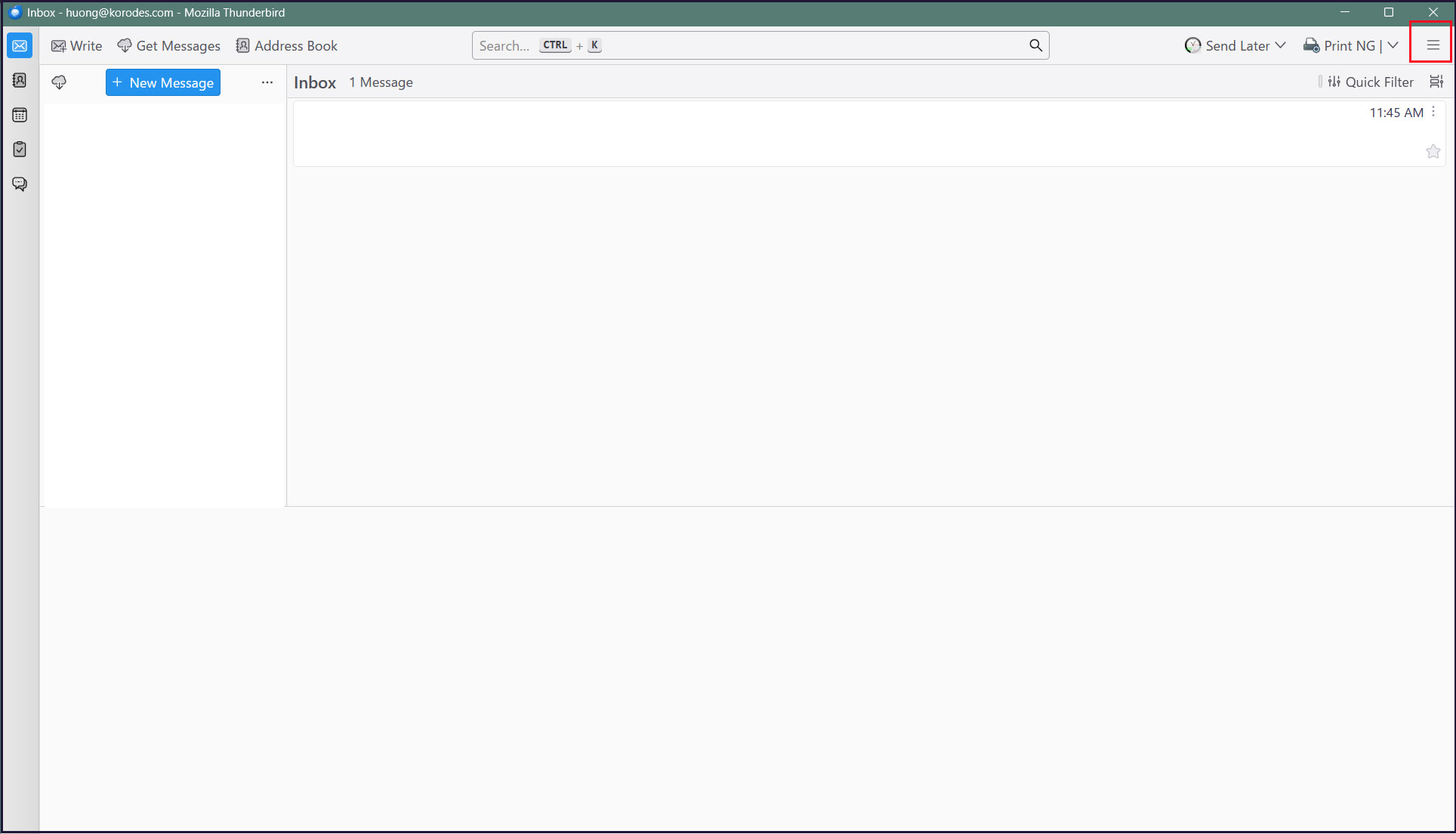
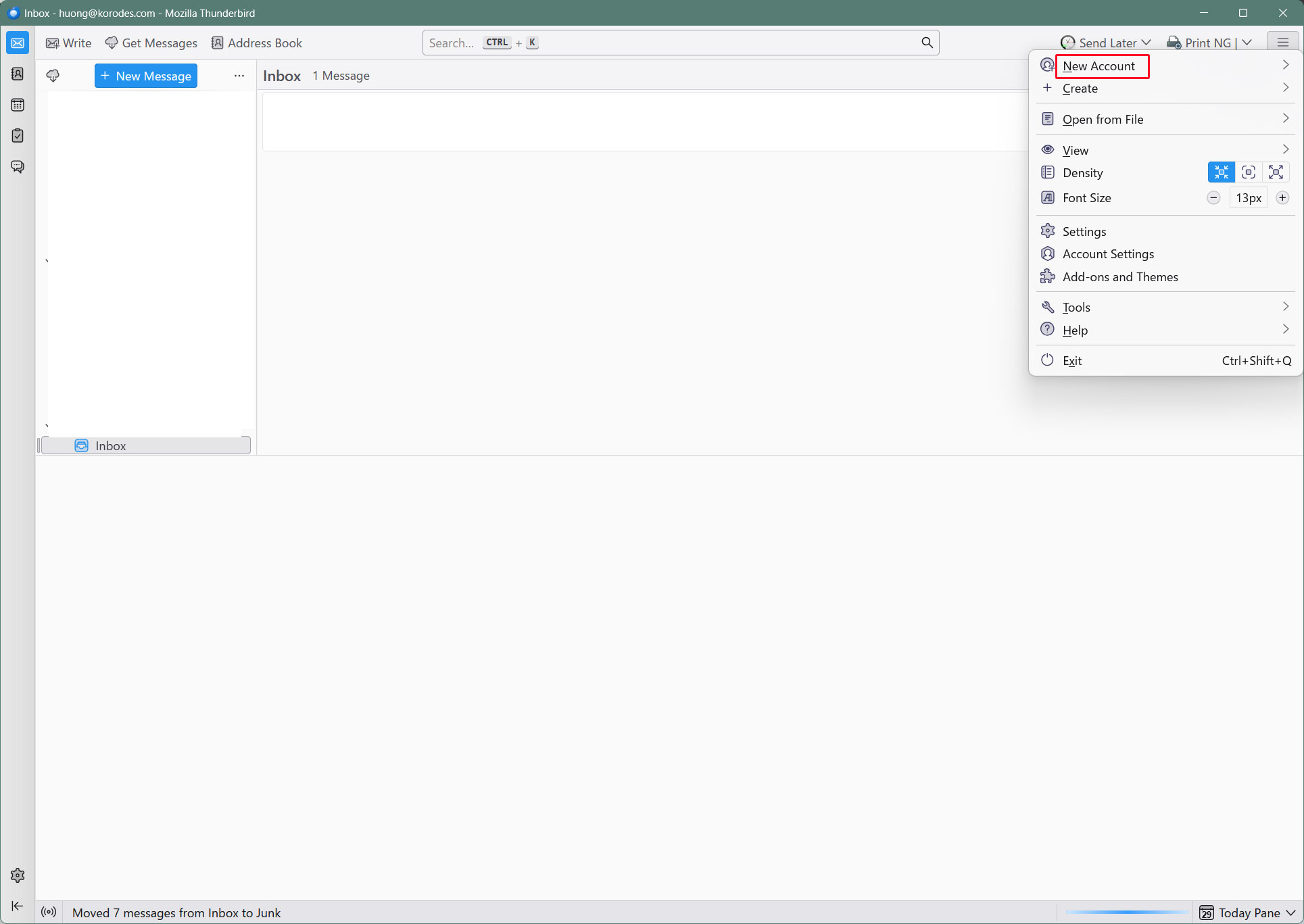
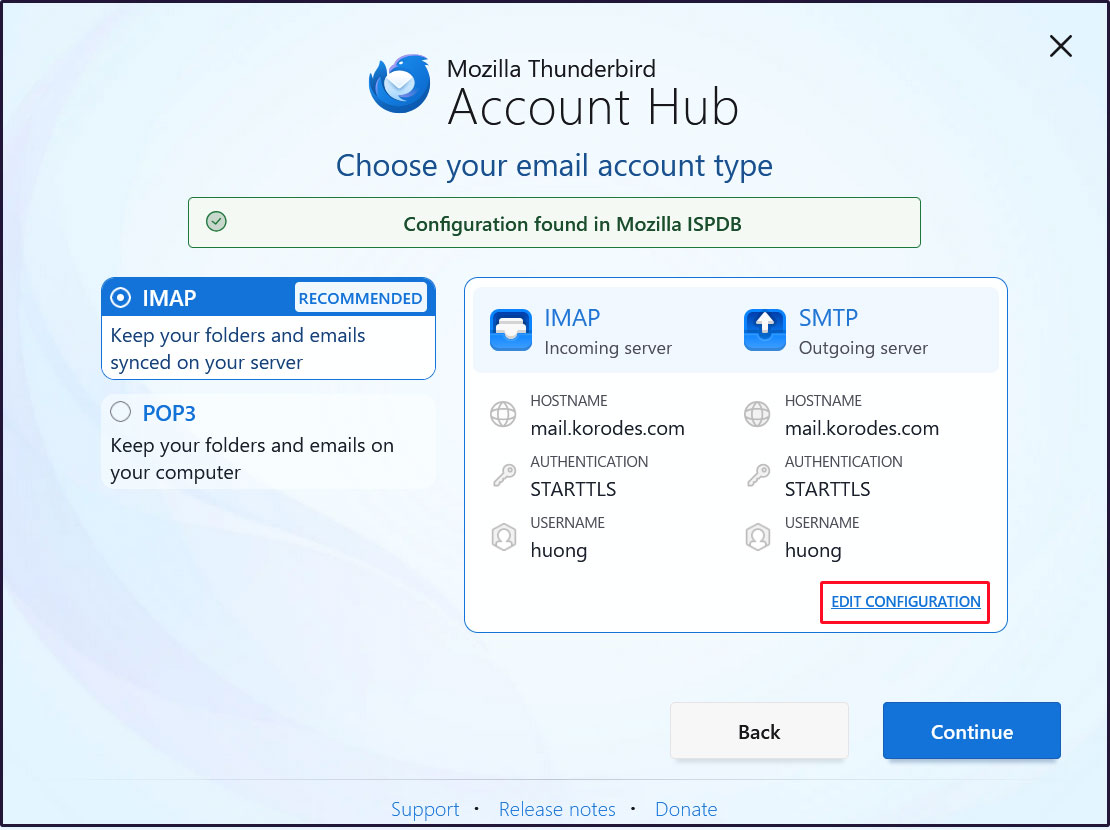
①Start Thunderbird and click [New Account][Email] in the [Three] Button-menu in the upper right corner.
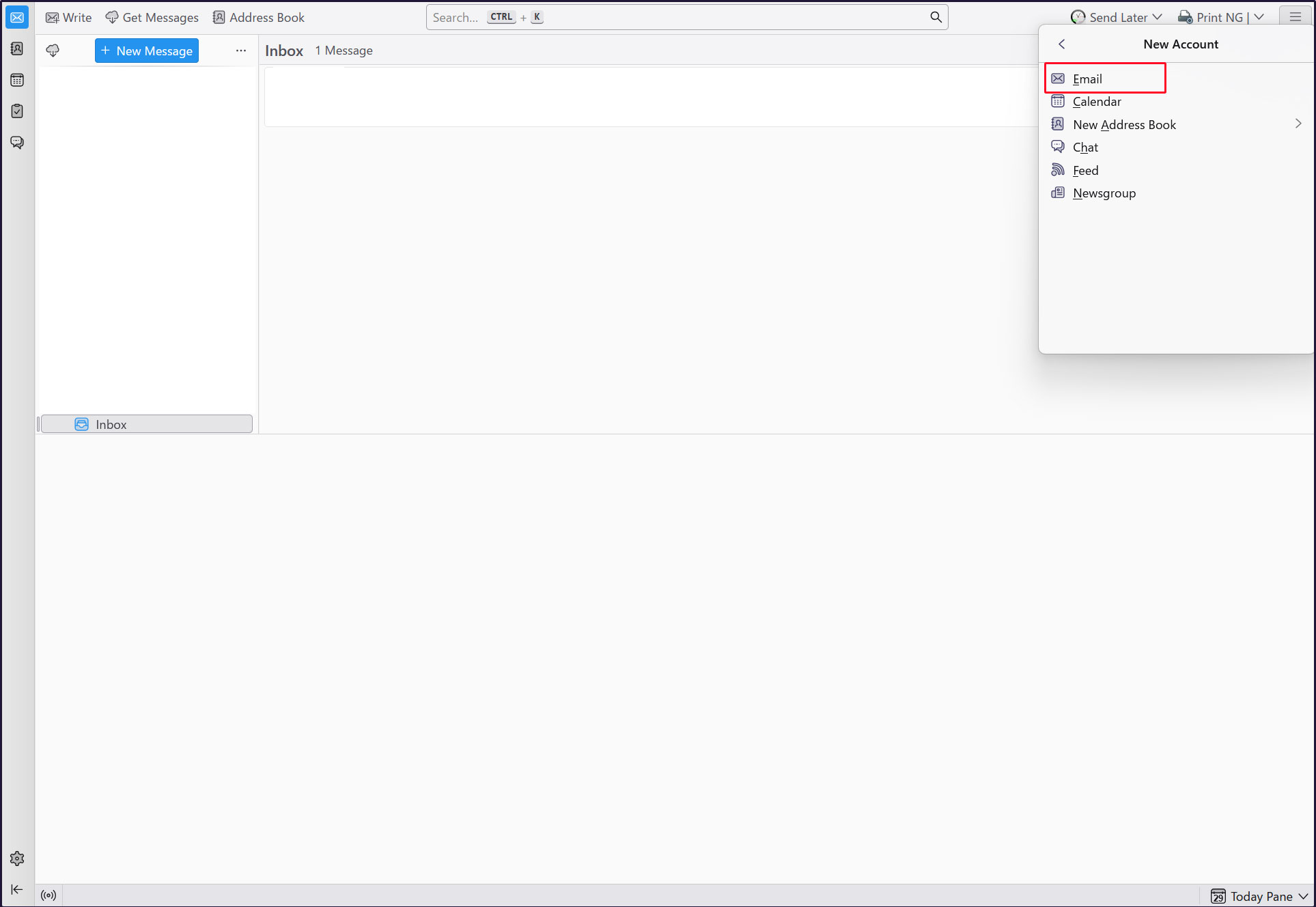
Full name : Any name
Email address : huong@<domain-name>
「Continue」click
[EDIT CONFIGURATION] click
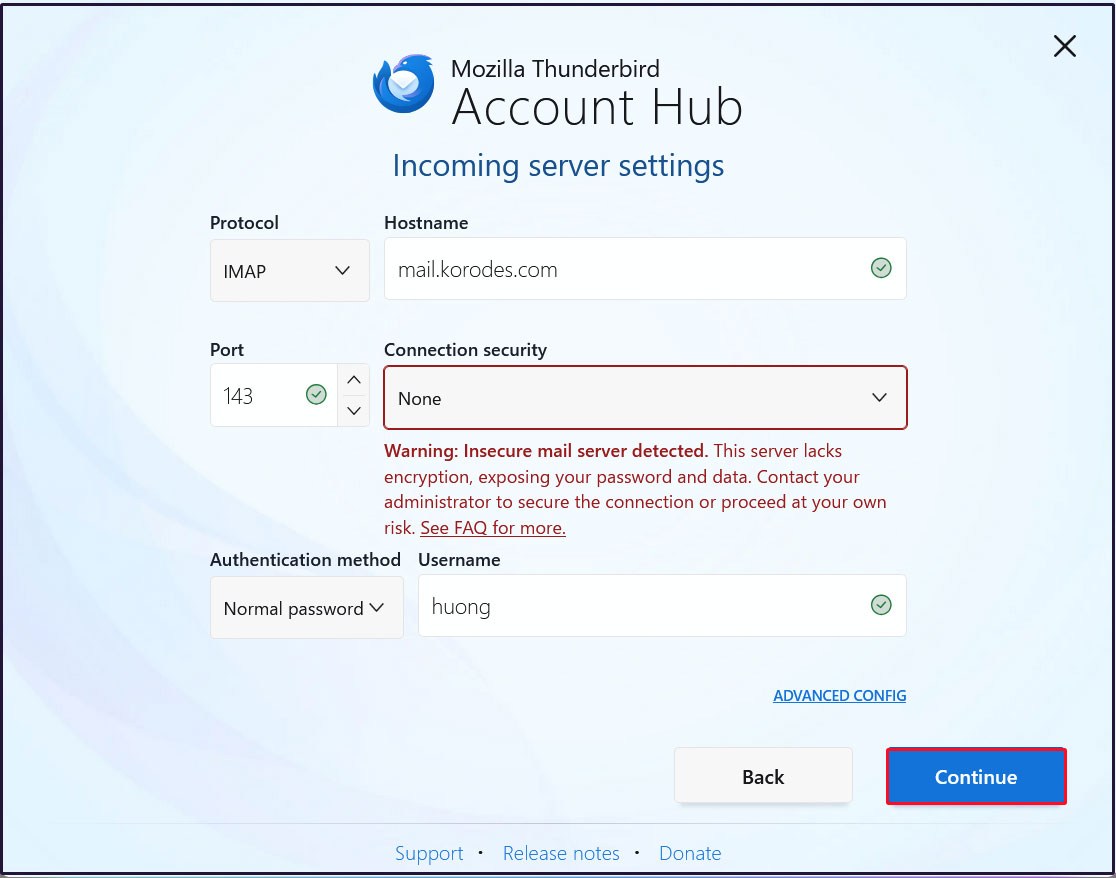
Incoming server settings
Set [Connection security] to [None] and click [Continue].
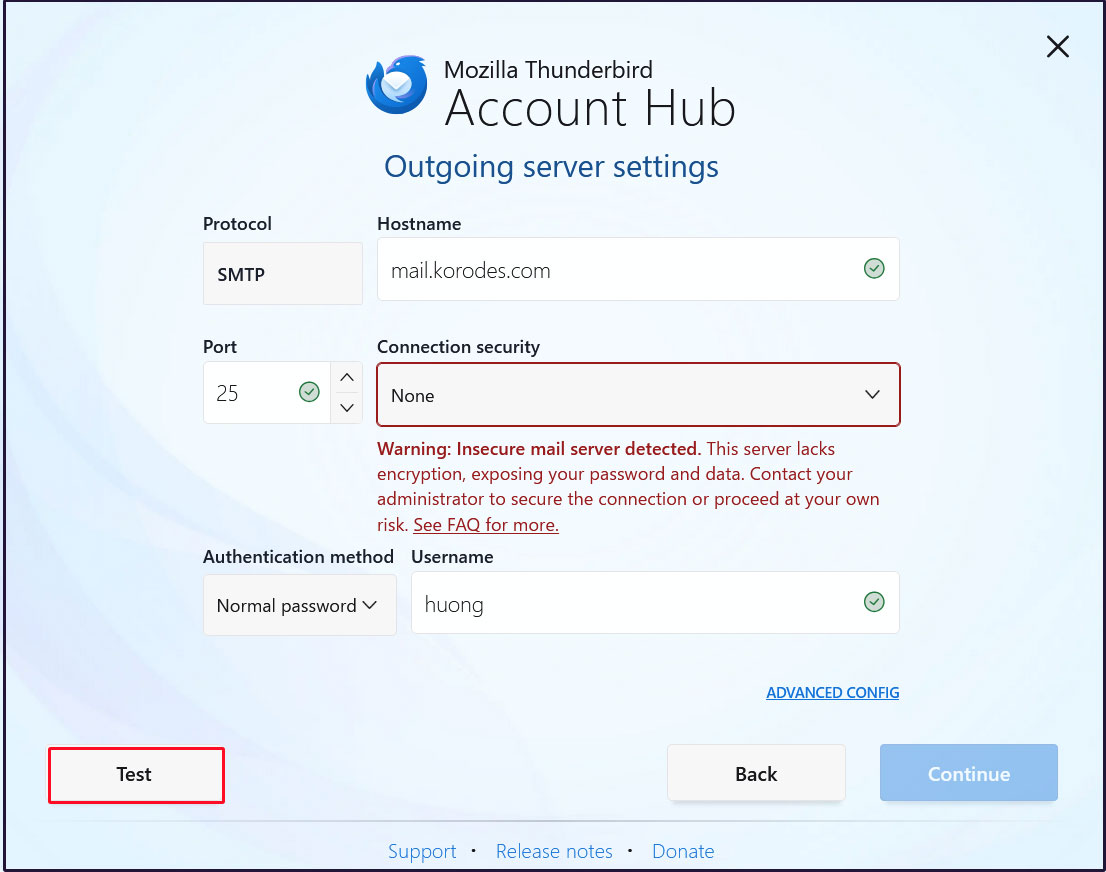
Sending Server Settings
Set [Connection security] to [None] and click [Test].
[Continue] click
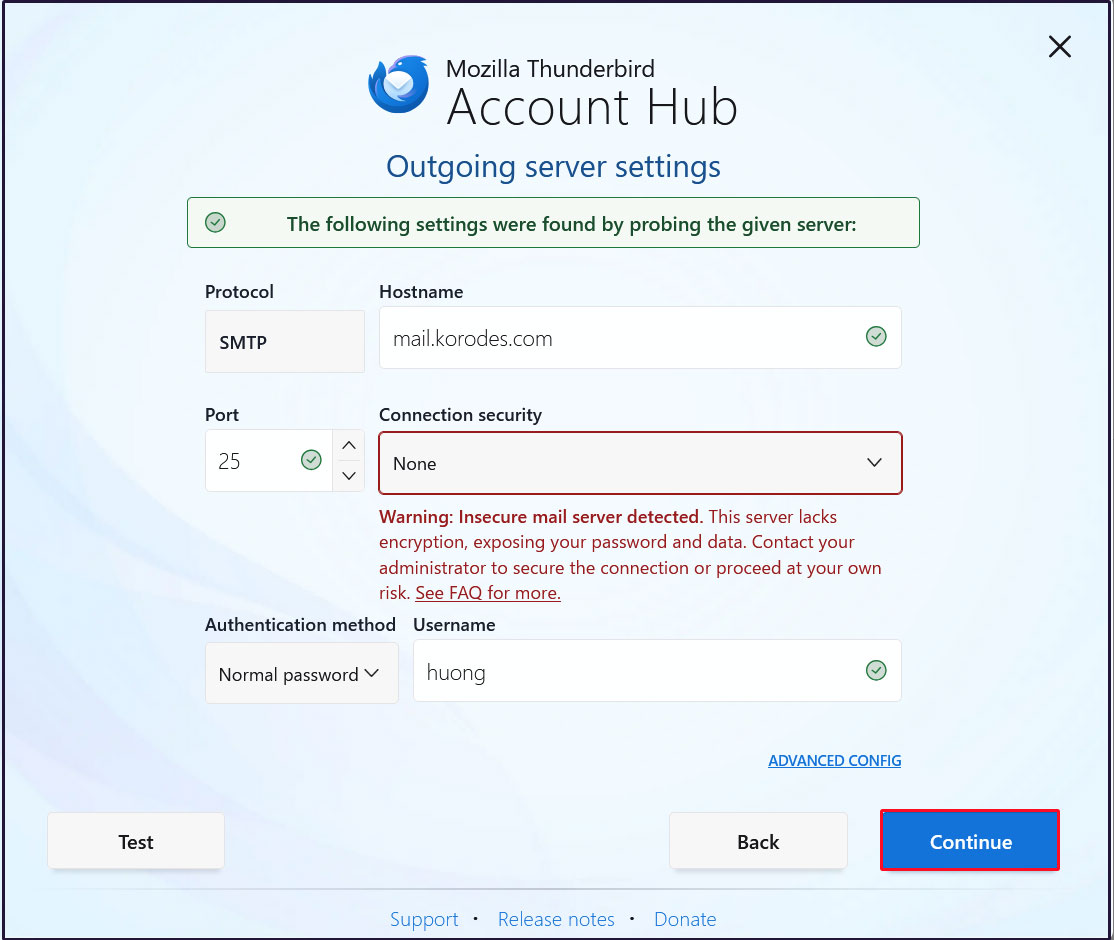
Enter the user's password in the “Password” field and click "Continue"
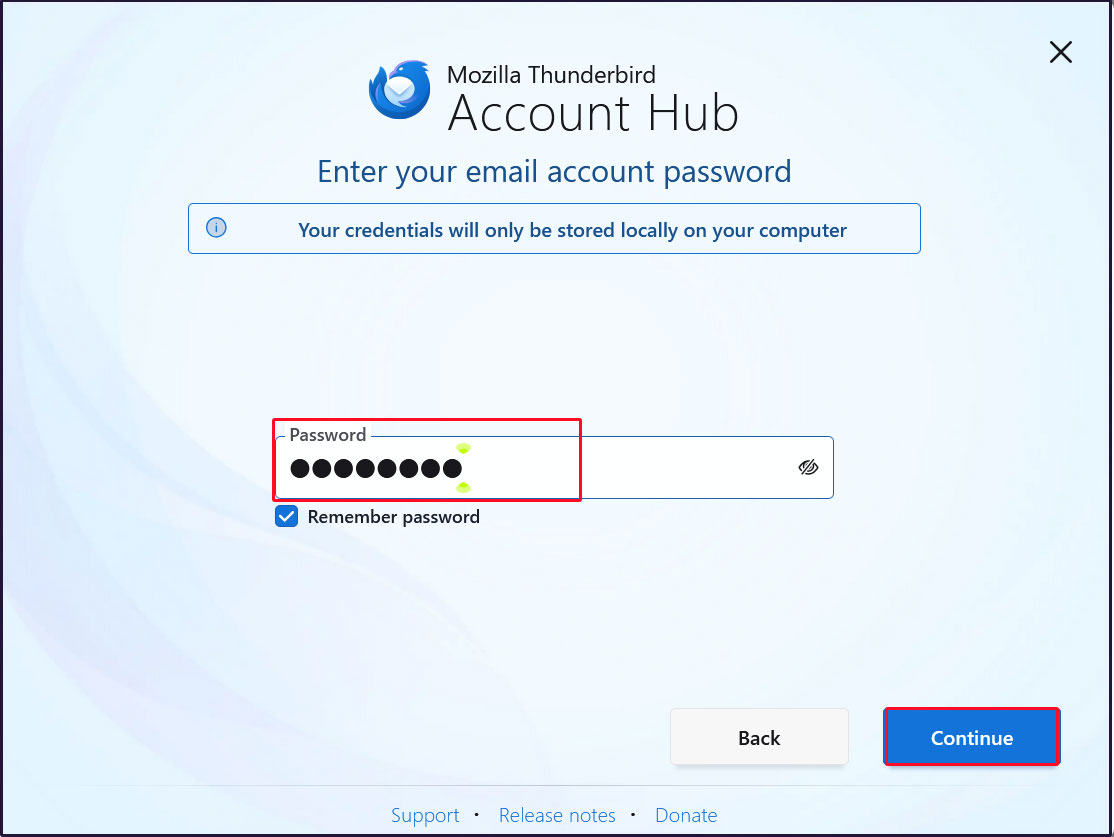
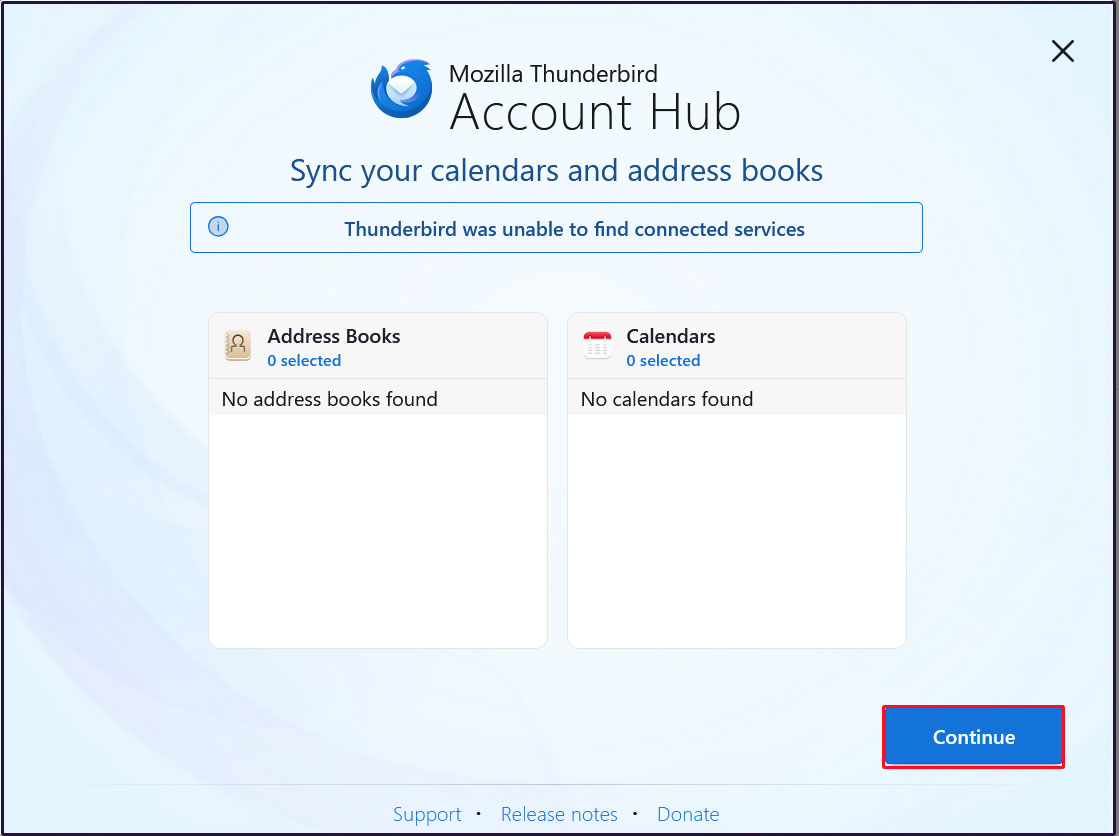
[Continue] click
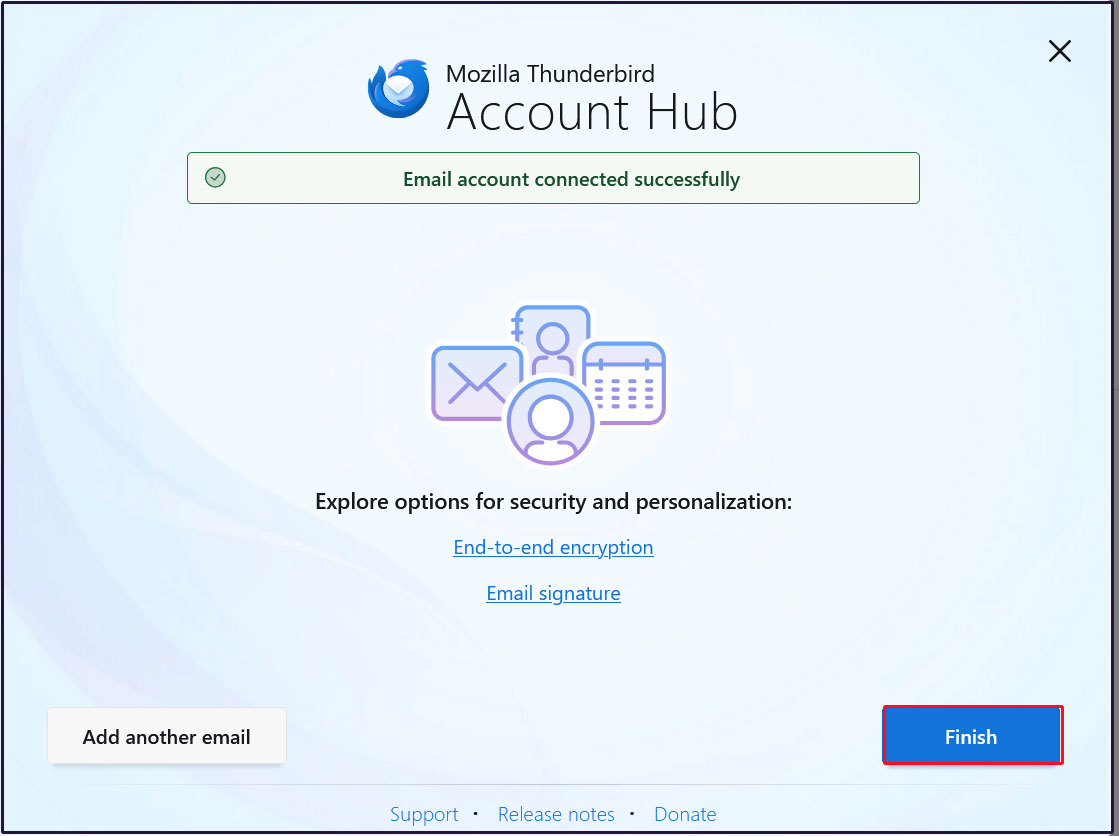
Click “Finish” when the email account has been successfully created.
Mail Server : Postfix + Clamav + clamav-milter+SpamAssassin
1.Real-time scanning of e-mails
①clamav-milter Install
Virus checks are performed on the mail server side using Clam AntiVirus.
The mail server and Clam AntiVirus are linked using clamav-milter.
# dnf -y install clamav-milter clamav-milter-systemd
➁clamav-milter configuration
# vi /etc/mail/clamav-milter.conf

Line 6 : Comment Out
# Comment or remove the line below.
#Example

Per Line 23-24: Add
# Default: no default
#MilterSocket /run/clamav-milter/clamav-milter.socket
#MilterSocket /tmp/clamav-milter.sock
#MilterSocket inet:7357
MilterSocket /var/run/clamav-milter/clamav-milter.socket ← Specify the UNIX socket name for clamav-milter
MilterSocketMode 660 ← Specify UNIX socket access rights for clamav-milter

Per Linr 98 : Add
# Default: no default
#ClamdSocket tcp:scanner.mydomain:7357
#ClamdSocket unix:/run/clamav/clamd.sock
ClamdSocket unix:/var/run/clamd.scan/clamd.sock ← Specify the UNIX socket name for Clam AntiVirus (match the LocalSocket option in /etc/clamd.d/scan.conf)

Per Line 171 : Add
# Action to be performed on infected messages
# Default: Quarantine
#OnInfected Quarantine
OnInfected Blackhole ← Destroy virus-infected e-mails.

Per Line 193 : Add
# Note that while "Replace" can potentially break DKIM signatures, "Add" may
# confuse procmail and similar filters.
# Default: no
#AddHeader Replace
AddHeader Yes ← Outputs a message in the mail header stating that a virus check has been performed.

Per Line 253 : Uncomment
# Default: LOG_LOCAL6
LogFacility LOG_MAIL ← Log output destination to mail log
➂clamav-milter startup and auto-startup settings
# systemctl start clamav-milter
# systemctl enable clamav-milter
④Postfix and clamav-milter integration settings
Edit Postfix configuration file
# vi /etc/postfix/main.cf

Add the following to the last line
milter_default_action = tempfail
smtpd_milters = unix:/var/run/clamav-milter/clamav-milter.socket
non_smtpd_milters = unix:/var/run/clamav-milter/clamav-milter.socket
⑤Add postfix user to clamilt group
# usermod -G clamilt -a postfix
⑥Postfix Settings Reflected
# systemctl restart postfix
⑦Check with Thunderbird
I sent a blank email to myself in Thunderbird, and in the header display of the received email, I see the following
「X-Virus-Scanned: clamav-milter 1.4.5 at Lepard」
X-Mozilla-Status: 0001
X-Mozilla-Status2: 00000000
Return-Path: xxxxx@xxxxxx.com
X-Original-To: xxxxx@xxxxxx.com
Delivered-To: xxxxx@xxxxxx.com
Received: from [192.168.11.14] (buffalo.setup [192.168.11.1])
by mail.xxxxxxx.com (Postfix) with ESMTPA id 53CFE2148EA3
for xxxxx@xxxxxx.com; Fri, 17 Jul 2026 14:46:03 +0900 (JST)
Message-ID: 1dec7f6b-0a1c-43f0-9580-46212c4c0e09@xxxxxxx.com
Date: Fri, 17 Jul 2026 14:46:00 +0900
MIME-Version: 1.0
User-Agent: Mozilla Thunderbird
From: xxxxx xxxxx@xxxxxx.com
Content-Language: en-US
To: xxxxxx xxxxx@xxxxxx.com
Content-Type: text/plain; charset=UTF-8; format=flowed
Content-Transfer-Encoding: 7bit
X-Virus-Scanned: clamav-milter 1.4.5 at Lepard
X-Virus-Status: Clean
Try sending yourself an email with the body of the email "X5O!P%@AP[4\PZX54(P^)7CC)7}$EICAR-STANDARD-ANTIVIRUS-TEST-FILE!$H+H*" and confirm that the email is discarded and never received
2.Email spam protection
2.1 SpamAssassin・procmail・postfix settings
①SpamAssassin・procmail Install
# dnf -y install spamassassin procmail
➁procmail settings
Create "/etc/procmailrc" if you want to apply the settings to all users
To configure for each individual, create "~/.procmailrc" in each user's home directory
Create "/etc/procmailrc" this time
# vi /etc/procmailrc
Contents of procmailrc
SHELL=/bin/bash
PATH=/usr/bin:/bin:/usr/local/bin
DROPPRIVS=yes
MAILDIR=$HOME/Maildir
DEFAULT=$MAILDIR/
SPAM=$MAILDIR/.Spam/
LOGFILE=$HOME/.procmail.log # Log output destination
VERBOSE=ON # Detailed log output

# If there is no “X-Spam-***” in the mail header, spamassassassin will be started.
:0fw
*!^X-Spam.*
|spamassassin

# If there is an “X-Spam-Status: Yes” in the mail header, the mail is stored in the “.Spam” directory
:0
* ^X-Spam-Status: Yes
$SPAM
➂Edit postfix configuration file
# vi /etc/postfix/main.cf

Per Line 477 : Add
mailbox_command = /usr/bin/procmail -a "$EXTENSION"
④Editing spamassassin configuration file
# vi /etc/mail/spamassassin/v310.pre

Delete # at beginning of line per line 24
loadplugin Mail::SpamAssassin::Plugin::DCC
⑤postfix、spamassassin restart
# systemctl restart postfix spamassassin
# systemctl enable spamassassin
⑥Confirmed by Thudrtbird.
Send a blank email to yourself, and if the header looks like the following, it is normal.
X-Mozilla-Status: 0001
X-Mozilla-Status2: 00000000
Return-Path: xxxxx@xxxxxx.com
X-Spam-Checker-Version: SpamAssassin 4.0.1 (2024-03-26) on Lepard
X-Spam-Level: ***
X-Spam-Status: No, score=3.1 required=5.0 tests=ALL_TRUSTED,EMPTY_MESSAGE,
MISSING_SUBJECT autolearn=no autolearn_force=no version=4.0.1
--------------------------------------------------
⑦SpamAssassin configuration file modernization script
# cd /var/www/system

# vi spamassassin-update.sh
Describe the following
#!/bin/bash

cd /etc/mail/spamassassin
wget -q https://github.com/kittyfreak/spamassassin_user_prefs/archive/refs/heads/main.zip
[ $? -ne 0 ] && exit
unzip main.zip >/dev/null 2>&1
[ $? -ne 0 ] && exit
rm -f main.zip
mv spamassassin_user_prefs-main/user_prefs .
rm -rf spamassassin_user_prefs-main
diff user_prefs user_prefs.org > /dev/null 2>&1
if [ $? -ne 0 ]; then
cp user_prefs local.cf
echo "report_safe 0" >> local.cf
echo "rewrite_header Subject ***SPAM***" >> local.cf
# SpamAssassin restart
if [ -f /etc/rc.d/init.d/spamassassin ]; then
/etc/rc.d/init.d/spamassassin restart > /dev/null
else
systemctl restart spamassassin > /dev/null
fi
fi
cp user_prefs user_prefs.org
Grant execute permission to the spamassassin-update script and run it
# chmod 700 /var/www/system/spamassassin-update.sh
# /var/www/system/spamassassin-update.sh
Confirm that the SpamAssassin configuration file (local.cf) has been created in the /etc/mail/spamassassin directory with the date of the day
# ls -l /etc/mail/spamassassin
total 1636
drwxr-xr-x 2 root root     40 Jul 17 14:51 channel.d
-rw-r--r-- 1 root root   1649 Nov 29  2024 init.pre
-rw-r--r-- 1 root root 500636 Jul 17 14:58 local.cf
drwx------ 2 root root      6 Nov 29  2024 sa-update-keys
-rw-r--r-- 1 root root     62 Nov 29  2024 spamassassin-default.rc
-rwxr-xr-x 1 root root     39 Nov 29  2024 spamassassin-helper.sh
-rw-r--r-- 1 root root     55 Nov 29  2024 spamassassin-spamc.rc
-rw-r--r-- 1 root root 500588 Apr 30  2023 user_prefs
-rw-r--r-- 1 root root 500588 Jul 17 14:58 user_prefs.org
-rw-r--r-- 1 root root   2262 Jul 17 14:55 v310.pre
-rw-r--r-- 1 root root   1168 Nov 29  2024 v312.pre
-rw-r--r-- 1 root root   2416 Nov 29  2024 v320.pre
-rw-r--r-- 1 root root   1237 Nov 29  2024 v330.pre
-rw-r--r-- 1 root root   1020 Nov 29  2024 v340.pre
-rw-r--r-- 1 root root   1315 Nov 29  2024 v341.pre
-rw-r--r-- 1 root root   1519 Nov 29  2024 v342.pre
-rw-r--r-- 1 root root   1266 Nov 29  2024 v343.pre
-rw-r--r-- 1 root root   1482 Nov 29  2024 v400.pre
-rw-r--r-- 1 root root   1118 Nov 29  2024 v401.pre
Set up cron to automatically run a script daily that updates the SpamAssassin configuration file
# crontab -e

Describe the following
0 2 * * * /var/www/system/spamassassin-update.sh > /dev/null 2>&1
2.2 Spam mail sorting settings
Mail marked as spam in the mail header by SpamAssassin will be delivered to a spam-only mailbox, while other mail will be delivered to a normal mailbox.
Create a dedicated spam mailbox
For existing users, add a spam-only mailbox to their mailboxes.
For new users, a spam-only mailbox will be automatically created when a user is added.
①Created script to create spam-only mailboxes
# vi spamfolder-create

Describe the following
#!/bin/bash

for user in `ls /home`
do
    id -u $user > /dev/null 2>&1
    if [ $? -eq 0 ] && [ ! -d /home/$user/Maildir/.Spam/new ]; then
        mkdir -p /home/$user/Maildir/.Spam/new
        mkdir -p /home/$user/Maildir/.Spam/cur
        mkdir -p /home/$user/Maildir/.Spam/tmp
        chmod -R 700 /home/$user/Maildir/.Spam
        chown -R $user:$user /home/$user/Maildir/.Spam
        echo $user
    fi
done
Run script to create spam-only mailboxes
# bash spamfolder-create
huong
linux
smbuser
Measures against new users
Automatic spam-only mailbox creation when adding new users
# mkdir -p /etc/skel/Maildir/.Spam/{new,cur,tmp}
# chmod -R 700 /etc/skel/Maildir/.Spam
➁spam mail sorting
Emails identified as spam by SpamAssassin are delivered to a spam-only mailbox.
# vi /etc/procmailrc

Add the following to the end
# Emails identified as spam by SpamAssassin are delivered to a spam-only mailbox
:0
*^X-Spam-Flag: YES
$HOME/Maildir/.Spam/
➂spamass-milter confirmation
Send yourself an email with the body of the email "XJS*C4JDBQADN1.NSBN3*2IDNEN*GTUBE-STANDARD-ANTI-UBE-TEST-EMAIL*C.34X" and make sure the email is not delivered and is sorted into the Spam folder
The header states
X-Spam-Checker-Version: SpamAssassin 4.0.1 (2024-03-26) on Lepard
X-Spam-Flag: YES
X-Spam-Level: ********************************************
X-Spam-Status: Yes, score=1001.8 required=13.0 tests=ALL_TRUSTED,
CONTENT_TYPE_PRESENT,GTUBE,HTML_MESSAGE,MPART_ALT_DIFF,
MULTIPART_ALTERNATIVE autolearn=no autolearn_force=no version=4.0.1
X-Spam-Report:
* 0.1 ALL_TRUSTED Passed through trusted hosts only via SMTP
* -0.1 CONTENT_TYPE_PRESENT exists:Content-Type
* 0.1 MULTIPART_ALTERNATIVE Multipart/alternative
* 1000 GTUBE BODY: Generic Test for Unsolicited Bulk Email
* 0.7 MPART_ALT_DIFF BODY: HTML and text parts are different
* 1.0 HTML_MESSAGE BODY: HTML included in message