

1.Anti-virus software Clamav installed
1.1 Install
# apt -y install clamav clamav-daemon
The clamav-related configuration files are installed in the "/etc/clamav/" folder.
1.2 Virus definition updates
# systemctl stop clamav-freshclam
# freshclam
# systemctl start clamav-freshclam
Change configuration file
# vi /etc/logrotate.d/clamav-freshclam

Line 7
create 640 clamav adm
↓
create 640 clamav clamav
1.3 Virus Check Confirmation
①Running manual virus checks
# clamscan --infected --remove --recursive /home

----------- SCAN SUMMARY -----------
Known viruses: 3628169
Engine version: 1.5.4
Scanned directories: 5
Scanned files: 8
Infected files: 0
Data scanned: 12.18 KiB
Data read: 6.27 KiB (ratio 1.94:1)
Time: 10.077 sec (0 m 10 s)
Start Date: 2026:10:16 14:55:51
End Date:   2026:10:16 14:56:01
Infected files: 0, so no virus
②Download a test virus to detect viruses
Download a trial harmless virus to test detection
# cd
# wget https://secure.eicar.org/eicar.com.txt
# clamscan --infected --remove --recursive
/root/eicar.com.txt: Eicar-Test-Signature FOUND
/root/eicar.com.txt: Removed.

----------- SCAN SUMMARY -----------
Known viruses: 3628169
Engine version: 1.5.4
Scanned directories: 6
Scanned files: 7
Infected files: 1
Data scanned: 38.44 KiB
Data read: 19.92 KiB (ratio 1.93:1)
Time: 8.431 sec (0 m 8 s)
Start Date: 2026:10:16 14:56:49
End Date:   2026:10:16 14:56:57
The virus is notified with the message "FOUND" and "Infected files: 1". Also, since the "--remove" option is attached, the test virus has been removed.
1.4 Create a script file to do a full scan
①Create a directory where you can save the script
# mkdir /opt/script
# cd /opt/script
➁Full scan script clam-full.sh New
# vi clam-full.sh

Fill in the following
#!/bin/sh
echo =========================================
date
hostname
clamscan / \
--infected \
--recursive \
--log=/var/log/clamav/clamscan.log \
--move=/var/log/clamav/virus \
--exclude-dir=^/boot \
--exclude-dir=^/sys \
--exclude-dir=^/proc \
--exclude-dir=^/dev \
--exclude-dir=^/var/log/clamav/virus
if [ $? = 0 ]; then
echo "virus undetected"
else
echo "Virus detected!!"
fi
➂grant execution authority
# chmod +x /opt/script/clam-full.sh
④Create a folder for virus quarantine (if it already exists, it is OK, but if it does not, a runtime error will occur because it is specified as an excluded directory in the above script).
# mkdir /var/log/clamav/virus
⑤try and run it.
# /opt/script/clam-full.sh

----------- SCAN SUMMARY -----------
Known viruses: 3628169
Engine version: 1.5.4
Scanned directories: 13911
Scanned files: 88761
Infected files: 0
Data scanned: 5.77 GiB
Data read: 8.62 GiB (ratio 0.67:1)
Time: 1085.016 sec (18 m 5 s)
Start Date: 2026:10:16 15:02:32
End Date:   2026:10:16 15:20:37
virus undetected
⑥Scheduled virus scan execution with cron
# crontab -e
0 2 * * mon /opt/script/clam-full.sh >> /var/log/clamav/clamascan.log
2. Mail Server
2.1 Postfix : Installation/Configuration
Install Postfix and build an SMTP server. 25/TCP is used for SMTP.
To prevent unauthorized mail relay, use the SASL function of Dovecot (see below), and configure Postfix so that authentication is required even for outgoing mail.
①Install
# apt -y install postfix sasl2-bin
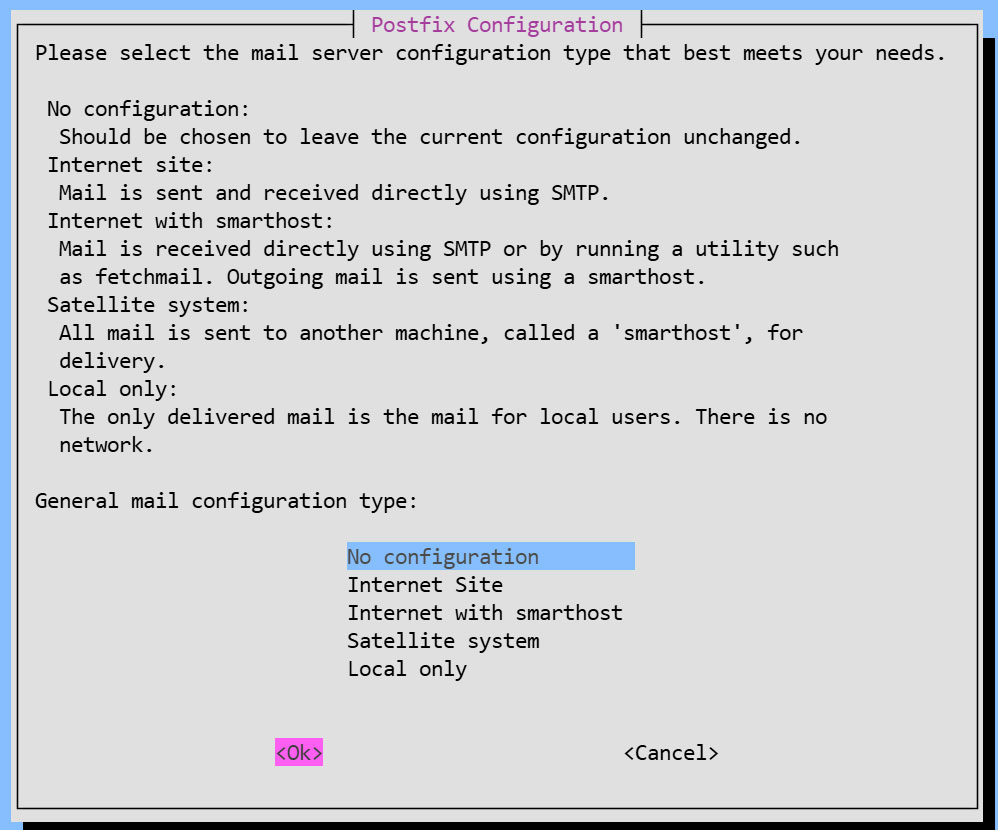
Installation Status Screen
You will be asked to select a general configuration setting, select "No Configuration" to set it manually later.
②Configuration File Edit
# cp /usr/share/postfix/main.cf.dist /etc/postfix/main.cf
# vi /etc/postfix/main.cf
Line 82:Uncomments
mail_owner = postfix
Line 108:Add hostname specification
myhostname = mail.[domain name]
Line 115:Domain Name Specification Addition
mydomain = [domain name]
Line 133 : Comments
#myorigin = /etc/mailname
Line 135:Uncomments
myorigin = $mydomain
Line 149:Uncomments
inet_interfaces = all
Line 197:Uncomments
mydestination = $myhostname, localhost.$mydomain, localhost, $mydomain
Line 240:Uncomments
local_recipient_maps = unix:passwd.byname $alias_maps
Line 285:Uncomments
mynetworks_style = subnet
Line 302:Self-Network Addendum
mynetworks = 127.0.0.0/8, 192.168.11.0/24
Line 423:Uncomments
alias_maps = hash:/etc/aliases
Line 434:Uncomments
alias_database = hash:/etc/aliases
Line 456:Uncomments
home_mailbox = Maildir/
Line 592:Add a comment and append it below
#smtpd_banner = $myhostname ESMTP $mail_name (Ubuntu)
smtpd_banner = $myhostname ESMTP
Line 666:Add
sendmail_path = /usr/sbin/postfix
Line 670:Uncomments
newaliases_path = /usr/bin/newaliases
Line 675:Uncomments
mailq_path = /usr/bin/mailq
Line 681:Uncomments
setgid_group = postdrop
#Add to the last line:
#Limit sent and received email size to 10MB
message_size_limit = 10485760
#Limit mailbox size to 1GB
mailbox_size_limit = 1073741824
#SMTP Authentication Settings
smtpd_sasl_type = dovecot
smtpd_sasl_path = private/auth
smtpd_sasl_auth_enable = yes
smtpd_sasl_security_options = noanonymous
smtpd_sasl_local_domain = $myhostname
smtpd_recipient_restrictions = permit_mynetworks, permit_auth_destination, permit_sasl_authenticated, reject
③master.cf edit
# vi /etc/postfix/master.cf
Line 19,23 : Uncomments
submission inet n - y - - smtpd
# -o syslog_name=postfix/submission
# -o smtpd_forbid_unauth_pipelining=no
# -o smtpd_tls_security_level=encrypt
-o smtpd_sasl_auth_enable=yes
# -o smtpd_tls_auth_only=yes
④Reflecting settings
# touch /etc/aliases

# vi /etc/aliases
postmaster:    root
huong:         huong
# newaliases
# systemctl restart postfix
2.2 Dovecot : Installation/Configuration
Install Dovecot and build a POP/IMAP server, using 110/TCP for POP and 143/TCP for IMAP
# apt -y install dovecot-core dovecot-pop3d dovecot-imapd
①Configure Dovecot to provide SASL functionality for Postfix
# vi /etc/dovecot/dovecot.conf

Line 30:Uncomment
listen = *, ::
# vi /etc/dovecot/conf.d/10-auth.conf

Line 10:Disable comments (also allow plain text authentication)
auth_allow_cleartext = yes

Line 93:Uncomment and added.
auth_mechanisms = plain login
# vi /etc/dovecot/conf.d/10-mail.conf

# Line 36-39 : Add a comment and append below it (Changed to Maildir format)
#mail_driver = mbox
#mail_home = /home/%{user|username}
#mail_path = %{home}/mail
#mail_inbox_path = /var/mail/%{user}
mail_driver = maildir
mail_path = ~/Maildir
# vi /etc/dovecot/conf.d/10-master.conf

Line 110-112:Uncomments and add
# Postfix smtp-authi
unix_listener /var/spool/postfix/private/auth {
  mode = 0666
  user = postfix
  group = postfix
}
②Configuration Reflection
# systemctl restart dovecot
2.3 Port Open
# ufw allow pop3
# ufw allow imap
# ufw allow smtp
# ufw reload
2.4 Email User Account Registration
Register a user account for e-mail.
This setting is for when a user account on the OS is also used for e-mail.
If you want to use mail with a user account on the OS, you do not need to make any additional settings, only register an OS user.
①Mail Client Install
# apt -y install mailutils
②Mailboxes are set to refer to Maildir
# echo 'export MAIL=$HOME/Maildir/' >> /etc/profile.d/mail.sh
2.5 operation check ①
①Test sending mail
Send test mail to yourself [mail (user name)@(host name)].(This time, general user huong)
# su - [user name]
$ mail [user name]@localhost
# Cc
Cc:
# Subject
Subject: Test Mail
# Text
This is the first mail.
Ctrl + D key to exit the main text
➁Check incoming mail
$ mail
"/home/huong/Maildir/": 1 message 1 new
>N   1 huong              Fri Oct 16 06:41  13/427   Test Mail
? 1
Return-Path: <huong@lepard>
X-Original-To: huong@localhost
Delivered-To: huong@localhost
Received: by mail.korodes.com (Postfix, from userid 1000)
        id 1696F60998; Fri, 16 Oct 2026 15:41:21 +0900 (JST)
To: <huong@localhost>
Subject: Test Mail
User-Agent: mail (GNU Mailutils 3.21)
Date: Fri, 16 Oct 2026 15:41:21 +0900
Message-Id: <20261016064121.1696F60998@mail.korodes.com>
From: huong <huong@lepard>

This is the first mail.
? q
Saved 1 message in /home/huong/mbox
Held 0 messages in /home/huong/Maildir/
2.6 operation check ②
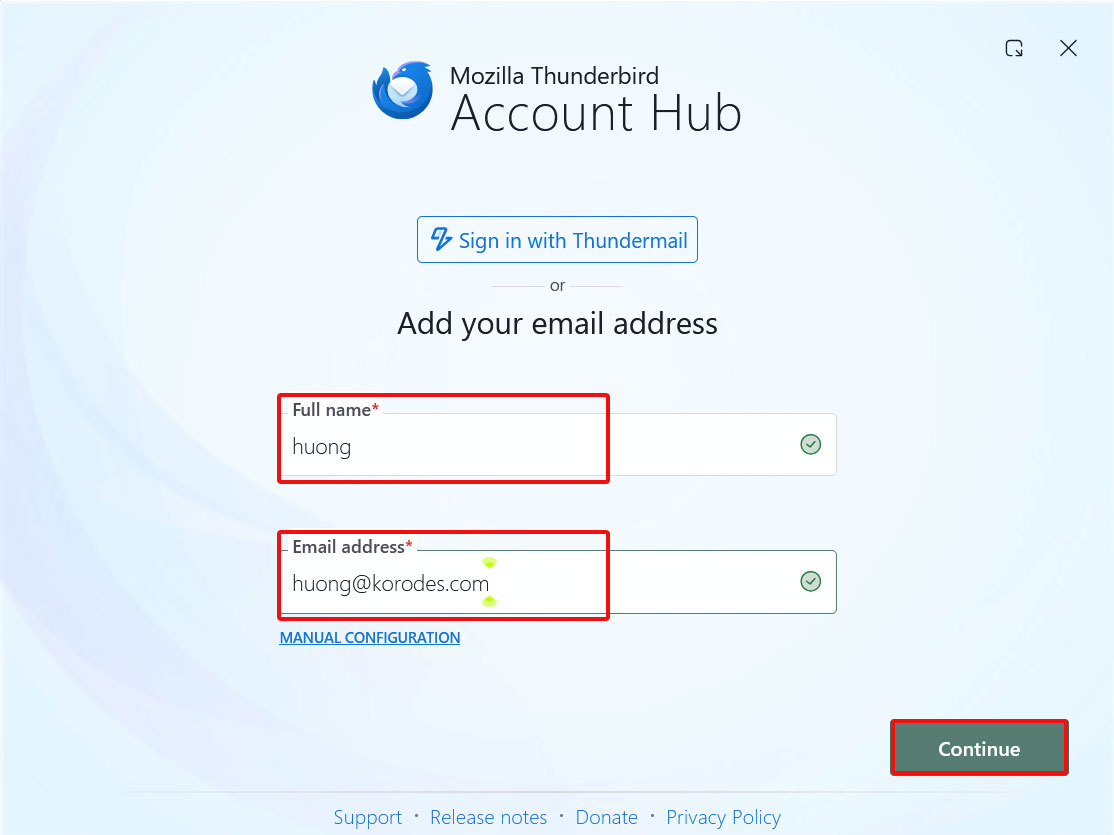
Set up and confirm your account in Mozilla Thunderbird. This time we will set it up with the general user "huong".
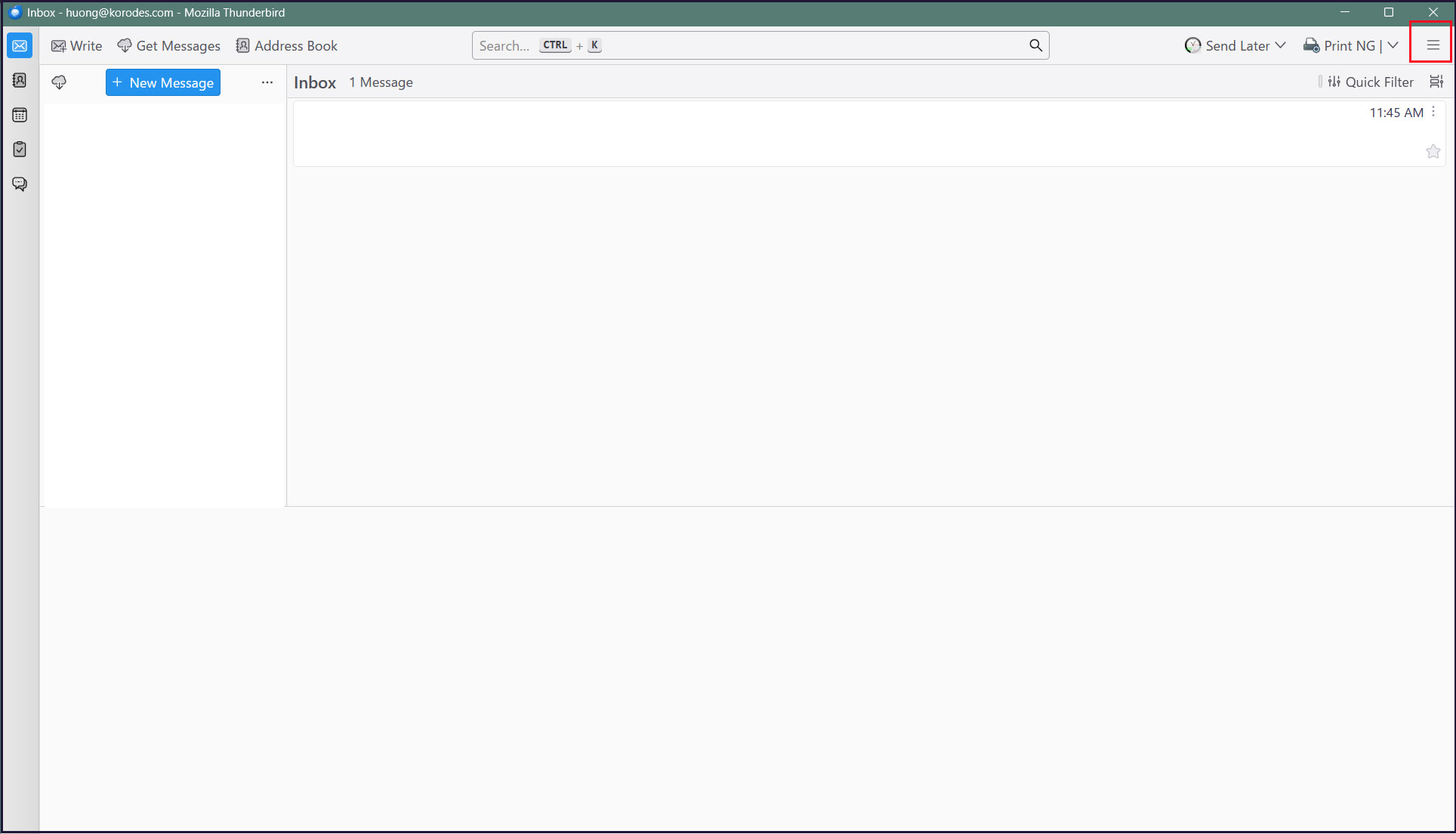
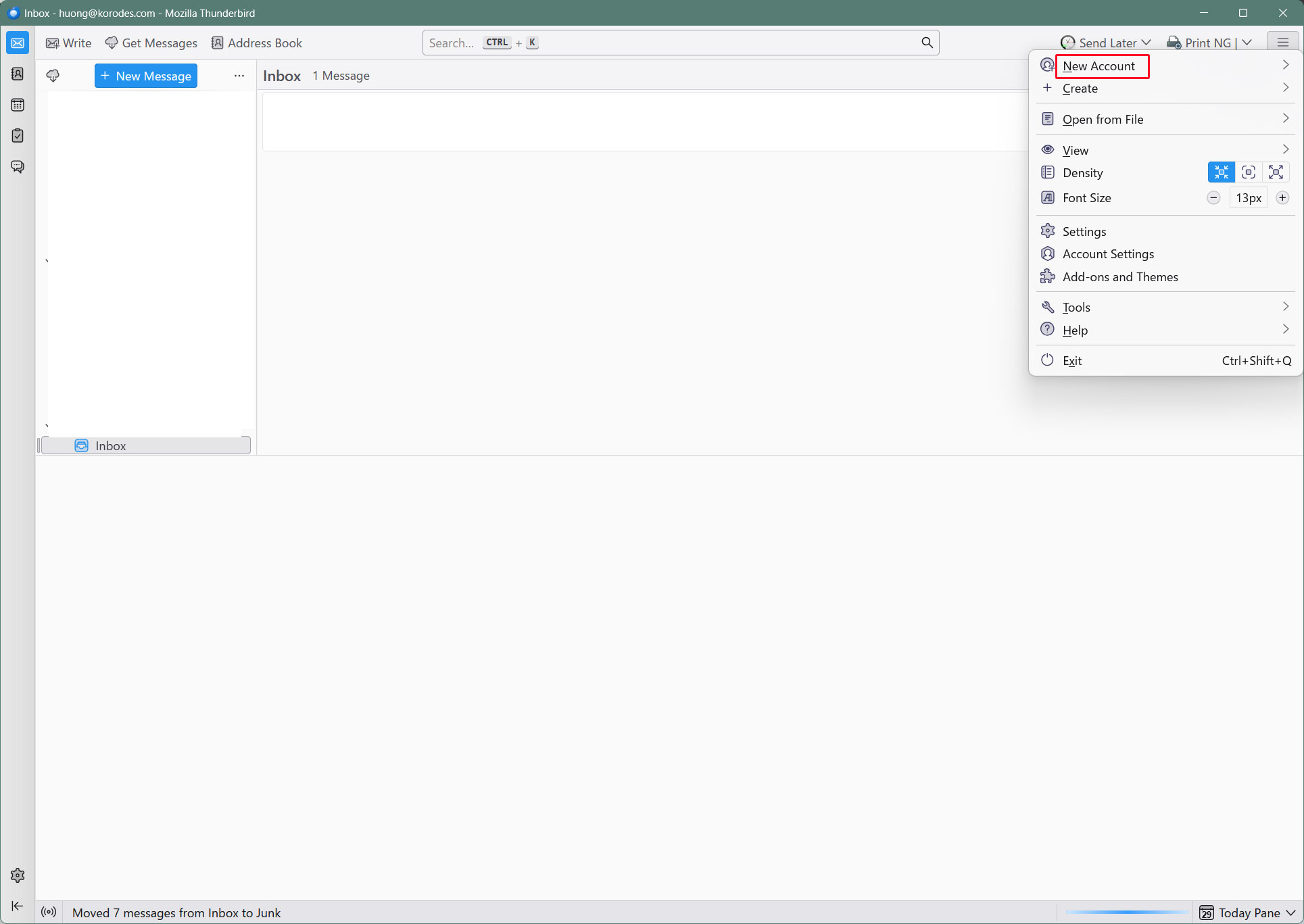
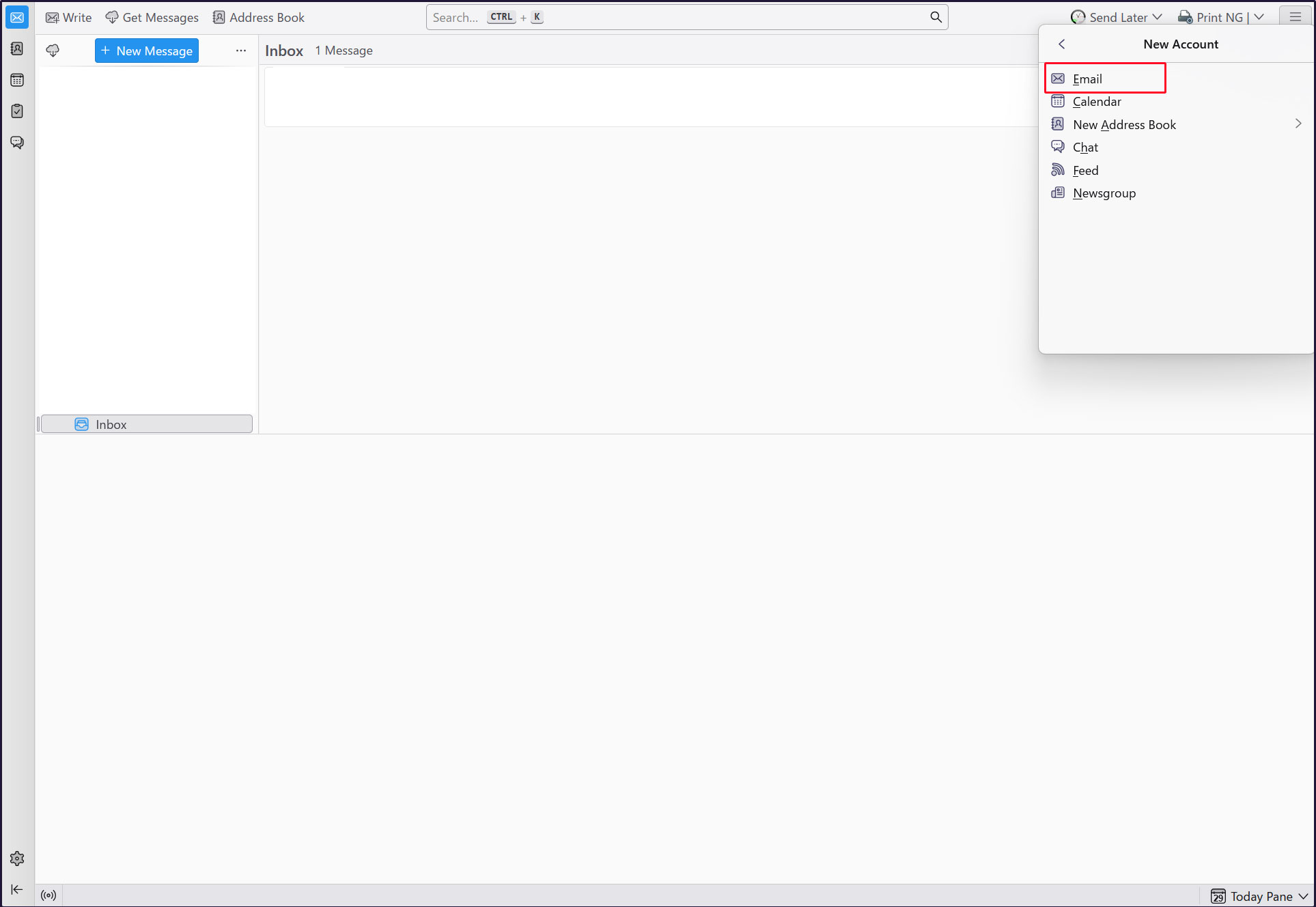
Start Thunderbird and click [New Account][Email] in the [Three] Button-menu in the upper right corner.
Full name : Any name
Email address : huong@<domain-name>
「Continue」click
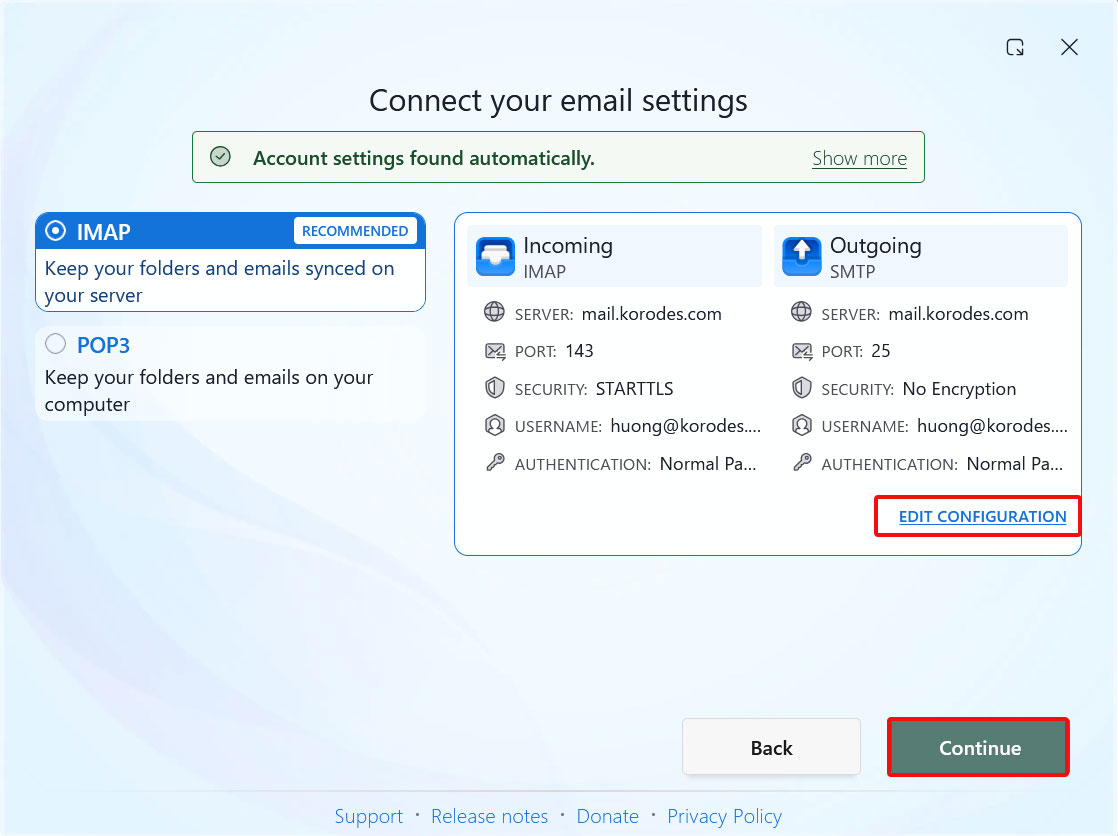
[EDIT CONFIGURATION] click
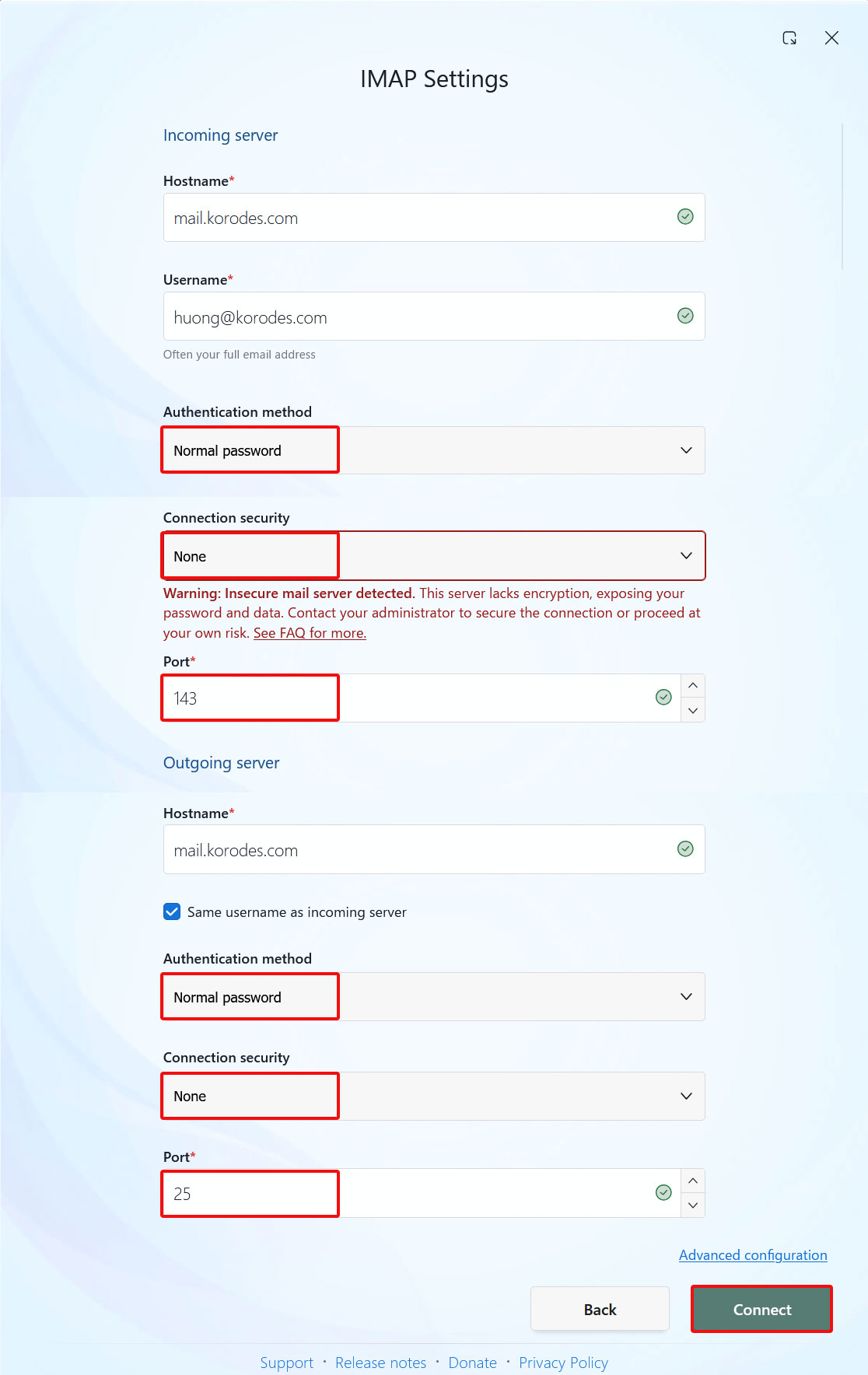
Incoming server settings
Set [Connection security] to [None]
Sending Server Settings
Set [Connection security] to [None] and click [Connect].
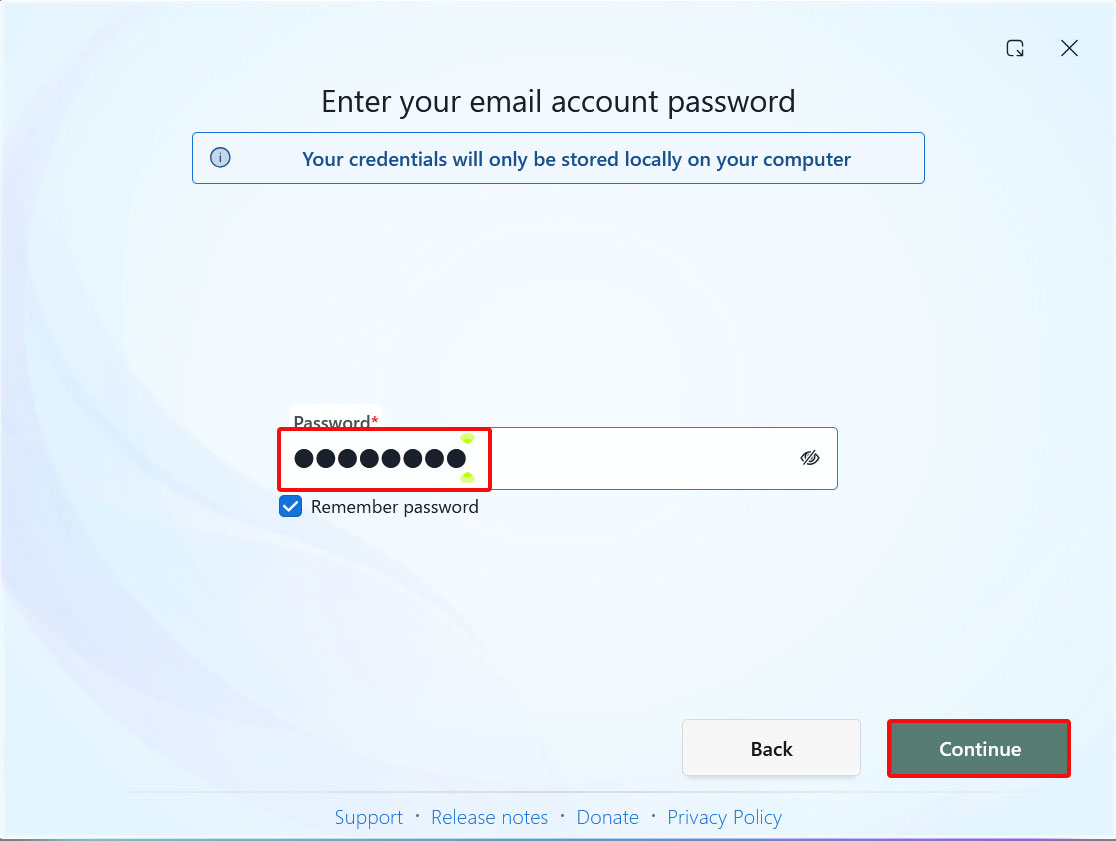
Enter the user's password in the “Password” field and click "Continue"
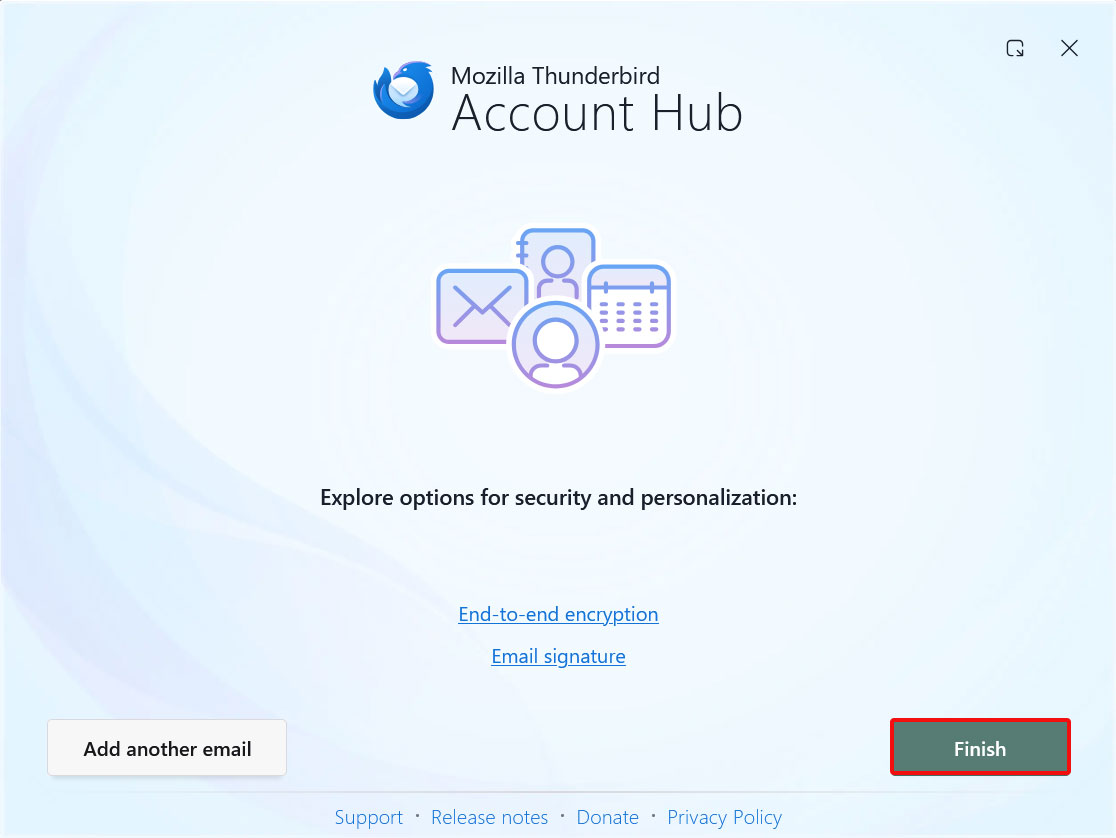
Click “Finish” when the email account has been successfully created.
2.7 Applying ClamAV to the Postfix mail server
Configure Postfix and ClamAV to enable real-time scanning of incoming and outgoing emails.
①Install Amavisd and Clamav Daemon, then start Clamav Daemon.
$ su -
Password:
# apt -y install clamav-daemon amavisd-new
If the server does not use a fully qualified domain name (FQDN) as its hostname, Amavis may fail to start.
Additionally, since the hostname of the operating system may change, set a valid hostname directly in the Amavis configuration file.
# vi /etc/amavis/conf.d/05-node_id

Line 11 : Uncomments and changes
$myhostname = "mail.[domain name]";
②Editing 15-content_filter_mode
# vi /etc/amavis/conf.d/15-content_filter_mode

Uncomment lines 13 and 14 to enable virus scanning.
@bypass_virus_checks_maps = (
\%bypass_virus_checks, \@bypass_virus_checks_acl, \$bypass_virus_checks_re);
③Register your own domain name
# echo '<yourDomain>' > /etc/mailname
④Main.cf Editing
# vi /etc/postfix/main.cf

Add to the last line
content_filter=smtp-amavis:[127.0.0.1]:10024
⑤Editing master.cf
# vi /etc/postfix/master.cf

# Append all lines below to the end of the file.
smtp-amavis     unix    -       -       n       -       2       smtp
        -o smtp_data_done_timeout=1200
        -o smtp_send_xforward_command=yes
        -o disable_dns_lookups=yes
127.0.0.1:10025 inet    n       -       n       -       -       smtpd
        -o content_filter=
        -o local_recipient_maps=
        -o relay_recipient_maps=
        -o smtpd_restriction_classes=
        -o smtpd_client_restrictions=
        -o smtpd_helo_restrictions=
        -o smtpd_sender_restrictions=
        -o smtpd_recipient_restrictions=permit_mynetworks,reject
        -o mynetworks=127.0.0.0/8
        -o strict_rfc821_envelopes=yes
        -o smtpd_error_sleep_time=0
        -o smtpd_soft_error_limit=1001
        -o smtpd_hard_error_limit=1000
⑥Postfix Settings Reflected
# usermod -G clamav amavis
# usermod -G amavis clamav
# systemctl restart clamav-daemon amavis postfix
⑦Confirm
If you send an email to yourself using Thunderbird or similar software, you'll know it worked if the following message appears in the header of the received email.
X-Mozilla-Status: 0001
X-Mozilla-Status2: 00000000
Return-Path: xxxxx@xxxxxxx.com
X-Original-To: xxxxx@xxxxxxx.com
Delivered-To: xxxxx@xxxxxxx.com
Received: from localhost (localhost [127.0.0.1])
by mail.xxxxxxx.com (Postfix) with ESMTP id 88BD160EF5
for xxxxx@xxxxxxx.com; Fri, 16 Oct 2026 16:03:53 +0900 (JST)
X-Virus-Scanned: Debian amavis at xxxxxxx.com
Received: from mail.xxxxxxx.com ([127.0.0.1])
by localhost (mail.xxxxxxx.com [127.0.0.1]) (amavis, port 10024) with ESMTP
id vpD7gdZWgTMP for xxxxx@xxxxxxx.com;
Fri, 16 Oct 2026 16:03:53 +0900 (JST)
Received: from [192.168.11.8] (xxxxxxx.setup [192.168.11.1])
by mail.xxxxxxx.com (Postfix) with ESMTPA id 732CA60EF4
for xxxxx@xxxxxxx.com; Fri, 16 Oct 2026 16:03:53 +0900 (JST)
Message-ID: 39ea6861-71c6-429e-b84e-0435eea70093@xxxxxxx.com
Date: Fri, 16 Oct 2026 16:03:53 +0900
MIME-Version: 1.0
User-Agent: Mozilla Thunderbird
From: xxxxx xxxxx@xxxxxxx.com
Content-Language: en-US
To: xxxxx xxxxx@xxxxxxx.com
Content-Type: text/plain; charset=UTF-8; format=flowed
Content-Transfer-Encoding: 7bit
Try sending yourself an email with the body of the email "X5O!P%@AP[4\PZX54(P^)7CC)7}$EICAR-STANDARD-ANTIVIRUS-TEST-FILE!$H+H*" and confirm that the email is discarded and never received
2.8 Applying SpamAssassin to the Postfix mail server
2.8.1 spamassassin Installation/Setup
①spamassassin install
# apt update
# apt upgrade
# apt -y install spamassassin spamass-milter
②SpamAssassin Configuration
# vi /etc/mail/spamassassin/v310.pre

Per Line 24 : Uncomments
loadplugin Mail::SpamAssassin::Plugin::DCC
➂SpamAssassin Configuration File Modernization Script New
# vi /opt/script/spamassassin-update.sh
#!/bin/bash
cd /etc/mail/spamassassin
wget -q https://github.com/kittyfreak/spamassassin_user_prefs/archive/refs/heads/main.zip
[ $? -ne 0 ] && exit
unzip main.zip >/dev/null 2>&1
[ $? -ne 0 ] && exit
rm -f main.zip
mv spamassassin_user_prefs-main/user_prefs .
rm -rf spamassassin_user_prefs-main
diff user_prefs user_prefs.org > /dev/null 2>&1
if [ $? -ne 0 ]; then
cp user_prefs local.cf
echo "report_safe 0" >> local.cf
echo "rewrite_header Subject SPAM" >> local.cf
if [ -f /etc/init.d/spamd ]; then
/etc/init.d/spamd restart > /dev/null
else
systemctl restart spamd > /dev/null
fi
fi
cp user_prefs user_prefs.org
Grant the spamassassin-update script execution permissions and run it.
※Install unzip beforehand
# chmod +x /opt/script/spamassassin-update.sh
# /opt/script/spamassassin-update.sh
Confirm that the SpamAssassin configuration file (local.cf) has been created in the /etc/mail/spamassassin directory with the date of the day
# ls -l /etc/mail/spamassassin/

total 1540
-rw-r--r-- 1 root root   1292 Sep  1  2025 65_debian.cf
-rw-r--r-- 1 root root   1644 Jul 24 01:20 init.pre
-rw-r--r-- 1 root root 500630 Oct 16 16:10 local.cf
-rw-r--r-- 1 root root    118 Sep  1  2025 sa-compile.pre
drwxr-xr-x 2 root root   4096 Oct 16 15:57 sa-update-hooks.d
-rw-rw-r-- 1 root root 500588 Apr 30  2023 user_prefs
-rw-rw-r-- 1 root root 500588 Oct 16 16:10 user_prefs.org
-rw-r--r-- 1 root root   2257 Oct 16 16:08 v310.pre
-rw-r--r-- 1 root root   1163 Jul 24 01:20 v312.pre
-rw-r--r-- 1 root root   2411 Jul 24 01:20 v320.pre
-rw-r--r-- 1 root root   1232 Jul 24 01:20 v330.pre
-rw-r--r-- 1 root root   1015 Jul 24 01:20 v340.pre
-rw-r--r-- 1 root root   1310 Jul 24 01:20 v341.pre
-rw-r--r-- 1 root root   1514 Jul 24 01:20 v342.pre
-rw-r--r-- 1 root root   1261 Jul 24 01:20 v343.pre
-rw-r--r-- 1 root root   1477 Jul 24 01:20 v400.pre
-rw-r--r-- 1 root root   1118 Jul 24 01:20 v401.pre
-rw-r--r-- 1 root root   1145 Jul 24 01:20 v402.pre
-rw-r--r-- 1 root root   1208 Jul 24 01:20 v403.pre
Set up cron to automatically run a script daily that updates the SpamAssassin configuration file
# crontab -e
0 2 * * * /opt/script/spamassassin-update.sh > /dev/null 2>&1
④spamass-milter startup and automatic startup settings
# systemctl start spamass-milter

# systemctl enable spamass-milter
- Create a directory named ".Spam" in Maildir format for storing spam emails
- Creation must be performed by the target user.
# su - <user name>
$ cd ~
Create a directory named ".Spam"
$ cd Maildir
$ /usr/bin/maildirmake.dovecot .Spam
$ su -
Password:
2.8.2 Preparing Procmail
①Procmail Install
# apt -y install procmail
If installed, the following result will be returned.
# which procmail
/usr/bin/procmail
②Procmail Settings
Entering settings in /etc/procmailrc, which governs all mail filters, applies them to all users.
Entering settings in /home/[user]/.procmailrc, which is each user's individual mail filter file, applies the filter only to that user.
This time, we will enter settings in /etc/procmailrc to apply them to all users.
# vi /etc/procmailrc
#Set the path
PATH=/bin:/usr/bin:/usr/local/bin
#Mailbox Settings
MAILDIR=$HOME/Maildir
DEFAULT=$MAILDIR/
#Specify the output location for Procmail log files
LOGFILE=$MAILDIR/procmaillog
#Specify the path to the lock file
LOCKFILE=$HOME/.lockmail
#If the mail header does not contain an "X-Spam-***" entry, SpamAssassin will be launched.
:0fw
*!^X-Spam.*
|spamassassin
#If the email header contains "X-Spam-Status: Yes", the email will be stored in the ".Spam" directory.
:0
*^X-Spam-Status: Yes
$MAILDIR/.Spam/
2.8.3 Postfix Configuration
① Editing main.cf
# vi /etc/postfix/main.cf

Line 484 : Uncomments
mailbox_command = /usr/bin/procmail
②Reflecting Settings and Launching
# systemctl start spamd
# systemctl restart postfix
2.8.4 Learning about spam emails
Teach the system to recognize all contents within every user's ".Spam" directory as spam email.
①Learning about spam emails
# /usr/bin/sa-learn --spam /home/*/Maildir/.Spam/cur
Learned tokens from 0 message(s) (0 message(s) examined).
②Learning regular emails
# /usr/bin/sa-learn --ham /home/*/Maildir/cur
Learned tokens from 4 message(s) (4 message(s) examined).
③Create a script and register it with Cron
Name the file something like "spam-learns.sh" and place it under /opt/scripts.
After saving the script, grant it executable permissions using chmod 750 spam-learns.sh.
# vi /opt/script/spam-learns.sh
#! /bin/sh
#Learning about spam emails
/usr/bin/sa-learn --spam /home/*/Maildir/.Spam/cur
#Learning regular emails
/usr/bin/sa-learn --ham /home/*/Maildir/cur
#If you want to force the deletion of the contents of the spam email storage directory, add the following line:
/bin/rm -f /home/*/Maildir/.Spam/cur
# chmod 750 /opt/script/spam-learns.sh
Once spam-learns.sh is created, create the definition file directly under /lib/systemd/system.
Name it so that it ends with .service, like spam-learns.service.
Define the Type as simple.
# cd /lib/systemd/system
# vi spam-learns.service
[Unit]
Description=demo sample node.js program
[Service]
Type=simple
ExecStart= /opt/script/spam-learns.sh
Restart=always
[Install]
WantedBy=multi-user.target
# crontab -e
0 4 * * * /opt/script/spam-learns.sh
# systemctl enable spam-learns
Created symlink '/etc/systemd/system/multi-user.target.wants/spam-learns.service' → '/usr/lib/systemd/system/spam-learns.service'.
④Spam Check Confirmation
If you send an empty email to yourself using Thunderbird or similar software and see a message like the following in the received email header, it means the process was successful.
X-Mozilla-Status: 0001
X-Mozilla-Status2: 00000000
Return-Path: xxxxx@xxxxxxx.com
X-Spam-Checker-Version: SpamAssassin 4.0.3-r1932428 (2026-03-21) on Lepard
X-Spam-Level: **
X-Spam-Status: No, score=2.3 required=13.0 tests=ALL_TRUSTED,
CONTENT_TYPE_PRESENT,EMPTY_MESSAGE autolearn=no autolearn_force=no
version=4.0.3-r1932428
X-Original-To: xxxxx@xxxxxxx.com
Delivered-To: xxxxx@xxxxxxx.com
---------------------------------------------
Send yourself an email with the body of the email "XJS*C4JDBQADN1.NSBN3*2IDNEN*GTUBE-STANDARD-ANTI-UBE-TEST-EMAIL*C.34X" and make sure the email is not delivered and is sorted into the Spam folder
The header states
Check the emails under /home/[user]/Maildir/.Spam/new/
Return-Path: xxxxx@xxxxxxx.com
X-Spam-Checker-Version: SpamAssassin 4.0.3-r1932428 (2026-03-21) on Lepard
X-Spam-Flag: YES
X-Spam-Level: **************************************************
X-Spam-Status: Yes, score=1001.9 required=13.0 tests=ALL_TRUSTED,
CONTENT_TYPE_PRESENT,GTUBE,HTML_MESSAGE,HTML_OBFUSCATE_05_10,
MPART_ALT_DIFF,MULTIPART_ALTERNATIVE autolearn=no autolearn_force=no
version=4.0.3-r1932428
X-Spam-Report:
* 0.1 ALL_TRUSTED Passed through trusted hosts only via SMTP
* 1000 GTUBE BODY: Generic Test for Unsolicited Bulk Email
* -0.1 CONTENT_TYPE_PRESENT exists:Content-Type
* 0.1 MULTIPART_ALTERNATIVE Multipart/alternative
* 0.1 HTML_OBFUSCATE_05_10 BODY: Message is 5% to 10% HTML obfuscation
* 1.0 HTML_MESSAGE BODY: HTML included in message
* 0.7 MPART_ALT_DIFF BODY: HTML and text parts are different