

1.ウイルス対策ソフトClamav導入
1.1 インストール
# apt -y install clamav clamav-daemon
尚、clamav関連の設定ファイルは、/etc/clamav/フォルダにインストールされる
1.2 ウイルス定義の更新
# systemctl stop clamav-freshclam
# freshclam
# systemctl start clamav-freshclam
設定ファイルを変更
# vi /etc/logrotate.d/clamav-freshclam

7行目
create 640 clamav adm
↓
create 640 clamav clamav
1.3 ウイルスチェックの確認
①手動でウイルスチェックの実行
# clamscan --infected --remove --recursive /home

----------- SCAN SUMMARY -----------
Known viruses: 3628169
Engine version: 1.5.4
Scanned directories: 5
Scanned files: 8
Infected files: 0
Data scanned: 12.18 KiB
Data read: 6.27 KiB (ratio 1.94:1)
Time: 10.077 sec (0 m 10 s)
Start Date: 2026:10:16 14:55:51
End Date:   2026:10:16 14:56:01
Infected files: 0 なのでウイルスはありません
②テストウイルスをダウンロードしてウイルス検出
お試し無害ウィルスをダウンロードして検出するかテストしてみる
# cd
# wget https://secure.eicar.org/eicar.com.txt
# clamscan --infected --remove --recursive
/root/eicar.com.txt: Eicar-Test-Signature FOUND
/root/eicar.com.txt: Removed.

----------- SCAN SUMMARY -----------
Known viruses: 3628169
Engine version: 1.5.4
Scanned directories: 6
Scanned files: 7
Infected files: 1
Data scanned: 38.44 KiB
Data read: 19.92 KiB (ratio 1.93:1)
Time: 8.431 sec (0 m 8 s)
Start Date: 2026:10:16 14:56:49
End Date:   2026:10:16 14:56:57
このように「FOUND」という表示と「Infected files: 1」という表示でウイルスを通知してくれる。又、「--remove」オプションを付けているので、テストウイルスは削除された
1.4 フルスキャンするスクリプトファイルを作成
①スクリプト保存先ディレクトリー作成
# mkdir /opt/script
# cd /opt/script
➁フルスキャンスクリプトclam-full.sh 新規作成
# vi clam-full.sh

下記を記入
#!/bin/sh
echo =========================================
date
hostname
clamscan / \
--infected \
--recursive \
--log=/var/log/clamav/clamscan.log \
--move=/var/log/clamav/virus \
--exclude-dir=^/boot \
--exclude-dir=^/sys \
--exclude-dir=^/proc \
--exclude-dir=^/dev \
--exclude-dir=^/var/log/clamav/virus
if [ $? = 0 ]; then
echo "virus undetected"
else
echo "Virus detected!!"
fi
➂実行権限を与える
# chmod +x /opt/script/clam-full.sh
④ウイルス隔離用フォルダを作成(既にあればOKだが、無いと上記スクリプトで除外ディレクトリに指定しているので実行時エラーになる)
# mkdir /var/log/clamav/virus
⑤試しに実行してみる
# /opt/script/clam-full.sh

----------- SCAN SUMMARY -----------
Known viruses: 3628169
Engine version: 1.5.4
Scanned directories: 13911
Scanned files: 88761
Infected files: 0
Data scanned: 5.77 GiB
Data read: 8.62 GiB (ratio 0.67:1)
Time: 1085.016 sec (18 m 5 s)
Start Date: 2026:10:16 15:02:32
End Date:   2026:10:16 15:20:37
virus undetected
⑥cronでウイルススキャンの定期実行
# crontab -e
0 2 * * mon /opt/script/clam-full.sh >> /var/log/clamav/clamascan.log
2. Mail サーバー
2.1 Postfix : インストール/設定
Postfix をインストールして SMTPサーバーを構築します。SMTP は 25/TCP を使用します。
メール不正中継防止に、後述の Dovecot の SASL機能を利用し、送信にも認証が必要なように Postfix を設定します
①インストール
# apt -y install postfix sasl2-bin
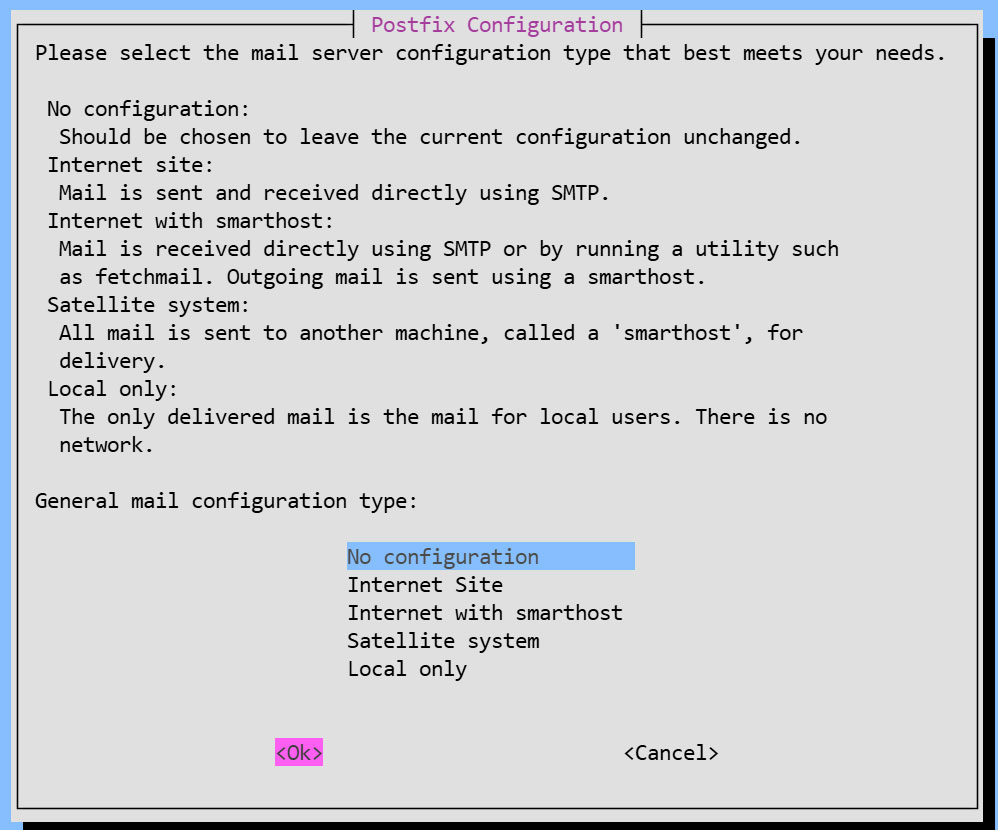
インストール状況画面
一般的な構成設定の選択を求められるが、後で手動設定するため [No Configuration] を選択
②設定ファイル編集
# cp /usr/share/postfix/main.cf.dist /etc/postfix/main.cf
# vi /etc/postfix/main.cf
82行目:コメント解除
mail_owner = postfix
108行目:ホスト名指定追加
myhostname = mail.[domain name]
115行目:ドメイン名指定追加
mydomain = [domain name]
133行目 : コメント
#myorigin = /etc/mailname
135行目:コメント解除
myorigin = $mydomain
149行目:コメント解除
inet_interfaces = all
197行目:コメント解除
mydestination = $myhostname, localhost.$mydomain, localhost, $mydomain
240行目:コメント解除
local_recipient_maps = unix:passwd.byname $alias_maps
285行目:コメント解除
mynetworks_style = subnet
302行目:自ネットワーク追記
mynetworks = 127.0.0.0/8, 192.168.11.0/24
423行目:コメント解除
alias_maps = hash:/etc/aliases
434行目:コメント解除
alias_database = hash:/etc/aliases
456行目:コメント解除
home_mailbox = Maildir/
592行目:コメントにしてその下に追記
#smtpd_banner = $myhostname ESMTP $mail_name (Ubuntu)
smtpd_banner = $myhostname ESMTP
666行目:追加
sendmail_path = /usr/sbin/postfix
670行目:コメント解除
newaliases_path = /usr/bin/newaliases
675行目:コメント解除
mailq_path = /usr/bin/mailq
681行目:コメント解除
setgid_group = postdrop
#最終行へ追記:
#送受信メールサイズを10Mに制限
message_size_limit = 10485760
#メールボックスサイズを1Gに制限
mailbox_size_limit = 1073741824
#SMTP-Auth 設定
smtpd_sasl_type = dovecot
smtpd_sasl_path = private/auth
smtpd_sasl_auth_enable = yes
smtpd_sasl_security_options = noanonymous
smtpd_sasl_local_domain = $myhostname
smtpd_recipient_restrictions = permit_mynetworks, permit_auth_destination, permit_sasl_authenticated, reject
③master.cf編集
# vi /etc/postfix/master.cf
19,23行目 : コメント解除
submission inet n - y - - smtpd
# -o syslog_name=postfix/submission
# -o smtpd_forbid_unauth_pipelining=no
# -o smtpd_tls_security_level=encrypt
-o smtpd_sasl_auth_enable=yes
# -o smtpd_tls_auth_only=yes
④設定内容反映
# touch /etc/aliases

# vi /etc/aliases
postmaster:    root
huong:         huong
# newaliases
# systemctl restart postfix
2.2 Dovecot : インストール/設定
DovecotをインストールしてPOP/IMAPサーバーを構築します。POP は 110/TCP, IMAP は 143/TCP を使用します
# apt -y install dovecot-core dovecot-pop3d dovecot-imapd
①Postfix に SASL機能が提供できるように Dovecot を設定
# vi /etc/dovecot/dovecot.conf

30行目:コメント解除
listen = *, ::
# vi /etc/dovecot/conf.d/10-auth.conf

10行目:コメント解除(プレーンテキスト認証も許可する)
auth_allow_cleartext = yes

93行目:コメント解除し、追記
auth_mechanisms = plain login
# vi /etc/dovecot/conf.d/10-mail.conf

# 36-39行目 : コメントにしてその下に追記 (Maildir 形式に変更)
#mail_driver = mbox
#mail_home = /home/%{user|username}
#mail_path = %{home}/mail
#mail_inbox_path = /var/mail/%{user}
mail_driver = maildir
mail_path = ~/Maildir
# vi /etc/dovecot/conf.d/10-master.conf

110-112行目:コメント解除し追記
# Postfix smtp-authi
unix_listener /var/spool/postfix/private/auth {
  mode = 0666
  user = postfix
  group = postfix
}
②設定反映
# systemctl restart dovecot
2.3 ポートの開放
# ufw allow pop3
# ufw allow imap
# ufw allow smtp
# ufw reload
2.4 メールユーザーアカウント登録
メール用のユーザーアカウントを登録します。
OS上のユーザーアカウントでメールも利用する場合の設定です
OS上のユーザーアカウントでメールを利用する場合は、追加の設定は不要で OSユーザーを登録するのみです。
①メールクライアントインストール
# apt -y install mailutils
②メールボックスは Maildir を参照するよう設定
# echo 'export MAIL=$HOME/Maildir/' >> /etc/profile.d/mail.sh
2.5 動作確認 ①
①メールの送信テスト
自身にテストメール送信 [mail (ユーザー名)@(ホスト名)](今回は一般ユーザーhuong)
# su - [user name]
$ mail [user name]@localhost
# Cc の宛先
Cc:
# 件名
Subject: Test Mail
# 本文
This is the first mail.
本文を終了する場合は Ctrl + D キー
➁受信メール確認
$ mail
"/home/huong/Maildir/": 1 message 1 new
>N   1 huong              Fri Oct 16 06:41  13/427   Test Mail
? 1
Return-Path: <huong@lepard>
X-Original-To: huong@localhost
Delivered-To: huong@localhost
Received: by mail.korodes.com (Postfix, from userid 1000)
        id 1696F60998; Fri, 16 Oct 2026 15:41:21 +0900 (JST)
To: <huong@localhost>
Subject: Test Mail
User-Agent: mail (GNU Mailutils 3.21)
Date: Fri, 16 Oct 2026 15:41:21 +0900
Message-Id: <20261016064121.1696F60998@mail.korodes.com>
From: huong <huong@lepard>

This is the first mail.
? q
Saved 1 message in /home/huong/mbox
Held 0 messages in /home/huong/Maildir/
2.6 動作確認 ➁
Mozilla Thunderbirdにアカウントを設定し、確認します(メールユーザーとしてOSユーザーhuongの場合)
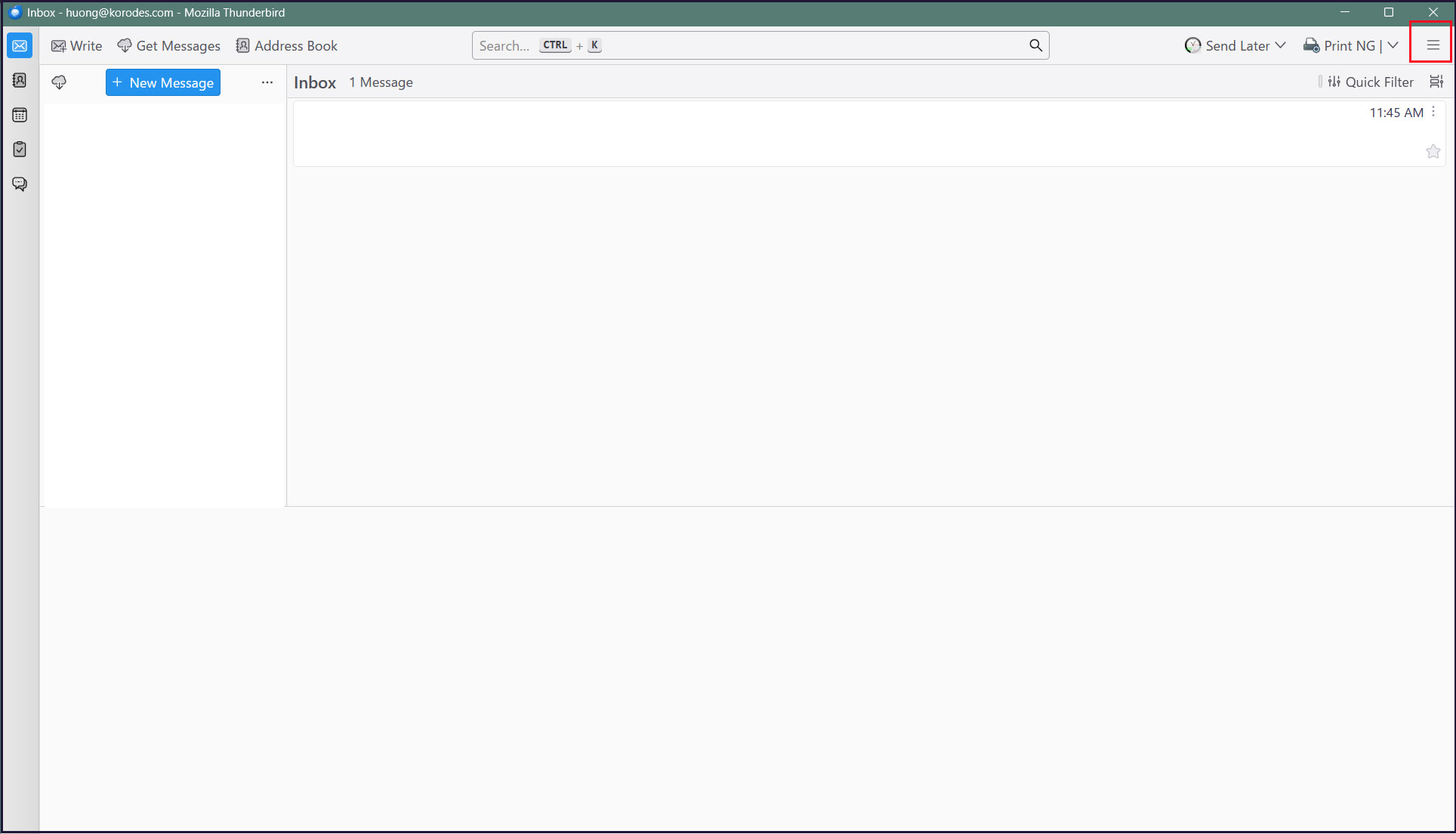
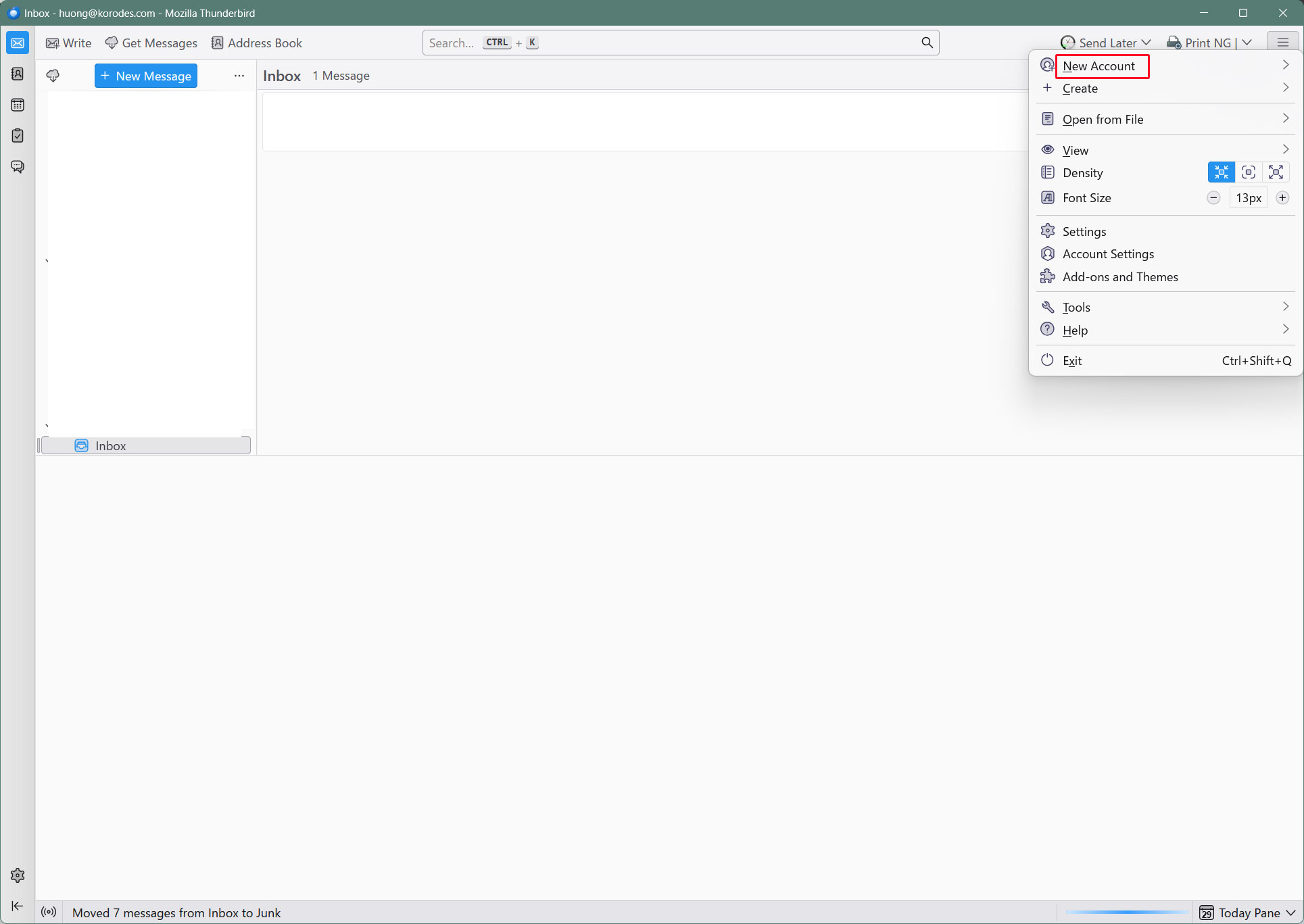
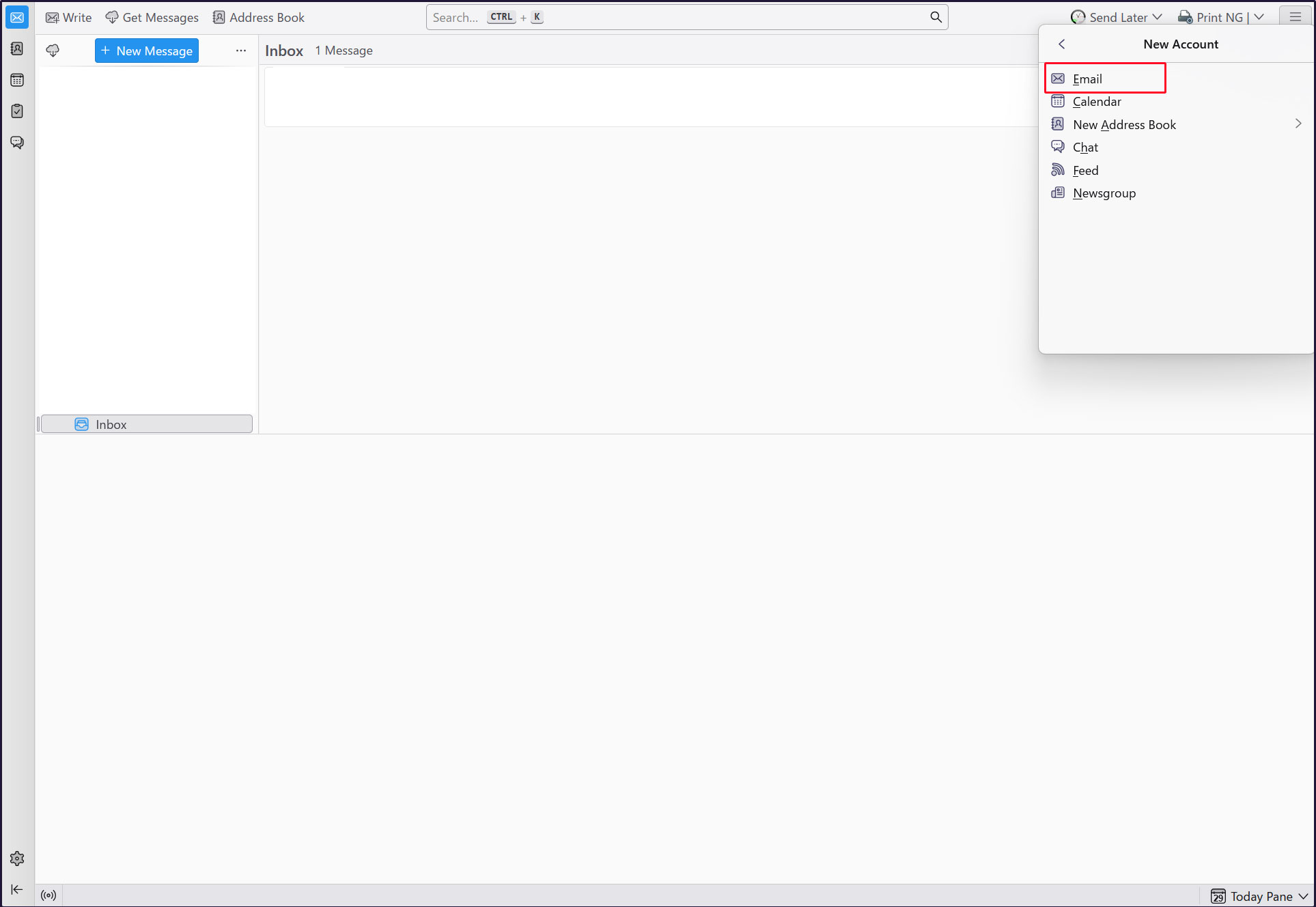
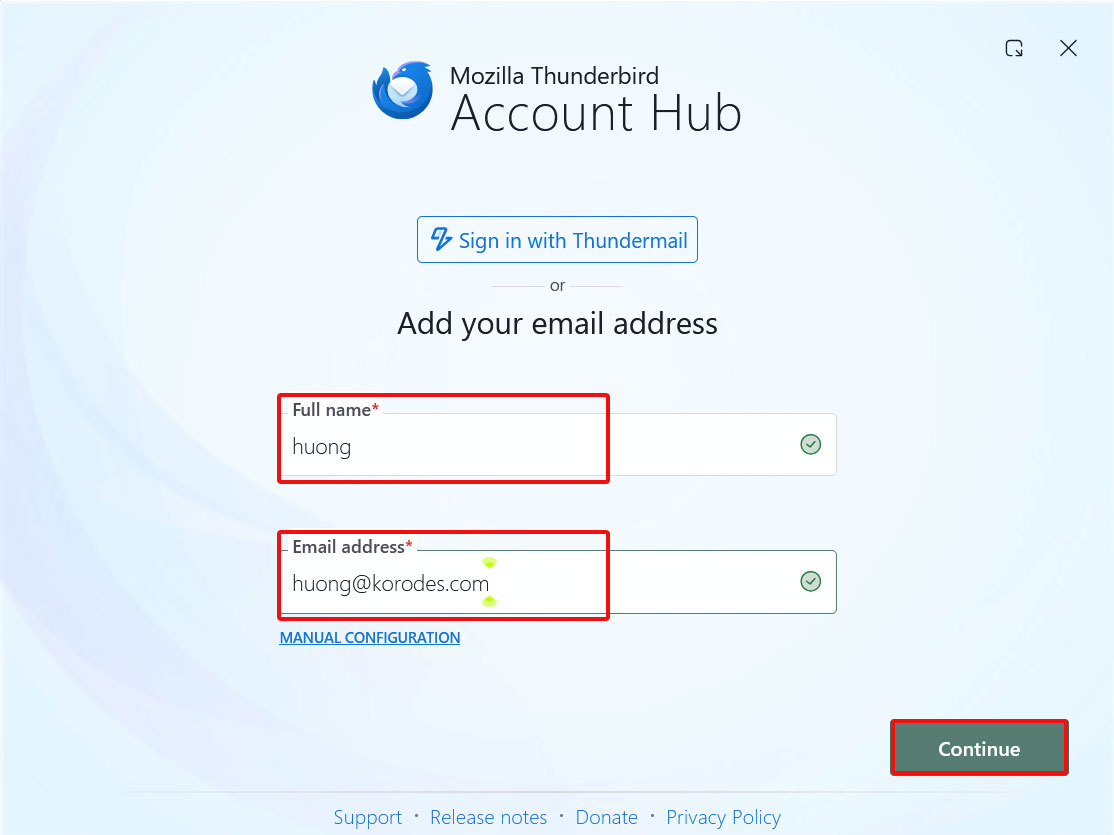
Thunderbirdを起動し、右上の[三本]メニューの[New Account][Email]をクリック
Full name : 任意の名称
Email address : huong@<domain-name>
をそれぞれ入力し、「Continue」クリック
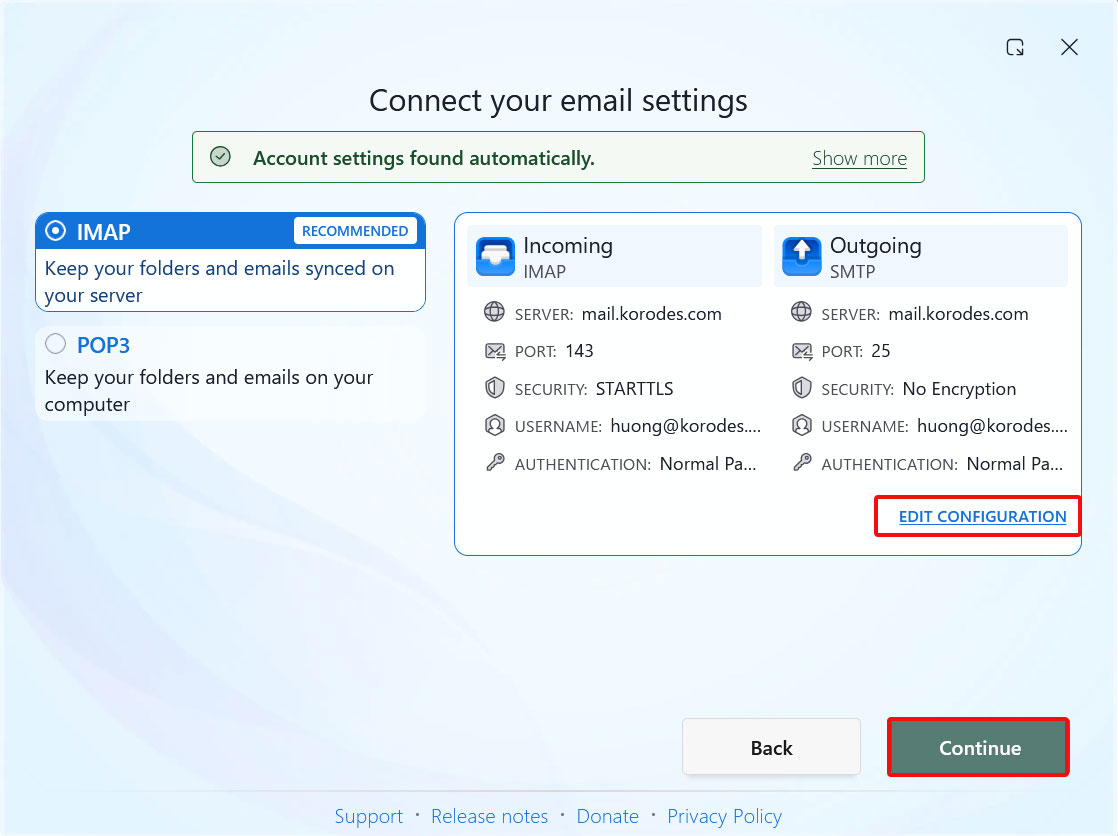
[EDIT CONFIGURATION]をクリック
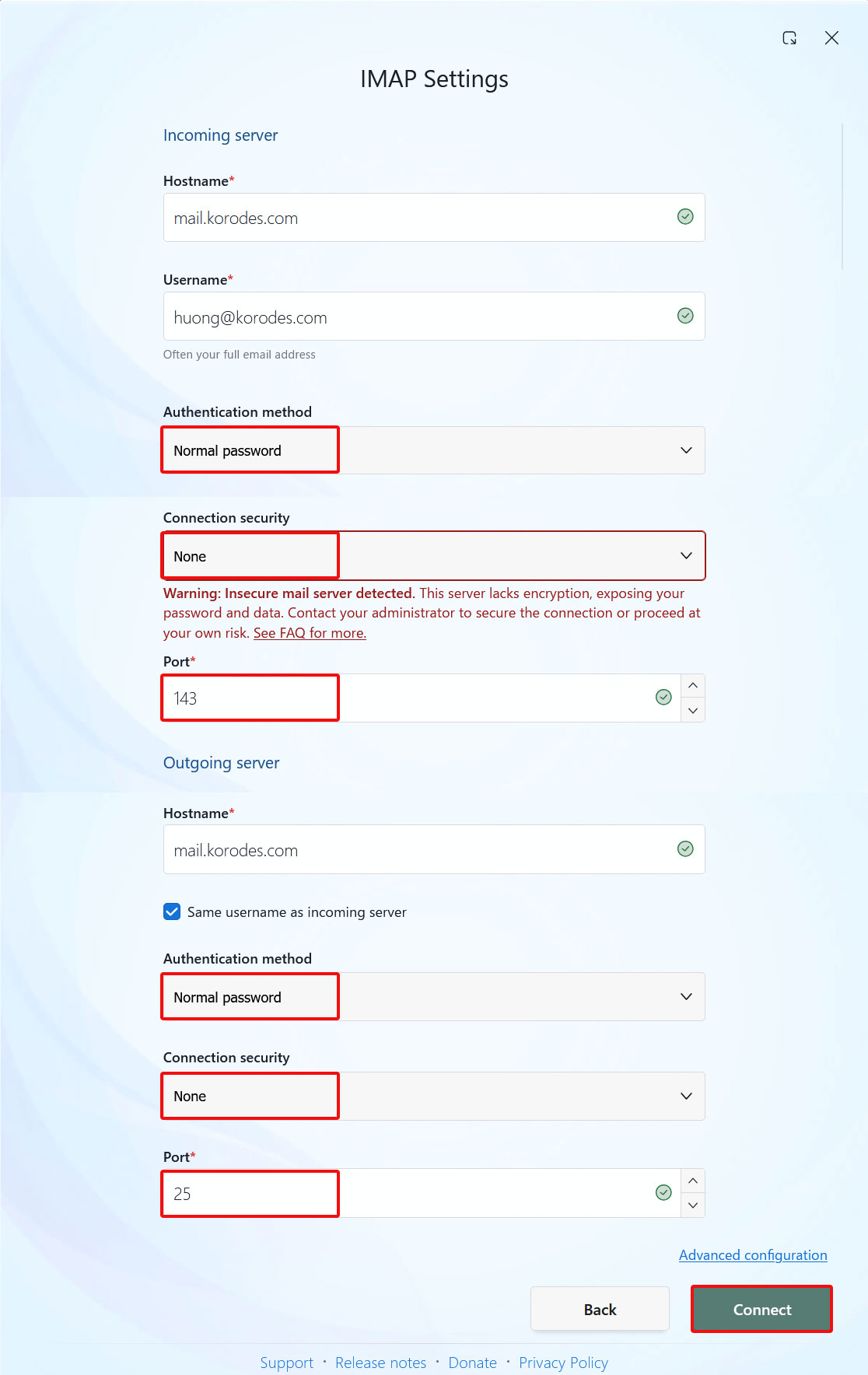
受信サーバーの設定
[Connection security]を[None]にして
送信サーバーの設定
[Connection security]を[None]にして[Connect]をクリック
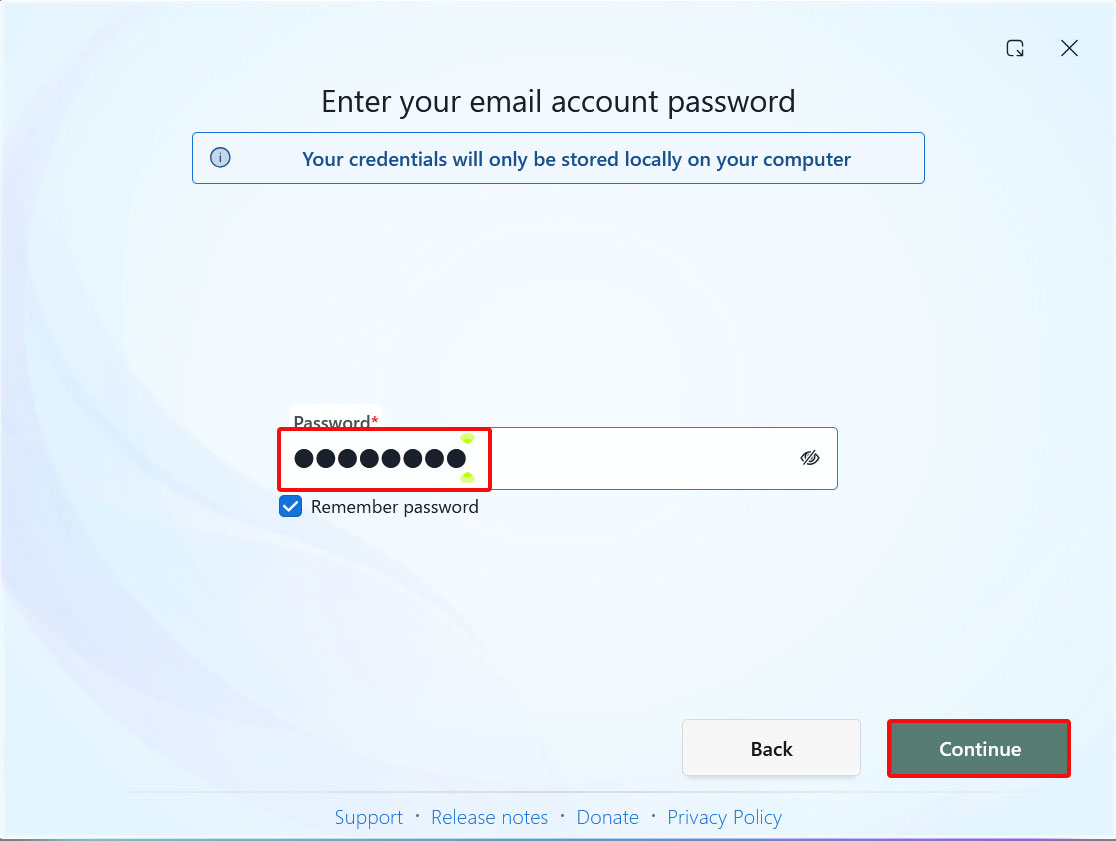
[Password]欄にユーザーのパスワードを入力し、[Continue]をクリック
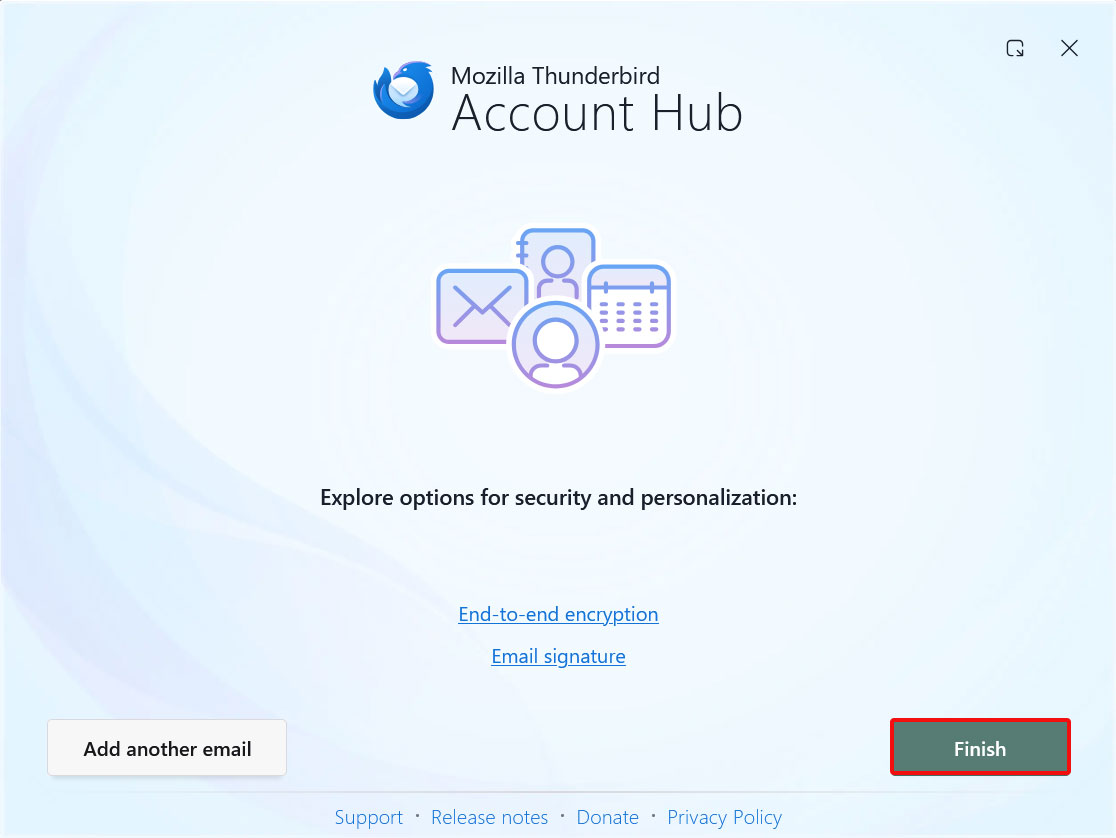
メールアカウントの作成が成功しましたので、[Finish]をクリック
2.7 メールサーバーPostfixに ClamAV適用
Postfix と Clamav を連携させて 送受信メールをリアルタイムスキャンできるように設定します
①Amavisd および Clamav Daemon をインストールして Clamav Daemon を起動
$ su -
Password:
# apt -y install clamav-daemon amavisd-new
サーバーがホスト名として完全修飾ドメイン名(FQDN)を使用していない場合、Amavisの起動に失敗する可能性があります。また、OSのホスト名が変更される可能性があるため、有効なホスト名をAmavis構成ファイルに直接設定します
# vi /etc/amavis/conf.d/05-node_id

11行目 コメント解除し変更
$myhostname = "mail.[domain name]";
②15-content_filter_modeの編集
# vi /etc/amavis/conf.d/15-content_filter_mode

13,14行目コメント解除してウィルススキャン有効化
@bypass_virus_checks_maps = (
\%bypass_virus_checks, \@bypass_virus_checks_acl, \$bypass_virus_checks_re);
③自身のドメイン名を登録
# echo '<yourDomain>' > /etc/mailname
④Posrfix Main.cf編集
# vi /etc/postfix/main.cf

最終行へ追記
content_filter=smtp-amavis:[127.0.0.1]:10024
⑤Postfix master.cf編集
# vi /etc/postfix/master.cf

# 最終行へ以下全行追記
smtp-amavis     unix    -       -       n       -       2       smtp
        -o smtp_data_done_timeout=1200
        -o smtp_send_xforward_command=yes
        -o disable_dns_lookups=yes
127.0.0.1:10025 inet    n       -       n       -       -       smtpd
        -o content_filter=
        -o local_recipient_maps=
        -o relay_recipient_maps=
        -o smtpd_restriction_classes=
        -o smtpd_client_restrictions=
        -o smtpd_helo_restrictions=
        -o smtpd_sender_restrictions=
        -o smtpd_recipient_restrictions=permit_mynetworks,reject
        -o mynetworks=127.0.0.0/8
        -o strict_rfc821_envelopes=yes
        -o smtpd_error_sleep_time=0
        -o smtpd_soft_error_limit=1001
        -o smtpd_hard_error_limit=1000
⑥設定反映
# usermod -G clamav amavis
# usermod -G amavis clamav
# systemctl restart clamav-daemon amavis postfix
⑦確認
Thuderbird等で自己宛にメールを送ると、受信メールのヘッダーに次のようなメッセージがあれば成功です。
X-Mozilla-Status: 0001
X-Mozilla-Status2: 00000000
Return-Path: xxxxx@xxxxxxx.com
X-Original-To: xxxxx@xxxxxxx.com
Delivered-To: xxxxx@xxxxxxx.com
Received: from localhost (localhost [127.0.0.1])
by mail.xxxxxxx.com (Postfix) with ESMTP id 88BD160EF5
for xxxxx@xxxxxxx.com; Fri, 16 Oct 2026 16:03:53 +0900 (JST)
X-Virus-Scanned: Debian amavis at xxxxxxx.com
Received: from mail.xxxxxxx.com ([127.0.0.1])
by localhost (mail.xxxxxxx.com [127.0.0.1]) (amavis, port 10024) with ESMTP
id vpD7gdZWgTMP for xxxxx@xxxxxxx.com;
Fri, 16 Oct 2026 16:03:53 +0900 (JST)
Received: from [192.168.11.8] (xxxxxxx.setup [192.168.11.1])
by mail.xxxxxxx.com (Postfix) with ESMTPA id 732CA60EF4
for xxxxx@xxxxxxx.com; Fri, 16 Oct 2026 16:03:53 +0900 (JST)
Message-ID: 39ea6861-71c6-429e-b84e-0435eea70093@xxxxxxx.com
Date: Fri, 16 Oct 2026 16:03:53 +0900
MIME-Version: 1.0
User-Agent: Mozilla Thunderbird
From: xxxxx xxxxx@xxxxxxx.com
Content-Language: en-US
To: xxxxx xxxxx@xxxxxxx.com
Content-Type: text/plain; charset=UTF-8; format=flowed
Content-Transfer-Encoding: 7bit
自分自身にメール本文が「X5O!P%@AP[4\PZX54(P^)7CC)7}$EICAR-STANDARD-ANTIVIRUS-TEST-FILE!$H+H*」のメールを送ってみて、メールが破棄されて届かないことを確認する
2.8 メールサーバーPostfixに spamassassin適用
2.8.1 spamassassin インストール/設定
①spamassassin をインストール
# apt update
# apt upgrade
# apt -y install spamassassin spamass-milter
②SpamAssassin の設定
# vi /etc/mail/spamassassin/v310.pre

24 行目あたり行頭の#を削除
loadplugin Mail::SpamAssassin::Plugin::DCC
➂SpamAssassin 設定ファイル最新化スクリプト新規作成
# vi /opt/script/spamassassin-update.sh
#!/bin/bash
cd /etc/mail/spamassassin
wget -q https://github.com/kittyfreak/spamassassin_user_prefs/archive/refs/heads/main.zip
[ $? -ne 0 ] && exit
unzip main.zip >/dev/null 2>&1
[ $? -ne 0 ] && exit
rm -f main.zip
mv spamassassin_user_prefs-main/user_prefs .
rm -rf spamassassin_user_prefs-main
diff user_prefs user_prefs.org > /dev/null 2>&1
if [ $? -ne 0 ]; then
cp user_prefs local.cf
echo "report_safe 0" >> local.cf
echo "rewrite_header Subject SPAM" >> local.cf
if [ -f /etc/init.d/spamd ]; then
/etc/init.d/spamd restart > /dev/null
else
systemctl restart spamd > /dev/null
fi
fi
cp user_prefs user_prefs.org
spamassassin-update スクリプトに実行権限を付与し、実行
※事前にunzipをインストールしておく
# chmod +x /opt/script/spamassassin-update.sh
# /opt/script/spamassassin-update.sh
/etc/mail/spamassassin ディレクトリにSpamAssassin 設定ファイル(local.cf)が当日日付で
作成されていることを確認
# ls -l /etc/mail/spamassassin/

total 1540
-rw-r--r-- 1 root root   1292 Sep  1  2025 65_debian.cf
-rw-r--r-- 1 root root   1644 Jul 24 01:20 init.pre
-rw-r--r-- 1 root root 500630 Oct 16 16:10 local.cf
-rw-r--r-- 1 root root    118 Sep  1  2025 sa-compile.pre
drwxr-xr-x 2 root root   4096 Oct 16 15:57 sa-update-hooks.d
-rw-rw-r-- 1 root root 500588 Apr 30  2023 user_prefs
-rw-rw-r-- 1 root root 500588 Oct 16 16:10 user_prefs.org
-rw-r--r-- 1 root root   2257 Oct 16 16:08 v310.pre
-rw-r--r-- 1 root root   1163 Jul 24 01:20 v312.pre
-rw-r--r-- 1 root root   2411 Jul 24 01:20 v320.pre
-rw-r--r-- 1 root root   1232 Jul 24 01:20 v330.pre
-rw-r--r-- 1 root root   1015 Jul 24 01:20 v340.pre
-rw-r--r-- 1 root root   1310 Jul 24 01:20 v341.pre
-rw-r--r-- 1 root root   1514 Jul 24 01:20 v342.pre
-rw-r--r-- 1 root root   1261 Jul 24 01:20 v343.pre
-rw-r--r-- 1 root root   1477 Jul 24 01:20 v400.pre
-rw-r--r-- 1 root root   1118 Jul 24 01:20 v401.pre
-rw-r--r-- 1 root root   1145 Jul 24 01:20 v402.pre
-rw-r--r-- 1 root root   1208 Jul 24 01:20 v403.pre
SpamAssassin 設定ファイルを最新化するスクリプトが毎日自動実行されるようcron に設定
# crontab -e
0 2 * * * /opt/script/spamassassin-update.sh > /dev/null 2>&1
④spamass-milter起動・自動起動設定
# systemctl start spamass-milter

# systemctl enable spamass-milter
- スパムメール保存用のディレクトリ「.Spam」を Maildir 形式で作成
- 作成には対象のユーザで行う
# su - <user name>
$ cd ~
「.Spam」という名のディレクトリを作成
$ cd Maildir
$ /usr/bin/maildirmake.dovecot .Spam
$ su -
Password:
2.8.2 Procmail のインストール/設定
①Procmail のインストール
# apt -y install procmail
インストールされていれば、以下の結果が返ってきます
# which procmail
/usr/bin/procmail
②Procmail の設定
メールフィルタの全体をつかさどる「 /etc/procmailrc 」に記述すると全ユーザに適応されます。
各ユーザ個別のメールフィルタファイルである「 /home/[user]/.procmailrc 」に記述するとそのユーザのみにフィルタが適応されます。
今回は全ユーザに適応させるために「 /etc/procmailrc 」に記述します
# vi /etc/procmailrc
#パスを設定
PATH=/bin:/usr/bin:/usr/local/bin
#メールボックスの設定
MAILDIR=$HOME/Maildir
DEFAULT=$MAILDIR/
#Procmailのログファイル出力先を指定
LOGFILE=$MAILDIR/procmaillog
#ロックファイルのパスを指定
LOCKFILE=$HOME/.lockmail
#メールヘッダー中に「 X-Spam-*** 」の記述がなければ spamassassin を起動します
:0fw
*!^X-Spam.*
|spamassassin
#メールヘッダー中に「 X-Spam-Status: Yes 」の記述があれば、「 .Spam 」ディレクトリにメールを格納します
:0
*^X-Spam-Status: Yes
$MAILDIR/.Spam/
2.8.3 Postfix の設定
① main.cfの編集
# vi /etc/postfix/main.cf

484行目コメント解除
mailbox_command = /usr/bin/procmail
②設定の反映と起動
# systemctl start spamd
# systemctl restart postfix
2.8.4 スパムメールの学習
すべてのユーザの「.Spam」ディレクトリの中身を全てスパムメールとして学習させます
①スパムメールの学習
# /usr/bin/sa-learn --spam /home/*/Maildir/.Spam/cur
Learned tokens from 0 message(s) (0 message(s) examined).
②通常のメールの学習
# /usr/bin/sa-learn --ham /home/*/Maildir/cur
Learned tokens from 4 message(s) (4 message(s) examined).
③スクリプトを作成し、Cron に登録
ファイル名は適当に「 spam-learns.sh 」とし、/opt/script/配下に設置する
スクリプトを保存した後は、「 chmod 750 spam-learns.sh 」として実行可能なアクセス権を与える。
# vi /opt/script/spam-learns.sh
#! /bin/sh
#スパムメールの学習
/usr/bin/sa-learn --spam /home/*/Maildir/.Spam/cur
#通常のメールを学習
/usr/bin/sa-learn --ham /home/*/Maildir/cur
#スパムメール保存ディレクトリの中身を強制的に消去してよいのなら以下の記述を追加
/bin/rm -f /home/*/Maildir/.Spam/cur
# chmod 750 /opt/script/spam-learns.sh
spam-learns.shができたら、定義ファイルを/lib/systemd/system直下に作成する。名前はspam-learns.serviceのように末尾が.serviceになるようにする。
Typeはsimpleで定義する
# cd /lib/systemd/system
# vi spam-learns.service
[Unit]
Description=demo sample node.js program
[Service]
Type=simple
ExecStart= /opt/script/spam-learns.sh
Restart=always
[Install]
WantedBy=multi-user.target
# crontab -e
0 4 * * * /opt/script/spam-learns.sh
# systemctl enable spam-learns
Created symlink '/etc/systemd/system/multi-user.target.wants/spam-learns.service' → '/usr/lib/systemd/system/spam-learns.service'.
④スパムチェック確認
Thunderbird等で自己宛に空メールを送付し、受信メールヘッダーを確認すると次のようなメッセージあれば成功です
X-Mozilla-Status: 0001
X-Mozilla-Status2: 00000000
Return-Path: xxxxx@xxxxxxx.com
X-Spam-Checker-Version: SpamAssassin 4.0.3-r1932428 (2026-03-21) on Lepard
X-Spam-Level: **
X-Spam-Status: No, score=2.3 required=13.0 tests=ALL_TRUSTED,
CONTENT_TYPE_PRESENT,EMPTY_MESSAGE autolearn=no autolearn_force=no
version=4.0.3-r1932428
X-Original-To: xxxxx@xxxxxxx.com
Delivered-To: xxxxx@xxxxxxx.com
---------------------------------------------
自分自身にメール本文が「XJS*C4JDBQADN1.NSBN3*2IDNEN*GTUBE-STANDARD-ANTI-UBE-TEST-EMAIL*C.34X」のメールを送るとメールは配信されずSpamフォルダへ振り分けられていることを確認する
ヘッダーには次のように表示されている
/home/[user]/Maildir/.Spam/new/ 配下のメールを確認する
Return-Path: xxxxx@xxxxxxx.com
X-Spam-Checker-Version: SpamAssassin 4.0.3-r1932428 (2026-03-21) on Lepard
X-Spam-Flag: YES
X-Spam-Level: **************************************************
X-Spam-Status: Yes, score=1001.9 required=13.0 tests=ALL_TRUSTED,
CONTENT_TYPE_PRESENT,GTUBE,HTML_MESSAGE,HTML_OBFUSCATE_05_10,
MPART_ALT_DIFF,MULTIPART_ALTERNATIVE autolearn=no autolearn_force=no
version=4.0.3-r1932428
X-Spam-Report:
* 0.1 ALL_TRUSTED Passed through trusted hosts only via SMTP
* 1000 GTUBE BODY: Generic Test for Unsolicited Bulk Email
* -0.1 CONTENT_TYPE_PRESENT exists:Content-Type
* 0.1 MULTIPART_ALTERNATIVE Multipart/alternative
* 0.1 HTML_OBFUSCATE_05_10 BODY: Message is 5% to 10% HTML obfuscation
* 1.0 HTML_MESSAGE BODY: HTML included in message
* 0.7 MPART_ALT_DIFF BODY: HTML and text parts are different