オープンソースの統合監視ソフトウェア「Nagios Server」インストール
Nagiosは、Linux 上で実行するオープンソースの監視ソリューションです。
Nagiosは、 Ethan Galstadによって開発され、 1999 年に最初にリリースされました。その後、このプロジェクトは、いくつかの貢献者によってオープンソース プロジェクトとして改良されました。
Nagiosは、ネットワーク、アプリケーション、またはサーバーの重要なパラメーターを定期的にチェックするように設計されています。これらのパラメータには、マイクロプロセッサの負荷、実行中のプロセス数、ログ ファイル、ディスクおよびメモリの使用量の他、SMTP (Simple Mail Transfer Protocol)、HTTP (Hypertext Transfer Protocol)、POP3 ( Post Office Protocol 3)の他の多くのサービスもチェックできます。
Nagoisを実行するにはPHP、MySQLなどのデータベース、ApacheやNginxなどのWebサーバーが必要です。今回はこれらすべてが構成済みという前提で進めます。
1. 必要なパッケージをインストール
|
1 2 |
# apt update # apt install autoconf gcc libc6 make wget unzip libgd-dev |
2. Nagios Coreのインストール
①ダウンロード
|
1 |
# wget https://go.nagios.org/get-core/4-5-12 |
②インストール
|
1 2 3 4 5 |
# apt install libssl-dev # tar zxvf 4-5-12 # cd nagios-4.5.12 # ./configure |
以下のように表示される
|
1 2 3 4 5 6 7 8 9 10 11 12 13 14 15 16 17 18 19 20 21 22 23 24 25 26 27 |
*** Configuration summary for nagios 4.5.10 2025-10-28 ***: General Options: ------------------------- Nagios executable: nagios Nagios user/group: nagios,nagios Command user/group: nagios,nagios Event Broker: yes Install ${prefix}: /usr/local/nagios Install ${includedir}: /usr/local/nagios/include/nagios Lock file: /run/nagios.lock Check result directory: /usr/local/nagios/var/spool/checkresults Init directory: /lib/systemd/system Apache conf.d directory: /etc/apache2/sites-available Mail program: /usr/bin/mail Host OS: linux-gnu IOBroker Method: epoll Web Interface Options: ------------------------ HTML URL: http://localhost/nagios/ CGI URL: http://localhost/nagios/cgi-bin/ Traceroute (used by WAP): Review the options above for accuracy. If they look okay, type 'make all' to compile the main program and CGIs. |
コンパイル
|
1 |
# make all |
以下のように表示される
|
1 2 3 4 5 6 7 8 9 10 11 12 13 14 15 16 17 18 19 20 21 22 23 24 25 |
*** Support Notes ******************************************* If you have questions about configuring or running Nagios, please make sure that you: - Look at the sample config files - Read the documentation on the Nagios Library at: https://library.nagios.com before you post a question to one of the mailing lists. Also make sure to include pertinent information that could help others help you. This might include: - What version of Nagios you are using - What version of the plugins you are using - Relevant snippets from your config files - Relevant error messages from the Nagios log file For more information on obtaining support for Nagios, visit: https://support.nagios.com ************************************************************* Enjoy. |
Nagios ユーザーとグループを作成
|
1 2 3 |
# make install-groups-users groupadd -r nagios useradd -g nagios nagios |
Nagios グループに Apache ユーザーを追加
|
1 |
# usermod -aG nagios www-data |
Nagios Core をインストール
|
1 |
# make install |
Nagios の init スクリプトをインストール
|
1 2 3 |
# make install-init /usr/bin/install -c -m 755 -d -o root -g root /lib/systemd/system /usr/bin/install -c -m 755 -o root -g root startup/default-service /lib/systemd/system/nagios.service |
外部コマンド ファイルと権限をインストール
|
1 2 3 4 5 6 |
# make install-commandmode /usr/bin/install -c -m 775 -o nagios -g nagios -d /usr/local/nagios/var/rw chmod g+s /usr/local/nagios/var/rw *** External command directory configured *** |
Nagios 構成ファイルをインストール
|
1 2 3 4 5 6 |
# make install-config *** Config files installed *** Remember, these are *SAMPLE* config files. You'll need to read the documentation for more information on how to actually define services, hosts, etc. to fit your particular needs. |
Nagios 用の Apache 構成ファイルをインストール
|
1 2 3 4 5 6 7 |
# make install-webconf /usr/bin/install -c -m 644 sample-config/httpd.conf /etc/apache2/sites-available/nagios.conf if [ 1 -eq 1 ]; then \ ln -s /etc/apache2/sites-available/nagios.conf /etc/apache2/sites-enabled/nagios.conf; \ fi *** Nagios/Apache conf file installed *** |
|
1 2 |
# a2enmod cgi # systemctl restart apache2 |
3. Nagios プラグインをインストール
①Nagios Pluginsページから最新の codeをダウンロード
|
1 |
# wget https://nagios-plugins.org/download/nagios-plugins-2.5.tar.gz |
②インストール
|
1 2 3 4 5 |
# tar zxvf nagios-plugins-2.5.tar.gz # cd nagios-plugins-2.5 # ./configure --with-nagios-user=nagios --with-nagios-group=nagios # make # make install |
下記のとおりnagios-pluginsが利用可能である
|
1 2 3 4 5 6 7 8 9 10 11 12 13 14 15 16 17 18 |
# ls /usr/local/nagios/libexec check_apt check_ide_smart check_ntp_peer check_ssmtp check_breeze check_ifoperstatus check_ntp_time check_swap check_by_ssh check_ifstatus check_nwstat check_tcp check_clamd check_imap check_oracle check_time check_cluster check_ircd check_overcr check_udp check_dhcp check_jabber check_ping check_ups check_dig check_load check_pop check_uptime check_disk check_log check_procs check_users check_disk_smb check_mailq check_real check_wave check_dns check_mrtg check_rpc negate check_dummy check_mrtgtraf check_sensors remove_perfdata check_file_age check_nagios check_simap urlize check_flexlm check_nntp check_smtp utils.pm check_ftp check_nntps check_spop utils.sh check_http check_nt check_ssh check_icmp check_ntp check_ssl_validity |
③必要なディレクトリを作成
|
1 2 |
# mkdir -p /usr/local/nagios/var/spool/checkresults # chown -R nagios:nagios /usr/local/nagios/var/spool/checkresults |
4. Nagios Web ユーザーの作成
Nagios Web ダッシュボードにアクセスするためのユーザー アカウントを作成する。このユーザーアカウントは、認証に使用される。
ユーザーのデフォルト名はnagiosadminで、/usr/local/nagios/etc/cgi.cfgファイル内に優先ユーザー名として定義されています。
|
1 2 3 4 |
# htpasswd -c /usr/local/nagios/etc/htpasswd.users nagiosadmin New password: [password] Re-type new password: [again password] Adding password for user nagiosadmin |
所有権と権限を設定
|
1 2 |
# chown www-data:www-data /usr/local/nagios/etc/htpasswd.users # chmod 640 /usr/local/nagios/etc/htpasswd.users |
Apache を再起動
|
1 |
# systemctl restart apache2 |
ファイアウォールで HTTP サービスポートを解放します
|
1 2 |
# ufw allow http # ufw reload |
Nagios サービスを有効化
|
1 2 |
# systemctl enable nagios --now Created symlink /etc/systemd/system/multi-user.target.wants/nagios.service → /lib/systemd/system/nagios.service. |
システムを再起動
|
1 |
# shutdown -r now |
サービスが実行しているか確認
|
1 2 3 4 5 6 7 8 9 10 11 12 13 14 15 16 17 18 19 20 21 22 23 24 25 26 27 28 |
# systemctl status nagios ● nagios.service - Nagios Core 4.5.12 Loaded: loaded (/usr/lib/systemd/system/nagios.service; enabled; preset: enabled) Active: active (running) since Sat 2026-04-25 14:48:11 JST; 2min 27s ago Invocation: 9c2b8472bec142b69ff358f1184bbea0 Docs: https://www.nagios.org/documentation Main PID: 2183 (nagios) Tasks: 6 (limit: 1443) Memory: 7.8M (peak: 8.8M) CPU: 131ms CGroup: /system.slice/nagios.service ├─2183 /usr/local/nagios/bin/nagios -d /usr/local/nagios/etc/nagios.cfg ├─2186 /usr/local/nagios/bin/nagios --worker /usr/local/nagios/var/rw/nagios.qh ├─2187 /usr/local/nagios/bin/nagios --worker /usr/local/nagios/var/rw/nagios.qh ├─2189 /usr/local/nagios/bin/nagios --worker /usr/local/nagios/var/rw/nagios.qh ├─2190 /usr/local/nagios/bin/nagios --worker /usr/local/nagios/var/rw/nagios.qh └─2233 /usr/local/nagios/bin/nagios -d /usr/local/nagios/etc/nagios.cfg Apr 25 14:48:11 Lepard nagios[2183]: qh: core query handler registered Apr 25 14:48:11 Lepard systemd[1]: Started nagios.service - Nagios Core 4.5.12. Apr 25 14:48:11 Lepard nagios[2183]: qh: echo service query handler registered Apr 25 14:48:11 Lepard nagios[2183]: qh: help for the query handler registered Apr 25 14:48:11 Lepard nagios[2183]: wproc: Successfully registered manager as @wproc with query handler Apr 25 14:48:11 Lepard nagios[2183]: wproc: Registry request: name=Core Worker 2190;pid=2190 Apr 25 14:48:11 Lepard nagios[2183]: wproc: Registry request: name=Core Worker 2186;pid=2186 Apr 25 14:48:11 Lepard nagios[2183]: wproc: Registry request: name=Core Worker 2189;pid=2189 Apr 25 14:48:11 Lepard nagios[2183]: wproc: Registry request: name=Core Worker 2187;pid=2187 Apr 25 14:48:11 Lepard nagios[2183]: Successfully launched command file worker with pid 2233 |
5. Nagios Web インターフェイスにアクセス
任意のブラウザで http://[FQDN]/nagios/ もしくは http://[IP address]/nagios にアクセスし[Username]にnagiosadmin、[Password]には上記でユーザーを作成したとき指定したパスワードを入力し、[Log in]
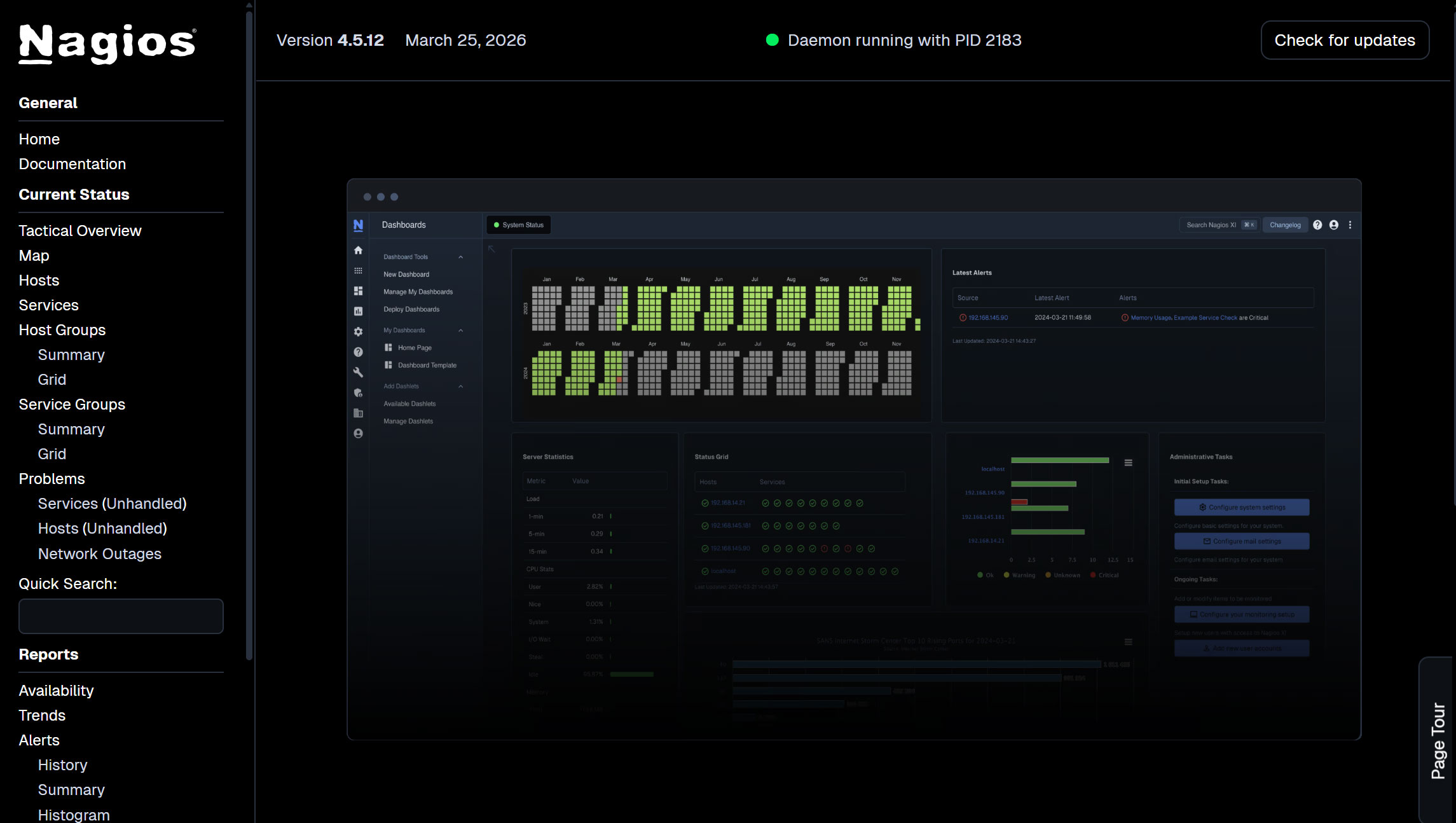
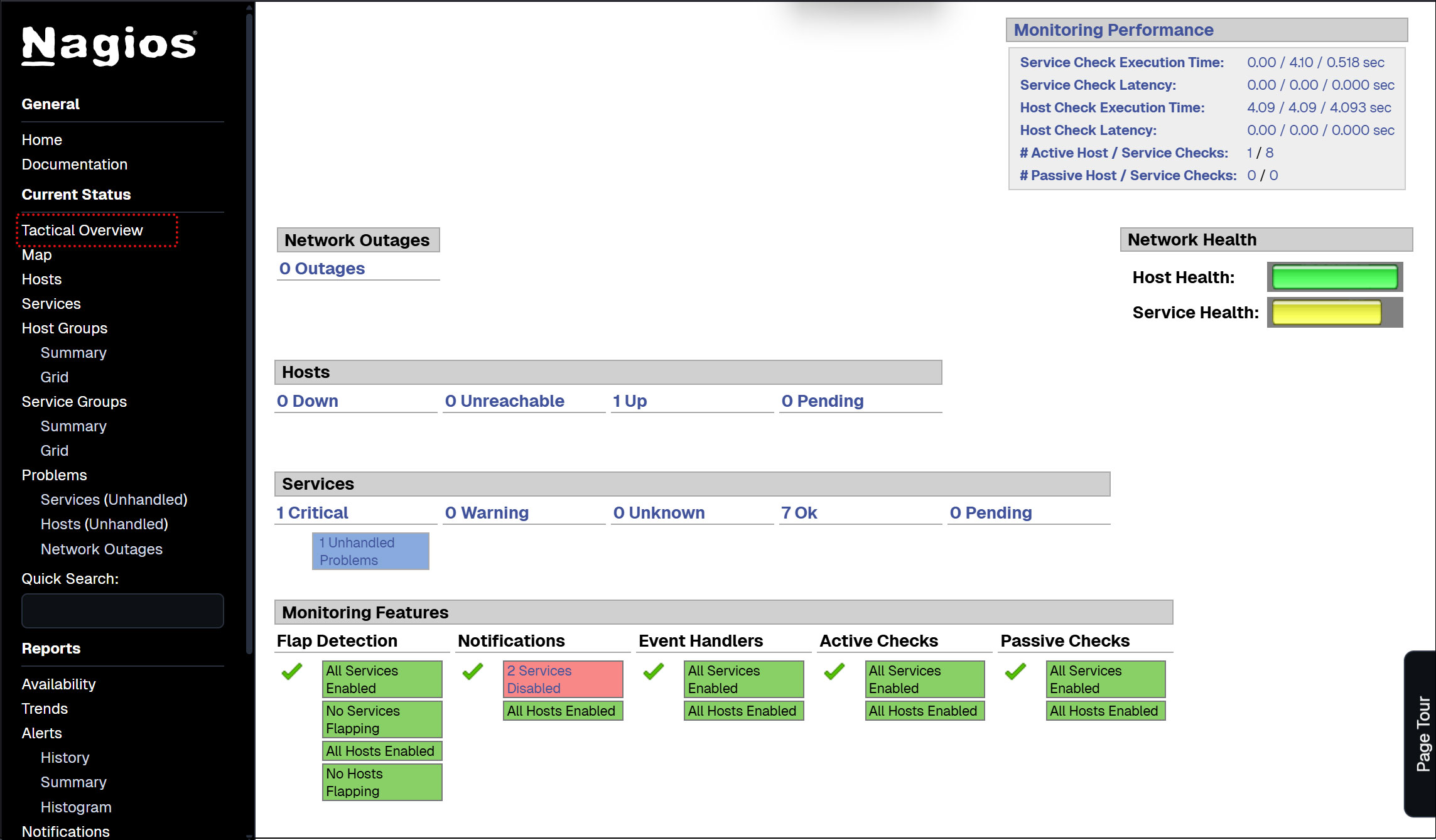
ログインに成功すると、以下のダッシュボードが表示されます。
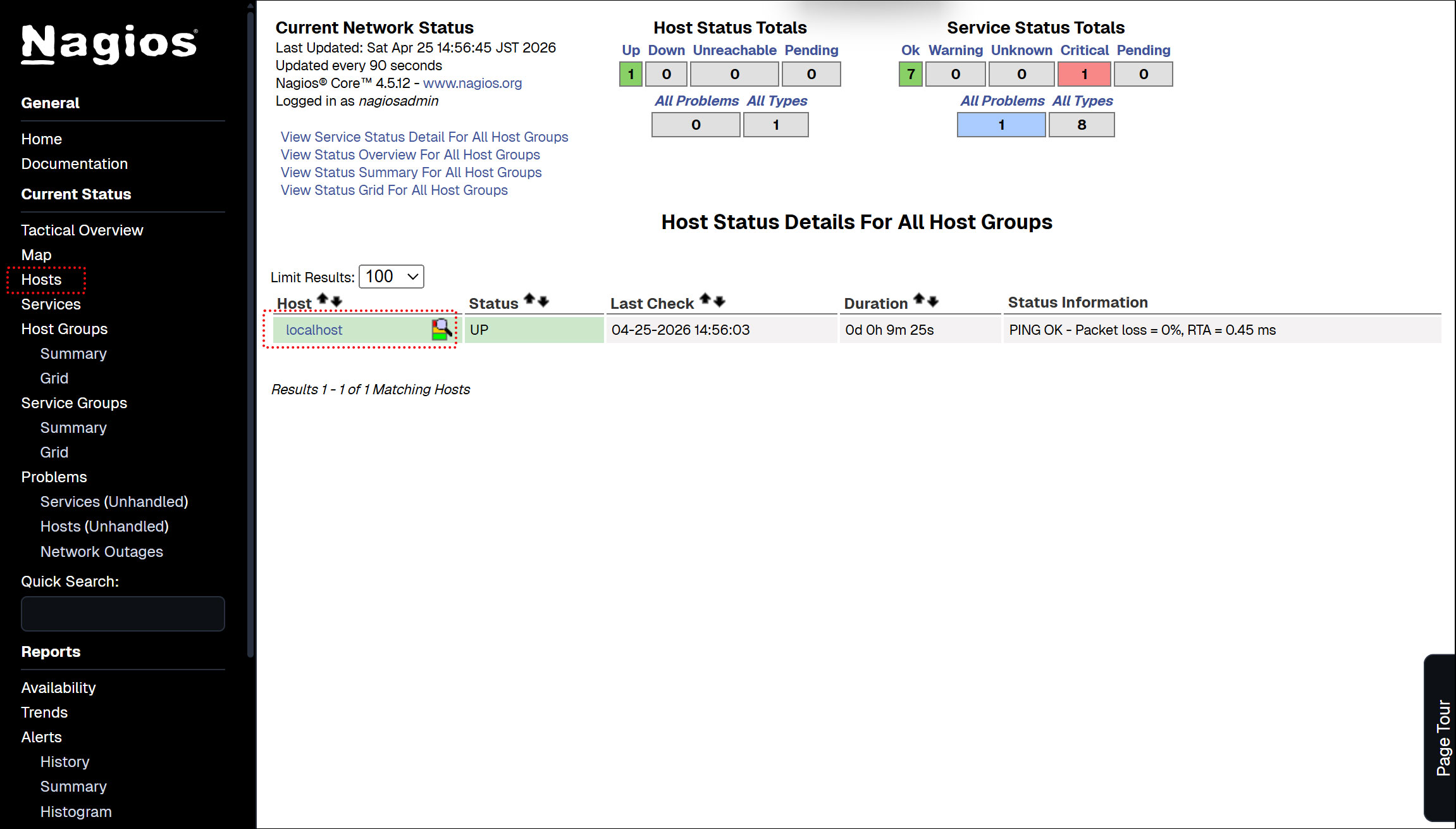
ホストの可用性を表示
左メニューの[Hosts]をクリック
左メニューの [Tactical Overview] をクリックすると監視データを閲覧できる
左メニューの [Current Status] [Services] をクリック : 現在の監視サービス内容が表示される
6. Nagios エージェントの構成
エージェントを監視するため。以下をインストールする
• プラグインを実行するNRPE Agent
6.1 Nagios NRPE Agentのインストール
NRPE エージェントは、デフォルトの Ubuntu リポジトリで利用可能
|
1 2 3 4 5 6 7 |
# apt-cache policy nagios-nrpe-server nagios-nrpe-server: Installed: (none) Candidate: 4.1.3-1ubuntu2 Version table: 4.1.3-1ubuntu2 500 500 http://jp.archive.ubuntu.com/ubuntu resolute/universe amd64 Packages |
|
1 |
# apt install -y nagios-nrpe-server |
バージョン確認
|
1 2 3 |
# nrpe -V NRPE - Nagios Remote Plugin Executor Version: 4.1.3 |
サービスを開始して有効にする
|
1 2 3 4 |
# systemctl enable --now nagios-nrpe-server Synchronizing state of nagios-nrpe-server.service with SysV service script with /lib/systemd/systemd-sysv-install. Executing: /lib/systemd/systemd-sysv-install enable nagios-nrpe-server |
NRPEエージェントのステータスを確認
|
1 2 3 4 5 6 7 8 9 10 11 12 13 14 15 16 17 18 19 20 21 |
# systemctl status nagios-nrpe-server ● nagios-nrpe-server.service - Nagios Remote Plugin Executor Loaded: loaded (/usr/lib/systemd/system/nagios-nrpe-server.service; enabled; preset: enabled) Active: active (running) since Sat 2026-04-25 15:00:45 JST; 1min 7s ago Invocation: 0f63b211351846a9848afe100105beae Docs: http://www.nagios.org/documentation Main PID: 4870 (nrpe) Tasks: 1 (limit: 1443) Memory: 1.3M (peak: 1.9M) CPU: 13ms CGroup: /system.slice/nagios-nrpe-server.service └─4870 /usr/sbin/nrpe -c /etc/nagios/nrpe.cfg -f Apr 25 15:00:45 Lepard systemd[1]: Started nagios-nrpe-server.service - Nagios Remote Plugin Executor. Apr 25 15:00:45 Lepard (nrpe)[4870]: nagios-nrpe-server.service: Referenced but unset environment variable evaluates to a> Apr 25 15:00:45 Lepard nrpe[4870]: Starting up daemon Apr 25 15:00:45 Lepard nrpe[4870]: Server listening on 0.0.0.0 port 5666. Apr 25 15:00:45 Lepard nrpe[4870]: Server listening on :: port 5666. Apr 25 15:00:45 Lepard nrpe[4870]: Listening for connections on port 5666 Apr 25 15:00:45 Lepard nrpe[4870]: Allowing connections from: 127.0.0.1,::1 |
ファイアウォールでNRPEのポートを開く
NRPEはデフォルトでTCP 5666ポートを使用します。ファイアウォールが動作している場合は、Nagiosモニタリングサーバーからの外部チェックを許可するために、このポートを開きます。
|
1 2 |
# ufw allow 5666/tcp # ufw reload |
ポート5666/tcpがリッスンされているか確認
|
1 2 3 4 5 6 |
# ss -altnp | grep 5666 LISTEN 0 5 0.0.0.0:5666 0.0.0.0:* users:(("nrpe",pid=4870,fd=4)) LISTEN 0 5 [::]:5666 [::]:* users:(("nrpe",pid=4870,fd=5)) |
7. 監視ホストの追加
下記サーバーをホストに追加し、 単純なPing による死活監視対象として設定
OS : Ubuntu24.04
IPアドレス : 192.168.11.85
7.1 設定ファイル編集
|
1 2 3 |
# vi /usr/local/nagios/etc/nagios.cfg 51行目 : コメント解除 cfg_dir=/usr/local/nagios/etc/servers |
7.2 ディレクトリー作成
|
1 2 3 |
# mkdir /usr/local/nagios/etc/servers # chgrp nagios /usr/local/nagios/etc/servers # chmod 750 /usr/local/nagios/etc/servers |
7.3 定義ファイル新規作成
"korodes.cfg" 名称は任意でよい
|
1 2 3 4 5 6 7 8 9 10 11 12 13 14 |
# vi /usr/local/nagios/etc/servers/korodes.cfg define host { use linux-server host_name korodes alias korodes address 192.168.11.85 } define service { use generic-service host_name korodes service_description PING check_command check_ping!100.0,20%!500.0,60% } |
7.4 Nagiosサーバー再起動
|
1 |
# systemctl restart nagios.service |
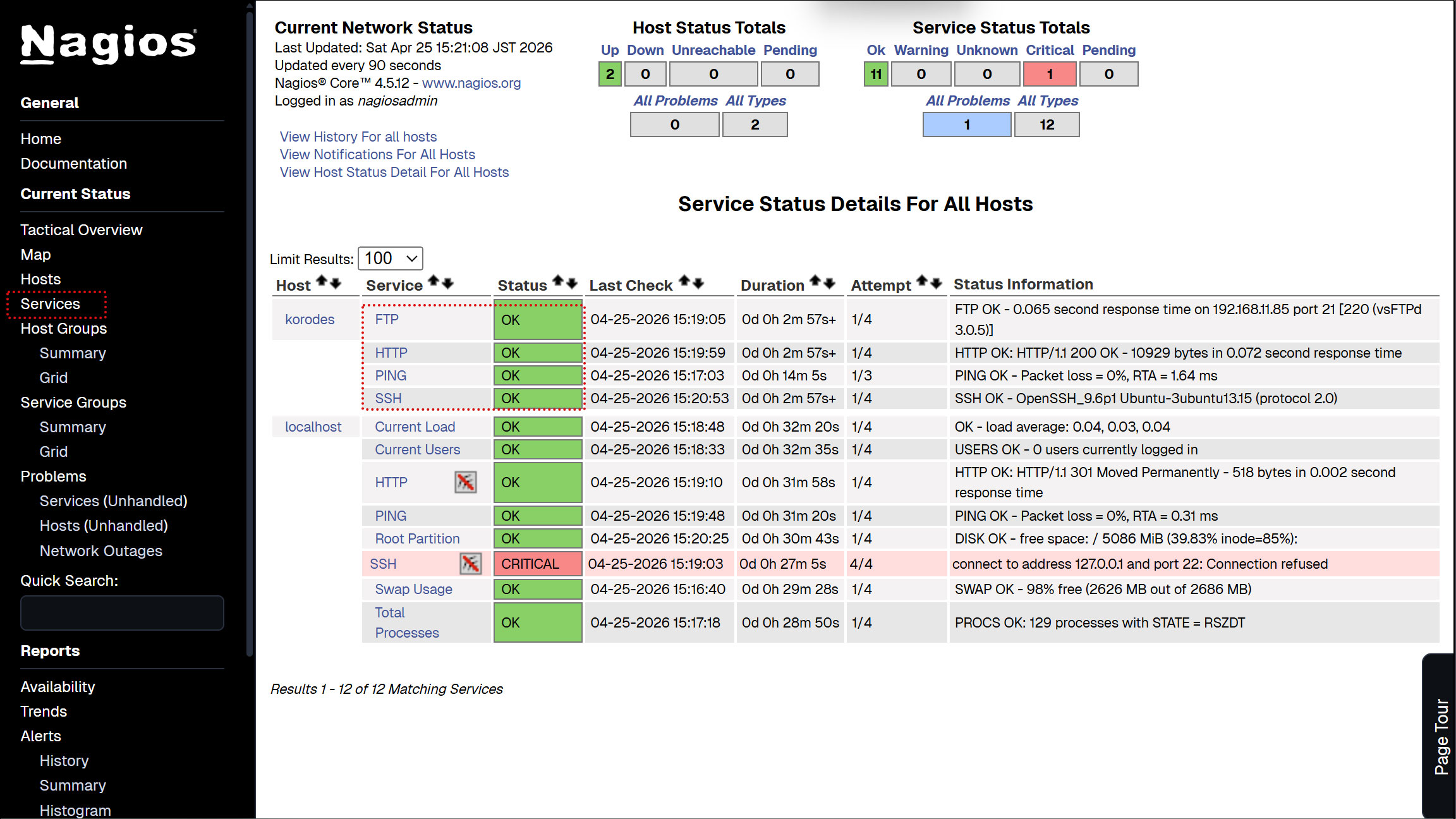
Nagios サーバーにログイン(http://[サーバーIPアドレス]/nagios)しHostsを見るとホストが追加されている
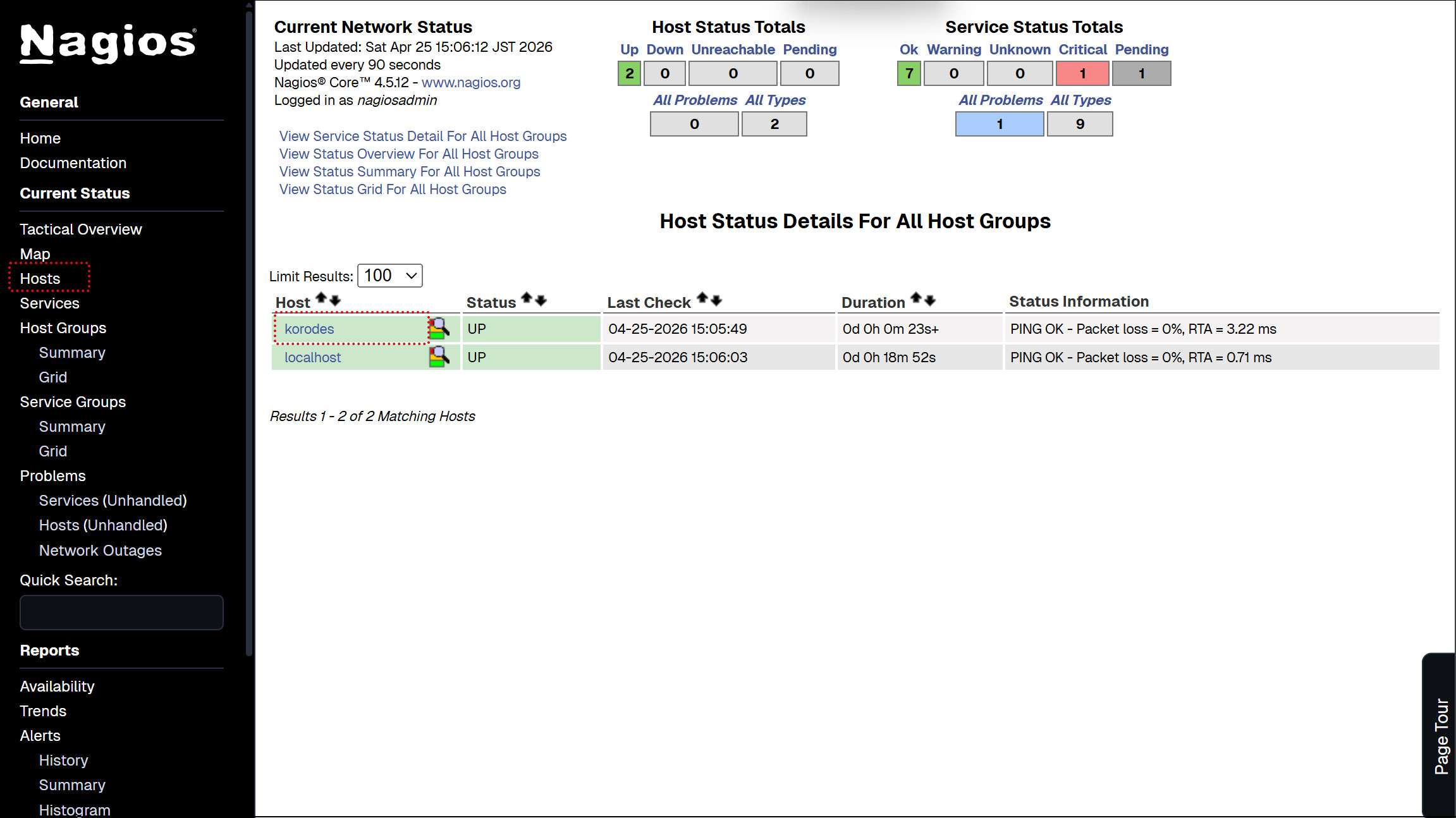
8. 監視サービスの追加
上記で追加したホストに監視サービスを追加する
OS : Ubuntu24.04
IPアドレス : 192.168.11.85
8.1 監視対象サーバー側の設定
8.1.1 監視対象ホストにエージェントをインストール
|
1 |
# apt install -y nagios-nrpe-server |
8.1.2 設定ファイル編集
# vi /etc/nagios/nrpe.cfg
106行目 : 接続を許可するホストを追記 (Nagios サーバーを指定)
allowed_hosts=127.0.0.1,::1,192.168.11.83
122行目 : コマンドの引数を許可
dont_blame_nrpe=1
300-304行目コメントにし、追加
# command[check_users]=/usr/lib/nagios/plugins/check_users -w 5 -c 10
# command[check_load]=/usr/lib/nagios/plugins/check_load -r -w .15,.10,.05 -c .30,.25,.20
# command[check_hda1]=/usr/lib/nagios/plugins/check_disk -w 20% -c 10% -p /dev/hda1
# command[check_zombie_procs]=/usr/lib/nagios/plugins/check_procs -w 5 -c 10 -s Z
# command[check_total_procs]=/usr/lib/nagios/plugins/check_procs -w 150 -c 200
pluginの一部を追加する
command[check_by_ssh]=/usr/lib/nagios/plugins/check_by_ssh $ARG1$
command[check_dhcp]=/usr/lib/nagios/plugins/check_dhcp $ARG1$
command[check_disk]=/usr/lib/nagios/plugins/check_disk $ARG1$
command[check_file_age]=/usr/lib/nagios/plugins/check_file_age $ARG1$
command[check_ftp]=/usr/lib/nagios/plugins/check_ftp $ARG1$
command[check_http]=/usr/lib/nagios/plugins/check_http $ARG1$
command[check_imap]=/usr/lib/nagios/plugins/check_imap $ARG1$
command[check_load]=/usr/lib/nagios/plugins/check_load $ARG1$
command[check_log]=/usr/lib/nagios/plugins/check_log $ARG1$
command[check_mysql]=/usr/lib/nagios/plugins/check_mysql $ARG1$
command[check_ntp]=/usr/lib/nagios/plugins/check_ntp $ARG1$
command[check_ntp_peer]=/usr/lib/nagios/plugins/check_ntp_peer $ARG1$
command[check_ntp_time]=/usr/lib/nagios/plugins/check_ntp_time $ARG1$
command[check_ping]=/usr/lib/nagios/plugins/check_ping $ARG1$
command[check_pop]=/usr/lib/nagios/plugins/check_pop $ARG1$
command[check_spop]=/usr/lib/nagios/plugins/check_spop $ARG1$
command[check_procs]=/usr/lib/nagios/plugins/check_procs $ARG1$
command[check_smtp]=/usr/lib/nagios/plugins/check_smtp $ARG1$
command[check_ssmtp]=/usr/lib/nagios/plugins/check_ssmtp $ARG1$
command[check_ssh]=/usr/lib/nagios/plugins/check_ssh $ARG1$
command[check_swap]=/usr/lib/nagios/plugins/check_swap $ARG1$
command[check_tcp]=/usr/lib/nagios/plugins/check_tcp $ARG1$
command[check_udp]=/usr/lib/nagios/plugins/check_udp $ARG1$
command[check_ups]=/usr/lib/nagios/plugins/check_ups $ARG1$
command[check_users]=/usr/lib/nagios/plugins/check_users $ARG1$
8.1.3 nrpeサーバー有効化、起動
|
1 2 3 4 5 6 7 8 9 10 11 12 13 14 15 16 17 18 19 20 21 22 23 24 25 |
# systemctl enable nagios-nrpe-server Synchronizing state of nagios-nrpe-server.service with SysV service script with /usr/lib/systemd/systemd-sysv-install. Executing: /usr/lib/systemd/systemd-sysv-install enable nagios-nrpe-server # systemctl start nagios-nrpe-server # /etc/init.d/nagios-nrpe-server status ● nagios-nrpe-server.service - Nagios Remote Plugin Executor Loaded: loaded (/usr/lib/systemd/system/nagios-nrpe-server.service; enabled; preset: enabled) Active: active (running) since Sat 2026-04-25 15:07:48 JST; 6min ago Docs: http://www.nagios.org/documentation Main PID: 29209 (nrpe) Tasks: 1 (limit: 4543) Memory: 1.0M (peak: 4.6M) CPU: 20ms CGroup: /system.slice/nagios-nrpe-server.service mq29209 /usr/sbin/nrpe -c /etc/nagios/nrpe.cfg -f Apr 25 15:07:48 Lion systemd[1]: Started nagios-nrpe-server.service - Nagios Remote Plugin Executor. Apr 25 15:07:49 Lion (nrpe)[29209]: nagios-nrpe-server.service: Referenced but unset environment variable evaluates to an empty string: NRPE_OPTS Apr 25 15:07:49 Lion nrpe[29209]: Starting up daemon Apr 25 15:07:49 Lion nrpe[29209]: Server listening on 0.0.0.0 port 5666. Apr 25 15:07:49 Lion nrpe[29209]: Server listening on :: port 5666. Apr 25 15:07:49 Lion nrpe[29209]: Listening for connections on port 5666 Apr 25 15:07:49 Lion nrpe[29209]: Allowing connections from: 127.0.0.1,::1 |
8.1.4 ファイアウォールでNRPEのポート5666/tcp,5666/udpを開く
|
1 2 3 |
# ufw allow 5666/tcp # ufw allow 5666/udp # ufw reload |
8.2 Nagios サーバー側の設定
8.2.1 nrpeプラグインのインストール
|
1 |
# apt install nagios-nrpe-plugin |
8.2.2 nagiosプラグインディレクトリーにコピー
|
1 |
# cp /usr/lib/nagios/plugins/check_nrpe /usr/local/nagios/libexec/ |
8.2.3 commands.cfg編集
|
1 2 3 4 5 6 7 |
# vi /usr/local/nagios/etc/objects/commands.cfg # 最終行に追記 define command { command_name check_nrpe command_line $USER1$/check_nrpe -H $HOSTADDRESS$ -c $ARG1$ } |
8.2.4 先ほどホストを追加したときに作成した korodes.cfg を編集追加する
今回はHTTP,SSH,FTPを追加してみる
|
1 2 3 4 5 6 7 8 9 10 11 12 13 14 15 16 17 18 19 20 21 22 23 24 25 |
# vi /usr/local/nagios/etc/servers/korodes.cfg # 以下を追加する # 'HTTP' command definition define service{ use local-service host_name korodes service_description HTTP check_command check_http } # 'SSH' command definition define service{ use local-service host_name korodes service_description SSH check_command check_ssh } # 'FTP' command definition define service{ use local-service host_name korodes service_description FTP check_command check_ftp } |
8.2.5 Nagios 再起動
|
1 |
# systemctl restart nagios.service |
8.2.6 http://[Nagios Server IP Address]/nagios にアクセスする
下図のように新しく追加した監視サービスが追加されている