

Prerequisites
1.Suricata
SURICATA IDS/IPS is an open source IDS that monitors communications on the network and detects suspicious traffic.
The basic mechanism is signature-based, so it can detect predefined unauthorized communications. Suricata is also characterized by its ability to provide protection as well as detection.
2.Elastic Stack,Kibana,Filebeat
Install and configure the Elastic Stack to enable visualization and search of SURICATA logs using Kibana and Filebeat.
This time, we will install Suricata IDS and ElasticStack on the following server.
・First Server Suricata IDS & Filebeat : RockyLinux10.2 IP address(192.168.11.83)
・Second server Elasticsearch & kibana : RockyLinux10.1 IP address(192.168.11.85)
Run as a sudo user other than root
First Server: Suricata Installation
1.Installing and Configuring Suricata
①Suricata Install
# dnf install https://dl.fedoraproject.org/pub/epel/epel-release-latest-10.noarch.rpm
# dnf install yum-plugin-copr
# dnf copr enable @oisf/suricata-8.0

# dnf -y install suricata

Version Check
# suricata -V
This is Suricata version 8.0.4 RELEASE
②Determine interface and IP address where Suricata will inspect network packets
# ip --brief add
lo               UNKNOWN        127.0.0.1/8 ::1/128
ens160           UP             192.168.11.83/24 fe80::20c:29ff:fe38:c59d/64
③Edit configuration file
# vi /etc/suricata/suricata.yaml

Line 18: Comment it out and add below (in the vars section, define the network)
#HOME_NET: "[192.168.0.0/16,10.0.0.0/8,172.16.0.0/12]"
HOME_NET: "[192.168.11.0/24]"

Around line 158: Change
community-id: false → community-id: true

Around line 661: Set the interface name in the af-packet section
af-packet:
    - interface: ens160
# vi /etc/sysconfig/suricata

# Line 8 :Specify interface
# Add options to be passed to the daemon
OPTIONS="-i ens160 --user suricata "
④Updating Suricata Rules
# suricata-update
⑤Activate Suricata
# systemctl enable --now suricata
Created symlink '/etc/systemd/system/multi-user.target.wants/suricata.service' → '/usr/lib/systemd/system/suricata.service'.
⑥Confirm Suricata startup
# systemctl status suricata

● suricata.service - Suricata Intrusion Detection Service
     Loaded: loaded (/usr/lib/systemd/system/suricata.service; enabled; preset: disabled)
     Active: active (running) since Wed 2026-06-03 17:18:34 JST; 24s ago
 Invocation: 2bf0e1e9e6384ca9af75741cd8492bef
       Docs: man:suricata(1)
    Process: 5324 ExecStartPre=/bin/rm -f /var/run/suricata.pid (code=exited, status=0/SUCCESS)
   Main PID: 5325 (Suricata-Main)
      Tasks: 8 (limit: 22808)
     Memory: 398M (peak: 398.5M)
        CPU: 17.051s
     CGroup: /system.slice/suricata.service
             └─5325 /sbin/suricata -c /etc/suricata/suricata.yaml --pidfile /var/run/suricata.pid>

Jun 03 17:18:34 Lepard systemd[1]: Starting suricata.service - Suricata Intrusion Detection Servi>
Jun 03 17:18:34 Lepard systemd[1]: Started suricata.service - Suricata Intrusion Detection Servic>
Jun 03 17:18:34 Lepard suricata[5325]: i: suricata: This is Suricata version 8.0.4 RELEASE runnin>
Jun 03 17:18:52 Lepard suricata[5325]: i: threads: Threads created -> W: 2 FM: 1 FR: 1   Engine s
Check Log
# tail /var/log/suricata/suricata.log

[5325 - Suricata-Main] 2026-06-03 17:18:34 Info: logopenfile: fast output device (regular) initialized: fast.log
[5325 - Suricata-Main] 2026-06-03 17:18:34 Info: logopenfile: eve-log output device (regular) initialized: eve.json
[5325 - Suricata-Main] 2026-06-03 17:18:34 Info: logopenfile: stats output device (regular) initialized: stats.log
[5325 - Suricata-Main] 2026-06-03 17:18:50 Info: detect: 1 rule files processed. 50128 rules successfully loaded, 0 rules failed, 0 rules skipped
[5325 - Suricata-Main] 2026-06-03 17:18:50 Info: threshold-config: Threshold config parsed: 0 rule(s) found
[5325 - Suricata-Main] 2026-06-03 17:18:50 Info: detect: 50133 signatures processed. 988 are IP-only rules, 4490 are inspecting packet payload, 44419 inspect application layer, 110 are decoder event only
[5325 - Suricata-Main] 2026-06-03 17:18:51 Info: unix-manager: unix socket '/var/run/suricata/suricata-command.socket'
[5325 - Suricata-Main] 2026-06-03 17:18:51 Info: runmodes: ens160: creating 2 threads
[5337 - W#01-ens160] 2026-06-03 17:18:51 Info: ioctl: ens160: MTU 1500
[5325 - Suricata-Main] 2026-06-03 17:18:52 Notice: threads: Threads created -> W: 2 FM: 1 FR: 1   Engine started.
Check the stats.log file for statistics (updated every 8 seconds by default)
# tail -f /var/log/suricata/stats.log
A more advanced output, EVE JSON, can be generated with the following command
# tail -f /var/log/suricata/eve.json
2.Suricata Testing
①Run ping test with curl utility
# curl http://testmynids.org/uid/index.html
uid=0(root) gid=0(root) groups=0(root)
②Check the log file using the specified rule number.
Suricata comes with the following two log files enabled by default:
/var/log/suricata/fast.log
/var/log/suricata/eve.log
To check the log entries corresponding to the curl request, use the grep command to examine the /var/log/suricata/fast.log log file.
2100498 Searches for log entries using the rule identifier. (For IPv4)
# grep 2100498 /var/log/suricata/fast.log

06/03/2026-17:21:26.413649  [**] [1:2100498:7] GPL ATTACK_RESPONSE id check returned root [**] [Classification: Potentially Bad Traffic] [Priority: 2] {TCP} 13.227.50.46:80 -> 192.168.11.83:40126
③Checking events in /var/log/suricata/eve.log
Install jq
# dnf -y install jq
Search for signature 2100498 to filter EVE log events
Display the alert object with the signature_id key matching the value 2100498
# jq 'select(.alert .signature_id==2100498)' /var/log/suricata/eve.json

{
  "timestamp": "2026-06-03T17:21:26.413649+0900",
  "flow_id": 1422615048963260,
  "in_iface": "ens160",
  "event_type": "alert",
  "src_ip": "13.227.50.46",
  "src_port": 80,
  "dest_ip": "192.168.11.83",
  "dest_port": 40126,
  "proto": "TCP",
  "ip_v": 4,
  "pkt_src": "wire/pcap",
  "community_id": "1:KqWkU7ntbnI8Ete9webUKD1vTk8=",
  "alert": {
    "action": "allowed",
    "gid": 1,
    "signature_id": 2100498,
    "rev": 7,
    "signature": "GPL ATTACK_RESPONSE id check returned root",
    "category": "Potentially Bad Traffic",
    "severity": 2,
    "metadata": {
      "confidence": [
        "Medium"
      ],
      "created_at": [
        "2010_09_23"
      ],
      "signature_severity": [
        "Informational"
      ],
      "updated_at": [
        "2019_07_26"
      ]
    }
  },
  "app_proto": "http",
  "direction": "to_client",
  "flow": {
    "pkts_toserver": 5,
    "pkts_toclient": 4,
    "bytes_toserver": 430,
    "bytes_toclient": 799,
    "start": "2026-06-03T17:21:25.724444+0900",
    "src_ip": "192.168.11.83",
    "dest_ip": "13.227.50.46",
    "src_port": 40126,
    "dest_port": 80
  }
}
3.Setting Suricata Rules
①Display of rule sets packaged in Suricata
# ls -al /var/lib/suricata/rules/
total 42480
drwxr-s--- 2 root     suricata       57 Jun  3 17:17 .
drwxrws--- 5 suricata suricata       46 Jun  3 17:18 ..
-rw-r--r-- 1 root     suricata     3228 Jun  3 17:17 classification.config
-rw-r--r-- 1 root     suricata 43493170 Jun  3 17:17 suricata.rules
②Index list of sources providing rule sets
# suricata-update list-sources

Name: abuse.ch/feodotracker
  Vendor: Abuse.ch
  Summary: Abuse.ch Feodo Tracker Botnet C2 IP ruleset
  License: CC0-1.0
Name: abuse.ch/sslbl-blacklist
  Vendor: Abuse.ch
  Summary: Abuse.ch SSL Blacklist
  License: CC0-1.0
  Replaces: sslbl/ssl-fp-blacklist
Name: abuse.ch/sslbl-c2
  Vendor: Abuse.ch
  Summary: Abuse.ch Suricata Botnet C2 IP Ruleset
  License: CC0-1.0
Name: abuse.ch/sslbl-ja3
  Vendor: Abuse.ch
  Summary: Abuse.ch Suricata JA3 Fingerprint Ruleset
  License: CC0-1.0
  Replaces: sslbl/ja3-fingerprints
Name: abuse.ch/urlhaus
  Vendor: abuse.ch
  Summary: Abuse.ch URLhaus Suricata Rules
  License: CC0-1.0
Name: aleksibovellan/nmap
  Vendor: aleksibovellan
  Summary: Suricata IDS/IPS Detection Rules Against NMAP Scans
  License: MIT
Name: et/open
  Vendor: Proofpoint
  Summary: Emerging Threats Open Ruleset
  License: MIT
Name: et/pro
  Vendor: Proofpoint
  Summary: Emerging Threats Pro Ruleset
  License: Commercial
  Replaces: et/open
  Parameters: secret-code
  Subscription: https://www.proofpoint.com/us/threat-insight/et-pro-ruleset
Name: etnetera/aggressive
  Vendor: Etnetera a.s.
  Summary: Etnetera aggressive IP blacklist
  License: MIT
Name: oisf/trafficid
  Vendor: OISF
  Summary: Suricata Traffic ID ruleset
  License: MIT
Name: pawpatrules
  Vendor: pawpatrules
  Summary: PAW Patrules is a collection of rules for IDPS / NSM Suricata engine
  License: CC-BY-SA-4.0
Name: ptrules/open
  Vendor: Positive Technologies
  Summary: Positive Technologies Open Ruleset
  License: Custom
Name: scwx/enhanced
  Vendor: Secureworks
  Summary: Secureworks suricata-enhanced ruleset
  License: Commercial
  Parameters: secret-code
  Subscription: https://www.secureworks.com/contact/ (Please reference CTU Countermeasures)
Name: scwx/malware
  Vendor: Secureworks
  Summary: Secureworks suricata-malware ruleset
  License: Commercial
  Parameters: secret-code
  Subscription: https://www.secureworks.com/contact/ (Please reference CTU Countermeasures)
Name: scwx/security
  Vendor: Secureworks
  Summary: Secureworks suricata-security ruleset
  License: Commercial
  Parameters: secret-code
  Subscription: https://www.secureworks.com/contact/ (Please reference CTU Countermeasures)
Name: stamus/lateral
  Vendor: Stamus Networks
  Summary: Lateral movement rules
  License: GPL-3.0-only
Name: stamus/nrd-14-open
  Vendor: Stamus Networks
  Summary: Newly Registered Domains Open only - 14 day list, complete
  License: Commercial
  Parameters: secret-code
  Subscription: https://www.stamus-networks.com/stamus-labs/subscribe-to-threat-intel-feed
Name: stamus/nrd-30-open
  Vendor: Stamus Networks
  Summary: Newly Registered Domains Open only - 30 day list, complete
  License: Commercial
  Parameters: secret-code
  Subscription: https://www.stamus-networks.com/stamus-labs/subscribe-to-threat-intel-feed
Name: stamus/nrd-entropy-14-open
  Vendor: Stamus Networks
  Summary: Newly Registered Domains Open only - 14 day list, high entropy
  License: Commercial
  Parameters: secret-code
  Subscription: https://www.stamus-networks.com/stamus-labs/subscribe-to-threat-intel-feed
Name: stamus/nrd-entropy-30-open
  Vendor: Stamus Networks
  Summary: Newly Registered Domains Open only - 30 day list, high entropy
  License: Commercial
  Parameters: secret-code
  Subscription: https://www.stamus-networks.com/stamus-labs/subscribe-to-threat-intel-feed
Name: stamus/nrd-phishing-14-open
  Vendor: Stamus Networks
  Summary: Newly Registered Domains Open only - 14 day list, phishing
  License: Commercial
  Parameters: secret-code
  Subscription: https://www.stamus-networks.com/stamus-labs/subscribe-to-threat-intel-feed
Name: stamus/nrd-phishing-30-open
  Vendor: Stamus Networks
  Summary: Newly Registered Domains Open only - 30 day list, phishing
  License: Commercial
  Parameters: secret-code
  Subscription: https://www.stamus-networks.com/stamus-labs/subscribe-to-threat-intel-feed
Name: tgreen/hunting
  Vendor: tgreen
  Summary: Threat hunting rules
  License: GPLv3
③Enable source (if tgreen/hunting is enabled)
# suricata-update enable-source tgreen/hunting

3/6/2026 -- 17:25:12 - <Info> -- Using data-directory /var/lib/suricata.
3/6/2026 -- 17:25:12 - <Info> -- Using Suricata configuration /etc/suricata/suricata.yaml
3/6/2026 -- 17:25:12 - <Info> -- Using /usr/share/suricata/rules for Suricata provided rules.
3/6/2026 -- 17:25:12 - <Info> -- Found Suricata version 8.0.4 at /usr/sbin/suricata.
3/6/2026 -- 17:25:12 - <Warning> -- Source index does not exist, will use bundled one.
3/6/2026 -- 17:25:12 - <Warning> -- Please run suricata-update update-sources.
3/6/2026 -- 17:25:12 - <Info> -- Creating directory /var/lib/suricata/update/sources
3/6/2026 -- 17:25:12 - <Info> -- Enabling default source et/open
3/6/2026 -- 17:25:12 - <Info> -- Source tgreen/hunting enabled
Perform update
# suricata-update update-sources
Restart Suricata service
# systemctl restart suricata
4. Configuring Suricata as an IPS
Configure Suricata to run in IPS mode to drop malicious network traffic.
Create the following custom signature to scan SSH traffic to non-SSH ports, and include it in the file /var/lib/suricata/rules/local.rules.
(Assuming the SSH port is 22)
# vi /var/lib/suricata/rules/local.rules

alert ssh any any -> 192.168.11.83 !22 (msg:"SSH TRAFFIC on non-SSH port"; flow:to_client, not_established; classtype: misc-attack; target: dest_ip; sid:1000000;)
Edit the /etc/suricata/suricata.yaml configuration file and include local.rules.
# vi /etc/suricata/suricata.yaml

Added on line 2320
rule-files:
  - suricata.rules
  - local.rules
Verify SURICATA Configuration
# suricata -T -c /etc/suricata/suricata.yaml -v

--------------------------------------------------
Info: detect: 50134 signatures processed. 988 are IP-only rules, 4490 are inspecting packet payload, 44420 inspect application layer, 110 are decoder event only
Notice: suricata: Configuration provided was successfully loaded. Exiting.
Edit the SURICATA configuration file located at /etc/sysconfig/suricata
# vi /etc/sysconfig/suricata

Line 8 : Add this as a comment, and add the following below it (to instruct SURICATA to run in IPS mode)
# OPTIONS="-i ens160 --user suricata"
OPTIONS="-q 0 -vvv --user suricata"
Restart Suricata
# systemctl restart suricata.service
Status Check
# systemctl status suricata.service

● suricata.service - Suricata Intrusion Detection Service
     Loaded: loaded (/usr/lib/systemd/system/suricata.service; enabled; preset: disabled)
     Active: active (running) since Wed 2026-06-03 17:43:19 JST; 30s ago
 Invocation: 8539300ea82b4c0f903017ca19c5c42b
       Docs: man:suricata(1)
    Process: 7133 ExecStartPre=/bin/rm -f /var/run/suricata.pid (code=exited, status=0/SUCCESS)
   Main PID: 7135 (Suricata-Main)
      Tasks: 10 (limit: 22808)
     Memory: 405.4M (peak: 405.4M)
        CPU: 17.009s
     CGroup: /system.slice/suricata.service
             └─7135 /sbin/suricata -c /etc/suricata/suricata.yaml --pidfile /var/run/suricata.pid>

Jun 03 17:43:36 Lepard suricata[7135]: [7135] Perf: mpm-hs-cache: rule group caching - loaded: 11>
Jun 03 17:43:36 Lepard suricata[7135]: [7135] Info: unix-manager: unix socket '/var/run/suricata/>
Jun 03 17:43:36 Lepard suricata[7135]: [7135] Config: tmqh-flow: AutoFP mode using "Hash" flow lo>
Jun 03 17:43:36 Lepard suricata[7135]: [7147] Info: nfq: binding this thread 0 to queue '0'
Jun 03 17:43:36 Lepard suricata[7135]: [7147] Info: nfq: setting queue length to 4096
Jun 03 17:43:36 Lepard suricata[7135]: [7147] Info: nfq: setting nfnl bufsize to 6144000
Jun 03 17:43:36 Lepard suricata[7135]: [7135] Config: flow-manager: using 1 flow manager threads
Jun 03 17:43:36 Lepard suricata[7135]: [7135] Config: flow-manager: using 1 flow recycler threads
Jun 03 17:43:36 Lepard suricata[7135]: [7135] Config: log-flush: log flusher thread not used with>
Jun 03 17:43:36 Lepard suricata[7135]: [7135] Notice: threads: Threads created -> RX: 1 W: 2 TX: >
Direct incoming network traffic to Suricata's NFQUEUE
Firewalld is installed and enabled, so add the necessary rules for Suricata to Firewalld.(Assuming the SSH port is 22)
# firewall-cmd --permanent --direct --add-rule ipv4 filter INPUT 0 -p tcp --dport 22 -j NFQUEUE --queue-bypass
# firewall-cmd --permanent --direct --add-rule ipv4 filter OUTPUT 0 -p tcp --sport 22 -j NFQUEUE --queue-bypass

Add the same rule for IPv6:
# firewall-cmd --permanent --direct --add-rule ipv6 filter INPUT 0 -p tcp --dport 22 -j NFQUEUE --queue-bypass
# firewall-cmd --permanent --direct --add-rule ipv6 filter OUTPUT 0 -p tcp --sport 22 -j NFQUEUE --queue-bypas

Add a FORWARD rule so that if the server is acting as a gateway for other systems, all of that traffic is also sent to SURICATA for processing.
# firewall-cmd --permanent --direct --add-rule ipv4 filter FORWARD 0 -j NFQUEUE
# firewall-cmd --permanent --direct --add-rule ipv6 filter FORWARD 0 -j NFQUEUE

The last two INPUT and OUTPUT rules send all remaining traffic that is not SSH traffic to Suricata for processing.
# firewall-cmd --permanent --direct --add-rule ipv4 filter INPUT 1 -j NFQUEUE
# firewall-cmd --permanent --direct --add-rule ipv4 filter OUTPUT 1 -j NFQUEUE

Do the same for IPv6
# firewall-cmd --permanent --direct --add-rule ipv6 filter INPUT 1 -j NFQUEUE
# firewall-cmd --permanent --direct --add-rule ipv6 filter OUTPUT 1 -j NFQUEUE

Reload Firewalld
# firewall-cmd --reload
Verify that SURICATA is correctly dropping traffic.
Switch the signature's default action from alert or log to active dropping traffic.
Open the /var/lib/suricata/rules/suricata.rules file and comment out any entries matching sid:2100498.
# vi /var/lib/suricata/rules/suricata.rules

#alert ip any any -> any any (msg:"GPL ATTACK_RESPONSE id check returned root"; content:"uid=0|28|root|29|"; classtype:bad-unknown; sid:2100498; rev:7; metadata:created_at 2010_09_23, confidence Medium, signature_severity Informational, updated_at 2019_07_26;)
Create a new rule named sid:2100498 in /var/lib/suricata/rules/local.rules.
# vi /var/lib/suricata/rules/local.rules

drop ip any any -> any any (msg:"GPL ATTACK_RESPONSE id check returned root"; content:"uid=0|28|root|29|"; classtype:bad-unknown; sid:2100498; rev:7; metadata:created_at 2010_09_23, confidence Medium, signature_severity Informational, updated_at 2019_07_26;)
Reload signatures
# kill -usr2 $(pidof suricata)
Test this rule using curl
# curl --max-time 5 http://testmynids.org/uid/index.html
curl: (28) Operation timed out after 5001 milliseconds with 0 out of 39 bytes received
Use jq to examine the eve.log file
# jq 'select(.alert .signature_id==2100498)' /var/log/suricata/eve.json

{
  "timestamp": "2026-06-03T18:43:21.925871+0900",
  "flow_id": 532678843688497,
  "event_type": "alert",
  "src_ip": "13.227.50.36",
  "src_port": 80,
  "dest_ip": "192.168.11.83",
  "dest_port": 38656,
  "proto": "TCP",
  "ip_v": 4,
  "pkt_src": "wire/pcap",
  "community_id": "1:HmbWtwfm0Ea1YOZJaYlZKsVSecQ=",
  "alert": {
    "action": "blocked",
    "gid": 1,
    "signature_id": 2100498,
    "rev": 7,
    "signature": "GPL ATTACK_RESPONSE id check returned root",
    "category": "Potentially Bad Traffic",
    "severity": 2,
    "metadata": {
      "confidence": [
        "Medium"
      ],
      "created_at": [
        "2010_09_23"
      ],
      "signature_severity": [
        "Informational"
      ],
      "updated_at": [
        "2019_07_26"
      ]
    }
  },
  "app_proto": "http",
  "direction": "to_client",
  "flow": {
    "pkts_toserver": 3,
    "pkts_toclient": 4,
    "bytes_toserver": 256,
    "bytes_toclient": 753,
    "start": "2026-06-03T18:43:21.910455+0900",
    "src_ip": "192.168.11.83",
    "dest_ip": "13.227.50.36",
    "src_port": 38656,
    "dest_port": 80
  }
}
"action": "blocked", is set
Integration of the ELK Stack and SURICATA
Install and configure the Elastic Stack to visualize and search SURICATA logs more efficiently.
This section is primarily performed on the second RockyLinux 10.1 server.
1. Elasticsearch Install
1.1 Download and install the GPG key
# rpm --import https://artifacts.elastic.co/GPG-KEY-elasticsearch
1.2 Create the repository definition in the /etc/yum/yum.repos.d directory.
#  vi /etc/yum.repos.d/elasticsearch.repo

The following content description
[elasticsearch]
name=Elasticsearch repository for 9.x packages
baseurl=https://artifacts.elastic.co/packages/9.x/yum
gpgcheck=1
gpgkey=https://artifacts.elastic.co/GPG-KEY-elasticsearch
enabled=0
autorefresh=1
type=rpm-md
1.3 Elasticsearch Install
# dnf -y install --enablerepo=elasticsearch elasticsearch
2. Elasticsearch Settings
Elasticsearch is configured by default to accept only local connections.
Additionally, tools such as Filebeat cannot send logs because authentication is not enabled.
This time, we will configure Elasticsearch's network settings and enable the xpack security module built into Elasticsearch.
2.1 Elasticsearch Network Configuration
Since the Elasticsearch and SURICATA servers are separate, Elasticsearch must be configured to listen for connections on the private network interface.
# vi /etc/elasticsearch/elasticsearch.yml

Line 57 : Add the local address of the Elasticsearch server
#network.host: 192.168.0.1
network.host: 192.168.11.85

Line 62 : Uncomments
http.port: 9200
2.2 Start Elasticsearch
# systemctl daemon-reload
# systemctl enable elasticsearch.service
# systemctl start elasticsearch.service
2.3 Create passwords for elastic and kibana_system
Be sure to copy the passwords for the elastic user and kibana_system user, as they will be needed later.
The kibana_system user is used for configuring Kibana.
The elastic user is used for configuring Filebeat and Auditbeat, and for logging into Kibana.
If you forget your password, you can use the command again to reset it.
[elastic] User password creation
# cd /usr/share/elasticsearch/bin

# ./elasticsearch-reset-password -u elastic
This tool will reset the password of the [elastic] user to an autogenerated value.
The password will be printed in the console.
Please confirm that you would like to continue [y/N]y


Password for the [elastic] user successfully reset.
New value: w76lGmInpdi1GHOyKnRi
※Resetting Elasticsearch Passwords
The automatically generated Elastic user password is too complex, so you can reset it using the /usr/share/elasticsearch/bin/elasticsearch-reset-password command.
To reset your password, execute the command.
# /usr/share/elasticsearch/bin/elasticsearch-reset-password -u elastic -i

This tool will reset the password of the [elastic] user.
You will be prompted to enter the password.
Please confirm that you would like to continue [y/N]y


Enter password for [elastic]:
Re-enter password for [elastic]:
Password for the [elastic] user successfully reset.
[kibana_system] User Password Creation
# cd /usr/share/elasticsearch/bin

# ./elasticsearch-reset-password -u kibana_system
This tool will reset the password of the [kibana_system] user to an autogenerated value.
The password will be printed in the console.
Please confirm that you would like to continue [y/N]y


Password for the [kibana_system] user successfully reset.
New value: GeTWKtBIvVl+ag4OKgMr
3. Installing and Configuring Kibana
This section is primarily performed on the second RockyLinux 10.1 server.
3.1 Kibana Installation
# dnf -y install --enablerepo=elasticsearch kibana

Installed:
  kibana-9.4.2-1.x86_64

Complete!
3.2 xpack Security Module Configuration
Enable Kibana's xpack security features to generate several encryption keys that Kibana uses to store data in Elasticsearch.
Encryption keys are created using the kibana-encryption-keys utility located in the /usr/share/kibana/bin directory.
Store the three keys you created in a secure location.
# cd /usr/share/kibana/bin/
# ./kibana-encryption-keys generate -q --force
xpack.encryptedSavedObjects.encryptionKey: 0c59ba54bd0ed01f121cc16d4d40ce1533546fc5988e113a02c3c0029963b868
xpack.reporting.encryptionKey: 41fff79903def10b28e41e8ed8ec39c555473b82d91c7980537eb91241ef2ffa
xpack.security.encryptionKey: 1e13328d547f556dca72ae2469c91ddadbcbbb5bbf110ad0b027481a01396bd4
Add these keys to Kibana's /etc/kibana/kibana.yml configuration file.
# vi /etc/kibana/kibana.yml

Described in the last line
xpack.encryptedSavedObjects.encryptionKey: 0c59ba54bd0ed01f121cc16d4d40ce1533546fc5988e113a02c3c0029963b868
xpack.reporting.encryptionKey: 41fff79903def10b28e41e8ed8ec39c555473b82d91c7980537eb91241ef2ffa
xpack.security.encryptionKey: 1e13328d547f556dca72ae2469c91ddadbcbbb5bbf110ad0b027481a01396bd4
3.3 Kibana Network Configuration
# vi /etc/kibana/kibana.yml

Line 6 : Uncomments
server.port: 5601

Line 12 : Add the server's private IP address (192.168.11.85)
#server.host: "localhost"
server.host: "192.168.11.85"
3.4 Generating a Kibana-Elasticsearch Enrollment Token
To configure a Kibana instance to communicate with an existing Elasticsearch cluster with security enabled, an enrollment token is required. An enrollment token for Kibana can be generated using the following command:
# /usr/share/elasticsearch/bin/elasticsearch-create-enrollment-token -s kibana
eyJ2ZXIiOiI4LjE0LjAiLCJhZHIiOlsiMTkyLjE2OC4xMS44NTo5MjAwIl0sImZnciI6IjMyNzBkNDExYTBmZTQxODkwM2E5YmE3MWZiYTU0YzM0ZTUwMzMwMmNiOGU5Y2RmOGI4Y2M1NzRiYzY4ODBkYWMiLCJrZXkiOiJpSjZpa0o0QjdLamJ2NGdUeXRiYzo3T25ybWRSajRyUkVNOXhrclpmQjRRIn0=
3.5 Starting Kibana
Launch Kibana 9 and configure it to run at system startup.
# systemctl enable --now kibana
# systemctl start kibana
Status Check
# systemctl status kibana

● kibana.service - Kibana
     Loaded: loaded (/usr/lib/systemd/system/kibana.service; enabled; preset: disabled)
     Active: active (running) since Thu 2026-06-04 12:18:10 JST; 2min 22s ago
 Invocation: 5f448ec6d3724a6ba10344aad30646ad
       Docs: https://www.elastic.co
   Main PID: 41415 (MainThread)
      Tasks: 11 (limit: 16805)
     Memory: 785.6M (peak: 786.1M)
        CPU: 17.823s
     CGroup: /system.slice/kibana.service
             mq41415 /usr/share/kibana/bin/../node/default/bin/node /usr/share/kibana/bin/../src/cli/kibana/dist

Jun 04 12:18:33 Lion kibana[41415]: Native global console methods have been overridden in production environment.
Jun 04 12:18:43 Lion kibana[41415]: [2026-06-04T12:18:43.667+09:00][INFO ][root] Kibana is starting
Jun 04 12:18:43 Lion kibana[41415]: [2026-06-04T12:18:43.743+09:00][INFO ][node] Kibana process configured with roles: [background_tasks, ui]
Jun 04 12:20:13 Lion kibana[41415]: [2026-06-04T12:20:13.228+09:00][INFO ][plugins-service] The following plugins are disabled: "alertingVTwo,cloudCha>
Jun 04 12:20:13 Lion kibana[41415]: [2026-06-04T12:20:13.307+09:00][INFO ][http.server.Preboot] http server running at http://192.168.11.85:5601
Jun 04 12:20:13 Lion kibana[41415]: [2026-06-04T12:20:13.496+09:00][INFO ][plugins-system.preboot] Setting up [1] plugins: [interactiveSetup]
Jun 04 12:20:13 Lion kibana[41415]: [2026-06-04T12:20:13.561+09:00][INFO ][preboot] "interactiveSetup" plugin is holding setup: Validating Elasticsear>
Jun 04 12:20:13 Lion kibana[41415]: [2026-06-04T12:20:13.594+09:00][INFO ][root] Holding setup until preboot stage is completed.
Jun 04 12:20:22 Lion kibana[41415]: i Kibana has not been configured.
Jun 04 12:20:22 Lion kibana[41415]: Go to http://192.168.11.85:5601/?code=792386 to get started.
The following appears toward the end of the output:
Go to http://192.168.11.85:5601/?code=792386 to get started.
Copy the provided Kibana URL (including the code) and use it in your browser to access Kibana and complete the setup.
4. Accessing the Kibana 9 Dashboard
If the firewall is running, open the Kibana port.
# firewall-cmd --add-port=5601/tcp --permanent
# firewall-cmd --reload
Accsess http://192.168.11.85:5601/?code=792386
(Copy each person's appropriate address)
When you access Kibana 9, the welcome page prompts you to configure Elastic.
First, enter the generated registration token.
Copy the Kibana token generated using the command /usr/share/elasticsearch/bin/elasticsearch-create-enrollment-token -s kibana and paste it into the box.
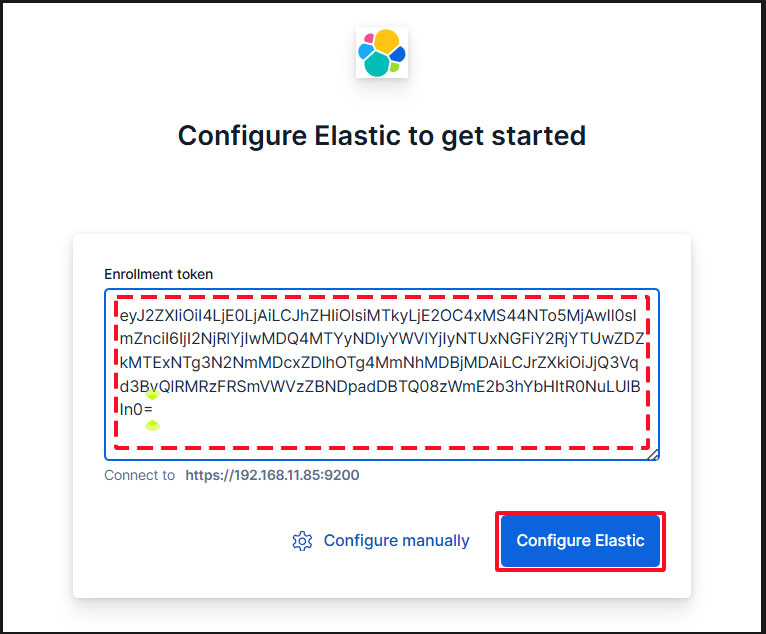
Paste the token, and Kibana will automatically connect to Elasticsearch.
Click Configure Elastic. The settings will be saved, and Elasticsearch will be configured and restarted.
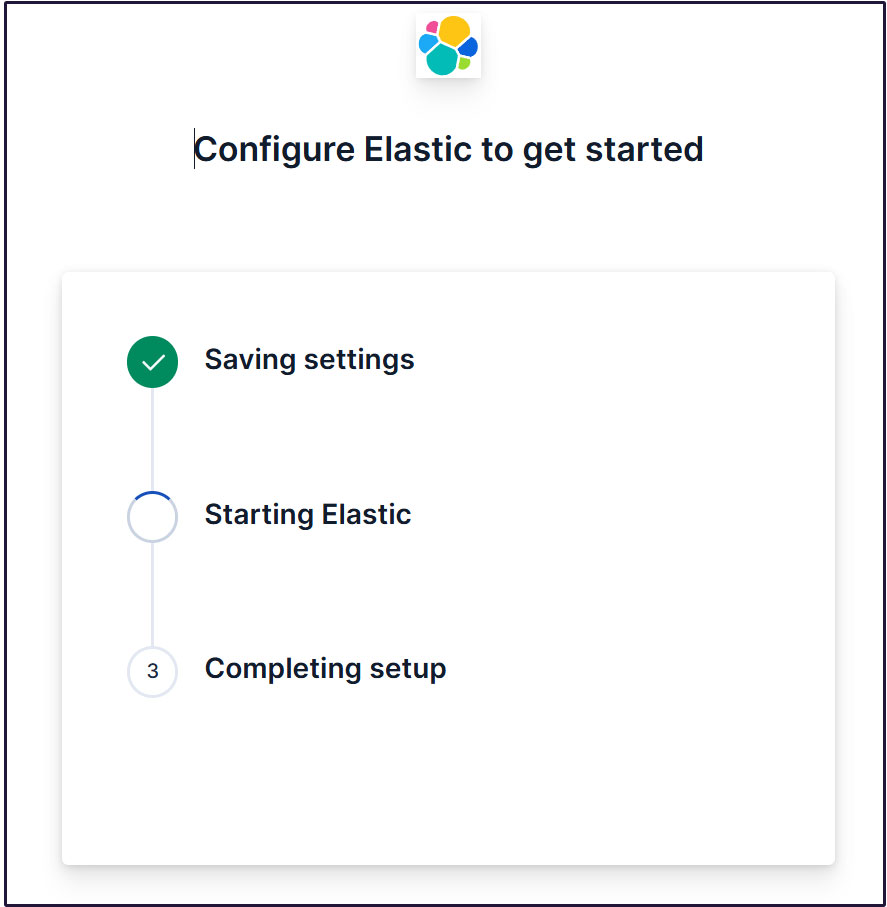
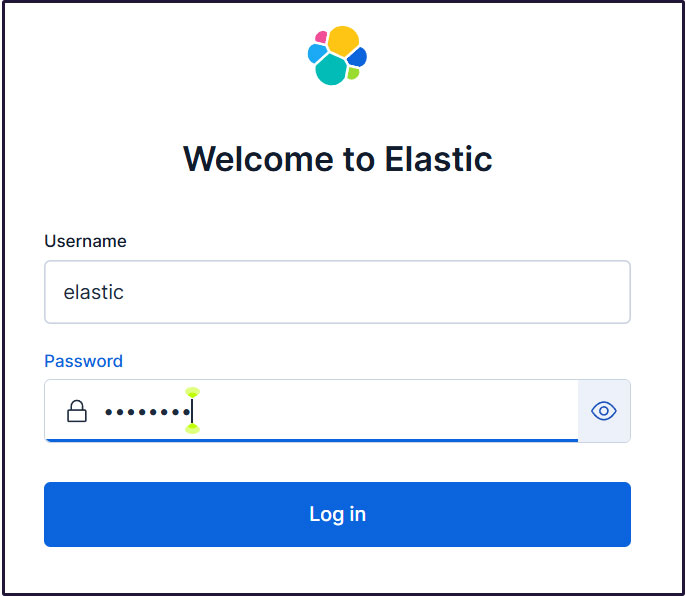
Proceed to the login page. Log in using the generated Elastic user credentials.
Username : elastic
Password : Password regenerated for clarity
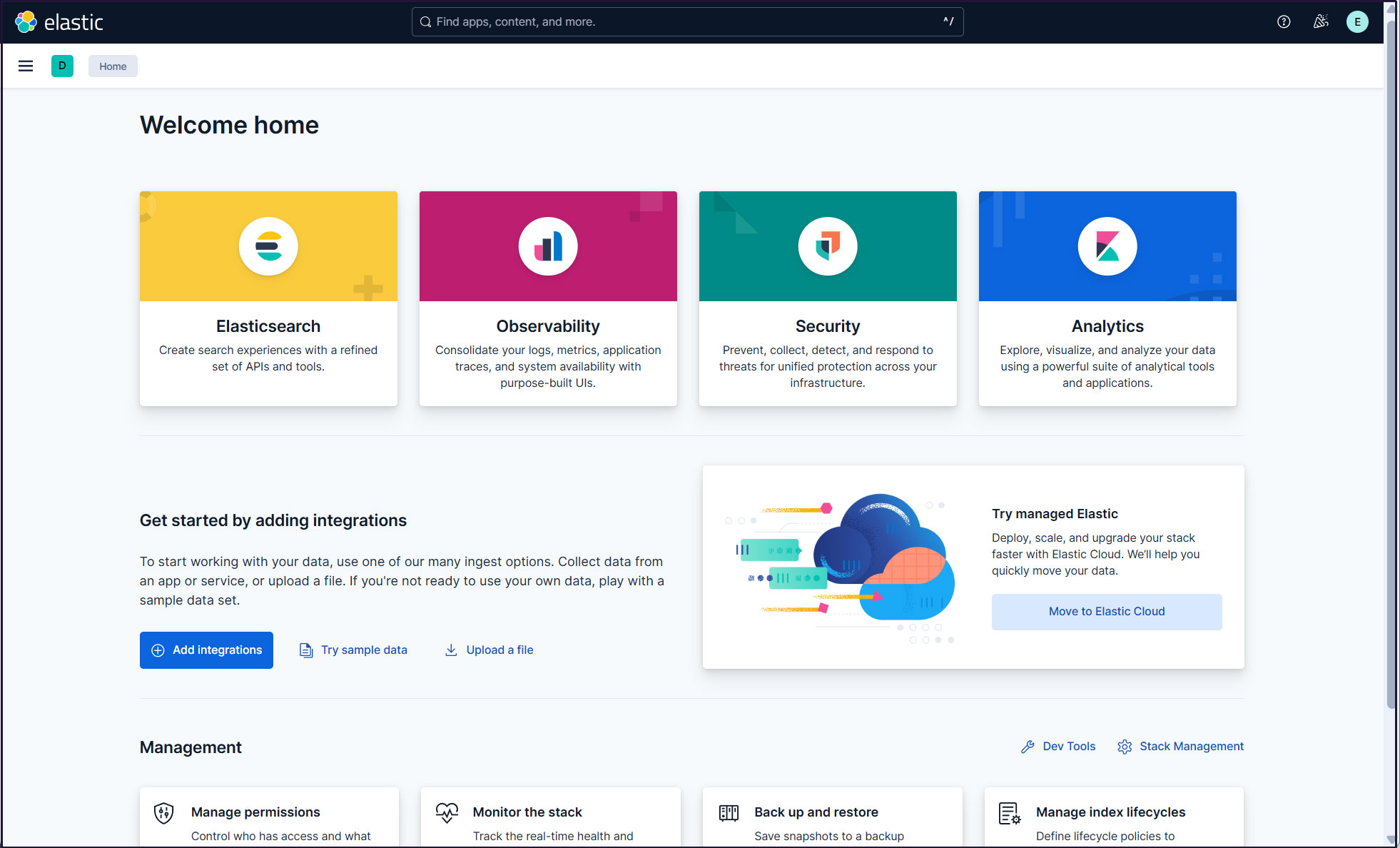
On the welcome page, click "Explore on my own" to proceed to the Kibana 9.x dashboard.

Create a new user account so that you do not need to use the elastic superuser account.
Open the main menu, then navigate to Stack Management > Security > Users
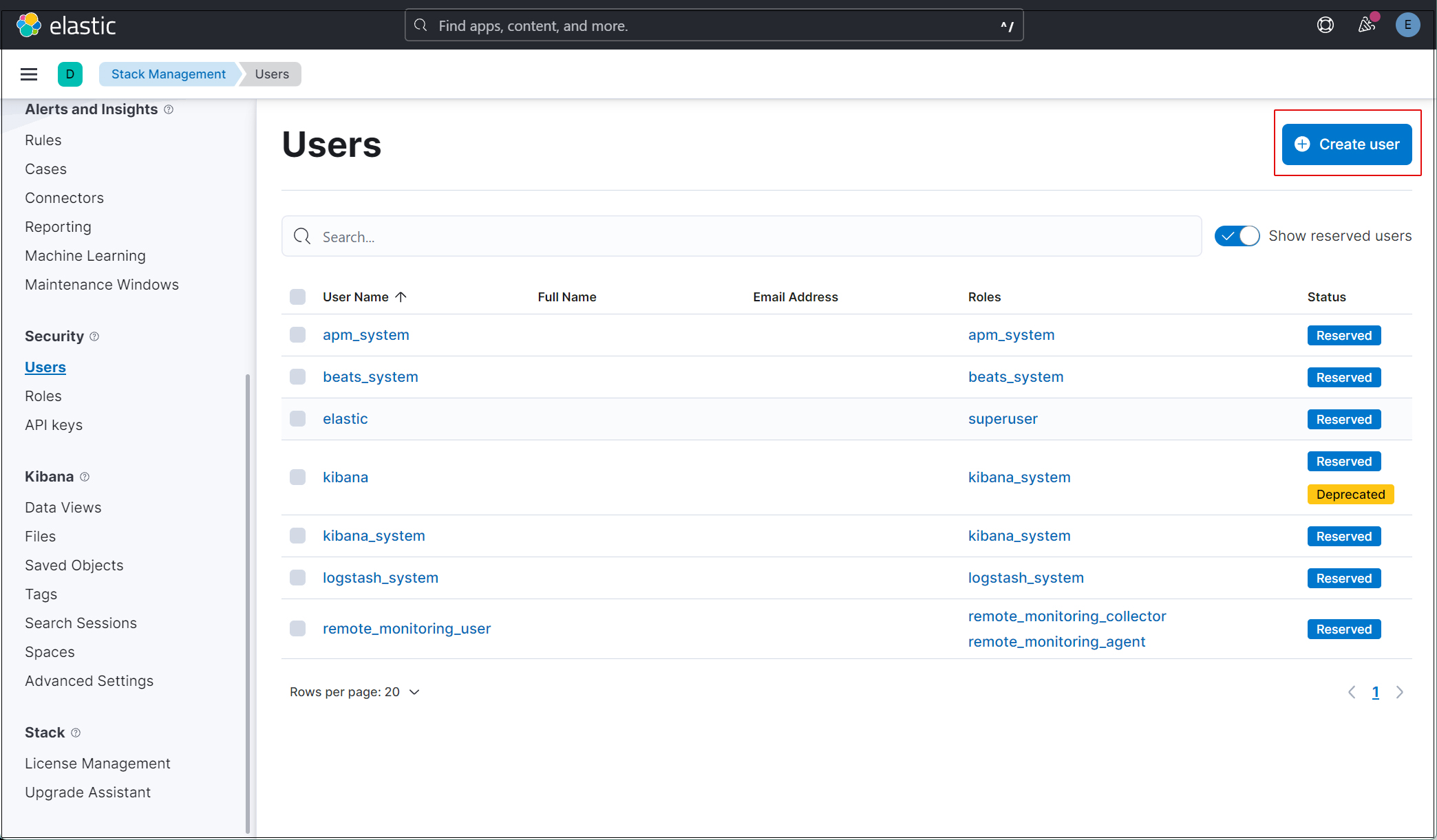
Click the "Create user" button in the upper right corner.
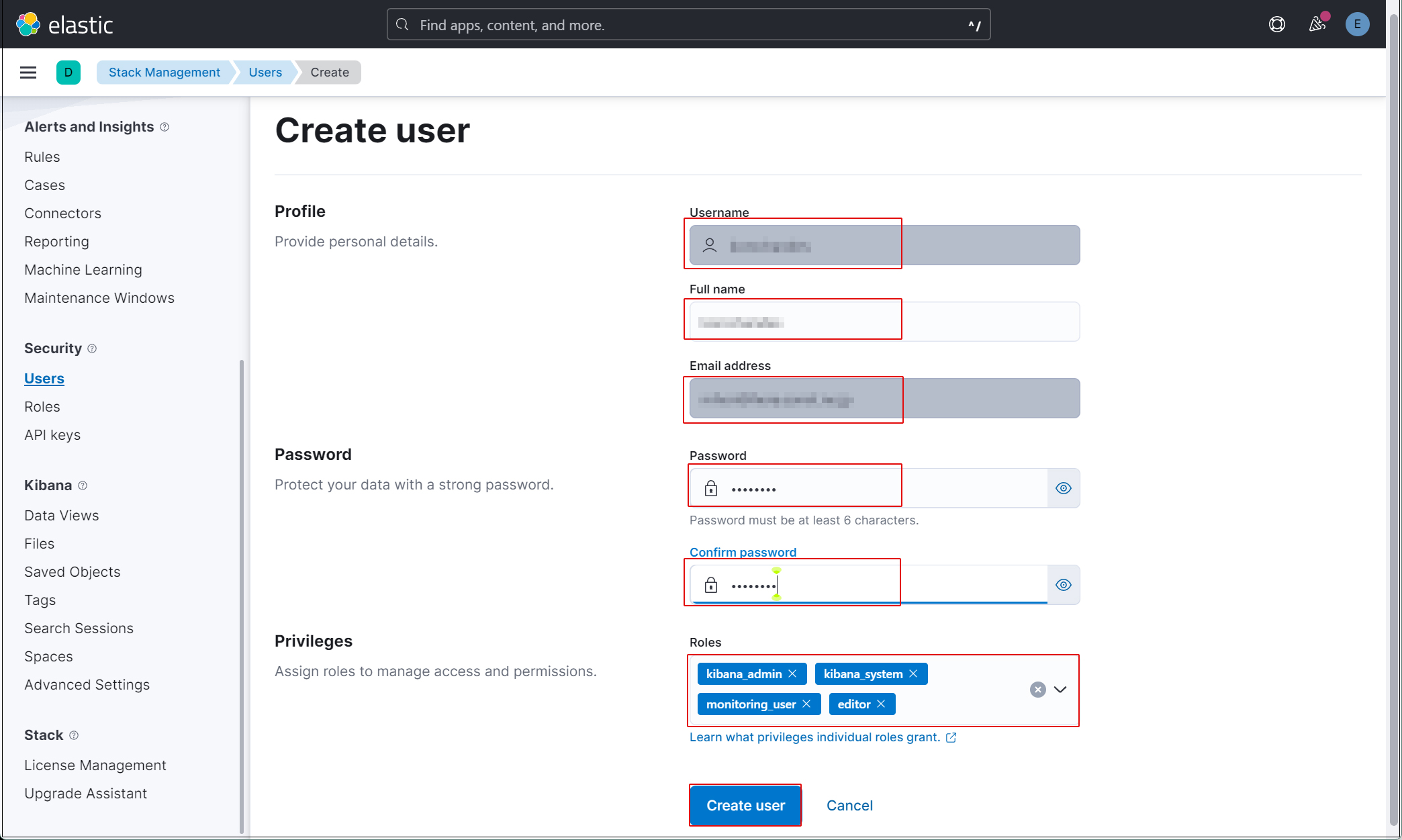
Enter new user information and assign the kibana_admin, kibana_system, monitoring_user, and editor roles under Privileges.
Finally, click [Create user].
Log out of the current profile and verify that you can log in with the newly created user account.
Currently, there is no data available to display in Kibana because Filebeat and Auditbeat are not configured on the SURICATA host.
Install Filebeat on the SURICATA server
This task will be performed on the first RockyLinux 10.2 server where Suricata has been installed.
1. Filebeat Install
1.1 Download Elasticsearch GPG Key
# rpm --import https://artifacts.elastic.co/GPG-KEY-elasticsearch
1.2 Create an elasticsearch.repo file in the /etc/yum/yum.repos.d directory with the following content:
# vi /etc/yum.repos.d/elasticsearch.repo

Please describe the following content.
[elasticsearch]
name=Elasticsearch repository for 9.x packages
baseurl=https://artifacts.elastic.co/packages/9.x/yum
gpgcheck=1
gpgkey=https://artifacts.elastic.co/GPG-KEY-elasticsearch
enabled=0
autorefresh=1
type=rpm-md
1.3 Install Filebeat
# dnf -y install --enablerepo=elasticsearch filebeat
Installed:
  filebeat-9.4.2-1.x86_64
1.4 Creating an Elasticsearch CA Certificate
Download the Elasticsearch CA certificate and save it to any directory (in this case, save it as /etc/filebeat/elastic-ca.crt).
※Keep port 9200 open on the second server (the server running RockyLinux 10.1 with Elasticsearch installed).
# openssl s_client -connect 192.168.11.85:9200 \
-showcerts </dev/null 2>/dev/null | \
openssl x509 -outform PEM > /etc/filebeat/elastic-ca.crt
1.5 Configure Filebeat to connect to Elasticsearch and Kibana
# vi /etc/filebeat/filebeat.yml

Line 137 : Add a line specifying the private IP address and port of the Kibana instance
#host: "localhost:5601"
host: "192.168.11.85:5601"

Line 164 : comment out
#hosts: ["localhost:9200"]

Line 165 : Enter the Elasticsearch IP address and Elasticsearch port number.
hosts: ["https://192.168.11.85:9200"]

Line 171 : Uncomments
protocol: "https"

Line 172 : Elasticsearch CA Certificate Specification
ssl.certificate_authorities: ["/etc/filebeat/elastic-ca.crt"]

Line 175,176 : Uncomment the line, leave [username] as the default, and enter the password for the [elastic] user in [password].
username: "elastic"
password: “xxxxxxxxx"
1.6 Configuration File Test
# filebeat test config
Config OK
1.7 Enable the built-in Suricata module in Filebeats
# filebeat modules enable suricata
The above command will change /etc/filebeat/modules.d/suricata.yml.disabled to /etc/filebeat/modules.d/suricata.yml, but the contents remain unchanged. Therefore, edit it as follows:
# vi /etc/filebeat/modules.d/suricata.yml

Line 6-7 : Changes as follows
  eve:
    enabled: true
    var.paths: ["/var/log/suricata/eve.json"]
1.8 Set up the initial environment
Load the pipeline into the Suricata service
Load the SIEM dashboard into Elasticsearch
# filebeat setup -e

-----------------------------------------------------------------------------------------------------------------------------------------
{"log.level":"info","@timestamp":"2026-06-04T13:26:42.678+0900","log.logger":"modules","log.origin":{"function":"github.com/elastic/beats/v7/filebeat/fileset.LoadPipeline","file.name":"fileset/pipelines.go","file.line":134},"message":"Elasticsearch pipeline loaded.","service.name":"filebeat","pipeline":"filebeat-9.4.2-suricata-eve-pipeline","ecs.version":"1.6.0"}
{"log.level":"info","@timestamp":"2026-06-04T13:26:42.735+0900","log.logger":"modules","log.origin":{"function":"github.com/elastic/beats/v7/filebeat/fileset.LoadPipeline","file.name":"fileset/pipelines.go","file.line":134},"message":"Elasticsearch pipeline loaded.","service.name":"filebeat","pipeline":"filebeat-9.4.2-suricata-eve-dns","ecs.version":"1.6.0"}
{"log.level":"info","@timestamp":"2026-06-04T13:26:42.773+0900","log.logger":"modules","log.origin":{"function":"github.com/elastic/beats/v7/filebeat/fileset.LoadPipeline","file.name":"fileset/pipelines.go","file.line":134},"message":"Elasticsearch pipeline loaded.","service.name":"filebeat","pipeline":"filebeat-9.4.2-suricata-eve-dns-answer-v1","ecs.version":"1.6.0"}
{"log.level":"info","@timestamp":"2026-06-04T13:26:42.814+0900","log.logger":"modules","log.origin":{"function":"github.com/elastic/beats/v7/filebeat/fileset.LoadPipeline","file.name":"fileset/pipelines.go","file.line":134},"message":"Elasticsearch pipeline loaded.","service.name":"filebeat","pipeline":"filebeat-9.4.2-suricata-eve-dns-answer-v2","ecs.version":"1.6.0"}
{"log.level":"info","@timestamp":"2026-06-04T13:26:42.862+0900","log.logger":"modules","log.origin":{"function":"github.com/elastic/beats/v7/filebeat/fileset.LoadPipeline","file.name":"fileset/pipelines.go","file.line":134},"message":"Elasticsearch pipeline loaded.","service.name":"filebeat","pipeline":"filebeat-9.4.2-suricata-eve-tls","ecs.version":"1.6.0"}
{"log.level":"info","@timestamp":"2026-06-04T13:26:42.909+0900","log.logger":"modules","log.origin":{"function":"github.com/elastic/beats/v7/filebeat/fileset.LoadPipeline","file.name":"fileset/pipelines.go","file.line":134},"message":"Elasticsearch pipeline loaded.","service.name":"filebeat","pipeline":"filebeat-9.4.2-suricata-eve-http","ecs.version":"1.6.0"}
-----------------------------------------------------------------------------------------------------------------------------------------
1.9 Start the Filebeat service
# systemctl start filebeat.service
2. Check in Kibana
Log back into Kibana using the user you created. Accsses http://192.168.11.85:5601
Enter "Suricata Events Overview" in the top search field, then click Events Overview.
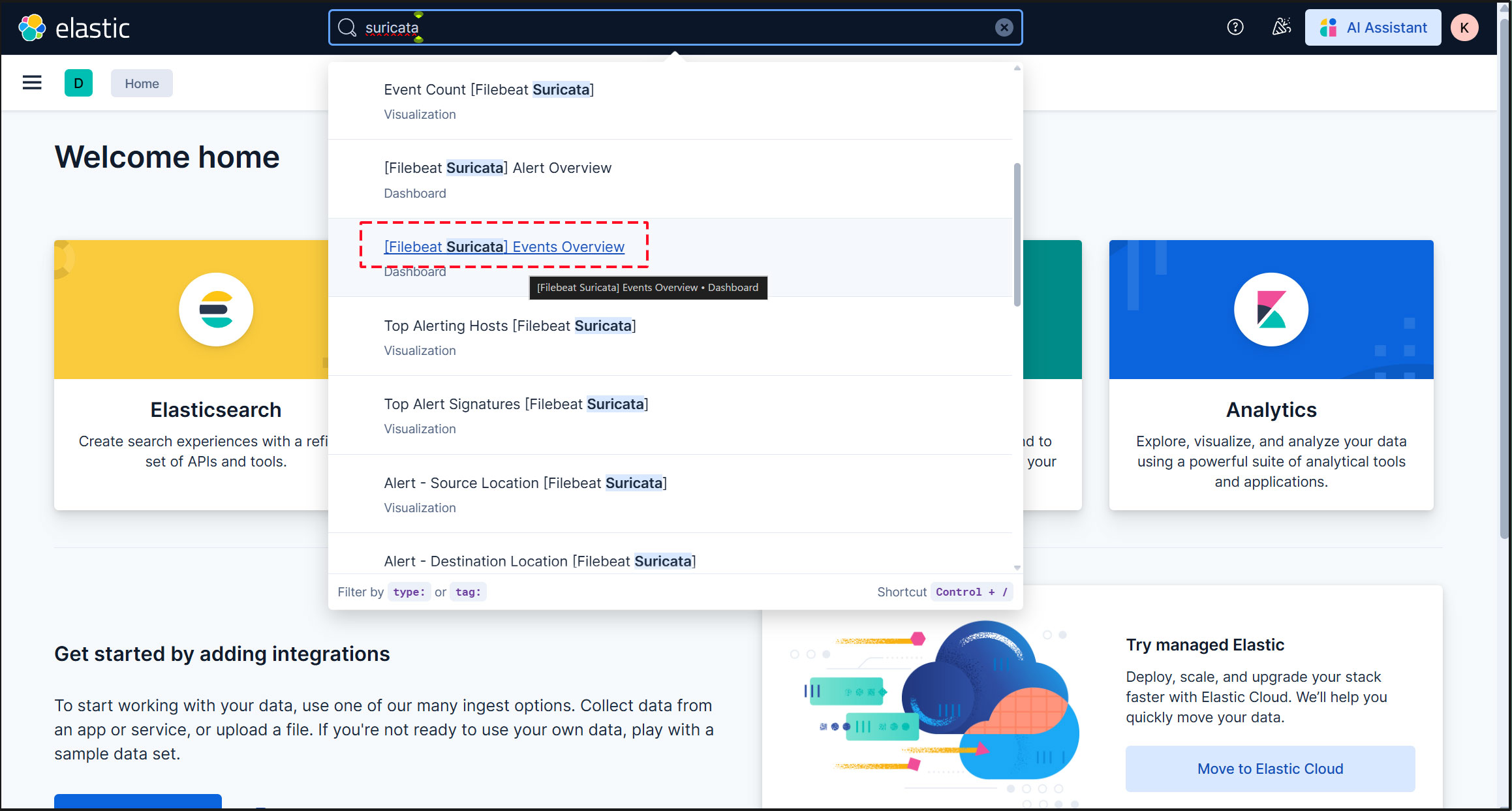
All Suricata events from the past 15 minutes are displayed.
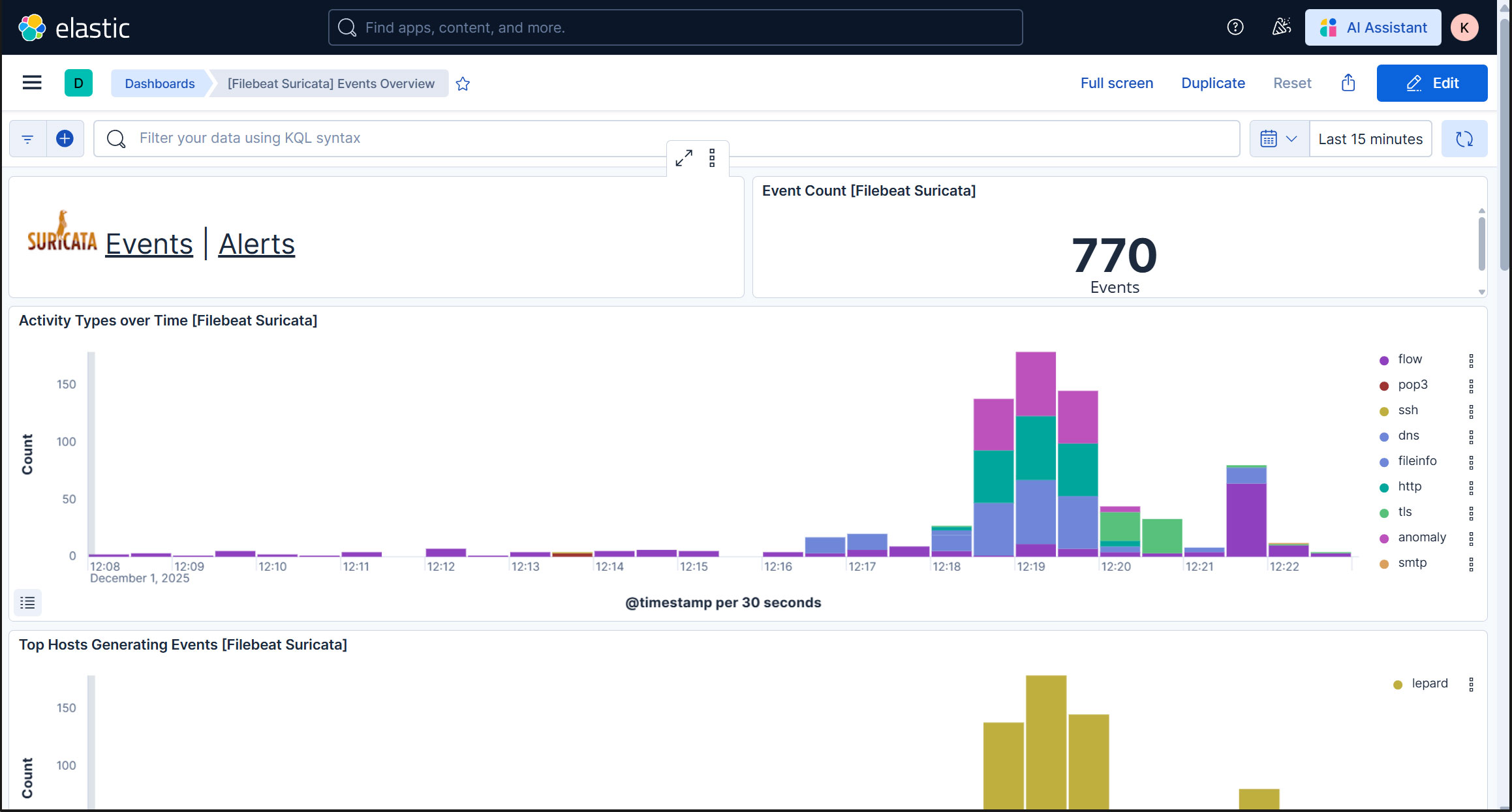
To display alerts for malicious traffic, click the "Alerts" text next to the Suricata logo.
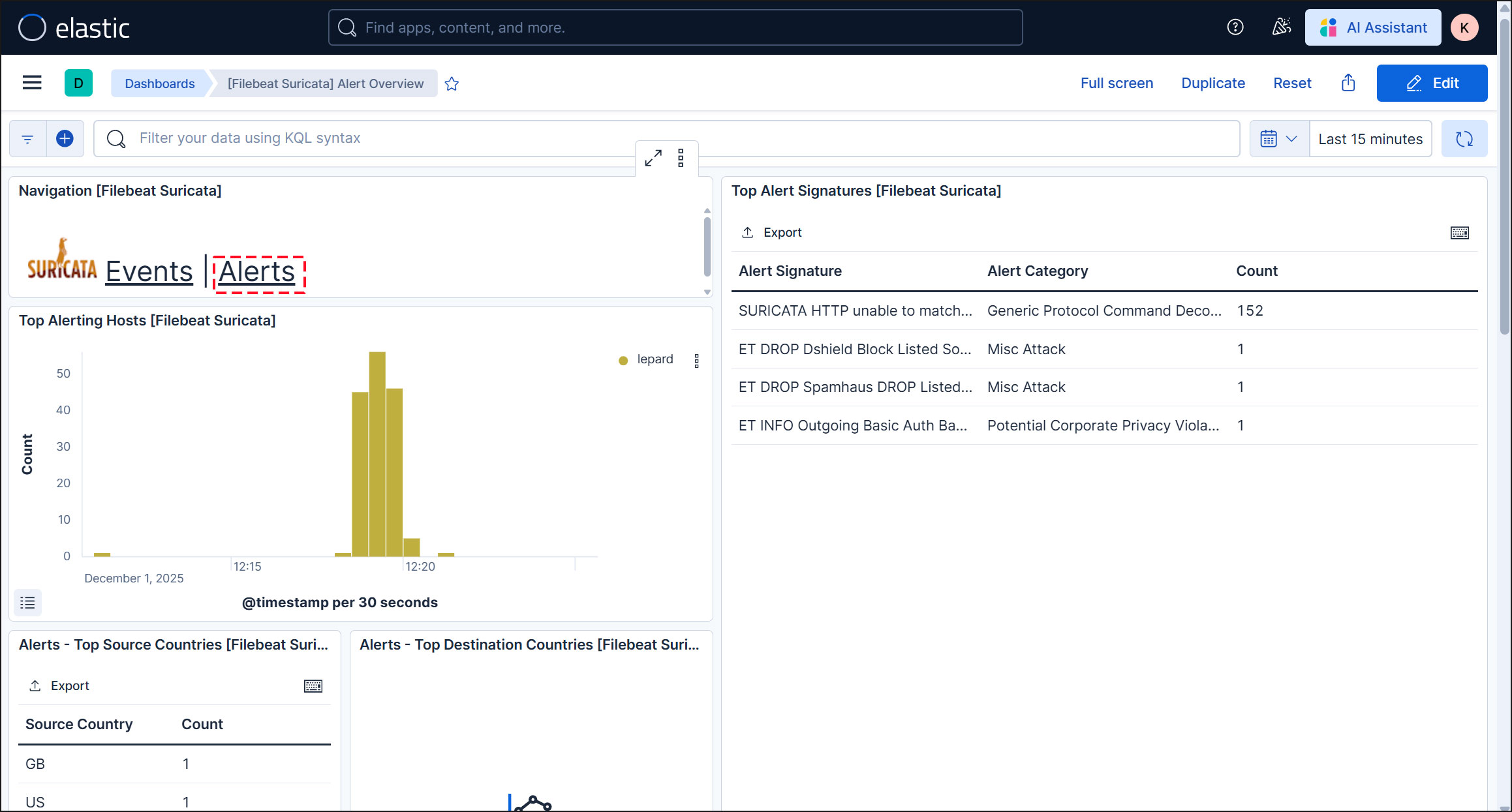
Kibana offers a variety of features and tools for visualizing logs, so feel free to experiment with them.