

Prerequisite
We will install Suricata IDS and ElasticStack anad Kibana on the following servers
・1st server Suricata IDS & Filebeat : Debian12.14 IP address (192.168.11.83)
・2nd server ElasticStack & kibana : Debian12.11 IP address (192.168.11.85)
Run as a sudo user other than root
1st server Suricata Install
SURICATA IDS/IPS is an open source IDS that monitors communications on the network and detects suspicious traffic. Its basic mechanism is signature-based, so it can detect predefined unauthorized communications. Suricata is also characterized by its ability to provide protection as well as detection.
1.Suricata
Suricata Install
Since Suricata 6 is included in the standard repositories for Debian 12, we will install Suricata 7 from bookworm-backports.
First, install the dependency packages.
# apt update
# apt upgrade
# apt install -y gnupg2 wget libpcap-dev libpcre3-dev libyaml-dev \
libcap-ng-dev libnet1-dev libmagic-dev libjansson-dev \
libnspr4-dev libnss3-dev liblz4-dev libpcre2-dev \
python3-pip python3-yaml
Install from backports
# apt install -y -t bookworm-backports suricata
Check Version
# suricata -V
This is Suricata version 7.0.10 RELEASE
Enable suricata.service to run on system reboot
# systemctl daemon-reload

# systemctl enable suricata.service
Synchronizing state of suricata.service with SysV service script with /lib/systemd/systemd-sysv-install.
Executing: /lib/systemd/systemd-sysv-install enable suricata

# systemctl start suricata.service
Stop the Suricata service as it needs to be configured first.
# systemctl stop suricata.service
2.Configure Suricata
①Determine interface and IP address where Suricata will inspect network packets
# ip --brief add
lo               UNKNOWN        127.0.0.1/8 ::1/128
ens33            UP             192.168.11.83/24 fe80::20c:29ff:fe77:dd30/64
Edit /etc/suricata/suricata.yaml file
# vi /etc/suricata/suricata.yaml

Line 18 : Change (Self Network)
HOME_NET: "[192.168.11.0/24]"

Per Line 136 : Change
community-id: false → community-id: true

Per Line 622 : Change to your own interface name
af-packet:
  - interface: eth0
↓
af-packet:
  - interface: ens33
➁Add rule set
Suricata has a tool called suricata-update that allows you to retrieve rulesets from external providers. You can download the latest rulesets for your suricata server by running
# suricata-update -o /var/lib/suricata/rules

-------------------------------------------------------------------------------------
29/5/2026 -- 10:28:12 - <Info> -- Fetching https://rules.emergingthreats.net/open/suricata-7.0.10/emerging.rules.tar.gz.
 100% - 5478255/5478255
29/5/2026 -- 10:28:14 - <Info> -- Done.
29/5/2026 -- 10:28:14 - <Info> -- Loading distribution rule file /etc/suricata/rules/app-layer-events.rules
29/5/2026 -- 10:28:14 - <Info> -- Loading distribution rule file /etc/suricata/rules/decoder-events.rules
29/5/2026 -- 10:28:14 - <Info> -- Loading distribution rule file /etc/suricata/rules/dhcp-events.rules
29/5/2026 -- 10:28:14 - <Info> -- Loading distribution rule file /etc/suricata/rules/dnp3-events.rules
29/5/2026 -- 10:28:14 - <Info> -- Loading distribution rule file /etc/suricata/rules/dns-events.rules
29/5/2026 -- 10:28:14 - <Info> -- Loading distribution rule file /etc/suricata/rules/files.rules
29/5/2026 -- 10:28:14 - <Info> -- Loading distribution rule file /etc/suricata/rules/http2-events.rules
29/5/2026 -- 10:28:14 - <Info> -- Loading distribution rule file /etc/suricata/rules/http-events.rules
29/5/2026 -- 10:28:14 - <Info> -- Loading distribution rule file /etc/suricata/rules/ipsec-events.rules
29/5/2026 -- 10:28:14 - <Info> -- Loading distribution rule file /etc/suricata/rules/kerberos-events.rules
29/5/2026 -- 10:28:14 - <Info> -- Loading distribution rule file /etc/suricata/rules/modbus-events.rules
29/5/2026 -- 10:28:14 - <Info> -- Loading distribution rule file /etc/suricata/rules/mqtt-events.rules
29/5/2026 -- 10:28:14 - <Info> -- Loading distribution rule file /etc/suricata/rules/nfs-events.rules
29/5/2026 -- 10:28:14 - <Info> -- Loading distribution rule file /etc/suricata/rules/ntp-events.rules
29/5/2026 -- 10:28:14 - <Info> -- Loading distribution rule file /etc/suricata/rules/quic-events.rules
29/5/2026 -- 10:28:14 - <Info> -- Loading distribution rule file /etc/suricata/rules/rfb-events.rules
29/5/2026 -- 10:28:14 - <Info> -- Loading distribution rule file /etc/suricata/rules/smb-events.rules
29/5/2026 -- 10:28:14 - <Info> -- Loading distribution rule file /etc/suricata/rules/smtp-events.rules
29/5/2026 -- 10:28:14 - <Info> -- Loading distribution rule file /etc/suricata/rules/ssh-events.rules
29/5/2026 -- 10:28:14 - <Info> -- Loading distribution rule file /etc/suricata/rules/stream-events.rules
29/5/2026 -- 10:28:14 - <Info> -- Loading distribution rule file /etc/suricata/rules/tls-events.rules
29/5/2026 -- 10:28:15 - <Info> -- Ignoring file f625293e2432dbf07497d06349de6f0b/rules/emerging-deleted.rules
29/5/2026 -- 10:28:16 - <Info> -- Loaded 66208 rules.
29/5/2026 -- 10:28:17 - <Info> -- Disabled 13 rules.
29/5/2026 -- 10:28:17 - <Info> -- Enabled 0 rules.
29/5/2026 -- 10:28:17 - <Info> -- Modified 0 rules.
29/5/2026 -- 10:28:17 - <Info> -- Dropped 0 rules.
29/5/2026 -- 10:28:17 - <Info> -- Enabled 136 rules for flowbit dependencies.
29/5/2026 -- 10:28:17 - <Info> -- Backing up current rules.
29/5/2026 -- 10:28:17 - <Info> -- Writing rules to /var/lib/suricata/rules/suricata.rules: total: 66208; enabled: 50288; added: 66208; removed 0; modified: 0
29/5/2026 -- 10:28:17 - <Info> -- Writing /var/lib/suricata/rules/classification.config
29/5/2026 -- 10:28:17 - <Info> -- Testing with suricata -T.
29/5/2026 -- 10:28:46 - <Info> -- Done.
It shows that suricata-update has retrieved the free Emerging Threats ET Open Rules and saved them in Suricata's /etc/suricata/rules/suricata.rules file. It also shows the number of rules processed, in this example 66208 were added, of which 50288 were activated.
➂Adding Rule Set Providers
List Default Providers
# suricata-update list-sources

Name: abuse.ch/feodotracker
  Vendor: Abuse.ch
  Summary: Abuse.ch Feodo Tracker Botnet C2 IP ruleset
  License: CC0-1.0
Name: abuse.ch/sslbl-blacklist
  Vendor: Abuse.ch
  Summary: Abuse.ch SSL Blacklist
  License: CC0-1.0
  Replaces: sslbl/ssl-fp-blacklist
Name: abuse.ch/sslbl-c2
  Vendor: Abuse.ch
  Summary: Abuse.ch Suricata Botnet C2 IP Ruleset
  License: CC0-1.0
Name: abuse.ch/sslbl-ja3
  Vendor: Abuse.ch
  Summary: Abuse.ch Suricata JA3 Fingerprint Ruleset
  License: CC0-1.0
  Replaces: sslbl/ja3-fingerprints
Name: abuse.ch/urlhaus
  Vendor: abuse.ch
  Summary: Abuse.ch URLhaus Suricata Rules
  License: CC0-1.0
Name: aleksibovellan/nmap
  Vendor: aleksibovellan
  Summary: Suricata IDS/IPS Detection Rules Against NMAP Scans
  License: MIT
Name: et/open
  Vendor: Proofpoint
  Summary: Emerging Threats Open Ruleset
  License: MIT
Name: et/pro
  Vendor: Proofpoint
  Summary: Emerging Threats Pro Ruleset
  License: Commercial
  Replaces: et/open
  Parameters: secret-code
  Subscription: https://www.proofpoint.com/us/threat-insight/et-pro-ruleset
Name: etnetera/aggressive
  Vendor: Etnetera a.s.
  Summary: Etnetera aggressive IP blacklist
  License: MIT
Name: oisf/trafficid
  Vendor: OISF
  Summary: Suricata Traffic ID ruleset
  License: MIT
Name: pawpatrules
  Vendor: pawpatrules
  Summary: PAW Patrules is a collection of rules for IDPS / NSM Suricata engine
  License: CC-BY-SA-4.0
Name: ptrules/open
  Vendor: Positive Technologies
  Summary: Positive Technologies Open Ruleset
  License: Custom
Name: scwx/enhanced
  Vendor: Secureworks
  Summary: Secureworks suricata-enhanced ruleset
  License: Commercial
  Parameters: secret-code
  Subscription: https://www.secureworks.com/contact/ (Please reference CTU Countermeasures)
Name: scwx/malware
  Vendor: Secureworks
  Summary: Secureworks suricata-malware ruleset
  License: Commercial
  Parameters: secret-code
  Subscription: https://www.secureworks.com/contact/ (Please reference CTU Countermeasures)
Name: scwx/security
  Vendor: Secureworks
  Summary: Secureworks suricata-security ruleset
  License: Commercial
  Parameters: secret-code
  Subscription: https://www.secureworks.com/contact/ (Please reference CTU Countermeasures)
Name: stamus/lateral
  Vendor: Stamus Networks
  Summary: Lateral movement rules
  License: GPL-3.0-only
Name: stamus/nrd-14-open
  Vendor: Stamus Networks
  Summary: Newly Registered Domains Open only - 14 day list, complete
  License: Commercial
  Parameters: secret-code
  Subscription: https://www.stamus-networks.com/stamus-labs/subscribe-to-threat-intel-feed
Name: stamus/nrd-30-open
  Vendor: Stamus Networks
  Summary: Newly Registered Domains Open only - 30 day list, complete
  License: Commercial
  Parameters: secret-code
  Subscription: https://www.stamus-networks.com/stamus-labs/subscribe-to-threat-intel-feed
Name: stamus/nrd-entropy-14-open
  Vendor: Stamus Networks
  Summary: Newly Registered Domains Open only - 14 day list, high entropy
  License: Commercial
  Parameters: secret-code
  Subscription: https://www.stamus-networks.com/stamus-labs/subscribe-to-threat-intel-feed
Name: stamus/nrd-entropy-30-open
  Vendor: Stamus Networks
  Summary: Newly Registered Domains Open only - 30 day list, high entropy
  License: Commercial
  Parameters: secret-code
  Subscription: https://www.stamus-networks.com/stamus-labs/subscribe-to-threat-intel-feed
Name: stamus/nrd-phishing-14-open
  Vendor: Stamus Networks
  Summary: Newly Registered Domains Open only - 14 day list, phishing
  License: Commercial
  Parameters: secret-code
  Subscription: https://www.stamus-networks.com/stamus-labs/subscribe-to-threat-intel-feed
Name: stamus/nrd-phishing-30-open
  Vendor: Stamus Networks
  Summary: Newly Registered Domains Open only - 30 day list, phishing
  License: Commercial
  Parameters: secret-code
  Subscription: https://www.stamus-networks.com/stamus-labs/subscribe-to-threat-intel-feed
Name: tgreen/hunting
  Vendor: tgreen
  Summary: Threat hunting rules
  License: GPLv3
If you include the tgreen/hunting ruleset as an example
# suricata-update enable-source tgreen/hunting

29/5/2026 -- 10:32:48 - <Info> -- Using data-directory /var/lib/suricata.
29/5/2026 -- 10:32:48 - <Info> -- Using Suricata configuration /etc/suricata/suricata.yaml
29/5/2026 -- 10:32:48 - <Info> -- Using /etc/suricata/rules for Suricata provided rules.
29/5/2026 -- 10:32:48 - <Info> -- Found Suricata version 7.0.10 at /usr/bin/suricata.
29/5/2026 -- 10:32:48 - <Warning> -- Source index does not exist, will use bundled one.
29/5/2026 -- 10:32:48 - <Warning> -- Please run suricata-update update-sources.
29/5/2026 -- 10:32:48 - <Info> -- Creating directory /var/lib/suricata/update/sources
29/5/2026 -- 10:32:48 - <Info> -- Enabling default source et/open
29/5/2026 -- 10:32:48 - <Info> -- Source tgreen/hunting enabled
Perform update
# suricata-update update-sources

29/5/2026 -- 10:38:13 - <Info> -- Using data-directory /var/lib/suricata.
29/5/2026 -- 10:38:13 - <Info> -- Using Suricata configuration /etc/suricata/suricata.yaml
29/5/2026 -- 10:38:13 - <Info> -- Using /etc/suricata/rules for Suricata provided rules.
29/5/2026 -- 10:38:13 - <Info> -- Found Suricata version 7.0.10 at /usr/bin/suricata.
29/5/2026 -- 10:38:13 - <Info> -- Downloading https://www.openinfosecfoundation.org/rules/index.yaml
29/5/2026 -- 10:38:14 - <Info> -- Adding all sources
29/5/2026 -- 10:38:14 - <Info> -- Saved /var/lib/suricata/update/cache/index.yaml
3.Suricata Configuration Testing
①Run Verification Tool
# suricata -T -c /etc/suricata/suricata.yaml -v

Notice: suricata: This is Suricata version 7.0.10 RELEASE running in SYSTEM mode
Info: cpu: CPUs/cores online: 2
Info: suricata: Running suricata under test mode
Info: suricata: Setting engine mode to IDS mode by default
Info: exception-policy: master exception-policy set to: auto
Info: logopenfile: fast output device (regular) initialized: fast.log
Info: logopenfile: eve-log output device (regular) initialized: eve.json
Info: logopenfile: stats output device (regular) initialized: stats.log
Info: detect: 1 rule files processed. 50288 rules successfully loaded, 0 rules failed, 0
Info: threshold-config: Threshold config parsed: 0 rule(s) found
Info: detect: 50293 signatures processed. 1287 are IP-only rules, 4490 are inspecting packet payload, 44281 inspect application layer, 109 are decoder event only
Notice: suricata: Configuration provided was successfully loaded. Exiting.
Suricata service restart
# systemctl start suricata

# systemctl status suricata
● suricata.service - Suricata IDS/IDP daemon
     Loaded: loaded (/lib/systemd/system/suricata.service; enabled; preset: enabled)
     Active: active (running) since Fri 2026-05-29 10:40:56 JST; 40s ago
       Docs: man:suricata(8)
             man:suricatasc(8)
             https://suricata.io/documentation/
    Process: 24391 ExecStart=/usr/bin/suricata -D --af-packet -c /etc/suricata/suricata.yaml --pidfile /run/suricata.pid (code=exited, status=0/SUCCESS)
   Main PID: 24392 (Suricata-Main)
      Tasks: 8 (limit: 4554)
     Memory: 505.2M
        CPU: 29.076s
     CGroup: /system.slice/suricata.service
             └─24392 /usr/bin/suricata -D --af-packet -c /etc/suricata/suricata.yaml --pidfile /run/suricata.pid

May 29 10:40:56 Lepard systemd[1]: Starting suricata.service - Suricata IDS/IDP daemon...
May 29 10:40:56 Lepard suricata[24391]: i: suricata: This is Suricata version 7.0.10 RELEASE running in SYSTEM mode
May 29 10:40:56 Lepard systemd[1]: Started suricata.service - Suricata IDS/IDP daemon.
Check log files
# tail -f /var/log/suricata/suricata.log

[24392 - Suricata-Main] 2026-05-29 10:40:56 Info: logopenfile: fast output device (regular) initialized: fast.log
[24392 - Suricata-Main] 2026-05-29 10:40:56 Info: logopenfile: eve-log output device (regular) initialized: eve.json
[24392 - Suricata-Main] 2026-05-29 10:40:56 Info: logopenfile: stats output device (regular) initialized: stats.log
[24392 - Suricata-Main] 2026-05-29 10:41:12 Info: detect: 1 rule files processed. 50288 rules successfully loaded, 0 rules failed, 0
[24392 - Suricata-Main] 2026-05-29 10:41:12 Info: threshold-config: Threshold config parsed: 0 rule(s) found
[24392 - Suricata-Main] 2026-05-29 10:41:12 Info: detect: 50293 signatures processed. 1287 are IP-only rules, 4490 are inspecting packet payload, 44281 inspect application layer, 109 are decoder event only
[24392 - Suricata-Main] 2026-05-29 10:41:25 Warning: af-packet: ens33: AF_PACKET tpacket-v3 is recommended for non-inline operation
[24392 - Suricata-Main] 2026-05-29 10:41:25 Info: runmodes: ens33: creating 2 threads
[24392 - Suricata-Main] 2026-05-29 10:41:25 Info: unix-manager: unix socket '/var/run/suricata-command.socket'
[24392 - Suricata-Main] 2026-05-29 10:41:25 Notice: threads: Threads created -> W: 2 FM: 1 FR: 1   Engine started.
4.Testing the Suricata Rule
①Test ET Open rule number 2100498 using the following command
# curl http://testmynids.org/uid/index.html
uid=0(root) gid=0(root) groups=0(root)
②Check the log file using the specified rule number
Suricata comes with the following two log files enabled by default.
/var/log/suricata/fast.log
/var/log/suricata/eve.log
To verify log entries corresponding to curl requests, check the /var/log/suricata/fast.log log file using the grep command. Search for log entries using the 2100498 rule identifier. (For IPv4)
# grep 2100498 /var/log/suricata/fast.log
05/29/2026-10:43:12.179624  [**] [1:2100498:7] GPL ATTACK_RESPONSE id check returned root [**] [Classification: Potentially Bad Traffic] [Priority: 2] {TCP} 13.227.50.46:80 -> 192.168.11.83:40418
③Check events in /var/log/suricata/eve.log
Install jq
# apt -y install jq
Filter EVE Log events by searching for 2100498 signatures
Display alert objects with signature_id keys that match the values in 2100498
# jq 'select(.alert .signature_id==2100498)' /var/log/suricata/eve.json

{
  "timestamp": "2026-05-29T10:43:12.179624+0900",
  "flow_id": 89550825416404,
  "in_iface": "ens33",
  "event_type": "alert",
  "src_ip": "13.227.50.46",
  "src_port": 80,
  "dest_ip": "192.168.11.83",
  "dest_port": 40418,
  "proto": "TCP",
  "pkt_src": "wire/pcap",
  "community_id": "1:5ETagbSOFSlxv7cX1Set0SjpuJw=",
  "tx_id": 0,
  "tx_guessed": true,
  "alert": {
    "action": "allowed",
    "gid": 1,
    "signature_id": 2100498,
    "rev": 7,
    "signature": "GPL ATTACK_RESPONSE id check returned root",
    "category": "Potentially Bad Traffic",
    "severity": 2,
    "metadata": {
      "confidence": [
        "Medium"
      ],
      "created_at": [
        "2010_09_23"
      ],
      "signature_severity": [
        "Informational"
      ],
      "updated_at": [
        "2019_07_26"
      ]
    }
  },
  "http": {
    "hostname": "testmynids.org",
    "url": "/uid/index.html",
    "http_user_agent": "curl/7.88.1",
    "http_content_type": "text/html",
    "http_method": "GET",
    "protocol": "HTTP/1.1",
    "status": 200,
    "length": 39
  },
  "files": [
    {
      "filename": "/uid/index.html",
      "gaps": false,
      "state": "CLOSED",
      "stored": false,
      "size": 39,
      "tx_id": 0
    }
  ],
  "app_proto": "http",
  "direction": "to_client",
  "flow": {
    "pkts_toserver": 6,
    "pkts_toclient": 5,
    "bytes_toserver": 496,
    "bytes_toclient": 876,
    "start": "2026-05-29T10:43:12.151922+0900",
    "src_ip": "192.168.11.83",
    "dest_ip": "13.227.50.46",
    "src_port": 40418,
    "dest_port": 80
  }
}
5.Reset SURICATA and restart it in IPS mode.
SURICATA operates in IDS mode by default and does not actively block network traffic; to switch to IPS mode, SURICATA's default settings must be changed.
5.1 Use the systemctl edit command to create a new systemd override file.
# systemctl edit suricata.service
Add the following section in red at the beginning
###Editing /etc/systemd/system/suricata.service.d/override.conf
###Anything between here and the comment below will become the new contents of the file
[Service]
ExecStart=
ExecStart=/usr/bin/suricata -c /etc/suricata/suricata.yaml --pidfile /run/suricata.pid -q 0 -vvv
Type=simple
###Lines below this comment will be discarded
# vi /etc/default/suricata

Line 4 : Change
run=yes
Reload systemd to detect new Suricata settings
# systemctl daemon-reload
# systemctl restart suricata.service
5.2 Configure UFW to send traffic to Suricata
# vi /etc/ufw/before.rules

Add to line 18
# Don't delete these required lines, otherwise there will be errors
*filter
:ufw-before-input - [0:0]
:ufw-before-output - [0:0]
:ufw-before-forward - [0:0]
:ufw-not-local - [0:0]
# End required lines

## Start Suricata NFQUEUE rules
-I INPUT 1 -p tcp --dport 2244 -j NFQUEUE --queue-bypass
-I OUTPUT 1 -p tcp --sport 2244 -j NFQUEUE --queue-bypass
-I FORWARD -j NFQUEUE
-I INPUT 2 -j NFQUEUE
-I OUTPUT 2 -j NFQUEUE
## End Suricata NFQUEUE rules
Similarly, change /etc/ufw/before6.rules
Restart UFW
# systemctl restart ufw.service
5.3 Create local rules and define them in the Suricata configuration file
First, disable packets matching signature sid:2100498 defined in suricata.rules to avoid conflicts.
# vi /var/lib/suricata/rules/suricata.rules

Find the line matching sid:2100498 and comment it out.
#alert ip any any -> any any (msg:"GPL ATTACK_RESPONSE id check returned root"; content:"uid=0|28|root|29|"; classtype:bad-unknown; sid:2100498; rev:7; metadata:created_at 2010_09_23, confidence Medium, signature_severity Informational, updated_at 2019_07_26;)
Create a new local rule
# vi /var/lib/suricata/rules/local.rules

drop ip any any -> any any (msg:"GPL ATTACK_RESPONSE id check returned root"; content:"uid=0|28|root|29|"; classtype:bad-unknown; sid:2100498; rev:7; metadata:created_at 2010_09_23, confidence Medium, signature_severity Informational, updated_at 2019_07_26;)
Define in the Suricata configuration file
# vi /etc/suricata/suricata.yaml

Add around line 2191
rule-files:
  - suricata.rules
      - local.rules
# systemctl restart suricata
5.4 Test this rule using curl
# curl --max-time 5 http://testmynids.org/uid/index.html
curl: (28) Operation timed out after 5000 milliseconds with 0 out of 39 bytes received
Checking eve.log using jq, "action" is set to "blocked
# jq 'select(.alert .signature_id==2100498)' /var/log/suricata/eve.json

{
  "timestamp": "2026-05-29T11:04:56.747595+0900",
  "flow_id": 35067945271039,
  "event_type": "alert",
  "src_ip": "13.227.50.49",
  "src_port": 80,
  "dest_ip": "192.168.11.83",
  "dest_port": 47980,
  "proto": "TCP",
  "pkt_src": "wire/pcap",
  "community_id": "1:kwYQPyoDaaHnv3VQLpHGfFTQ3Gc=",
  "tx_id": 0,
  "tx_guessed": true,
  "alert": {
    "action": "blocked",
    "gid": 1,
    "signature_id": 2100498,
    "rev": 7,
    "signature": "GPL ATTACK_RESPONSE id check returned root",
    "category": "Potentially Bad Traffic",
    "severity": 2,
    "metadata": {
      "confidence": [
        "Medium"
      ],
      "created_at": [
        "2010_09_23"
      ],
      "signature_severity": [
        "Informational"
      ],
      "updated_at": [
        "2019_07_26"
      ]
    }
  },
  "http": {
    "hostname": "testmynids.org",
    "url": "/uid/index.html",
    "http_user_agent": "curl/7.88.1",
    "http_content_type": "text/html",
    "http_method": "GET",
    "protocol": "HTTP/1.1",
    "status": 200,
    "length": 39
  },
  "files": [
    {
      "filename": "/uid/index.html",
      "gaps": false,
      "state": "CLOSED",
      "stored": false,
      "size": 39,
      "tx_id": 0
    }
  ],
  "app_proto": "http",
  "direction": "to_client",
  "flow": {
    "pkts_toserver": 3,
    "pkts_toclient": 4,
    "bytes_toserver": 256,
    "bytes_toclient": 754,
    "start": "2026-05-29T11:04:56.729060+0900",
    "src_ip": "192.168.11.83",
    "dest_ip": "13.227.50.49",
    "src_port": 47980,
    "dest_port": 80
  }
}
Second server Elastic Stack , Kibana Install
Elastic stack 9.x Install
Install & configure Elastic Stack to visualize & search SURICATA logs
This section is basically done on a second Debian12.11 server
①Install Elastic stack 9.x repository signing key
# apt update
# apt -y install gnupg2
# curl -fsSL https://artifacts.elastic.co/GPG-KEY-elasticsearch | gpg --dearmor -o /etc/apt/keyrings/elasticsearch-archive-keyring.gpg
➁Install Elastic Stack 9.x repository
# echo "deb [signed-by=/etc/apt/keyrings/elasticsearch-archive-keyring.gpg] https://artifacts.elastic.co/packages/9.x/apt stable main" | tee /etc/apt/sources.list.d/elastic-9.x.list
update
# apt update
➂Installing Elasticsearch 9.x on Debian12.11
# apt -y install elasticsearch

----------------------------------------- Security autoconfiguration information ------------------------------

Authentication and authorization are enabled.
TLS for the transport and HTTP layers is enabled and configured.

The generated password for the elastic built-in superuser is : 5=j5gME0zDH8OjDC07QF

If this node should join an existing cluster, you can reconfigure this with
'/usr/share/elasticsearch/bin/elasticsearch-reconfigure-node --enrollment-token <token-here>'
after creating an enrollment token on your existing cluster.

You can complete the following actions at any time:

Reset the password of the elastic built-in superuser with
'/usr/share/elasticsearch/bin/elasticsearch-reset-password -u elastic'.

Generate an enrollment token for Kibana instances with
 '/usr/share/elasticsearch/bin/elasticsearch-create-enrollment-token -s kibana'.

Generate an enrollment token for Elasticsearch nodes with
'/usr/share/elasticsearch/bin/elasticsearch-create-enrollment-token -s node'.

-------------------------------------------------------------------------------------------------
### NOT starting on installation, please execute the following statements to configure elasticsearch service to start automatically using systemd
 sudo systemctl daemon-reload
 sudo systemctl enable elasticsearch.service
### You can start elasticsearch service by executing
 sudo systemctl start elasticsearch.service
Security features are enabled by default during installation;
Certifications and authorizations are in effect.
TLS at the transport and HTTP layers is enabled and configured.
An Elastic super user account (elastic) and its password will be created.
④ Configuring Elasticsearch 9.x
Since this is a basic single-node cluster, we will use the default settings.
Check the Elasticsearch configuration file /etc/elasticsearch/elasticsearch.yml and you will see that the security settings are enabled
# cat /etc/elasticsearch/elasticsearch.yml
#----------------------- BEGIN SECURITY AUTO CONFIGURATION -----------------------
#
# The following settings, TLS certificates, and keys have been automatically
# generated to configure Elasticsearch security features on 29-05-2026 02:59:32
#
# --------------------------------------------------------------------------------

# Enable security features
xpack.security.enabled: true

xpack.security.enrollment.enabled: true

# Enable encryption for HTTP API client connections, such as Kibana, Logstash, and Agents
xpack.security.http.ssl:
  enabled: true
  keystore.path: certs/http.p12

# Enable encryption and mutual authentication between cluster nodes
xpack.security.transport.ssl:
  enabled: true
  verification_mode: certificate
  keystore.path: certs/transport.p12
  truststore.path: certs/transport.p12
# Create a new cluster with the current node only
# Additional nodes can still join the cluster later
cluster.initial_master_nodes: ["Lion"]

# Allow HTTP API connections from anywhere
# Connections are encrypted and require user authentication
http.host: 0.0.0.0

# Allow other nodes to join the cluster from anywhere
# Connections are encrypted and mutually authenticated
#transport.host: 0.0.0.0

#----------------------- END SECURITY AUTO CONFIGURATION -------------------------
⑤Start Elasticsearch
Start Elasticsearch and allow it to run at system startup
# systemctl daemon-reload

# systemctl enable --now elasticsearch
Created symlink /etc/systemd/system/multi-user.target.wants/elasticsearch.service → /lib/systemd/system/elasticsearch.service.

# systemctl start elasticsearch
Check Status
# systemctl status elasticsearch

● elasticsearch.service - Elasticsearch
     Loaded: loaded (/lib/systemd/system/elasticsearch.service; enabled; preset: enabled)
     Active: active (running) since Fri 2026-05-29 12:06:19 JST; 14s ago
       Docs: https://www.elastic.co
   Main PID: 2441 (server-launcher)
      Tasks: 95 (limit: 2255)
     Memory: 1.4G
        CPU: 50.245s
     CGroup: /system.slice/elasticsearch.service
             ├─2441 /usr/share/elasticsearch/lib/tools/server-launcher/server-launcher -p /var/run/elasticsearch/elasticsearch.pid --quiet
             ├─2490 /usr/share/elasticsearch/jdk/bin/java -Des.networkaddress.cache.ttl=60 -Des.networkaddress.cache.negative.ttl=10 -XX:+AlwaysPreTouch -Xss1m -Djava.>
             └─2512 /usr/share/elasticsearch/modules/x-pack-ml/platform/linux-x86_64/bin/controller

May 29 12:04:59 Lion systemd[1]: Starting elasticsearch.service - Elasticsearch...
May 29 12:06:10 Lion systemd-entrypoint[2441]: WARNING: A terminally deprecated method in sun.misc.Unsafe has been called
May 29 12:06:10 Lion systemd-entrypoint[2441]: WARNING: sun.misc.Unsafe::arrayBaseOffset has been called by com.google.protobuf.UnsafeUtil$MemoryAccessor (file:/usr/sh>
May 29 12:06:10 Lion systemd-entrypoint[2441]: WARNING: Please consider reporting this to the maintainers of class com.google.protobuf.UnsafeUtil$MemoryAccessor
May 29 12:06:10 Lion systemd-entrypoint[2441]: WARNING: sun.misc.Unsafe::arrayBaseOffset will be removed in a future release
May 29 12:06:19 Lion systemd[1]: Started elasticsearch.service - Elasticsearch.
You can also check the status of the ES using the curl command; replace IP as appropriate
# curl https://192.168.11.85:9200 --cacert /etc/elasticsearch/certs/http_ca.crt -u elastic
When prompted, enter the Elasticsearch password generated during the Elasticsearch installation
The output will look like this
Enter host password for user 'elastic':
{
  "name" : "Lion",
  "cluster_name" : "elasticsearch",
  "cluster_uuid" : "Jeu0pLexS4ORz6NTwkutng",
  "version" : {
    "number" : "9.4.2",
    "build_flavor" : "default",
    "build_type" : "deb",
    "build_hash" : "c402c2b36d90eae29c0182f86bd9050fd0b746cc",
    "build_date" : "2026-05-25T22:10:36.017759931Z",
    "build_snapshot" : false,
    "lucene_version" : "10.4.0",
    "minimum_wire_compatibility_version" : "8.19.0",
    "minimum_index_compatibility_version" : "8.0.0"
  },
  "tagline" : "You Know, for Search"
}
Also, make sure that both the HTTP and transport ports are open;
# ss -altnp | grep -E "9200|9300"

LISTEN 0      4096   [::ffff:127.0.0.1]:9300            *:*    users:(("java",pid=2490,fd=835))
LISTEN 0      4096                [::1]:9300         [::]:*    users:(("java",pid=2490,fd=834))
LISTEN 0      4096                    *:9200            *:*    users:(("java",pid=2490,fd=837))
⑥Reset Elasticsearch Password
The auto-generated Elastic user password is too complex, reset it using the command /usr/share/elasticsearch/bin/elasticsearch-reset-password
To reset the password, run the command
# /usr/share/elasticsearch/bin/elasticsearch-reset-password -u elastic -i

This tool will reset the password of the [elastic] user.
You will be prompted to enter the password.
Please confirm that you would like to continue [y/N]y


Enter password for [elastic]:
Re-enter password for [elastic]:
Password for the [elastic] user successfully reset.
⑦Elasticsearch Logs
Elasticsearch writes logs to the /var/log/elasticsearch path; the log you need to check if there is a problem with your Elasticsearch instance is /var/log/elasticsearch/CLUSTER_NAME.log The logs you need to check if there is a problem with your Elasticsearch instance are
CLUSTER_NAME is the value of the cluster.name option in the elasticsearch.yaml file. If this value is not changed, the default is elasticsearch and the log file is /var/log/elasticsearch/elasticsearch.log.
# tail -f /var/log/elasticsearch/elasticsearch.log

[2026-05-29T12:06:24,451][INFO ][o.e.x.i.IndexLifecycleTransition] [Lion] moving index [.ds-.logs-elasticsearch.deprecation-default-2026.05.29-000001] from [{"phase":"hot","action":"unfollow","name":"branch-check-unfollow-prerequisites"}] to [{"phase":"hot","action":"rollover","name":"check-rollover-ready"}] in policy [.deprecation-indexing-ilm-policy]
[2026-05-29T12:06:24,495][INFO ][o.e.c.m.MetadataMappingService] [Lion] [.ds-.logs-elasticsearch.deprecation-default-2026.05.29-000001/WVkGkDpGTlW_i4ja2HZ8IA] update_mapping [_doc]
[2026-05-29T12:06:29,405][INFO ][o.e.c.m.MetadataCreateIndexService] [Lion] creating index [.ds-ilm-history-7-2026.05.29-000001] in project [default], cause [initialize_data_stream], templates [provided in request], shards [1]/[1]
[2026-05-29T12:06:29,405][INFO ][o.e.c.m.MetadataCreateDataStreamService] [Lion] adding data stream [ilm-history-7] with write index [.ds-ilm-history-7-2026.05.29-000001], backing indices [], and aliases []
[2026-05-29T12:06:29,406][INFO ][o.e.c.r.a.AllocationService] [Lion] in project [default] updating number_of_replicas to [0] for indices [.ds-ilm-history-7-2026.05.29-000001]
[2026-05-29T12:06:29,478][INFO ][o.e.c.r.a.AllocationService] [Lion] current.health="GREEN" message="Cluster health status changed from [YELLOW] to [GREEN] (reason: [shards started [[.ds-ilm-history-7-2026.05.29-000001][0]]])." previous.health="YELLOW" reason="shards started [[.ds-ilm-history-7-2026.05.29-000001][0]]"
[2026-05-29T12:09:51,629][INFO ][o.e.x.s.a.f.FileUserPasswdStore] [Lion] users file [/etc/elasticsearch/users] changed. updating users...
[2026-05-29T12:09:51,639][INFO ][o.e.x.s.a.f.FileUserRolesStore] [Lion] users roles file [/etc/elasticsearch/users_roles] changed. updating users roles...
[2026-05-29T12:10:06,647][INFO ][o.e.x.s.a.f.FileUserPasswdStore] [Lion] users file [/etc/elasticsearch/users] changed. updating users...
[2026-05-29T12:10:06,649][INFO ][o.e.x.s.a.f.FileUserRolesStore] [Lion] users roles file [/etc/elasticsearch/users_roles] changed. updating users roles...
Kibana 9.x Install
This section is basically done on a second Debian12.11 server
①Install
# apt install kibana
➁Configure Kibana 9
Kibana is configured by default to run on localhost:5601. To allow external access, edit the configuration file and replace the server.host value with the interface IP.
# vi /etc/kibana/kibana.yml

Line 6 : Uncomment
server.port: 5601

Per Line 12 : Add
# To allow connections from remote users, set this parameter to a non-loopback address.
#server.host: "localhost"
server.host: "192.168.11.85"
➂Generate Kibana-Elasticsearch Enrollment Token
To configure your Kibana instance to communicate with an existing Elasticsearch cluster with security features enabled, you need an Enrollment Token.
# /usr/share/elasticsearch/bin/elasticsearch-create-enrollment-token -s kibana

eyJ2ZXIiOiI4LjE0LjAiLCJhZHIiOlsiMTkyLjE2OC4xMS44NTo5MjAwIl0sImZnciI6ImUxZjRkYTdhMGFkOWQxNDNkYWViOWEwZjAxY2YzMTczYTE1MmFmZjY0MGQ3YWEyMDRlNTg1Y2JhZjMzM2NlMWIiLCJrZXkiOiJ6d3ZyY1o0QmkycUp5Q3pnRVY1cTotTGZfa3ZyY2FzVjl5cFBNWmpmZUpnIn0=
④Generate Kibana encryption keys
Kibana uses encryption keys in several areas, from encrypting data for Kibana-related indexes to storing session information. The required keys are as follows
xpack.encryptedSavedObjects.encryptionKey:Used to encrypt stored objects such as dashboards and visualizationsxpack.reporting.encryptionKey: Used to encrypt saved reportsxpack.security.encryptionKey: Used to encrypt session information
These can be generated using the command below
# /usr/share/kibana/bin/kibana-encryption-keys generate

Settings:
xpack.encryptedSavedObjects.encryptionKey: 672de8a372802f938992745f11f8b704d205e036cd50eb65b4bf151104558e54
xpack.reporting.encryptionKey: 5213045ecf586684eac2c3c9a7938ae327f4af469e3b09cfd06805c3d7fb1cb7
xpack.security.encryptionKey: eda83a3fbd8aadff7d7ae8df20a59066f656135b0966141a73d0c8159d799b04
Insert these lines into Kibana config file, kibana.yml
# echo -e "xpack.encryptedSavedObjects.encryptionKey: 672de8a372802f938992745f11f8b704d205e036cd50eb65b4bf151104558e54
xpack.reporting.encryptionKey: 5213045ecf586684eac2c3c9a7938ae327f4af469e3b09cfd06805c3d7fb1cb7
xpack.security.encryptionKey: eda83a3fbd8aadff7d7ae8df20a59066f656135b0966141a73d0c8159d799b04" >> /etc/kibana/kibana.yml
⑤Running Kibana
Start Kibana 9 and allow it to run at system startup.
# systemctl enable --now kibana
# systemctl start kibana
status
# systemctl status kibana

● kibana.service - Kibana
     Loaded: loaded (/lib/systemd/system/kibana.service; enabled; preset: enabled)
     Active: active (running) since Fri 2026-05-29 13:14:22 JST; 25s ago
       Docs: https://www.elastic.co
   Main PID: 3268 (MainThread)
      Tasks: 11 (limit: 2255)
     Memory: 601.8M
        CPU: 13.724s
     CGroup: /system.slice/kibana.service
             └─3268 /usr/share/kibana/bin/../node/default/bin/node /usr/share/kibana/bin/../src/cli/kibana/dist

May 29 13:14:25 Lion kibana[3268]: Native global console methods have been overridden in production environment.
May 29 13:14:27 Lion kibana[3268]: [2026-05-29T13:14:27.336+09:00][INFO ][root] Kibana is starting
May 29 13:14:27 Lion kibana[3268]: [2026-05-29T13:14:27.371+09:00][INFO ][node] Kibana process configured with roles: [background_tasks, ui]
May 29 13:14:35 Lion kibana[3268]: [2026-05-29T13:14:35.225+09:00][INFO ][plugins-service] The following plugins are disabled: "alertingVTwo,cloudChat,cloudExperiments>
May 29 13:14:35 Lion kibana[3268]: [2026-05-29T13:14:35.315+09:00][INFO ][http.server.Preboot] http server running at http://192.168.11.85:5601
May 29 13:14:35 Lion kibana[3268]: [2026-05-29T13:14:35.529+09:00][INFO ][plugins-system.preboot] Setting up [1] plugins: [interactiveSetup]
May 29 13:14:35 Lion kibana[3268]: [2026-05-29T13:14:35.619+09:00][INFO ][preboot] "interactiveSetup" plugin is holding setup: Validating Elasticsearch connection conf>
May 29 13:14:35 Lion kibana[3268]: [2026-05-29T13:14:35.660+09:00][INFO ][root] Holding setup until preboot stage is completed.
May 29 13:14:41 Lion kibana[3268]: i Kibana has not been configured.
May 29 13:14:41 Lion kibana[3268]: Go to http://192.168.11.85:5601/?code=024021 to get started.
The following appears at the end of the output
Go to http://192.168.11.85:5601/?code=024021 to get started.
Copy the provided Kibana URL (including code) and use it in your browser to access Kibana and complete the setup.
Similarly, Kibana logs are available in /var/log/kibana/kibana.log and /var/log/syslog.
⑥Accessing the Kibana9 Dashboard
You can now access http://192.168.11.85:5601/?code=024021
(copy the appropriate address for each person)
If UFW is running, open Kibana port
# ufw allow 5601/tcp
Rule added
# ufw reload
Firewall reloaded
When you access Kibana 9, the welcome page asks you to configure Elastic.
First, enter the generated registration token.
Copy the Kibana token generated using the command /usr/share/elasticsearch/bin/elasticsearch-create-enrollment-token -s kibana, and paste it into the box
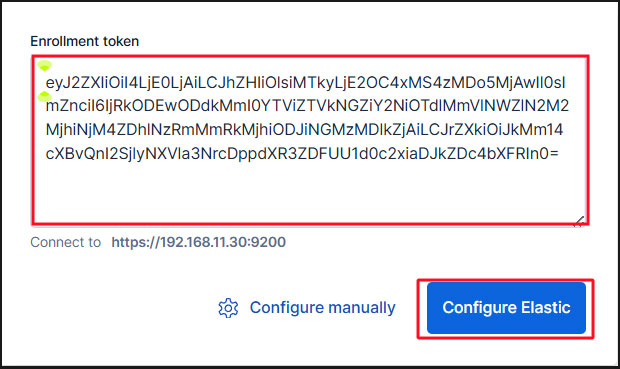
Paste the token and Kibana will automatically connect to Elasticsearch.
Click Configure Elastic. Your settings will be saved and Elasticsearch will be configured and restarted.
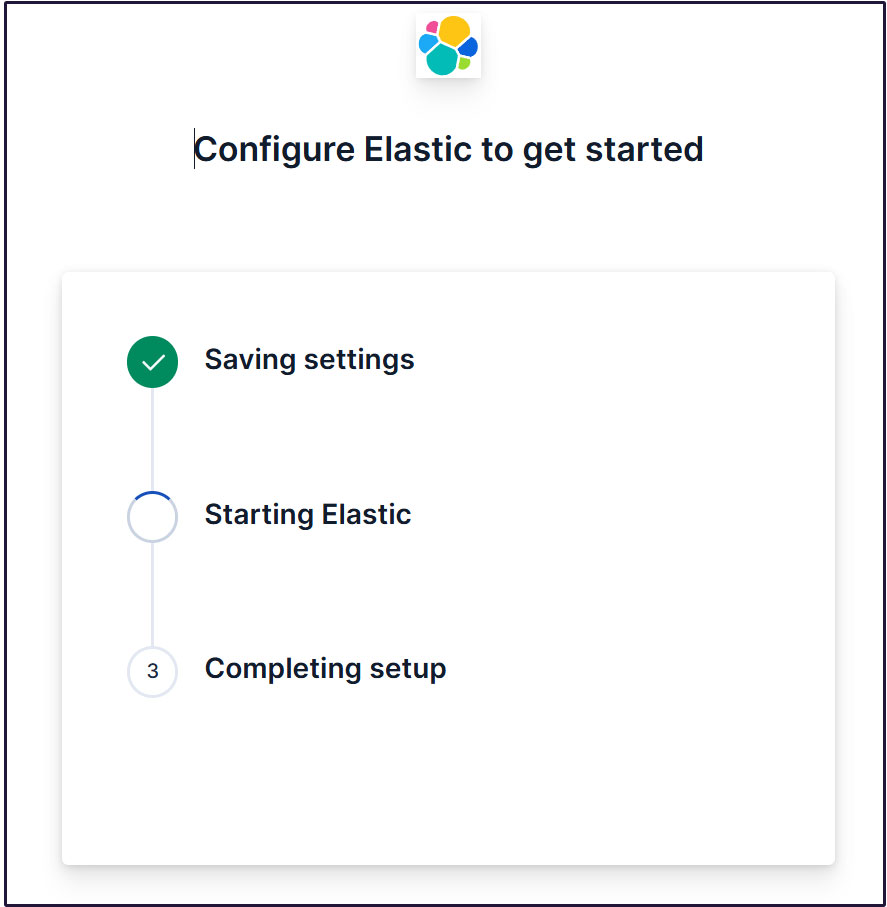
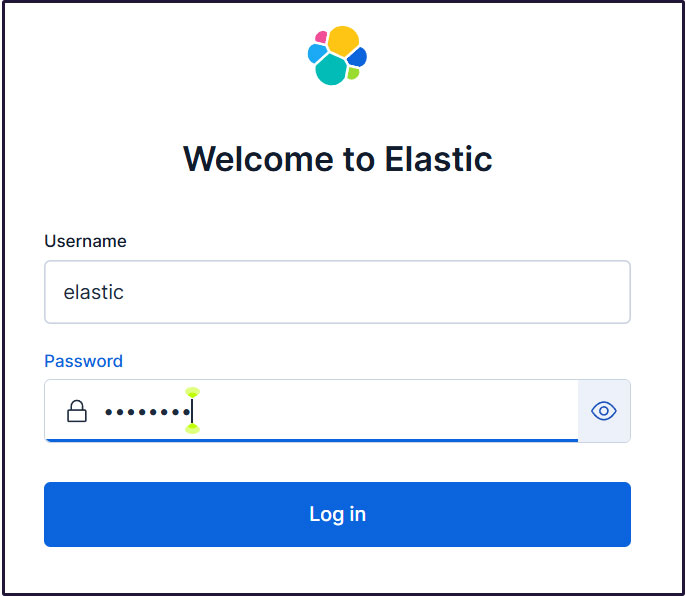
Go to the login page. Log in using the generated Elastic user credentials.
Username : elastic
Password : Password regenerated for clarity
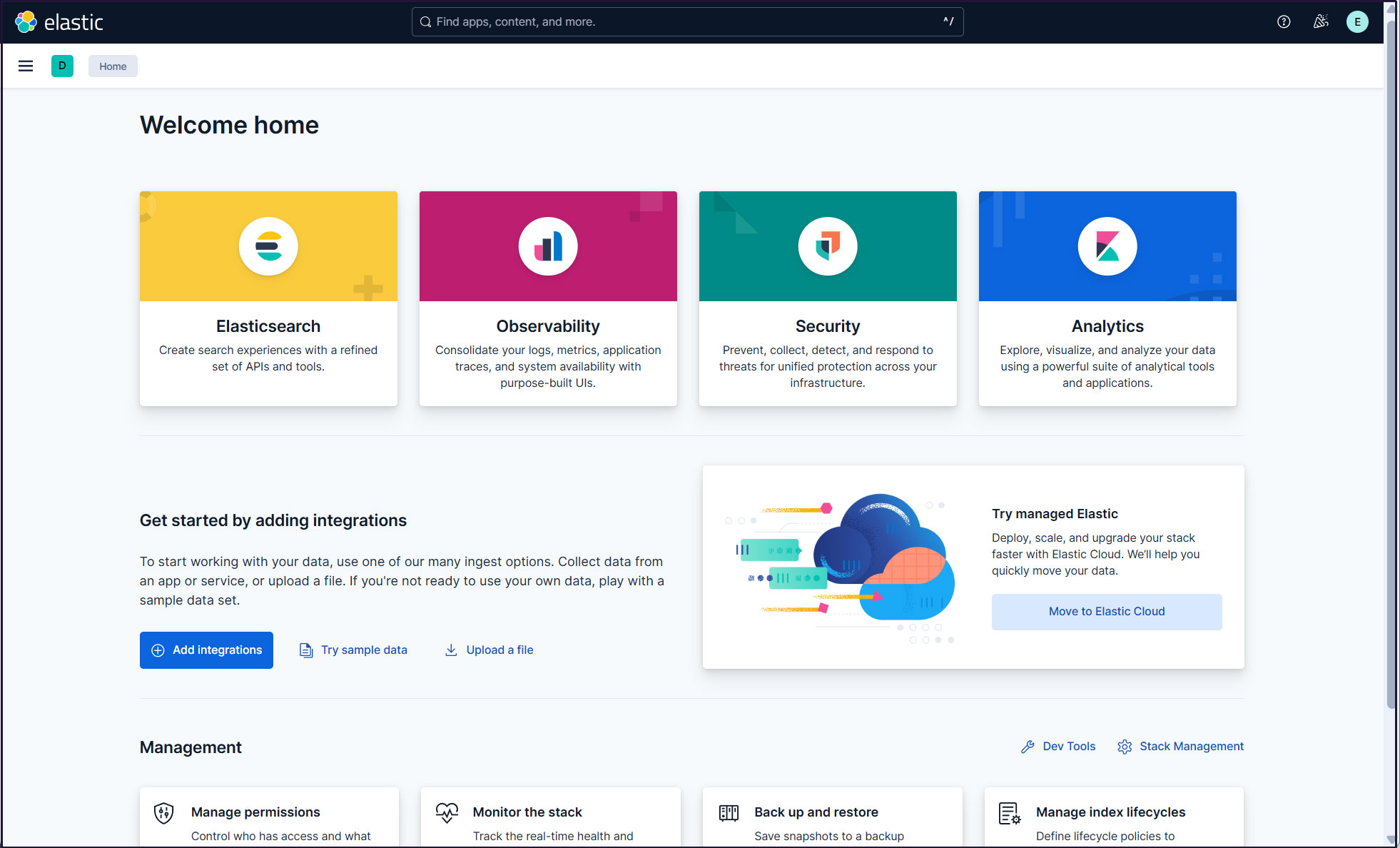
On the welcome page, click "Explore on my own" to proceed to the Kibana 9.x dashboard.

Installing Filebeat 9.x
To collect and monitor logs from Debian12.14 using the ELK stack, Filebeat must be installed.
This work will be done on the 1st server Debian12.14 IP address (192.168.11.83).
①Install the Elastic Stack 9.x repository signing key
# apt update
# apt install -y apt-transport-https gnupg2
# curl -fsSL https://artifacts.elastic.co/GPG-KEY-elasticsearch | gpg --dearmor -o /etc/apt/keyrings/elasticsearch-archive-keyring.gpg
➁Install the Elastic Stack 9.x repository
# echo "deb [signed-by=/etc/apt/keyrings/elasticsearch-archive-keyring.gpg] https://artifacts.elastic.co/packages/9.x/apt stable main" | tee /etc/apt/sources.list.d/elastic-9.x.list
update
# apt update
➂Install Filebeat 9
# apt install filebeat
④Configuring Filebeat Logging
The default filebeat configuration file is /etc/filebeat/filebeat.yml
To make Filebeat write logs to its own log file, enter the following settings in the configuration file
# cat >> /etc/filebeat/filebeat.yml << 'EOL'
logging.level: info
logging.to_files: true
logging.files:
  path: /var/log/filebeat
  name: filebeat
  keepfiles: 7
  permissions: 0640
EOL
⑤Connecting Filebeat to the data processing system
Configure Filebeat to connect to a data processing system. In this case, it is Elasticsearch.
To send logs directly to Elasticsearch, edit the Filebeat configuration file and update the Output Settings section.
Connecting to Elasticsearch 9 requires SSL and authentication.
Make sure you can connect to Elasticsearch port 9200/tcp
# telnet 192.168.11.85 9200

Trying 192.168.11.85...
Connected to 192.168.11.85.
Escape character is '^]'.
⑥Elasticsearch CA certificate creation
Download the Elasticsearch CA certificate and save it in a directory of your choice (this time as /etc/filebeat/elastic-ca.crt)
# openssl s_client -connect 192.168.11.85:9200 \
-showcerts </dev/null 2>/dev/null | \
openssl x509 -outform PEM > /etc/filebeat/elastic-ca.crt
Get the credentials that Filebeat uses to authenticate to Elasticsearch. In this case, we will use the default superadmin and Elastic user credentials.
# vi /etc/filebeat/filebeat.yml

Per Line 138 : Add the Kibana section as follows:
#host: "localhost:5601"
host: "192.168.11.85:5601"

Per Line 164 : Modify the Elasticsearch Output section as follows:
output.elasticsearch:
  # Array of hosts to connect to.
  #hosts: ["localhost:9200"]
  hosts: ["192.168.11.85:9200"]

Line 171 : Uncomment the line and add the Elasticsearch CA certificate below it
# Protocol - either `http` (default) or `https`.
  protocol: "https"
  ssl.certificate_authorities: ["/etc/filebeat/elastic-ca.crt"]

 Line 175,176 : Disable comments, leave the username as is, and use the Elastic password created on the second server
# Authentication credentials - either API key or username/password.
  #api_key: "id:api_key"
  username: "elastic"
  password: "Password"
⑦Configuration File Test
# filebeat test config
Config OK
⑧Test Filebeat output connections
# filebeat test output

elasticsearch: https://192.168.11.85:9200...
  parse url... OK
  connection...
    parse host... OK
    dns lookup... OK
    addresses: 192.168.11.85
    dial up... OK
  TLS...
    security: server's certificate chain verification is enabled
    handshake... OK
    TLS version: TLSv1.3
    dial up... OK
  talk to server... OK
  version: 9.4.2
⑨Enable Filebeat's Suricata module
Change it as follows
# filebeat modules enable suricata

# vi /etc/filebeat/modules.d/suricata.yml
Line 7-8:
# Module: suricata
# Docs: https://www.elastic.co/guide/en/beats/filebeat/main/filebeat-module-suricata.html

- module: suricata
  # All logs
  eve:
    enabled: true
    var.paths: ["/var/log/suricata/eve.json"]

    # Set custom paths for the log files. If left empty,
    # Filebeat will choose the paths depending on your OS.
    #var.paths:
⑩Set up initial environment
Load the SIEM dashboard and pipeline into Elasticsearch
filebeat setup command
# filebeat setup -e

{"log.level":"info","@timestamp":"2026-05-29T13:58:22.356+0900","log.logger":"modules","log.origin":{"function":"github.com/elastic/beats/v7/filebeat/fileset.LoadPipeline","file.name":"fileset/pipelines.go","file.line":134},"message":"Elasticsearch pipeline loaded.","service.name":"filebeat","pipeline":"filebeat-9.4.2-suricata-eve-pipeline","ecs.version":"1.6.0"}
{"log.level":"info","@timestamp":"2026-05-29T13:58:25.833+0900","log.logger":"modules","log.origin":{"function":"github.com/elastic/beats/v7/filebeat/fileset.LoadPipeline","file.name":"fileset/pipelines.go","file.line":134},"message":"Elasticsearch pipeline loaded.","service.name":"filebeat","pipeline":"filebeat-9.4.2-suricata-eve-dns","ecs.version":"1.6.0"}
{"log.level":"info","@timestamp":"2026-05-29T13:58:25.872+0900","log.logger":"modules","log.origin":{"function":"github.com/elastic/beats/v7/filebeat/fileset.LoadPipeline","file.name":"fileset/pipelines.go","file.line":134},"message":"Elasticsearch pipeline loaded.","service.name":"filebeat","pipeline":"filebeat-9.4.2-suricata-eve-dns-answer-v1","ecs.version":"1.6.0"}
{"log.level":"info","@timestamp":"2026-05-29T13:58:25.913+0900","log.logger":"modules","log.origin":{"function":"github.com/elastic/beats/v7/filebeat/fileset.LoadPipeline","file.name":"fileset/pipelines.go","file.line":134},"message":"Elasticsearch pipeline loaded.","service.name":"filebeat","pipeline":"filebeat-9.4.2-suricata-eve-dns-answer-v2","ecs.version":"1.6.0"}
{"log.level":"info","@timestamp":"2026-05-29T13:58:25.963+0900","log.logger":"modules","log.origin":{"function":"github.com/elastic/beats/v7/filebeat/fileset.LoadPipeline","file.name":"fileset/pipelines.go","file.line":134},"message":"Elasticsearch pipeline loaded.","service.name":"filebeat","pipeline":"filebeat-9.4.2-suricata-eve-tls","ecs.version":"1.6.0"}
{"log.level":"info","@timestamp":"2026-05-29T13:58:26.167+0900","log.logger":"modules","log.origin":{"function":"github.com/elastic/beats/v7/filebeat/fileset.LoadPipeline","file.name":"fileset/pipelines.go","file.line":134},"message":"Elasticsearch pipeline loaded.","service.name":"filebeat","pipeline":"filebeat-9.4.2-suricata-eve-http","ecs.version":"1.6.0"}
⑪Filebeat service launched
# systemctl start filebeat.service
# systemctl enable filebeat.service
⑫Check with Kibana
Log back into Kibana at accsess http://192.168.11.85:5601
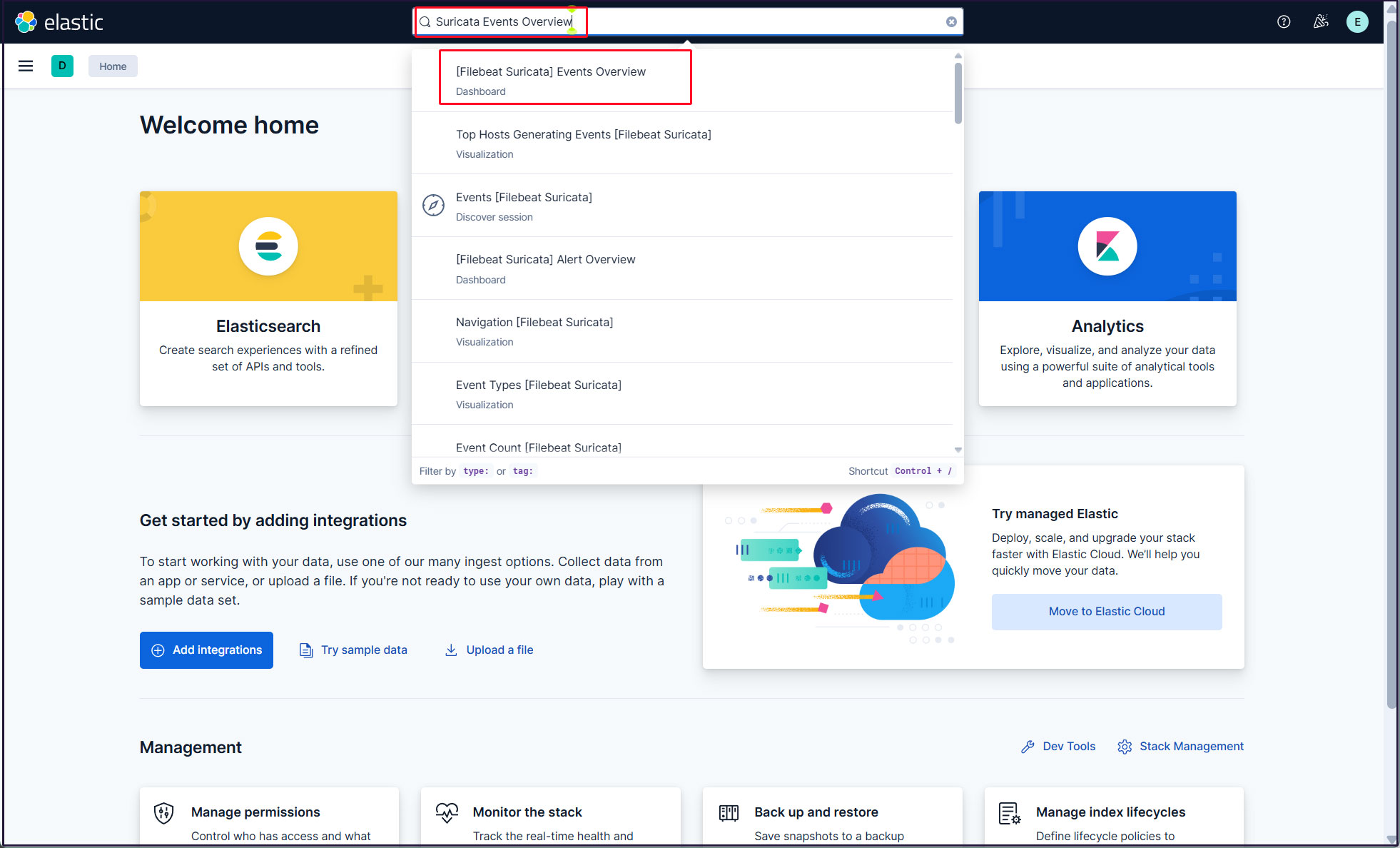
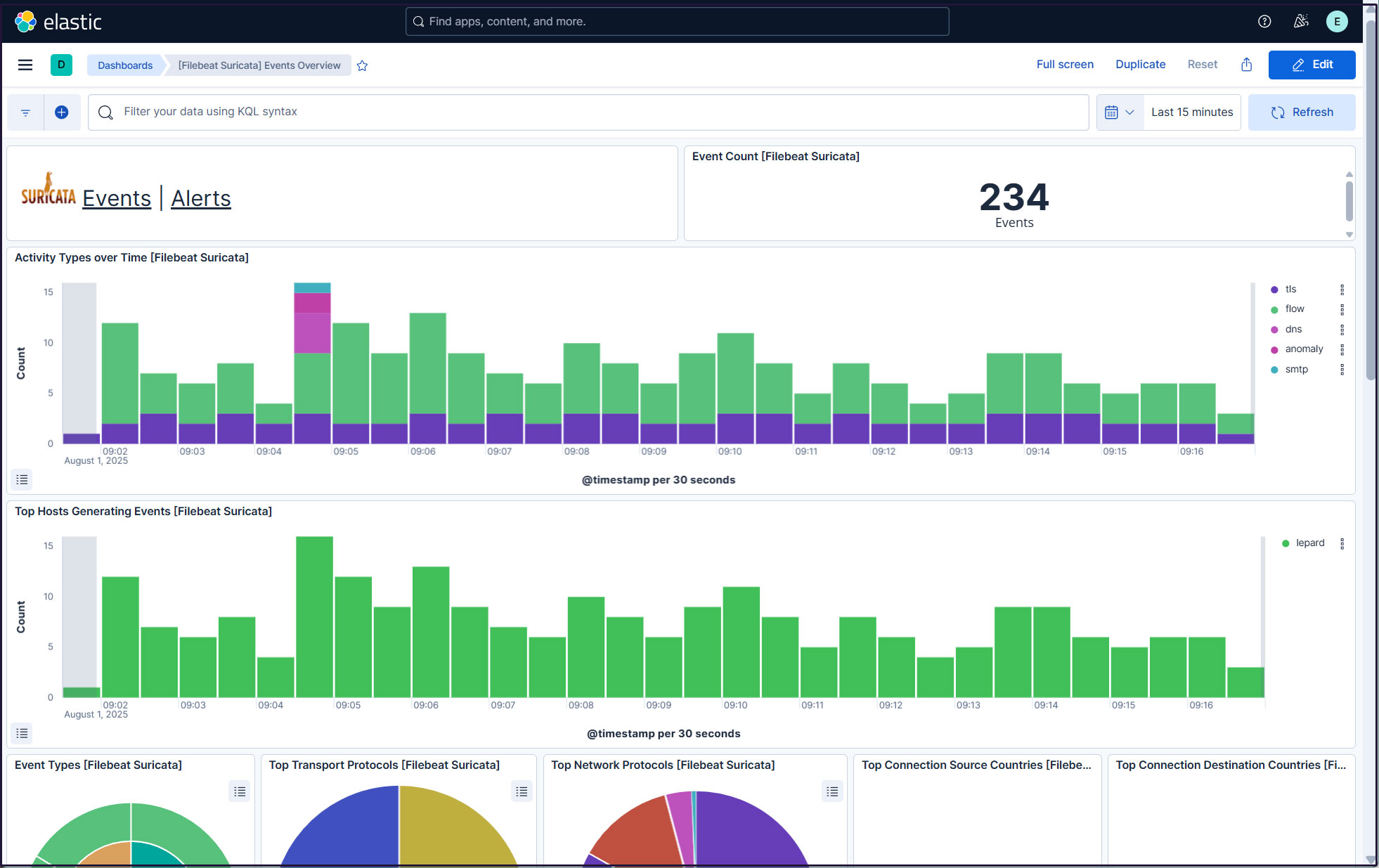
Type "Suricata Events Overview" in the top search field and click [Filebeat Suricata]Events Overview
All Suricata events in the last 15 minutes are displayed
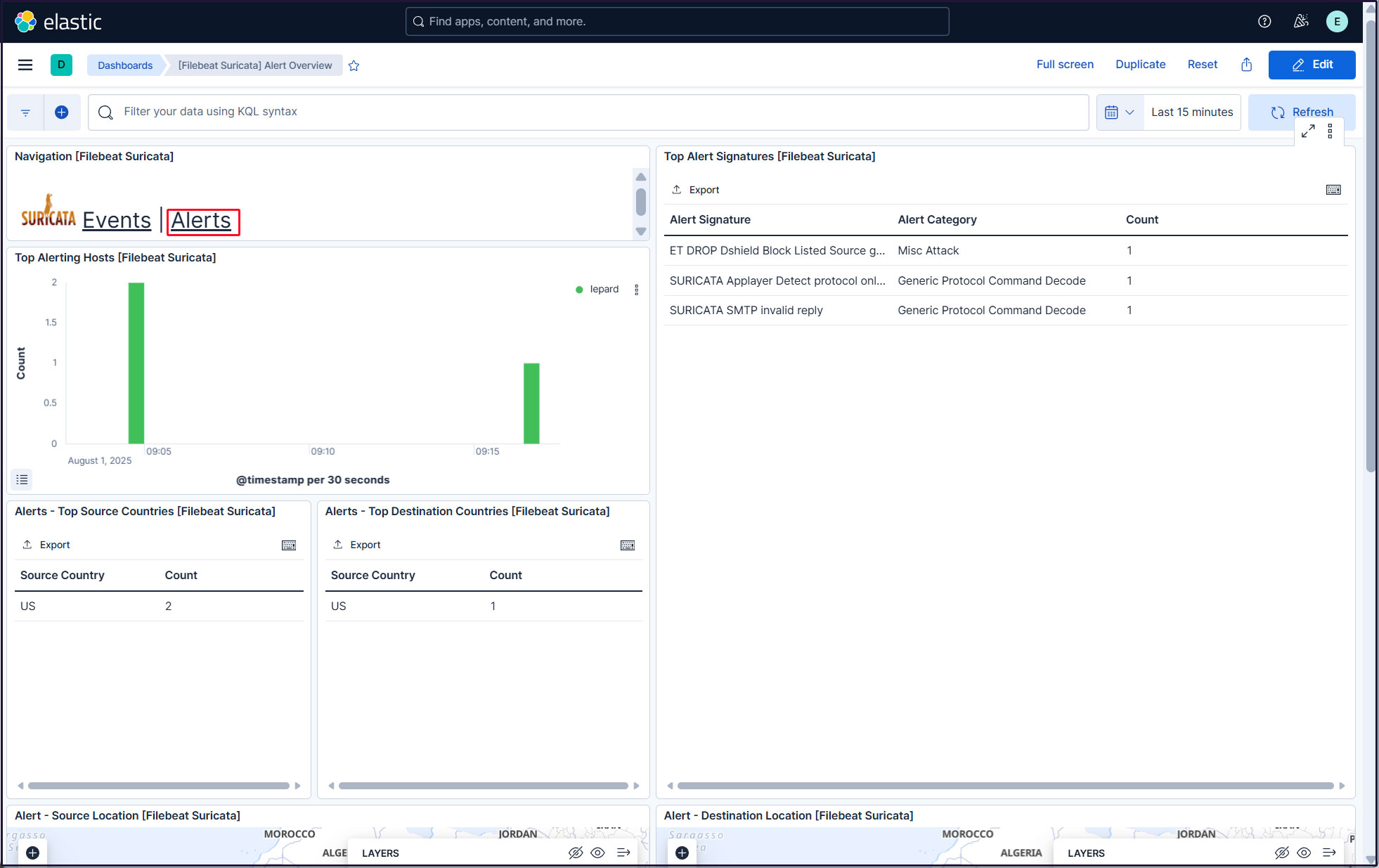
Click on the Alerts text next to the Suricata logo for malicious traffic alerts
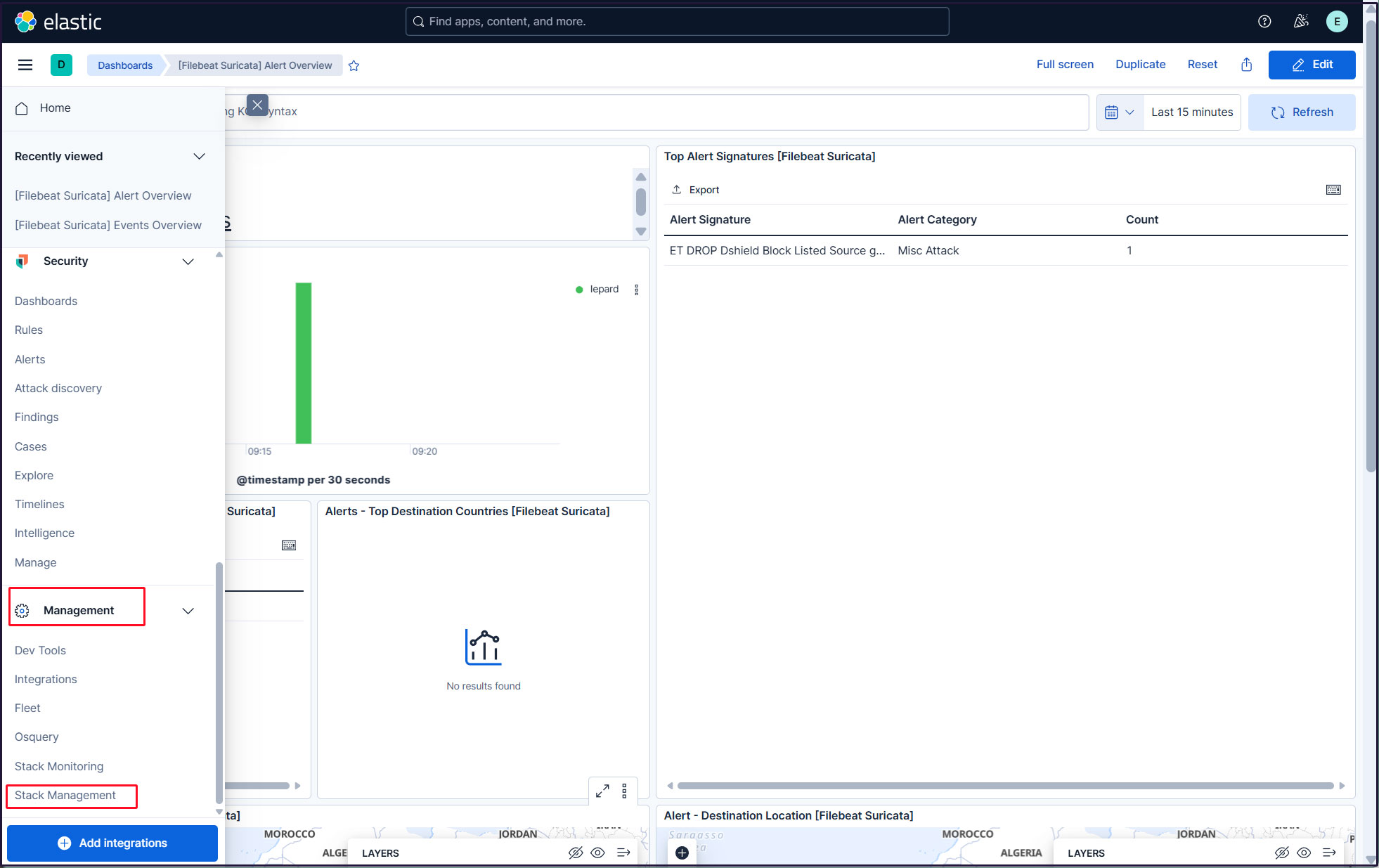
Create a new user account so that you do not have to use the elastic superuser account.
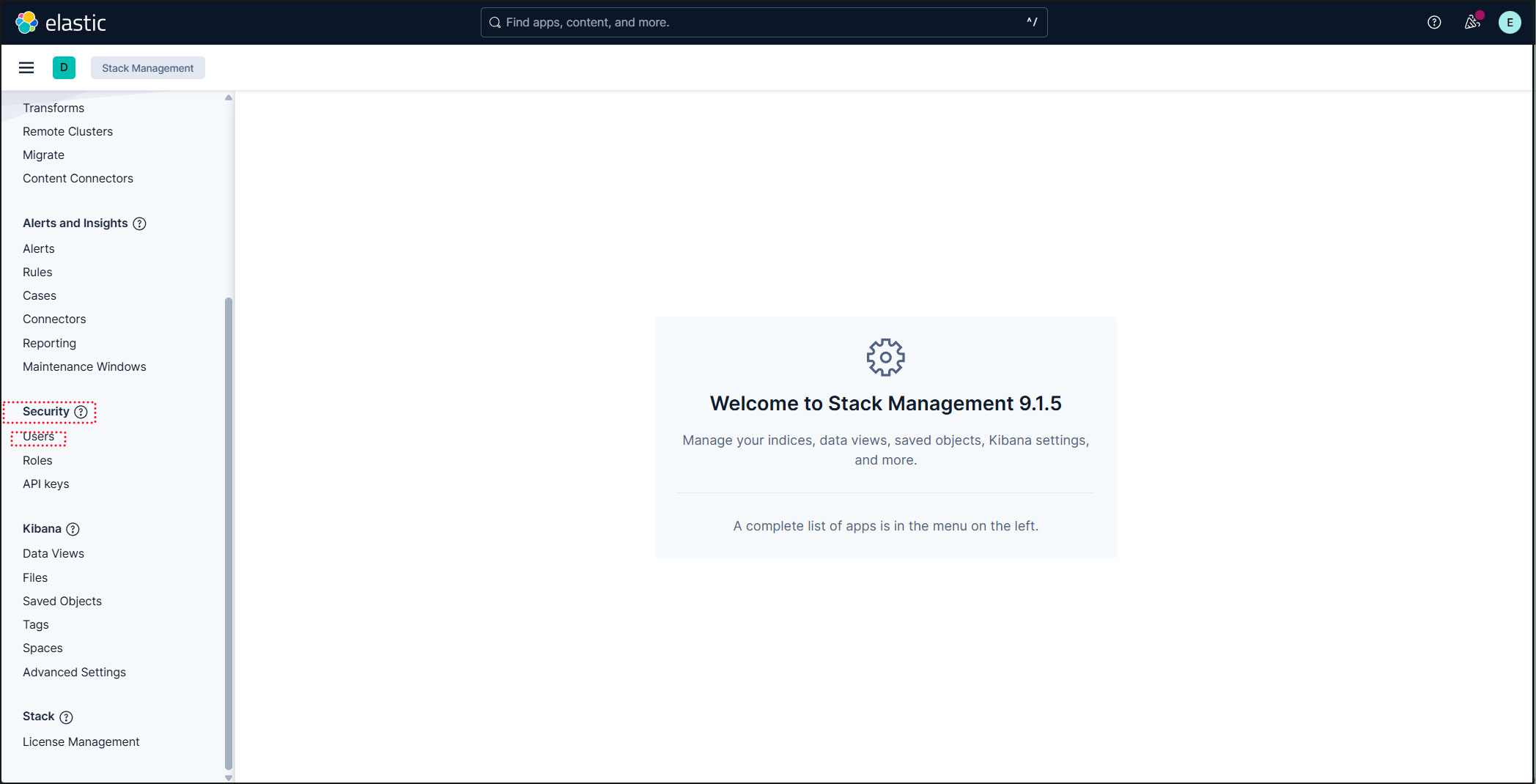
Click on the three-line mark in the upper left corner and select "Stack Management" under "Management"
Select "security" and "Users"
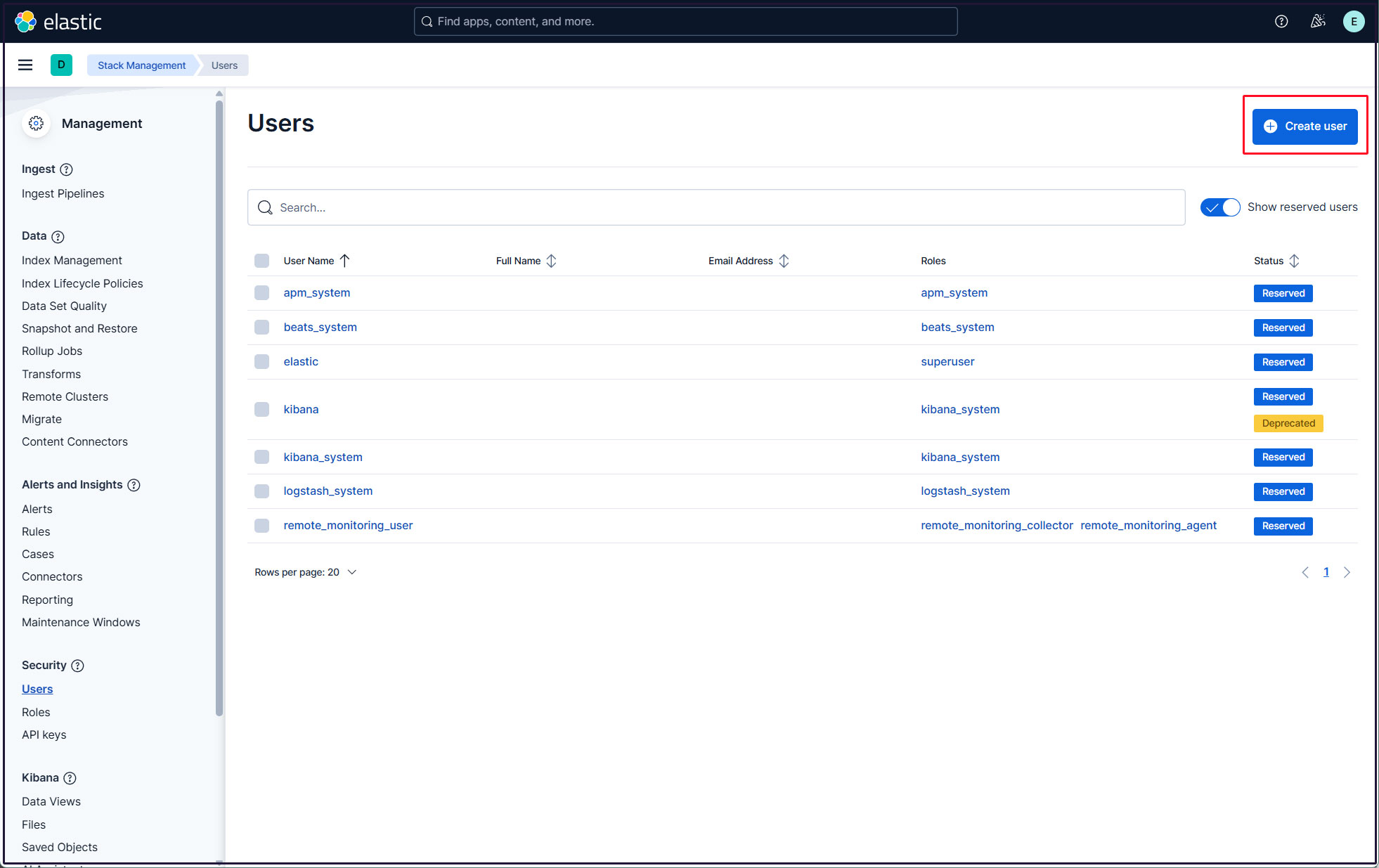
Click on the "Create user" button in the upper right corner
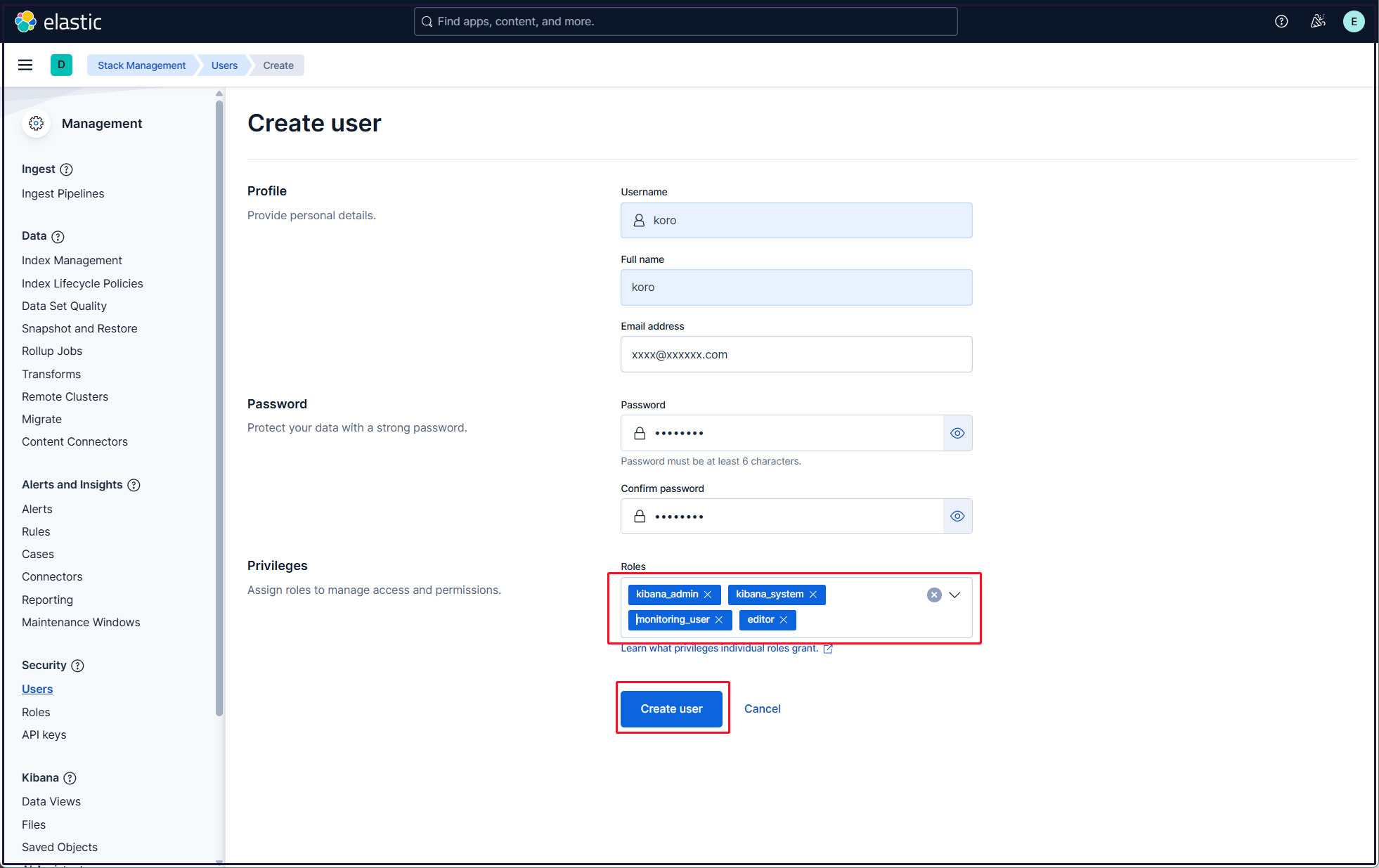
Enter new user information, assign the roles kibana_admin, kibana_system, monitoring_user, and editor in Privileges, and finally click Create user
Log out of the current profile and confirm that you can log in with the newly created user account.