

OracleLinux9.8
Oracle Linux provides a 100% application binary compatible alternative to Red Hat Enterprise Linux and CentOS Linux for both hybrid and multi-cloud environments.
Since 2006, Oracle Linux has been completely free to download and use. Source code, binaries and updates are provided free of charge. It is freely redistributable. Free for use in production environments
We will proceed with the latest Oracle Linux 9.8 (released July 20, 2026).
1.Oracle Linux9.8 Download
Download the Oracle Linux 9.8 installation image (OracleLinux-R9-U8-x86_64-dvd.iso ) from the following site

2.Oracle Linux 9.8 Install
Install USB media, change BIOS settings to boot from USB media, and install.
The installation procedure is the same as for Oracle Linux 9.3, so please refer to the following page

Initial setup after installation
1.Install bash completion extension package
# dnf -y install bash-completion
# reboot
2.Disabling SELinux
First, disable selinux. selinux is a feature that improves auditing and security in Linux, but when enabled, it places considerable restrictions on the behavior of services and on what can be configured. Therefore, it is basically disabled in many cases.
SELinux operating modes
Enforcing : SELinux functionality is enabled and access control is enabled
Permissive :SElinux will warn, but no access restrictions will be placed
disabled : Both SElinux function and access control are disabled
①Current SELinux status
# getenforce
Enforcing
②Switching to [permissive] mode
# setenforce 0
# getenforce
Permissive
③Switch to [enforcing] mode
# setenforce 1
# getenforce
Enforcing
④To completely disable SELinux, a reboot is required by adding selinux=0 to the kernel command line as follows
# grubby --update-kernel ALL --args selinux=0
# reboot
※ To return SELinux to active, do the following (reboot after changes)
# grubby --update-kernel ALL --remove-args selinux
# reboot
3.System Modernization
Update the packages as soon as possible after installing the operating system.
# dnf -y update
4.Services to be stopped due to security measures
I will disable the following services that appear to be unnecessary.
# systemctl stop atd.service
# systemctl disable atd.service
# systemctl stop kdump.service
# systemctl disable kdump.service
# systemctl stop lvm2-monitor.service
# systemctl disable lvm2-monitor.service
# systemctl stop mdmonitor.service
# systemctl disable mdmonitor.service
# systemctl stop smartd.service
# systemctl disable smartd.service
# systemctl stop tuned.service
# systemctl disable tuned.service
# systemctl stop dm-event.socket
# systemctl disable dm-event.socket
5.Adding Repositories
5.1 Added EPEL repository and epel-next repository
# dnf install -y https://dl.fedoraproject.org/pub/epel/epel-release-latest-9.noarch.rpm
# vi /etc/yum.repos.d/epel.repo
[epel]
name=Extra Packages for Enterprise Linux 9 - $basearch
# It is much more secure to use the metalink, but if you wish to use a local mirror
# place its address here.
# baseurl=https://download.example/pub/epel/9/Everything/$basearch/
metalink=https://mirrors.fedoraproject.org/metalink?repo=epel-9&arch=$basearch&infra=$infra&content=$contentdir
enabled=1
priority=10 ← Specify the priority within the range of 1 to 99
gpgcheck=1
countme=1
gpgkey=file:///etc/pki/rpm-gpg/RPM-GPG-KEY-EPEL-9
[epel-debuginfo]
name=Extra Packages for Enterprise Linux 9 - $basearch - Debug
# dnf install -y https://dl.fedoraproject.org/pub/epel/epel-next-release-latest-9.noarch.rpm
# vi /etc/yum.repos.d/epel-next.repo
[epel-next]
name=Extra Packages for Enterprise Linux 9 - Next - $basearch
# It is much more secure to use the metalink, but if you wish to use a local mirror
# place its address here.
# baseurl=https://download.example/pub/epel/next/9/Everything/$basearch/
metalink=https://mirrors.fedoraproject.org/metalink?repo=epel-next-9&arch=$basearch&infra=$infra&content=$contentdir
enabled=1
priority=10 ← Specify the priority within the range of 1 to 99
gpgcheck=1
countme=1
gpgkey=file:///etc/pki/rpm-gpg/RPM-GPG-KEY-EPEL-9
[epel-next-debuginfo]
name=Extra Packages for Enterprise Linux 9 - Next - $basearch - Debug
5.2 Add Remi's RPM repository
# dnf install -y https://rpms.remirepo.net/enterprise/remi-release-9.rpm
# vi /etc/yum.repos.d/remi-safe.repo
# This repository is safe to use with RHEL/CentOS base repository
# it only provides additional packages for the PHP stack
# all dependencies are in base repository or in EPEL
[remi-safe]
name=Safe Remi's RPM repository for Enterprise Linux $releasever_major - $basearch
#baseurl=http://rpms.remirepo.net/enterprise/$releasever_major/safe/$basearch/
#mirrorlist=https://rpms.remirepo.net/enterprise/$releasever_major/safe/$basearch/httpsmirror
mirrorlist=http://cdn.remirepo.net/enterprise/$releasever_major/safe/$basearch/mirror
enabled=1
priority=10 ← Specify the priority within the range of 1 to 99
gpgcheck=1
# can be enabled if not behind a proxy because of possible cache issue
repo_gpgcheck=0
gpgkey=file:///etc/pki/rpm-gpg/RPM-GPG-KEY-remi.el$releasever_major
[remi-safe-debuginfo]
name=Remi's RPM repository for Enterprise Linux $releasever_major - $basearch - debuginfo
6.Network configuration (command line configuration method)
6.1 Host Name Change
Change the host name to Lepard to try it out
# hostnamectl set-hostname Lepard
# reboot
[huong@Lepard:~]$
6.2 Static IP address setting
If the default setting is to obtain an IP address via DHCP during OS installation, change the network settings to a fixed IP address if necessary.
First, find out the name of your network interface with the following command
In this case, it is “ens160”.
# nmcli dev s
DEVICE  TYPE      STATE                   CONNECTION
ens160  ethernet  connected               ens160
lo      loopback  connected (externally)  lo
In Oraclelinux8, this could be changed by rewriting the ifcfg-xxx file that was in network-scripts, but in Oraclelinux9, the ifcfg format is deprecated and by default, NetworkManager creates new profiles in this format and no longer exists.
Change it with the “nmcli” command.
Change the static IPv4 address to “192.168.11.83”.
# Fixed IPv4 address setting
# nmcli connection modify ens160 ipv4.addresses 192.168.11.83/24

# Gateway Configuration
# nmcli connection modify ens160 ipv4.gateway 192.168.11.1

# Referenced DNS settings
# nmcli connection modify ens160 ipv4.dns 192.168.11.1

# DNS search base settings (own domain name)
# nmcli connection modify ens160 ipv4.dns-search [domain]

# Set to fixed IP address assignment
# nmcli connection modify ens160 ipv4.method manual

# Reboot interface to reflect settings
# nmcli connection down ens160; nmcli connection up ens160
Connection 'ens160' successfully deactivated (D-Bus active path: /org/freedesktop/NetworkManager/ActiveConnection/1)
Connection successfully activated (D-Bus active path: /org/freedesktop/NetworkManager/ActiveConnection/2)
7.Network configuration (how to configure via GUI)
# nmtui
7.1 Static IP address setting
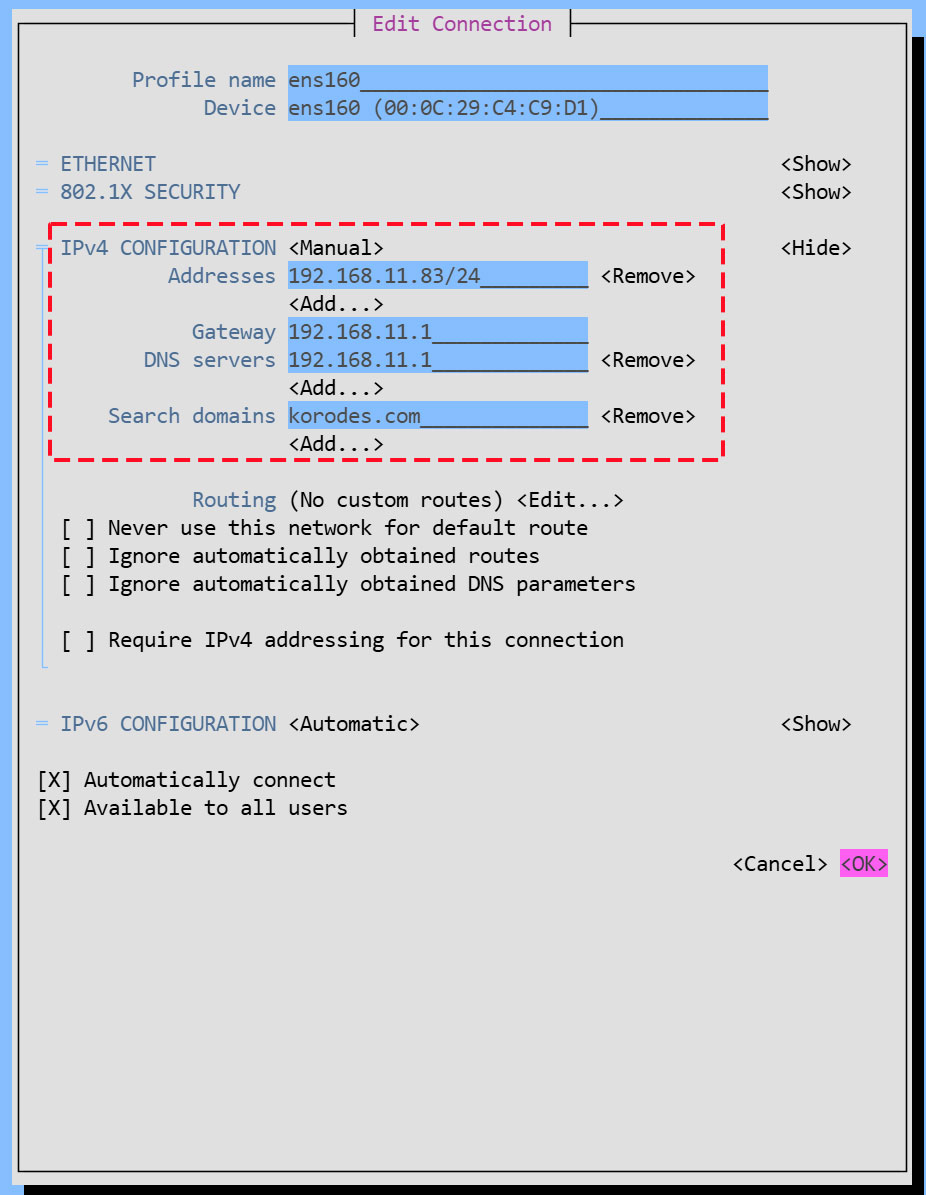
Change the fixed IPv4 address to "192.168.11.83" as above.
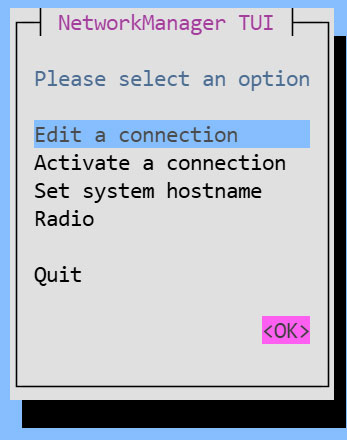
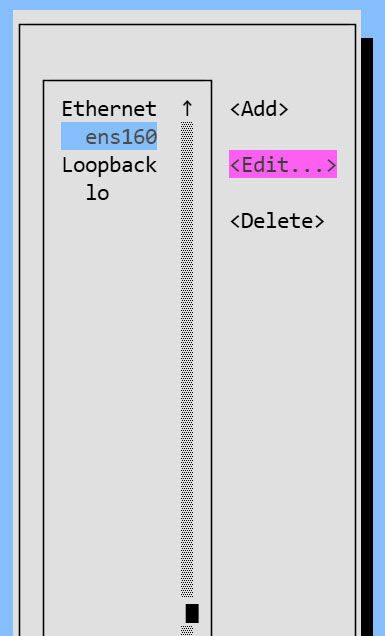
Enter the information in the fields below and click [OK].
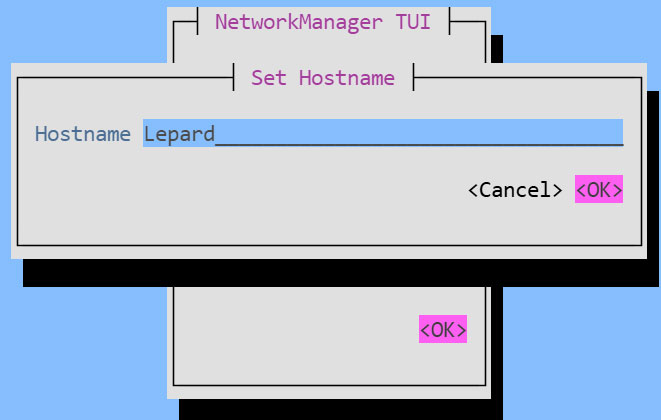
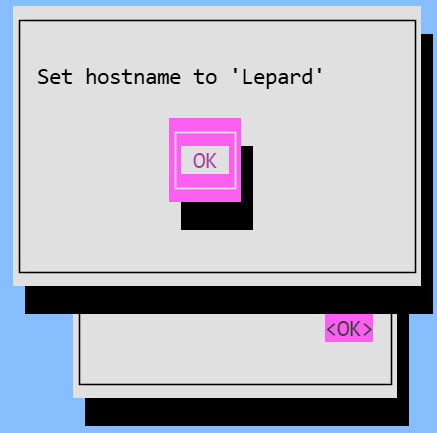
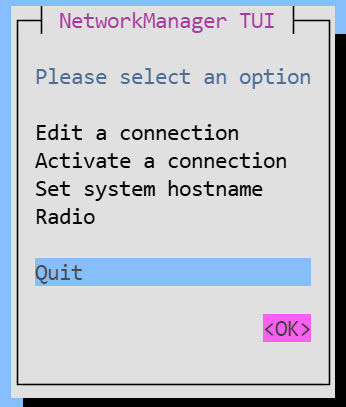
7.2 Host Name Change
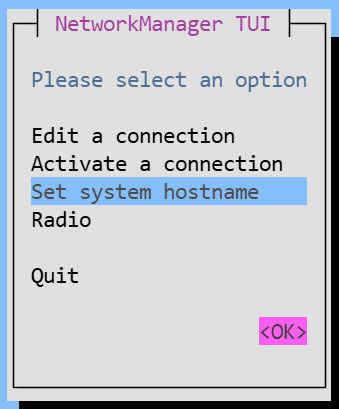
Change the hostname to Lepard
Return to the first screen of [NetworkManager TUI], select [Set system hostname], and click <OK>.
8.Vim Configuration
①Installing Vim Extensions
# dnf -y install vim-enhanced
②Apply and reflect Vim
# vi ~/.bashrc

# Add alias to the last line
alias vi='vim'
Apply settings
# source ~/.bashrc
③Configure Vim as a user-specific environment
# vi ~/.vimrc
"Use Vim's proprietary extensions (not compatible with vi)
set nocompatible
" Specify character encoding
set encoding=utf-8
" Specify file encoding (read sequentially from the beginning until successful)
set fileencodings=utf-8,iso-2022-jp,sjis,euc-jp
" Specify the line break code for automatic recognition
set fileformats=unix,dos
" Take a backup
set backup
" Specify the directory to back up
set backupdir=~/backup
" Number of generations to retain search history
set history=50
" Searches are case-insensitive
set ignorecase
" If you include uppercase letters in your search terms, the search will distinguish between uppercase and lowercase letters.
set smartcase
" Highlight words matching the search term
set hlsearch
" Use incremental search
set incsearch
" Show line numbers
set number
" Visualize line breaks ($) and tabs (^I)
set list
" Highlight the corresponding bracket when entering a bracket
set showmatch
" Do not add a line break at the end of the file.
set binary noeol
" Enable auto-indentation
set autoindent
" Syntax highlighting
syntax on
" Change the color of comment statements when syntax is enabled
highlight Comment ctermfg=LightCyan
" Wrap lines to fit the window width
set wrap