1.SSL Certificate Acquisition ( Let's Encrypt )
Install the latest open ssl
# dnf -y install openssl-devel
1.1 advance preparation
1.Package management system Snappy installation
Since the SSL certificate issuing tool "certbot" of Let's Encrypt is recommended to be installed using "snap" after 2021, install Snapd first.(Can also be installed the traditional way with dnf or yum)

# dnf install epel-release
# dnf upgrade
# dnf -y install snapd
Enable systemd unit to manage the main snap communication socket
# systemctl enable --now snapd.socket
Enable Classics Snap support
# ln -s /var/lib/snapd/snap /snap
Bring snapd version up to date
# snap install core
If the above fails, run the following command instead (the core package will be installed along with the package called hello-world)
# snap install hello-world
Update core package
# snap refresh core
Version Check
# snap --version
snap          2.76-0.el9
snapd         2.76-0.el9
series        16
ol            9.8
kernel        6.12.0-205.92.4.2.el9uek.x86_64
architecture  amd64
Log out and log in again or reboot the system to ensure that the snap path is updated correctly
2.certbot package install
# snap install --classic certbot
certbot 5.7.0 from Certbot Project (certbot-eff✓) installed
Create symbolic link to /snap/bin/certbot
# ln -s /snap/bin/certbot /usr/bin/certbot
Confirmation
# ls -la /usr/bin/certbot
lrwxrwxrwx 1 root root 17 Jan  6 14:35 /usr/bin/certbot -> /snap/bin/certbot

# ls -la /snap/bin/certbot
lrwxrwxrwx 1 root root 13 Jan  6 14:34 /snap/bin/certbot -> /usr/bin/snap
1.2 Obtaining Certificates
# certbot certonly --webroot -w /var/www/html/[FQDN] -d [FQDN]
Registration of e-mail address and agreement to terms of use are required for the first time only.
Specify an email address to receive
Saving debug log to /var/log/letsencrypt/letsencrypt.log
Enter email address or hit Enter to skip.
(Enter 'c' to cancel): [mail address]
Please read the Terms of Service at:
https://letsencrypt.org/documents/LE-SA-v1.8-July-06-2026.pdf
You must agree in order to register with the ACME server. Do you agree?
(Y)es/(N)o: y
Would you be willing, once your first certificate is successfully issued, to
share your email address with the Electronic Frontier Foundation, a founding
partner of the Let's Encrypt project and the non-profit organization that
develops Certbot? We'd like to send you email about our work encrypting the web,
EFF news, campaigns, and ways to support digital freedom.
(Y)es/(N)o: y
Account registered.
Requesting a certificate for [FQDN]
Successfully received certificate.
Certificate is saved at: /etc/letsencrypt/live/[FQDN]/fullchain.pem
Key is saved at: /etc/letsencrypt/live/[FQDN]/privkey.pem
This certificate expires on 2026-11-17.
These files will be updated when the certificate renews.
Certbot has set up a scheduled task to automatically renew this certificate in the background.
If you like Certbot, please consider supporting our work by:
- Donating to ISRG / Let's Encrypt: https://letsencrypt.org/donate
- Donating to EFF: https://eff.org/donate-le
Success if displayed"Successfully received certificate".
# The following certificate is obtained under [/etc/letsencrypt/live/<FQDN>/] as described in the message
cert.pem ⇒ SSL server certificate (including public key)
chain.pem ⇒ intermediate certificate
fullchain.pem ⇒ File containing cert.pem and chain.pem combined
privkey.pem ⇒ private key
※Obtaining a Let's Encrypt certificate when the web server is not running
It is a prerequisite that the server on which the work is to be performed is accessible from the Internet at port 80.
Use the simple Web server function by specifying [--standalone].
# certbot certonly --standalone -d <FQDN>
Renewing certificates already obtained
# Renew all certificates with an expiration date of less than 30 days
# If you want to renew regardless of the number of days remaining on the expiration date, specify [--force-renewal] as well.
# certbot [--force-renewal] renew
1.2 Automatic renewal of certificates(Let's Encrypt)
①Pre-registration testing
First, test the automatic update using the following --dry-run option.
With this option, certificates are not renewed, only checked, so there is no need to worry about getting stuck with a limit on the number of times a certificate can be obtained.
# certbot renew --dry-run
Saving debug log to /var/log/letsencrypt/letsencrypt.log
Processing /etc/letsencrypt/renewal/[FQDN].conf
Account registered.
Simulating renewal of an existing certificate for [FQDN]
Congratulations, all simulated renewals succeeded:
/etc/letsencrypt/live/[FQDN]/fullchain.pem (success)
②When you install the snap version of certbot, the automatic certificate renewal function is also installed.
# systemctl list-timers | less

NEXT                        LEFT         LAST                        PASSED       UNIT                         ACTIVATES
Thu 2026-08-20 09:40:00 JST 9min left    Thu 2026-08-20 09:30:06 JST 16s ago      sysstat-collect.timer        sysstat-collect.service
Thu 2026-08-20 09:55:00 JST 24min left   Thu 2026-08-20 09:25:06 JST 5min ago     pmlogger_check.timer         pmlogger_check.service
Thu 2026-08-20 09:55:10 JST 24min left   Thu 2026-08-20 09:25:16 JST 5min ago     pmlogger_farm_check.timer    pmlogger_farm_check.service
Thu 2026-08-20 09:58:00 JST 27min left   Thu 2026-08-20 09:28:06 JST 2min 17s ago pmie_check.timer             pmie_check.service
Thu 2026-08-20 09:58:10 JST 27min left   Thu 2026-08-20 09:28:16 JST 2min 7s ago  pmie_farm_check.timer        pmie_farm_check.service
Thu 2026-08-20 10:03:21 JST 32min left   -                           -            dnf-makecache.timer          dnf-makecache.service
Thu 2026-08-20 12:31:00 JST 3h 0min left -                           -            snap.certbot.renew.timer     snap.certbot.renew.service
Fri 2026-08-21 00:00:00 JST 14h left     Thu 2026-08-20 09:01:50 JST 28min ago    logrotate.timer              logrotate.service
Fri 2026-08-21 00:00:00 JST 14h left     Thu 2026-08-20 09:01:50 JST 28min ago    mlocate-updatedb.timer       mlocate-updatedb.service
Fri 2026-08-21 00:00:00 JST 14h left     -                           -            sa-update.timer              sa-update.service
Fri 2026-08-21 00:00:00 JST 14h left     Thu 2026-08-20 09:01:50 JST 28min ago    unbound-anchor.timer         unbound-anchor.service
Fri 2026-08-21 00:07:00 JST 14h left     -                           -            sysstat-summary.timer        sysstat-summary.service
Fri 2026-08-21 00:08:00 JST 14h left     Thu 2026-08-20 09:02:21 JST 28min ago    pmie_daily.timer             pmie_daily.service
Fri 2026-08-21 00:10:00 JST 14h left     Thu 2026-08-20 09:02:23 JST 28min ago    pmlogger_daily.timer         pmlogger_daily.service
Fri 2026-08-21 09:28:23 JST 23h left     Thu 2026-08-20 09:28:22 JST 2min 0s ago  systemd-tmpfiles-clean.timer systemd-tmpfiles-clean.service

15 timers listed.
Pass --all to see loaded but inactive timers, too.
snap.certbot.renew.timer is registered
Check the unit file snap.certbot.renew.timer
# vi /etc/systemd/system/snap.certbot.renew.timer

[Unit]
# Auto-generated, DO NOT EDIT
Description=Timer renew for snap application certbot.renew
Requires=var-lib-snapd-snap-certbot-5781.mount
After=var-lib-snapd-snap-certbot-5781.mount
X-Snappy=yes

[Timer]
Unit=snap.certbot.renew.service
OnCalendar=*-*-* 00:39
OnCalendar=*-*-* 12:31

[Install]
WantedBy=timers.target
According to the above configuration, it will attempt to update at 00:39 and 12:31 every day as specified in the OnCalender parameter(However, the set time changes randomly with each update)
Check the unit file snap.certbot.renew.service
# vi /etc/systemd/system/snap.certbot.renew.service

[Unit]
# Auto-generated, DO NOT EDIT
Description=Service for snap application certbot.renew
Requires=var-lib-snapd-snap-certbot-5781.mount
Wants=network.target
After=var-lib-snapd-snap-certbot-5781.mount network.target snapd.apparmor.service
X-Snappy=yes

[Service]
EnvironmentFile=-/etc/environment
ExecStart=/usr/bin/snap run --timer="00:00~24:00/2" certbot.renew
SyslogIdentifier=certbot.renew
Restart=no
WorkingDirectory=/var/snap/certbot/5781
TimeoutStopSec=30s
Type=oneshot
However, the web server using the certificate will not be restarted, so set up a script to run automatically after the update
# vi /etc/letsencrypt/renewal-hooks/post/web_restart.sh

Please fill in the following
#!/bin/bash
systemctl reload httpd
Execution permissions for the script
# chmod 755 /etc/letsencrypt/renewal-hooks/post/web_restart.sh
2. Converting Apache to https
Install the following just in case
# dnf -y install mod_ssl
2.1 Edit ssl.conf file
# vi /etc/httpd/conf.d/ssl.conf
Line 43 : Uncomments and make changes
DocumentRoot "/var/www/html/[FQDN]"
Line 44 : Uncomments and make changes
ServerName [FQDN]:443
Line 85 : Add it as a comment below
#SSLCertificateFile /etc/pki/tls/certs/localhost.crt
SSLCertificateFile /etc/letsencrypt/live/[FQDN]/cert.pem
Line 93 : Add it as a comment below
#SSLCertificateKeyFile /etc/pki/tls/private/localhost.key
SSLCertificateKeyFile /etc/letsencrypt/live/[FQDN]/privkey.pem
Line 103 : Add
SSLCertificateChainFile /etc/letsencrypt/live/[FQDN]/chain.pem
Restart Apache.
# systemctl restart httpd.service
Allow https in Firewall
# firewall-cmd --add-service=https --permanent
# firewall-cmd --reload
2.2 Redirect HTTP communications to HTTPS
Append to the virtual host configuration file
# vi /etc/httpd/conf.d/vhost.conf
<VirtualHost *:80>
Addition below
RewriteEngine On
RewriteCond %{HTTPS} off
RewriteRule ^(.*)$ https://%{HTTP_HOST}%{REQUEST_URI} [R=301,L]
DocumentRoot /var/www/html/[FQDN]
ServerName [FQDN]
ServerAdmin [email address]
ErrorLog logs/[FQDN].error_log
CustomLog logs/[FQDN].access_log combined
</VirtualHost>
<Directory "/var/www/html/[FQDN]>
Options FollowSymLinks
AllowOverride All
</Directory>
Restart Apache
# systemctl restart httpd.service
3. SSL/TLS (Let's Encrypt) settings on the mail server
3.1Obtaining a certificate for the mail server
To obtain a certificate for the mail server, you must first stop the web server.
# systemctl stop httpd.service
# certbot certonly --standalone -d mail.[domain]
Saving debug log to /var/log/letsencrypt/letsencrypt.log
Requesting a certificate for mail.[Domain]
Successfully received certificate.
Certificate is saved at: /etc/letsencrypt/live/mail.[Domain]/fullchain.pem
Key is saved at: /etc/letsencrypt/live/mail.[Domain]/privkey.pem
This certificate expires on 2026-11-17.
These files will be updated when the certificate renews.
Certbot has set up a scheduled task to automatically renew this certificate in the background.
If you like Certbot, please consider supporting our work by:
- Donating to ISRG / Let's Encrypt: https://letsencrypt.org/donate
- Donating to EFF: https://eff.org/donate-le
Start Apache.
# systemctl start httpd.service
3.2 Postfix Configuration
# vi /etc/postfix/main.cf
Per Line 709,715 : Commenting
#smtpd_tls_cert_file = /etc/pki/tls/certs/postfix.pem
#smtpd_tls_key_file = /etc/pki/tls/private/postfix.key
Add to the last line
smtpd_use_tls = yes
smtp_tls_mandatory_protocols = !SSLv2, !SSLv3
smtpd_tls_mandatory_protocols = !SSLv2, !SSLv3
smtpd_tls_cert_file = /etc/letsencrypt/live/mail.[domain]/fullchain.pem
smtpd_tls_key_file = /etc/letsencrypt/live/mail.[domain]/privkey.pem
smtpd_tls_session_cache_database = btree:${data_directory}/smtpd_scache
# vi /etc/postfix/master.cf
Line 17-20 : Uncomments
submission inet n - n - - smtpd
-o syslog_name=postfix/submission
-o smtpd_tls_security_level=encrypt
-o smtpd_sasl_auth_enable=yes
# -o smtpd_tls_auth_only=yes
Line 29-32 : Uncomments
smtps inet n - n - - smtpd
-o syslog_name=postfix/smtps
-o smtpd_tls_wrappermode=yes
-o smtpd_sasl_auth_enable=yes
# -o smtpd_reject_unlisted_recipient=no
3.3 Dovecot Settings
# vi /etc/dovecot/conf.d/10-ssl.conf
Line 8:Confirmation
ssl = yes
Line 14,15:Add a comment, and below it, specify the following certificate/key files.
#ssl_cert = </etc/pki/dovecot/certs/dovecot.pem
#ssl_key = </etc/pki/dovecot/private/dovecot.pem
ssl_cert = </etc/letsencrypt/live/mail.[domain]/fullchain.pem
ssl_key = </etc/letsencrypt/live/mail.[domain]/privkey.pem
Allow Port 587 in firewall
# firewall-cmd --add-port=587/tcp --permanent
# firewall-cmd --reload
# systemctl restart postfix.service dovecot.service
3.4 Thunderbird Settings
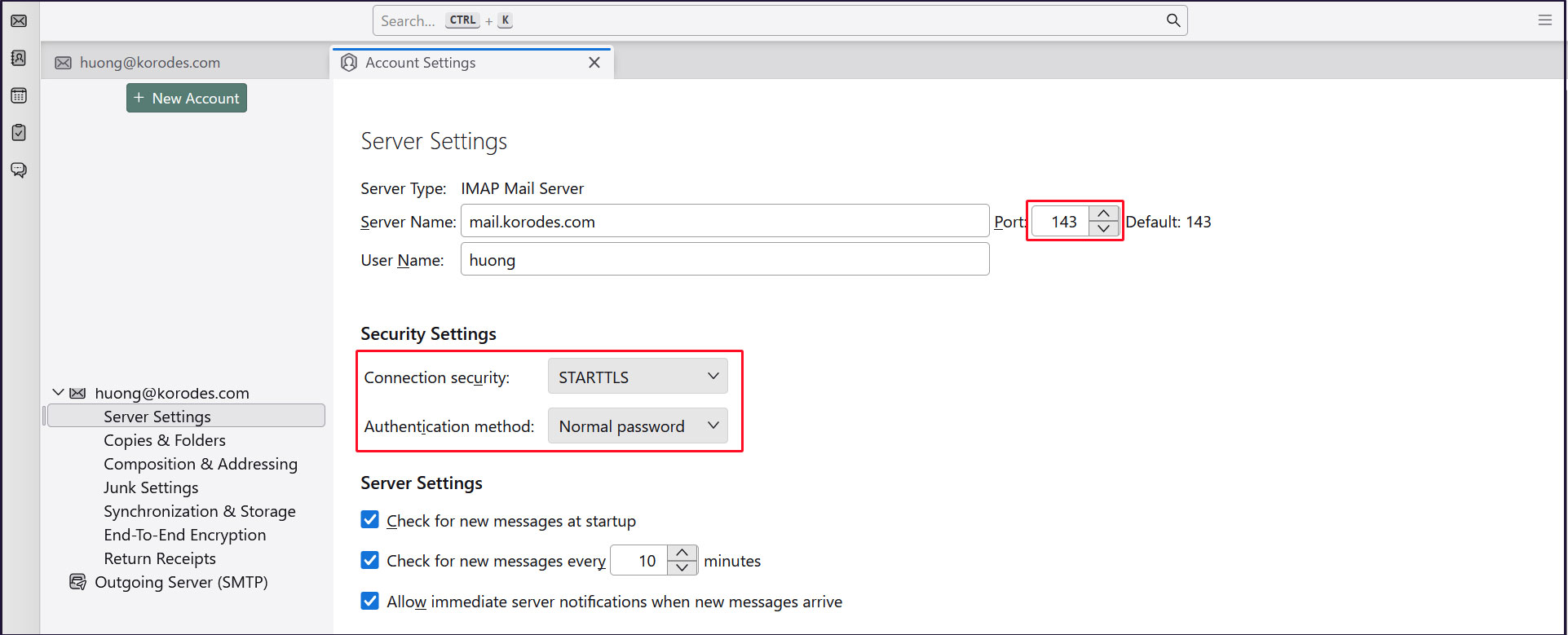
Receiving servers
Port : 143
Connection security : STARTTLS
Authentication method : Normal password
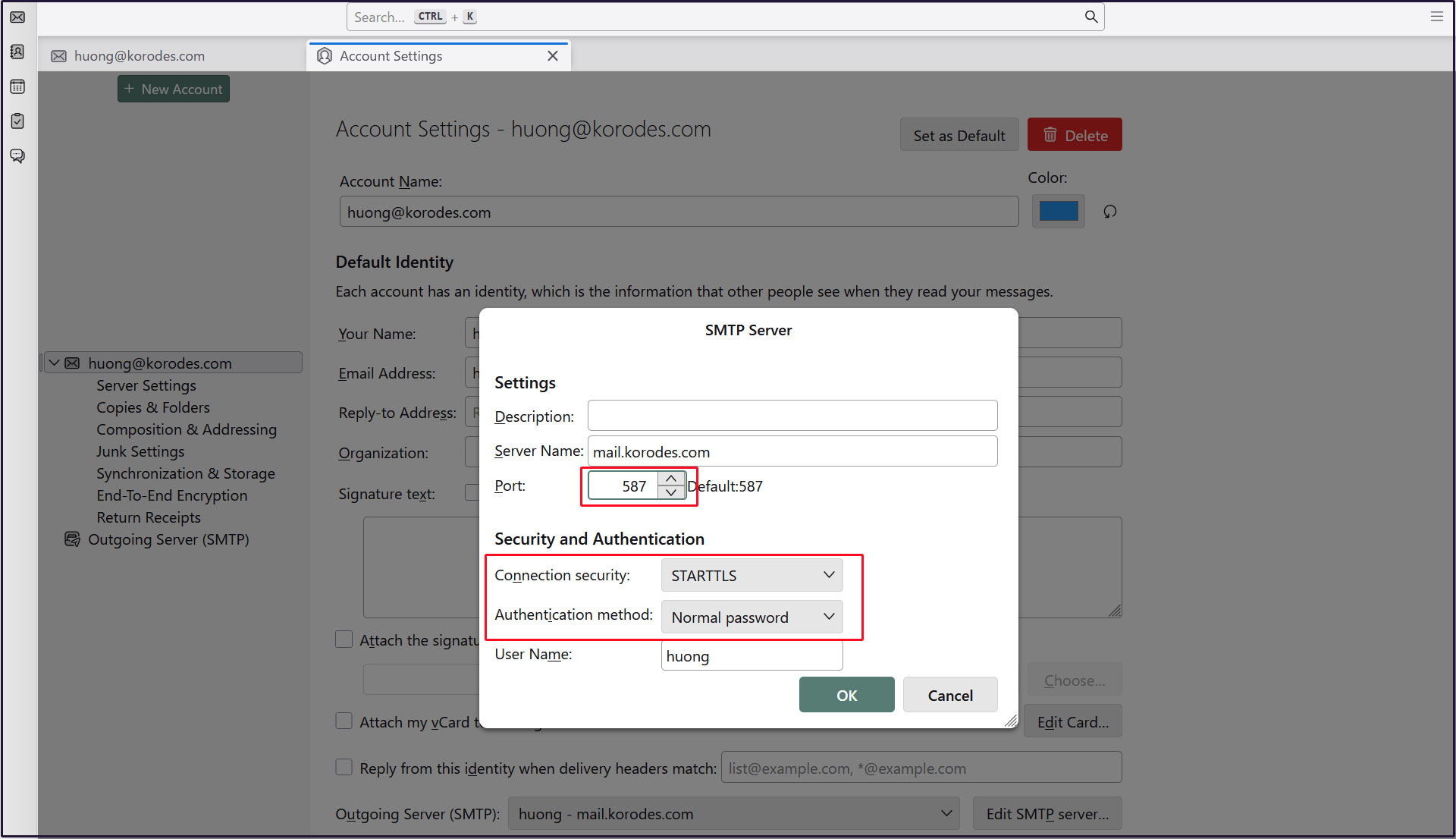
Sending server
Port : 587
Connection security : STARTTLS
Authentication method : Normal password