
1.Disabling SELinux
First, disable selinux. selinux is a feature that improves auditing and security in Linux, but when enabled, it places considerable restrictions on the behavior of services and on what can be configured. Therefore, it is basically disabled in many cases.
SELinux Operation Mode
Enforcing : SELinux functionality is enabled and access control is enabled
Permissive : SElinux will warn, but no access restrictions will be placed
disabled : Both SElinux function and access control are disabled
①Current SELinux status
# getenforce
Enforcing
②Switching to [permissive] mode
# setenforce 0
# getenforce
Permissive
➂To completely disable SELinux, a reboot is required by adding selinux=0 to the kernel command line as follows
# grubby --update-kernel ALL --args selinux=0
# reboot
※ To return SELinux to active, do the following (reboot after changes)
# grubby --update-kernel ALL --remove-args selinux
# reboot
2.System Modernization
Update packages as soon as possible after OS installation.
# dnf -y update
3.Services to be stopped due to security measures
# systemctl stop atd.service
# systemctl disable atd.service
# systemctl stop kdump.service
# systemctl disable kdump.service
# systemctl stop lvm2-monitor.service
# systemctl disable lvm2-monitor.service
# systemctl stop mdmonitor.service
# systemctl disable mdmonitor.service
# systemctl stop smartd.service
# systemctl disable smartd.service
# systemctl stop dm-event.socket
# systemctl disable dm-event.socket
4.Adding Repositories
4.1 Add EPEL repository
|
1 2 |
# dnf config-manager --set-enabled crb # dnf -y install epel-release |
|
1 |
# vi /etc/yum.repos.d/epel.repo |
|
1 2 3 4 5 6 7 8 9 10 11 12 13 14 15 16 17 |
[epel] name=Extra Packages for Enterprise Linux $releasever - $basearch # It is much more secure to use the metalink, but if you wish to use a local mirror # place its address here. #baseurl=https://download.example/pub/epel/$releasever_major${releasever_minor:+.$releasever_minor}/Everything/$basearch/ metalink=https://mirrors.fedoraproject.org/metalink?repo=epel-$releasever_major${releasever_minor:+.$releasever_minor}&arch=$basearch gpgkey=file:///etc/pki/rpm-gpg/RPM-GPG-KEY-EPEL-$releasever_major gpgcheck=1 repo_gpgcheck=0 metadata_expire=24h countme=1 enabled=1 priority=10 # ← Specify priority in the range of 1~99 [epel-debuginfo] name=Extra Packages for Enterprise Linux $releasever - $basearch - Debug # It is much more secure to use the metalink, but if you wish to use a local mirror # place its address here. |
4.2 Added Remi's RPM repository
|
1 2 |
# dnf -y install https://rpms.remirepo.net/enterprise/remi-release-10.rpm # dnf -y config-manager --set-enabled remi |
|
1 |
# vi /etc/yum.repos.d/remi-safe.repo |
|
1 2 3 4 5 6 7 8 9 10 11 12 13 14 15 16 17 18 |
# This repository is safe to use with RHEL/CentOS base repository # it only provides additional packages for the PHP stack # all dependencies are in base repository or in EPEL [remi-safe] name=Safe Remi's RPM repository for Enterprise Linux $releasever_major - $basearch #baseurl=http://rpms.remirepo.net/enterprise/$releasever_major/safe/$basearch/ #mirrorlist=https://rpms.remirepo.net/enterprise/$releasever_major/safe/$basearch/httpsmirror mirrorlist=http://cdn.remirepo.net/enterprise/$releasever_major/safe/$basearch/mirror enabled=1 priority=10 # ← Specify priority in the range of 1~99 gpgcheck=1 # can be enabled if not behind a proxy because of possible cache issue repo_gpgcheck=0 gpgkey=file:///etc/pki/rpm-gpg/RPM-GPG-KEY-remi.el$releasever_major [remi-safe-debuginfo] name=Remi's RPM repository for Enterprise Linux $releasever_major - $basearch - debuginfo |
5.Network configuration (command line configuration)
5.1 Check network device name
|
1 2 3 4 |
# nmcli dev s DEVICE TYPE STATE CONNECTION ens160 ethernet connected ens160 lo loopback connected (externally) lo |
Network device name is "ens160".
5.2 Host Name Change
Change the host name to Lepard
|
1 2 3 4 |
# hostnamectl set-hostname Lepard Log in again [huong@Lepard:~]$ |
5.3 Static IPv4 address configuration
The name of the network interface is "ens160" from 5.1
On CentOS8, it could be changed by rewriting the ifcfg-xxx file found in network-scripts, but on CentOS9, it can be changed with the "nmcli" command.
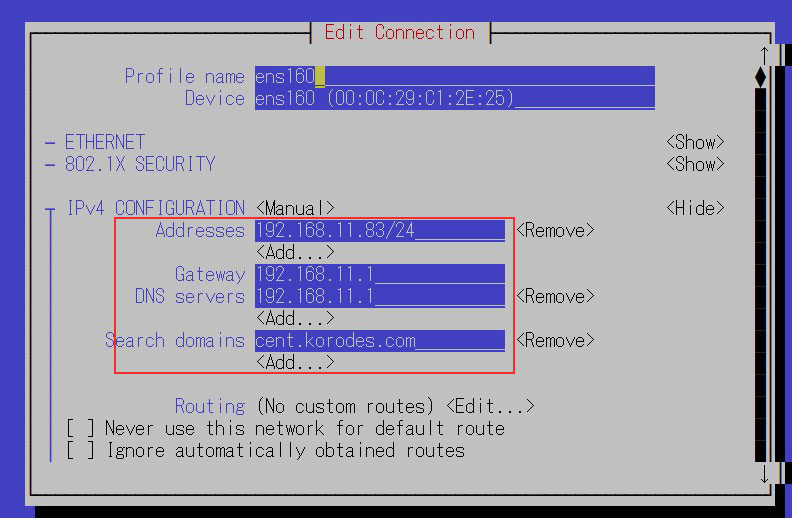
Change the static IPv4 address to "192.168.11.83".
①Change by "nmcli" command
|
1 2 3 4 5 6 7 8 9 10 11 12 13 14 15 16 17 18 19 |
# Fixed IPv4 address setting # nmcli connection modify ens160 ipv4.addresses 192.168.11.83/24 # Gateway Configuration # nmcli connection modify ens160 ipv4.gateway 192.168.11.1 # Referenced DNS settings # nmcli connection modify ens160 ipv4.dns 192.168.11.1 # DNS Search Base Settings (own domain name) # nmcli connection modify ens160 ipv4.dns-search cent.korodes.com # Set to fixed IP address assignment # nmcli connection modify ens160 ipv4.method manual # Reboot interface to reflect settings # nmcli connection down ens160; nmcli connection up ens160 Connection 'ens160' successfully deactivated (D-Bus active path: /org/freedesktop/NetworkManager/ActiveConnection/1) Connection successfully activated (D-Bus active path: /org/freedesktop/NetworkManager/ActiveConnection/2) |
➁Change in GUI
|
1 |
# nmtui |
Change the fixed IPv4 address to "192.168.11.83" as above.
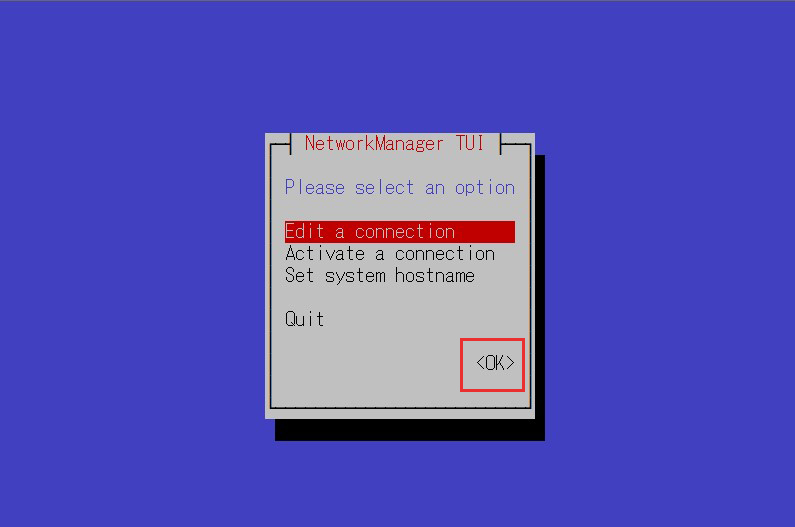
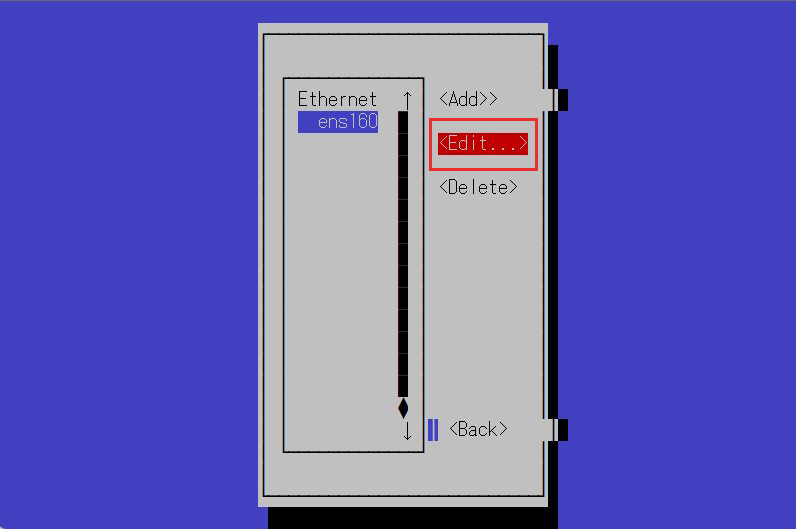
Change the address in the IPv4 settings, scroll down and click [OK]
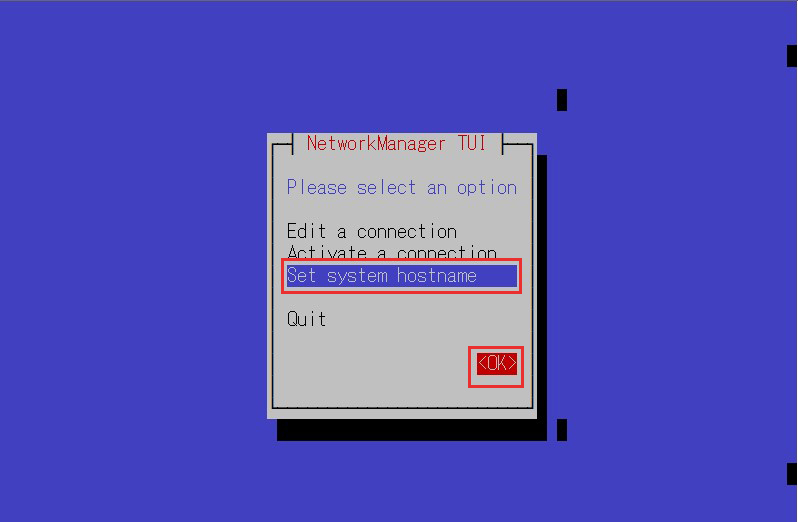
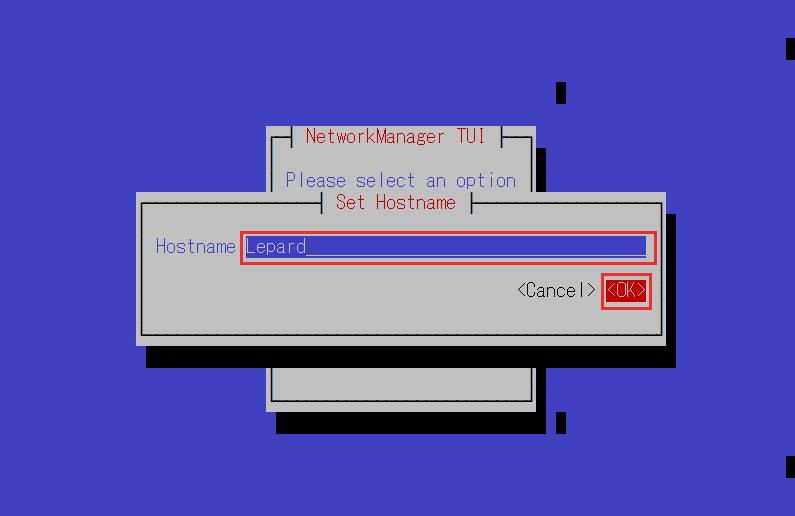
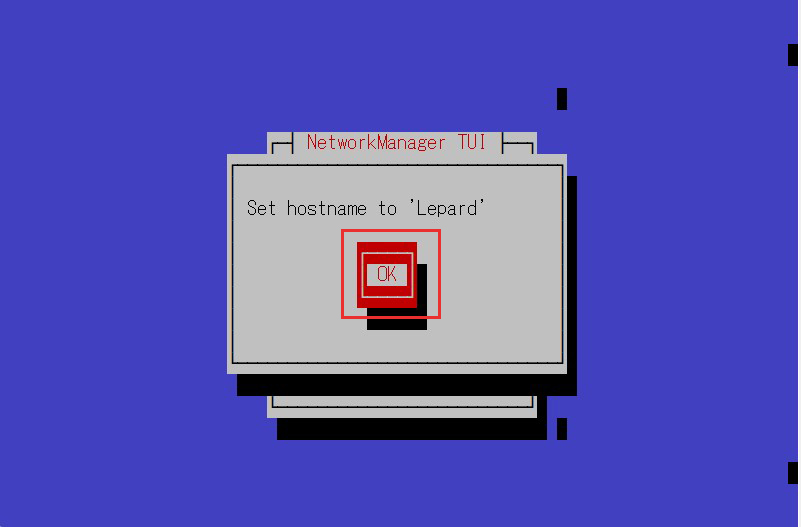
5.4 Host Name Change
Change the host name to Lepard
6.Vim Settings
①Installing Vim
|
1 |
# dnf -y install vim-enhanced |
②Apply and reflect Vim
|
1 2 3 |
# vi ~/.bashrc # Alias appended to the last line alias vi='vim' |
|
1 |
# source ~/.bashrc |
③Configure Vim as a user-specific environment
|
1 |
# vi ~/.vimrc |
|
1 2 3 4 5 6 7 8 9 10 11 12 13 14 15 16 17 18 19 20 21 22 23 24 25 26 27 28 29 30 31 32 33 34 35 36 37 38 |
" Use vim's own extensions (not compatible with vi) set nocompatible " Specify character code set encoding=utf-8 " Specify file encoding (read from the beginning until success) set fileencodings=utf-8,iso-2022-jp,sjis,euc-jp " Specify the line feed code to be recognized automatically set fileformats=unix,dos " Get Backup set backup " Specify the directory from which to obtain backups set backupdir=~/backup " Number of generations to keep search history set history=50 " Do not distinguish case when searching set ignorecase " Mixing capital letters in search terms makes the search case sensitive set smartcase " Highlight words matching your search term set hlsearch " Use incremental search set incsearch " Display line numbers set number " Visualize line breaks ( $ ) and tabs ( ^I ) set list " Highlight corresponding parentheses when entering parentheses set showmatch " No newlines at the end of files set binary noeol " Enable automatic indentation set autoindent " Color-coded display by syntax syntax on " Change color of comment text in case of syntax on highlight Comment ctermfg=LightCyan " Wrap lines by window width set wrap |