1.SSL証明書を取得する (Let's Encrypt)
1.1 事前準備
①mod_sslを有効にする
mod_sslが有効になっていない場合には、有効化しておきます
# a2enmod ssl
パッケージ管理システム Snappyインストール
Let’s EncryptのSSL証明書発行ツール「certbot」は2021年以降は「snap」を利用したインストールが推奨されていますので、まずSnapdをインストールします。
openSUSE16用のsnapリポジトリーを追加する
# zypper addrepo --refresh \
  https://download.opensuse.org/repositories/system:/snappy/openSUSE_Leap_16.0 \
  snappy
リポジトリを追加したら、そのGPGキーをインポートします
# zypper --gpg-auto-import-keys refresh
パッケージキャッシュをアップグレードして新しいsnappyリポジトリを含める:
# zypper dup --from snappy
snapdをインストール
# zypper -n install snapd
システムを再起動して/snap/binをPATHに追加する
snapd.apparmor サービスを有効化して起動します
# systemctl enable --now snapd.apparmor
snapdを有効化し、起動する
# systemctl enable --now snapd
# systemctl start snapd
snapdおよびsnapコマンドラインツールのバージョンを確認
# snap version

snap           2.78
snapd          2.78
series         16
opensuse-leap  16.1
kernel         6.12.0-160100.9-default
architecture   amd64
1.2 certbotインストール
# ln -s /var/lib/snapd/snap /snap
# snap install --classic certbot
certbot 5.10.0 from Certbot Project (certbot-eff✓) installed
1.3 証明書の取得
# zypper -n install python313-certbot
# certbot certonly --webroot -w /srv/www/htdocs/[FQDN] -d <FQDN>
# 初回のみメールアドレスの登録と利用条件への同意が必要
# 受信可能なメールアドレスを指定
Saving debug log to /var/log/letsencrypt/letsencrypt.log
Enter email address (used for urgent renewal and security notices)
(Enter 'c' to cancel): [mail address]
Please read the Terms of Service at
https://letsencrypt.org/documents/LE-SA-v1.4-April-3-2024.pdf. You must agree in
order to register with the ACME server. Do you agree?
(Y)es/(N)o: y
Would you be willing, once your first certificate is successfully issued, to
share your email address with the Electronic Frontier Foundation, a founding
partner of the Let's Encrypt project and the non-profit organization that
develops Certbot? We'd like to send you email about our work encrypting the web,
EFF news, campaigns, and ways to support digital freedom.
(Y)es/(N)o: y
Account registered.
Requesting a certificate for [FQDN]
Successfully received certificate.
Certificate is saved at: /etc/letsencrypt/live/[FQDN]/fullchain.pem
Key is saved at: /etc/letsencrypt/live/[FQDN]/privkey.pem
This certificate expires on 2027-02-14.
These files will be updated when the certificate renews.
NEXT STEPS:
- The certificate will need to be renewed before it expires. Certbot can automatically renew the certificate in the background, but you may need to take steps to enable that functionality. See https://certbot.org/renewal-setup for instructions.
We were unable to subscribe you the EFF mailing list because your e-mail address appears to be invalid. You can try again later by visiting https://act.eff.org.
If you like Certbot, please consider supporting our work by:
- Donating to ISRG / Let's Encrypt: https://letsencrypt.org/donate
- Donating to EFF: https://eff.org/donate-le
「Successfully received certificate.」と表示されれば成功
# メッセージ中に記載の通り [/etc/letsencrypt/live/<FQDN>/] 配下に次の証明書が取得されている
# cert.pem ⇒ SSLサーバー証明書(公開鍵含む)
# chain.pem ⇒ 中間証明書
# fullchain.pem ⇒ cert.pem と chain.pem が結合されたファイル
# privkey.pem ⇒ 公開鍵に対する秘密鍵
2. WebサーバーSSL化
2.1 SSLの設定
# vi /etc/apache2/listen.conf

17行目:コメント解除
Listen 443
SSLバーチャルホスト設定ファイル新規作成
# vi /etc/apache2/vhosts.d/default-ssl.conf

下記を記入
<VirtualHost *:443>
DocumentRoot "/srv/www/htdocs/[FQDN]"
SSLEngine on
SSLProtocol all -SSLv2 -SSLv3
SSLCertificateFile /etc/letsencrypt/live/[FQDN]/cert.pem
SSLCertificateKeyFile /etc/letsencrypt/live/[FQDN]/privkey.pem
SSLCertificateChainFile /etc/letsencrypt/live/[FQDN]/chain.pem
<FilesMatch "\.(cgi|shtml|phtml|php)$">
SSLOptions +StdEnvVars
</FilesMatch>
<Directory "/srv/www/cgi-bin">
SSLOptions +StdEnvVars
</Directory>
</VirtualHost>
# systemctl restart apache2
2.2 HTTP 通信を HTTPS へリダイレクト
HTTP 通信も全て HTTPS へリダイレクトする場合は下記のようにvirtual_host.confに追記する
# vi /etc/apache2/vhosts.d/virtual_host.conf

<VirtualHost *:80>
RewriteEngine On
RewriteCond %{HTTPS} off
RewriteRule ^(.*)$ https://%{HTTP_HOST}%{REQUEST_URI} [R=301,L]

ServerName [FQDN]
ServerAdmin Email address
DocumentRoot /srv/www/htdocs/[FQDN]
ErrorLog /var/log/apache2/[FQDN].error.log
CustomLog /var/log/apache2/[FQDN].access.log combined
LogLevel warn
</VirtualHost>
# a2enmod rewrite
# a2enmod -l
actions alias auth_basic authn_core authn_file authz_host authz_groupfile authz_core authz_user autoindex cgi dir env expires include log_config mime negotiation setenvif ssl socache_shmcb userdir reqtimeout cgid php8 proxy proxy_fcgi rewrite
# systemctl restart apache2
Firewalld を有効にしている場合は HTTPS サービスの許可が必要。HTTPS は 443/TCP を使用します。
# firewall-cmd --add-service=https --permanent
# firewall-cmd --reload
3. Mail サーバーにSSL/TLS(Let's Encrypt) の設定
3.1 メールサーバー用証明書の取得
一度web サーバーを止めてから行う
# systemctl stop httpd.service
# certbot certonly --standalone -d mail.[domain name]
Saving debug log to /var/log/letsencrypt/letsencrypt.log
Requesting a certificate for mail.[Domain]
Successfully received certificate.
Certificate is saved at: /etc/letsencrypt/live/mail.[Domain]/fullchain.pem
Key is saved at: /etc/letsencrypt/live/mail.[Domain]/privkey.pem
This certificate expires on 2027-02-14.
These files will be updated when the certificate renews.
Certbot has set up a scheduled task to automatically renew this certificate in the background.
----------------------------------------------------------------------------------------------------------
If you like Certbot, please consider supporting our work by:
Donating to ISRG / Let's Encrypt: https://letsencrypt.org/donate
Donating to EFF: https://eff.org/donate-le
----------------------------------------------------------------------------------------------------------
Apache 起動
# systemctl start apache2
3.2 Postfixの設定
# vi /etc/postfix/main.cf

最終行に追記
smtpd_tls_cert_file = /etc/letsencrypt/live/mail.[domain name]/fullchain.pem
smtpd_tls_key_file = /etc/letsencrypt/live/mail.[domain name]/privkey.pem
smtpd_use_tls = yes
smtp_tls_mandatory_protocols = !SSLv2, !SSLv3
smtpd_tls_mandatory_protocols = !SSLv2, !SSLv3
smtpd_tls_session_cache_database = btree:/var/lib/postfix/smtpd_scache
# vi /etc/postfix/master.cf

19-23行目 : 下記のように変更
submission inet n       -       n       -       -       smtpd
  -o syslog_name=postfix/submission
#  -o smtpd_forbid_unauth_pipelining=no
  -o smtpd_tls_security_level=encrypt
  -o smtpd_sasl_auth_enable=yes

40-44行目 : 下記のように変更
submissions     inet  n       -       n       -       -       smtpd
  -o syslog_name=postfix/submissions
#  -o smtpd_forbid_unauth_pipelining=no
  -o smtpd_tls_wrappermode=yes
  -o smtpd_sasl_auth_enable=yes
3.3 Dovecotの設定
# vi /etc/dovecot/dovecot.conf

67行目 : 変更
ssl = yes

最終行に追加
ssl_server_cert_file = /etc/letsencrypt/live/mail.[domain name]/fullchain.pem
ssl_server_key_file = /etc/letsencrypt/live/mail.korodes.com/privkey.pem
postfix,dovecot再起動
# systemctl restart postfix dovecot
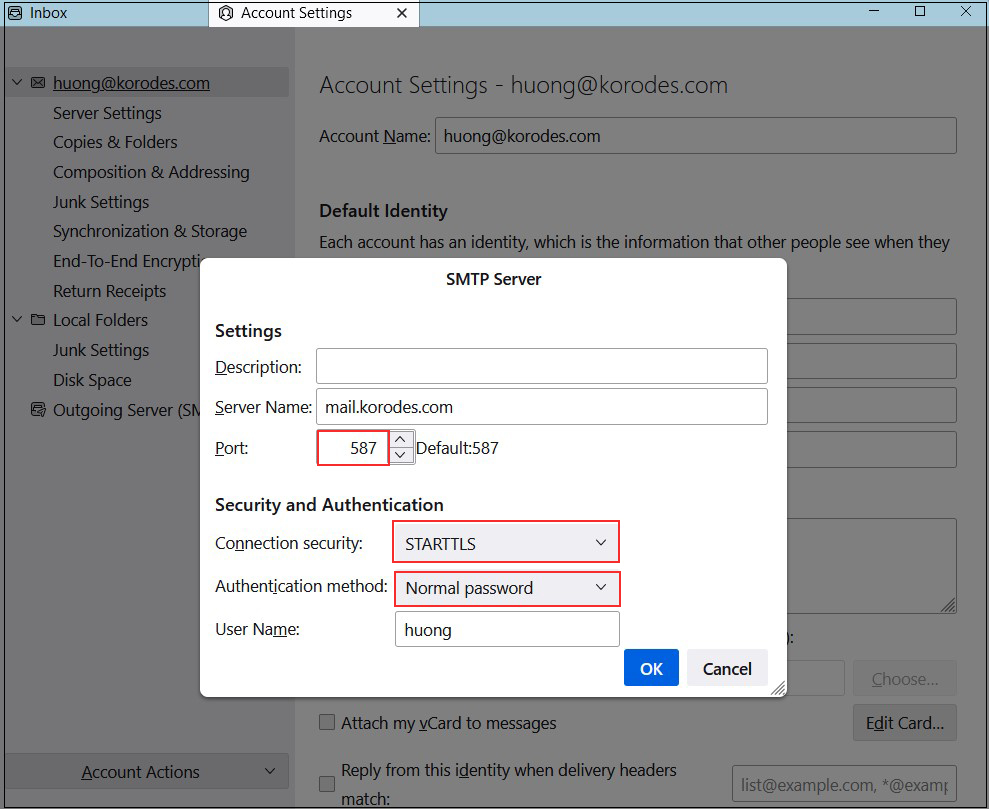
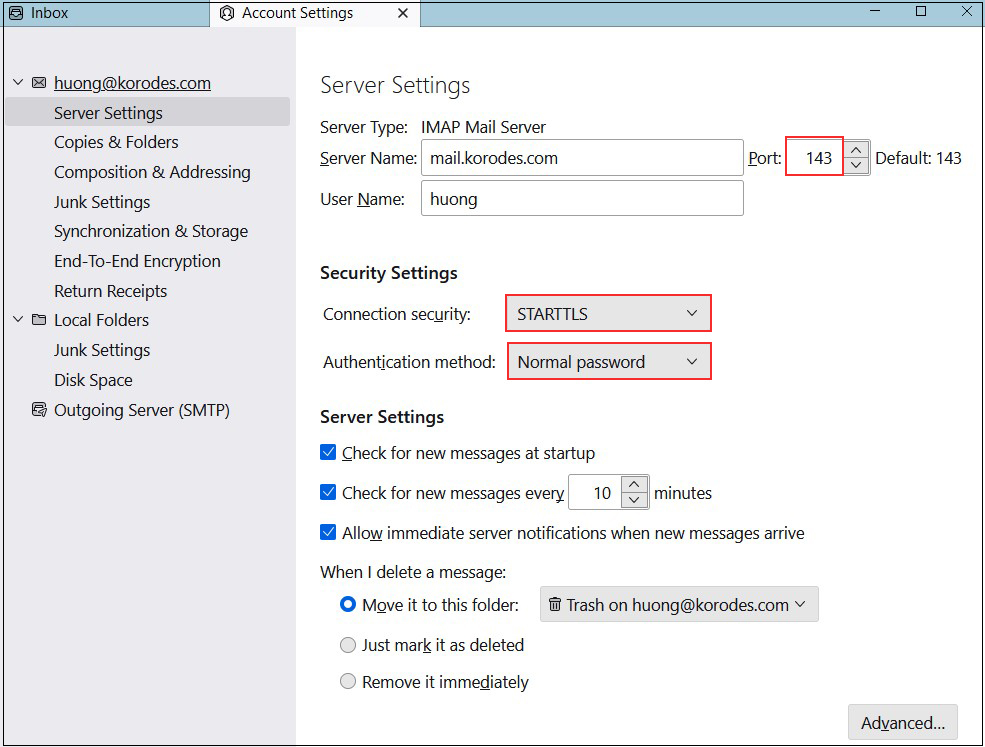
3.4 Thunderbirdの設定
受信サーバー
Port : 143
Connection security : STARTTLS
Authentication method : Normal password
送信サーバー
Port : 587
Connection security : STARTTLS
Authentication method : Normal password