

Clamav (anti-virus) Install
1.Clamav Install
# dnf -y install clamav clamd clamav-update
2.Clam AntiVirus Configuration File Edit
# vi /etc/clamd.d/scan.conf

Line 14 :Uncomment
# Default: disabled
LogFile /var/log/clamd.scan

Line 77 : Uncomment
# Default: disabled
PidFile /run/clamd.scan/clamd.pid

Add to line 103
#LocalSocket /run/clamd.scan/clamd.sock
LocalSocket /var/run/clamd.scan/clamd.sock

Line 233 : Commentout(Configure it to run with root privileges)
# Default: don't drop privileges
#User clamscan
3.Virus definition file update settings
# vi /etc/freshclam.conf

Line 78: Comment it out and add it below.
#DatabaseMirror database.clamav.net
DatabaseMirror db.jp.clamav.net

Around line 154: Addition
#NotifyClamd /path/to/clamd.conf
NotifyClamd /etc/clamd.d/scan.conf
4.Virus definition file update
# freshclam

ClamAV update process started at Mon Jun  8 10:22:56 2026
daily database available for download (remote version: 28024)
Time:    0.6s, ETA:    0.0s [========================>]   22.33MiB/22.33MiB
Testing database: '/var/lib/clamav/tmp.fc38971bb4/clamav-4a88d631a6623d315ea93e19181c8995.tmp-daily.cvd' ...
Database test passed.
daily.cvd updated (version: 28024, sigs: 355457, f-level: 90, builder: svc.clamav-publisher)
main database available for download (remote version: 63)
Time:    0.9s, ETA:    0.0s [========================>]   84.95MiB/84.95MiB
Testing database: '/var/lib/clamav/tmp.fc38971bb4/clamav-ebaa72dbb3fdba3245db4795e11a5cc9.tmp-main.cvd' ...
Database test passed.
main.cvd updated (version: 63, sigs: 3287027, f-level: 90, builder: tomjudge)
bytecode database available for download (remote version: 339)
Time:    0.2s, ETA:    0.0s [========================>]  275.10KiB/275.10KiB
Testing database: '/var/lib/clamav/tmp.fc38971bb4/clamav-e8d70a30eab3163509c0443cd5f170cc.tmp-bytecode.cvd' ...
Database test passed.
bytecode.cvd updated (version: 339, sigs: 80, f-level: 90, builder: nrandolp)
WARNING: Clamd was NOT notified: Can't connect to clamd through /var/run/clamd.scan/clamd.sock: No such file or directory
5.Clam AntiVirus start
clamd Startup and Automatic Startup Settings
# systemctl start clamd@scan
# systemctl enable clamd@scan
6.Conducted virus scan
■Download a test virus and perform a virus scan
# cd /home
# wget https://secure.eicar.org/eicar.com.txt
# clamscan --infected --remove --recursive /home
/home/eicar.com.txt: Eicar-Test-Signature FOUND
/home/eicar.com.txt: Removed.

----------- SCAN SUMMARY -----------
Known viruses: 3627865
Engine version: 1.4.3
Scanned directories: 5
Scanned files: 14
Infected files: 1
Data scanned: 0.01 MB
Data read: 0.00 MB (ratio 2.00:1)
Time: 13.691 sec (0 m 13 s)
Start Date: 2026:06:08 10:24:53
End Date:   2026:06:08 10:25:07
/home/eicar.com.txt: Eicar-Test-Signature FOUND
/home/eicar.com.txt: Removed.
Infected files: 1
The above is displayed and the virus file has been detected and deleted
7.Deployment of virus scan auto-execution scripts
Create script save directory
# mkdir -p /var/www/system
Create a file named clamscan.sh in /var/www/system with the following contents
# vi /var/www/system/clamscan.sh
Contents of clamscan.sh
#!/bin/bash
PATH=/usr/bin:/bin
# excludeopt setup
excludelist=/var/www/system/clamscan.exclude
if [ -s $excludelist ]; then
for i in `cat $excludelist`
do
if [ $(echo "$i"|grep \/$) ]; then
i=`echo $i|sed -e 's/^\([^ ]*\)\/$/\1/p' -e d`
excludeopt="${excludeopt} --exclude-dir=$i"
else
excludeopt="${excludeopt} --exclude=$i"
fi
done
fi
# signature update
freshclam
# virus scan
clamscan --recursive --remove ${excludeopt} /
# chmod 700 /var/www/system/clamscan.sh
8.Virus scan exclusion directory settings
Exclude the sys directory and proc directory.
# echo "/sys/" >> /var/www/system/clamscan.exclude
# echo "/proc/" >> /var/www/system/clamscan.exclude
Try to implement a trial script
# /var/www/system/clamscan.sh

----------- SCAN SUMMARY -----------
Known viruses: 3627865
Engine version: 1.4.3
Scanned directories: 18344
Scanned files: 118883
Infected files: 0
Data scanned: 11628.43 MB
Data read: 5306.66 MB (ratio 2.19:1)
Time: 1786.068 sec (29 m 46 s)
Start Date: 2026:06:08 10:27:20
End Date:   2026:06:08 10:57:06
9.Scheduled virus scan execution
# crontab -e
0 1 * * * /var/www/system/clamscan.sh > /dev/null 2>&1
Mail Server Install
1. Postfix
1.1 Install
Install Postfix and build an SMTP server
# dnf -y install postfix
onfirm Postfix is installed
# rpm -qa | grep postfix
postfix-3.5.25-2.el9.x86_64
postfix-perl-scripts-3.5.25-2.el9.x86_64
pcp-pmda-postfix-6.3.7-8.el9_8.x86_64
1.2 Register Postfix to the service
# systemctl enable postfix.service
Created symlink '/etc/systemd/system/multi-user.target.wants/postfix.service' → '/usr/lib/systemd/system/postfix.service'.
1.3 Backup postfix configuration files, main.cf and master.cf files
# cp -p /etc/postfix/main.cf `date '+/etc/postfix/main.cf.%Y%m%d'`
# cp -p /etc/postfix/master.cf `date '+/etc/postfix/master.cf.%Y%m%d'`
1.4 Edit postfix configuration file
To prevent unauthorized mail relay, configure Postfix to require authentication for outgoing mail as well, using Dovecot's SASL function.
# vi /etc/postfix/main.cf

Per Line 96: Added
#myhostname = virtual.domain.tld
myhostname = mail.<domain>

Per Line 103: Add your domain name
#mydomain = domain.tld
mydomain = <domain>

Per Line 118: Uncomment
myorigin = $mydomain

Per Line 132: Uncomment
inet_interfaces = all

Per Line135 : Commented out
#inet_interfaces = localhost

Per Line 183: Commented out
#mydestination = $myhostname, localhost.$mydomain, localhost

Per Line 184: Uncomment
mydestination = $myhostname, localhost.$mydomain, localhost, $mydomain

Per line 286 : Add your own server network (adjust 192.168.11.0/24 to match your environment)
#mynetworks = 168.100.189.0/28, 127.0.0.0/8
#mynetworks = $config_directory/mynetworks
#mynetworks = hash:/etc/postfix/network_table
mynetworks = 192.168.11.0/24, 127.0.0.0/8

Per Line 438: Uncomment (Configures the email storage format)
#home_mailbox = Mailbox
home_mailbox = Maildir/

Per Line 445 : Uncomment
#mail_spool_directory = /var/mail
mail_spool_directory = /var/spool/mail

Add around line 593
#smtpd_banner = $myhostname ESMTP $mail_name
#smtpd_banner = $myhostname ESMTP $mail_name ($mail_version)
smtpd_banner = $myhostname ESMTP unknown

Add the following content to the last line
#Limit sent and received email size to 10MB
message_size_limit = 10485760
#Limit mailbox size to 1 GB
mailbox_size_limit = 1073741824
#SMTP Authentication Settings
smtpd_sasl_type = dovecot
smtpd_sasl_path = private/auth
smtpd_sasl_auth_enable = yes
smtpd_sasl_security_options = noanonymous
smtpd_sasl_local_domain = $mydomain
smtpd_recipient_restrictions = permit_mynetworks, permit_auth_destination, permit_sasl_authenticated, reject
1.5 Allow SMTP port (port 25)
# firewall-cmd --add-service=smtp --permanent
# firewall-cmd --reload
1.6 Start Postfix
# systemctl restart --now postfix
2.Dovecot
2.1 dovecot Install
# dnf -y install dovecot
2.2 Edit dovecot.conf file
# cp -p /etc/dovecot/dovecot.conf `date '+ /etc/dovecot/dovecot.conf.%Y%m%d'`

# vi /etc/dovecot/dovecot.conf

Per Line 25: Append
# protocols = imap pop3 lmtp
protocols = imap pop3

Line 30: Uncomment (Remove [::] if listening only on IPv4)
listen = *
2.3 Edit 10-auth.conf file
# vi /etc/dovecot/conf.d/10-auth.conf

Line 10: Uncomment and modify
When plaintext authentication is also permitted
disable_plaintext_auth = no

Line 100: Postscript
auth_mechanisms = plain login
2.3 Edit 10-mail.conf file
# vi /etc/dovecot/conf.d/10-mail.conf

Line 31: Additional note
mail_location = maildir:~/Maildir
2.4 Edit 10-master.conf file
# vi /etc/dovecot/conf.d/10-master.conf

Lines 107-109: Uncomment and add
# Postfix smtp-auth
unix_listener /var/spool/postfix/private/auth {
mode = 0666
user = postfix
group = postfix
}
2.5 Edit 10-ssl.conf file
# vi /etc/dovecot/conf.d/10-ssl.conf

Around line 8
Change "ssl = required" to "ssl = yes"
ssl = yes
2.6 Register dovecot as a service and start it
# systemctl enable dovecot.service
# systemctl start dovecot.service
2.7 Allow POP/IMAP services in Firewalld Port Allow
POP is [110/TCP], IMAP is [143/TCP].
# firewall-cmd --permanent --add-service=pop3
# firewall-cmd --permanent --add-service=imap
# firewall-cmd --reload
3.Create mail user and check operation
3.1 advance preparation
①new user
When a new user is added, set up the system to automatically send and receive e-mail.
# mkdir -p /etc/skel/Maildir/{new,cur,tmp}
# chmod -R 700 /etc/skel/Maildir/
# echo "~/Maildir/"> /etc/skel/.forward
# chmod 600 /etc/skel/.forward
②Existing users
Configure the already created users to be able to send and receive e-mail.
# mkdir -p /home/huong/Maildir/{new,cur,tmp}
# chown -R huong:huong /home/huong/Maildir/
# chmod 700 /home/huong/Maildir
# chmod 700 /home/huong/Maildir/{new,cur,tmp}
3.2 User Account Creation
Email Client Installation
# dnf -y install s-nail
# echo 'export MAIL=$HOME/Maildir' >> /etc/profile.d/mail.sh

Add user [linux]
# useradd linux
# passwd linux
Changing password for user linux.
New password:
Retype new password:
passwd: password updated successfully
3.3 operation check ①
①Log in as an email user and send a test email.
# su - linux
$ mail linux@localhost
Subject: Test Mail
To: linux@localhost
mail test
^D
-------
(Preliminary) Envelope contains:
To: linux@localhost
Subject: Test Mail
Send this message [yes/no, empty: recompose]? yes
②Email Confirmation
$ mail
s-nail version v14.9.22.  Type `?' for help
/home/linux/Maildir: 1 message 1 new
▸N  1 linux@korodes.com     2026-06-08 11:20   14/404   "Test Mail                         "
& 1
[-- Message  1 -- 14 lines, 404 bytes --]:
Date: Mon, 08 Jun 2026 11:20:04 +0900
To: linux@localhost
Subject: Test Mail
Message-Id: <20260608022004.E5E10C4251@mail.korodes.com>
From: linux@korodes.com

mail test

& q
Held 1 message in /home/linux/Maildir
3.4 Operation check ②
Set up and confirm your account in Mozilla Thunderbird. This time we will set it up with the general user "huong".
Start Thunderbird and click [New Account][Email] in the [Three] Button-menu in the upper right corner.
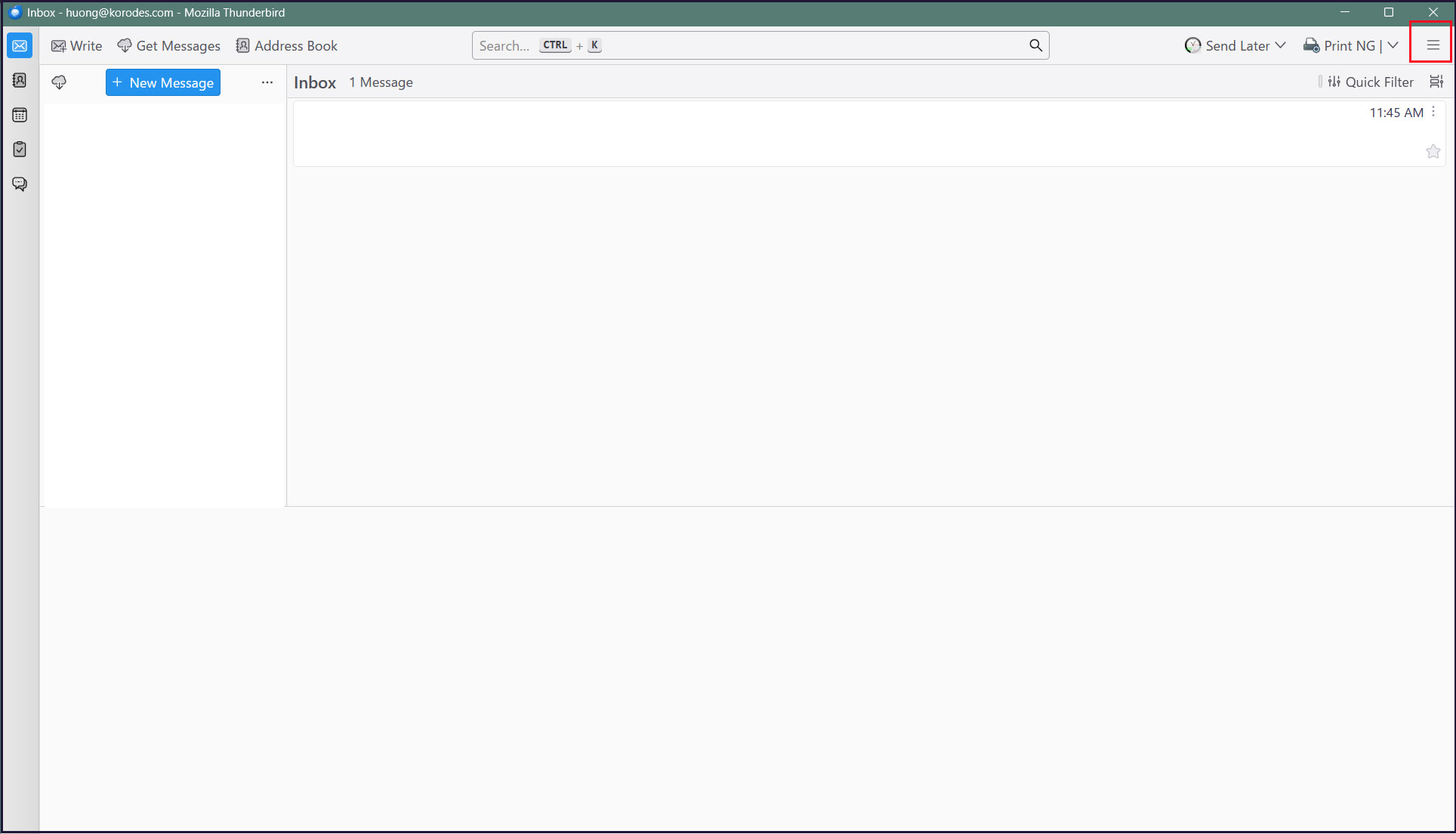
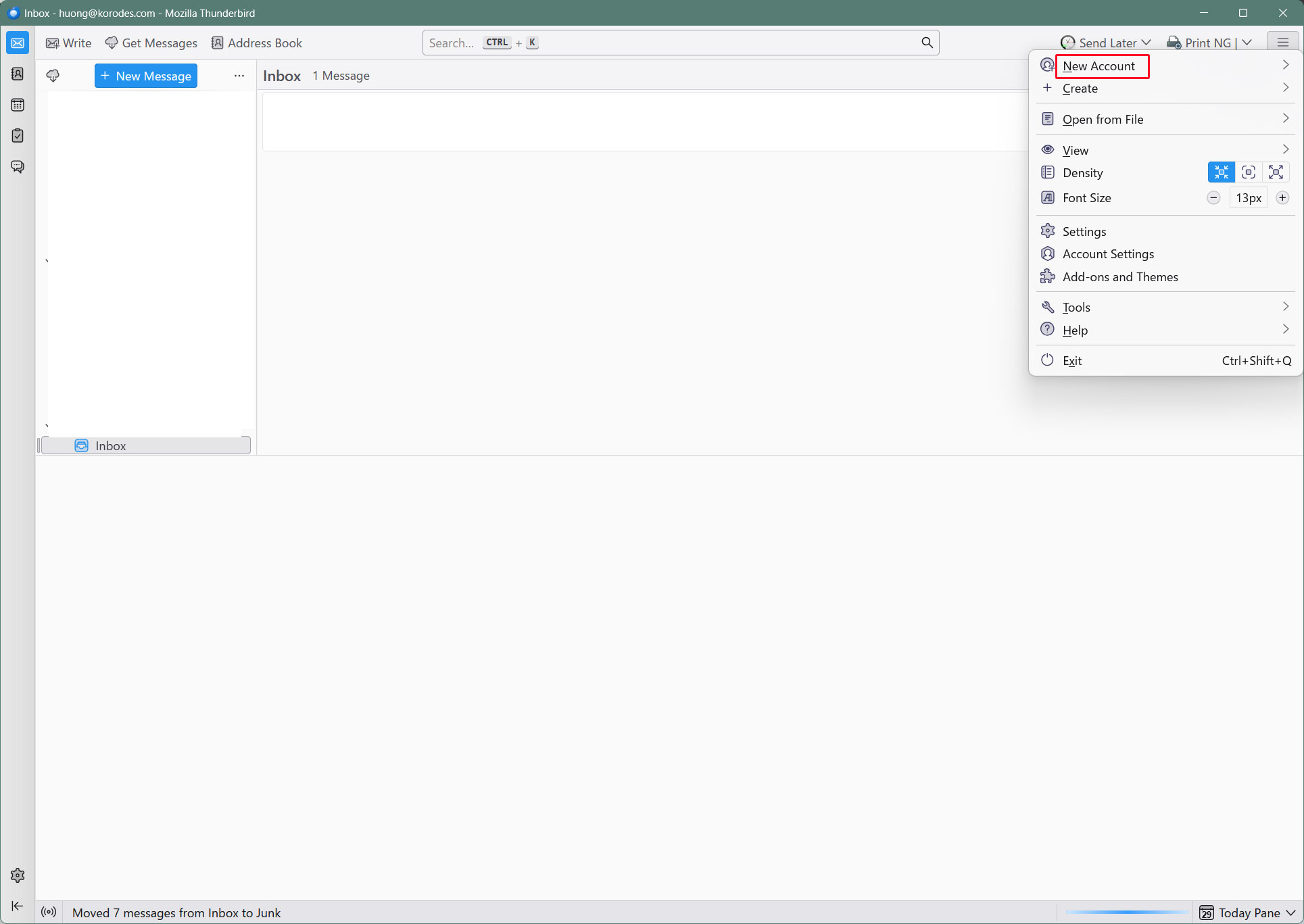
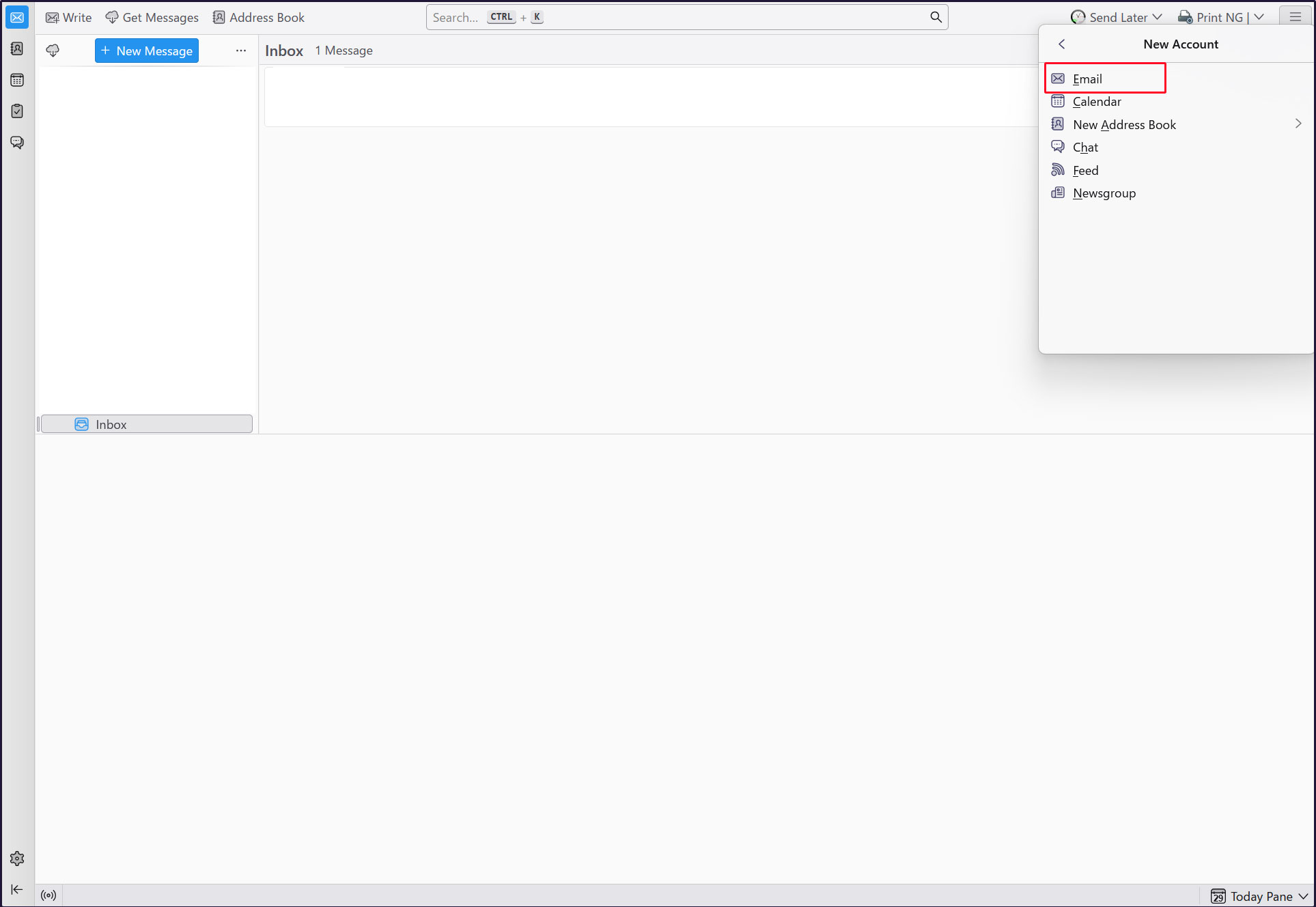
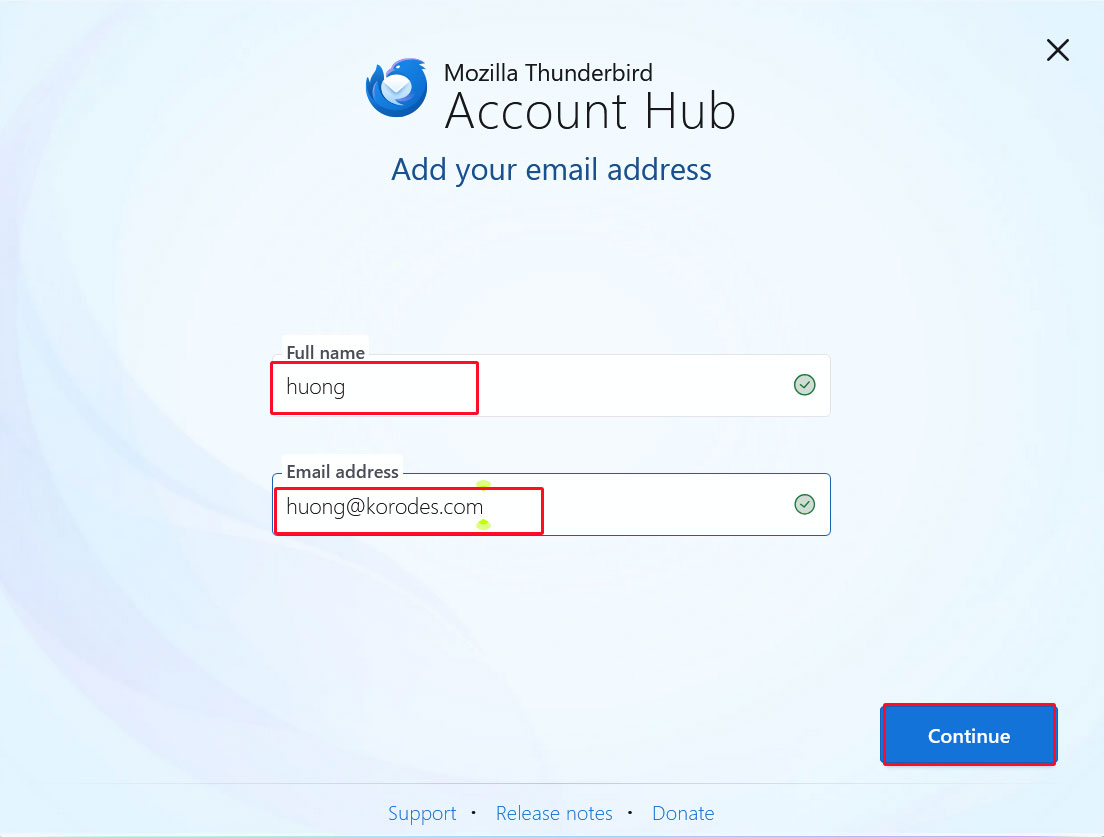
Full name : Any name
Email address : huong@<domain-name>
「Continue」click
[EDIT CONFIGURATION] click
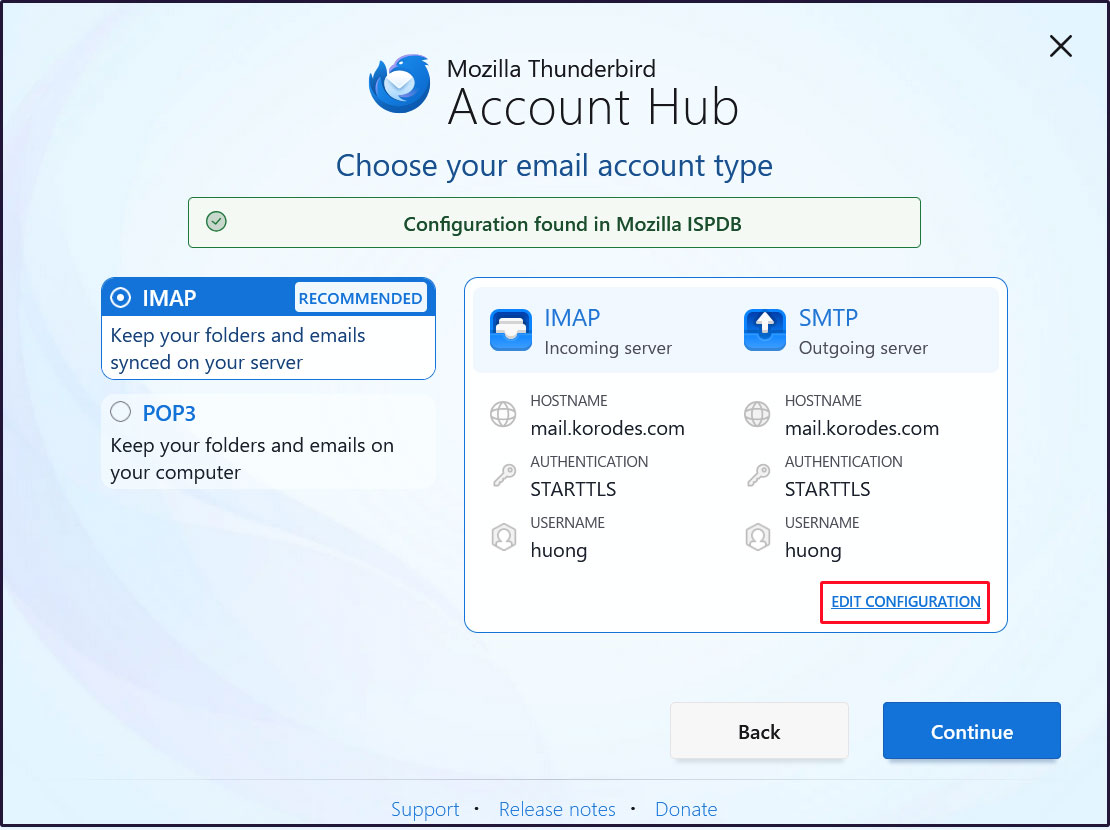
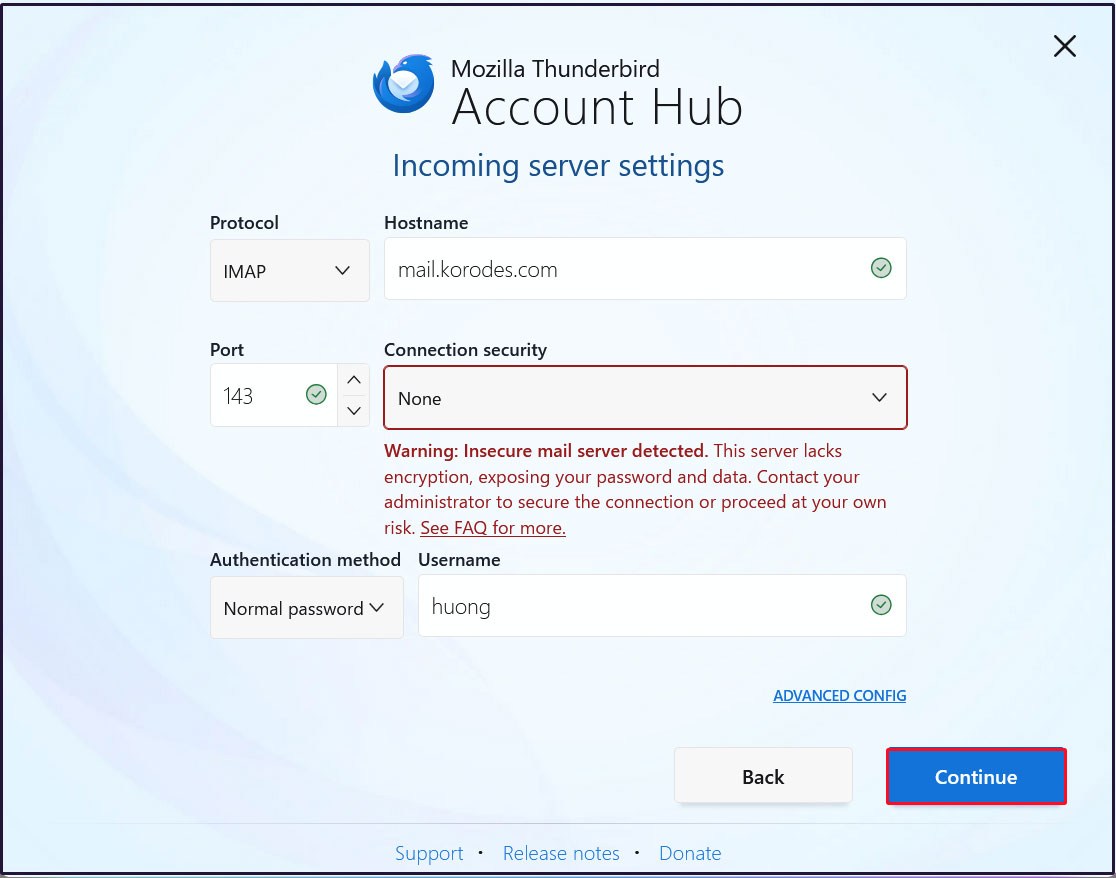
Incoming server settings
Set [Connection security] to [None] and click [Continue].
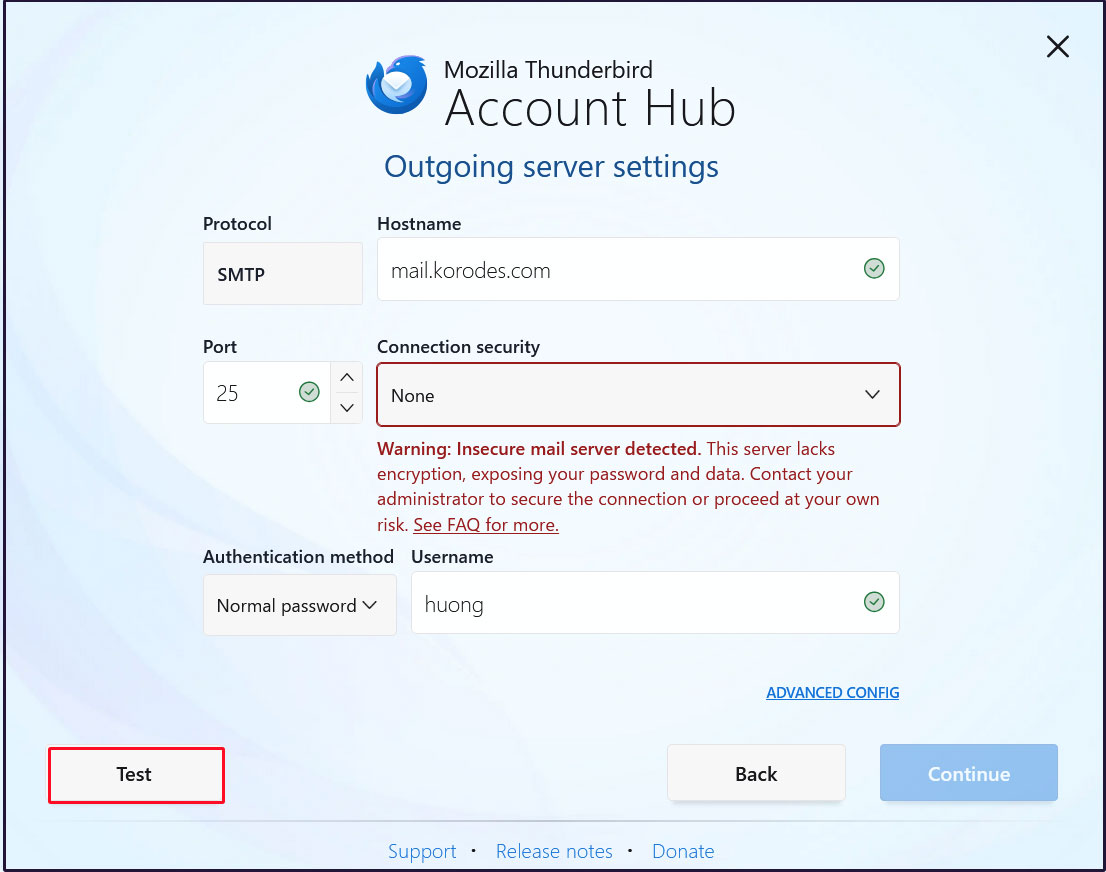
Sending Server Settings
Set [Connection security] to [None] and click [Test].
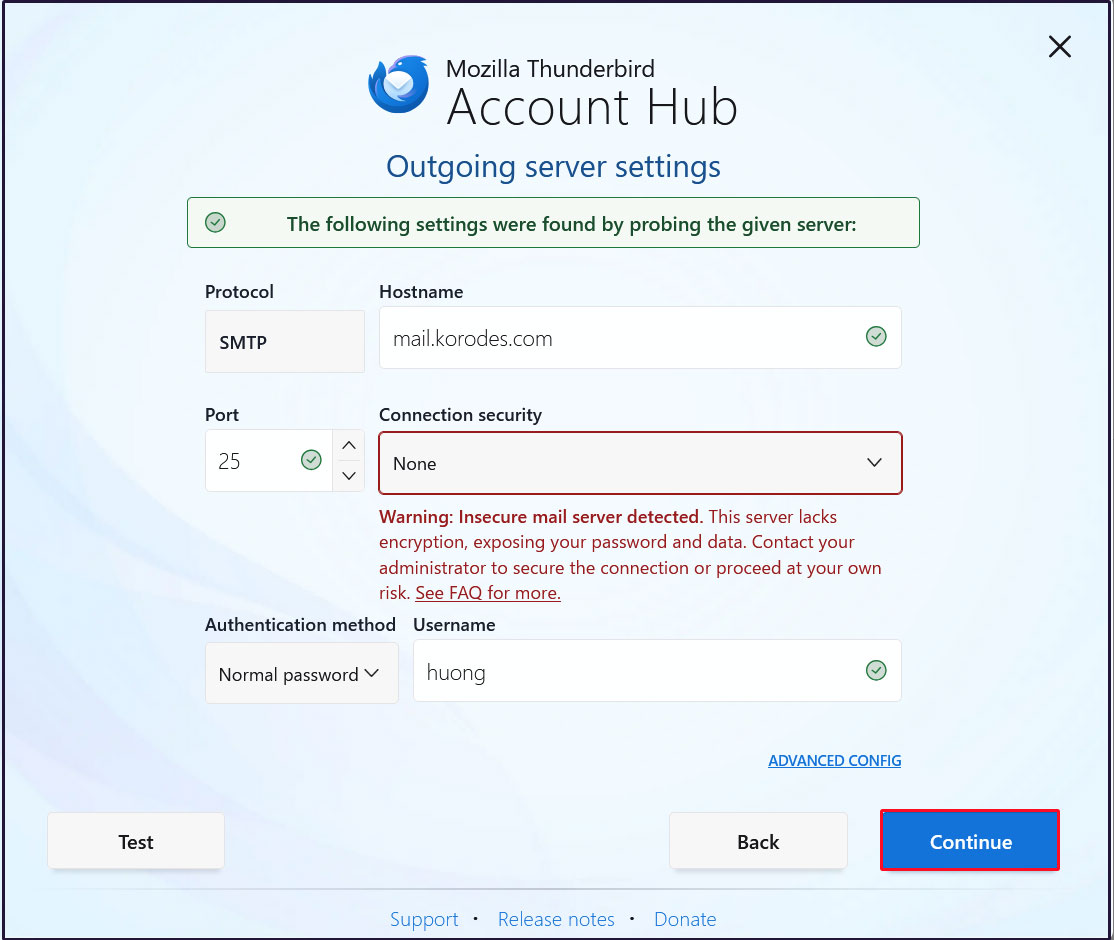
[Continue] click
Enter the user's password in the “Password” field and click "Continue"
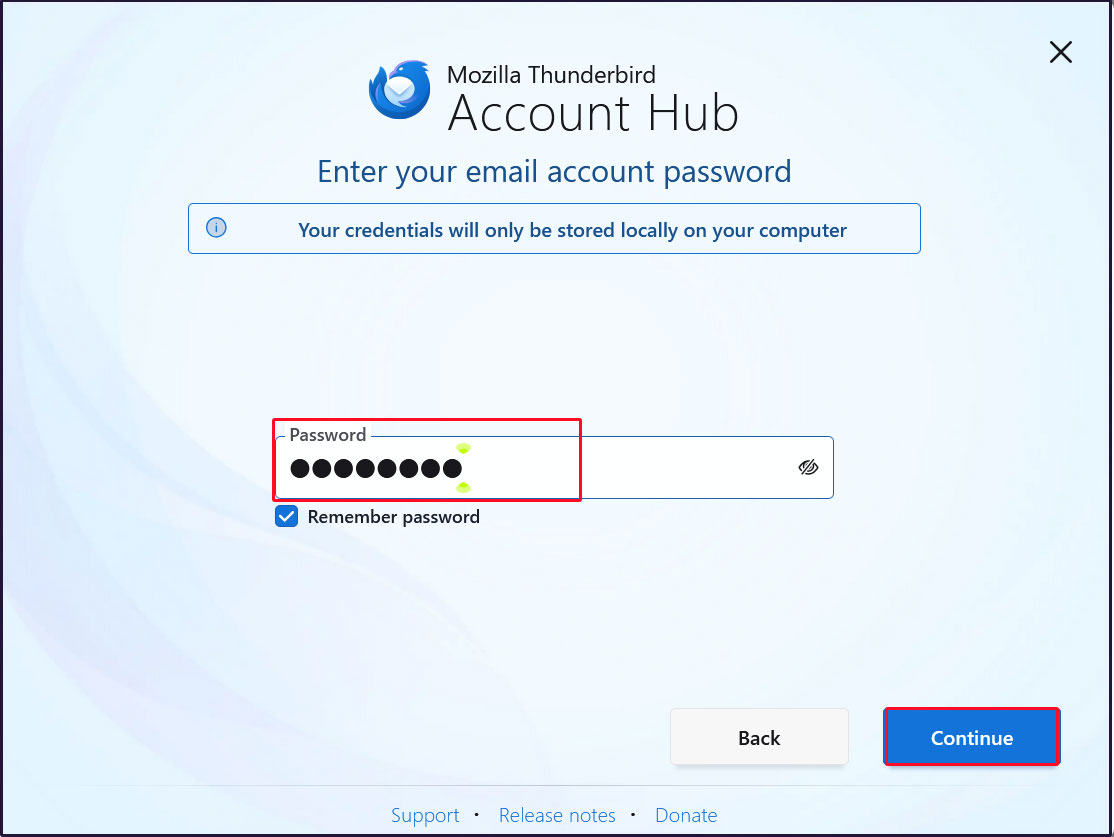
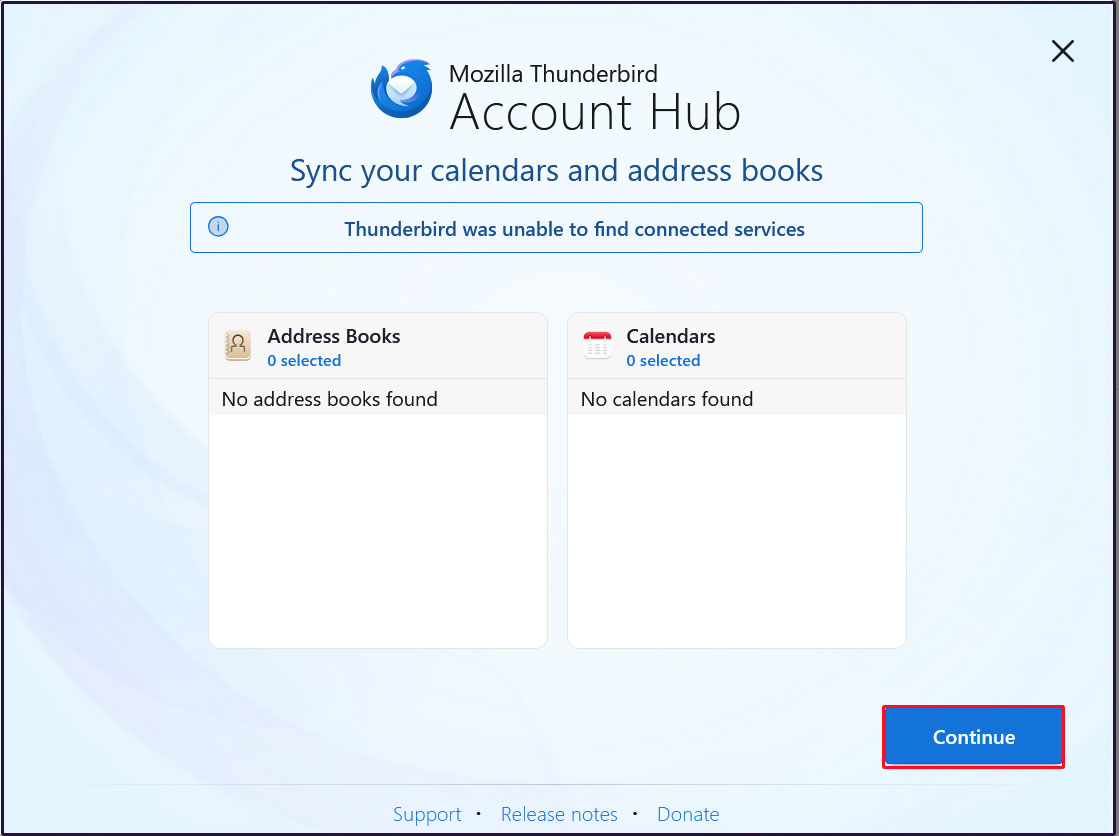
[Continue] click
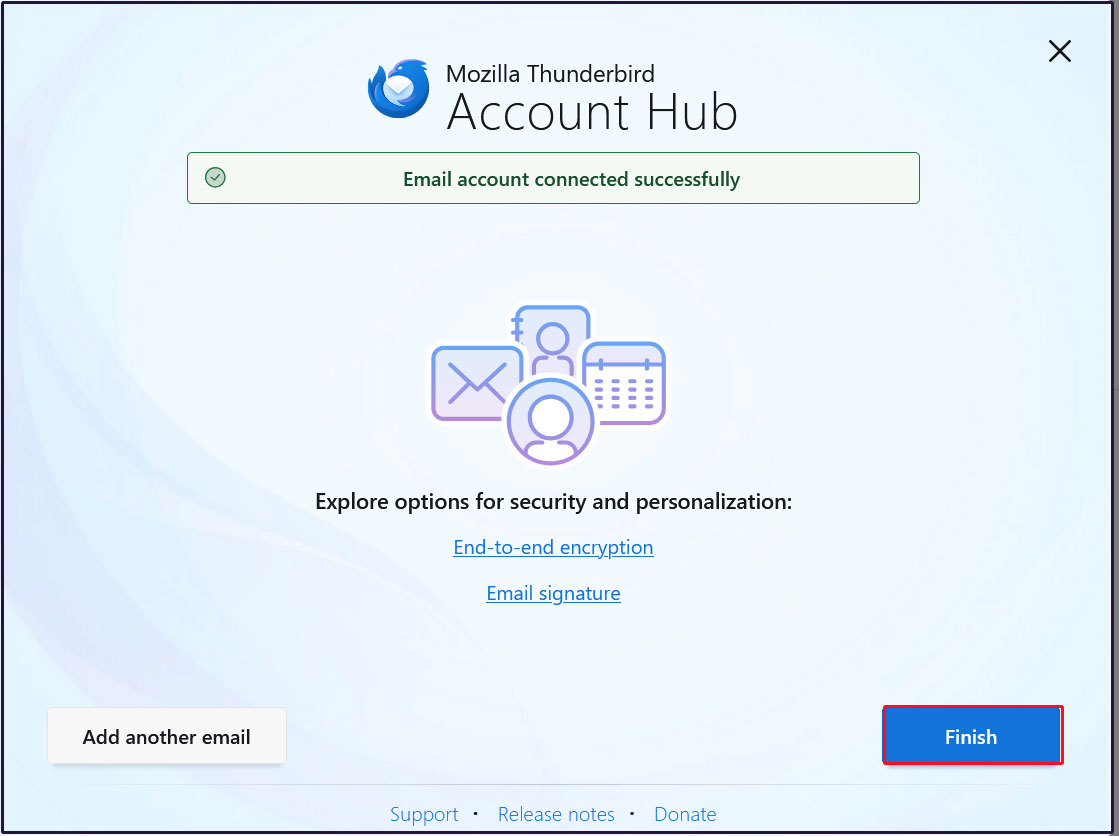
Click “Finish” when the email account has been successfully created.
Mail : Postfix + Clamav + clamav-milter+SpamAssassin
1.Real-time scanning of e-mails
①clamav-milter Install
Virus checks are performed on the mail server side using Clam AntiVirus.
The mail server and Clam AntiVirus are linked using clamav-milter.
# dnf -y install clamav-milter clamav-milter-systemd
➁clamav-milter configuration
Editing the clamav-milter configuration file
# vi /etc/mail/clamav-milter.conf

Line 6: Commented out
# Comment or remove the line below.
#Example

Per Line 23-24: Addition
# Default: no default
#MilterSocket /run/clamav-milter/clamav-milter.socket
#MilterSocket /tmp/clamav-milter.sock
#MilterSocket inet:7357
MilterSocket /var/run/clamav-milter/clamav-milter.socket ← Specify the UNIX socket name for clamav-milter
MilterSocketMode 660 ← Specify the access permissions for the UNIX socket of clamav-milter

Per Line 98: Addition
# Default: no default
#ClamdSocket tcp:scanner.mydomain:7357
#ClamdSocket unix:/run/clamav/clamd.sock
ClamdSocket unix:/var/run/clamd.scan/clamd.sock ← Specify the Clam AntiVirus UNIX socket name (matching the LocalSocket option in /etc/clamd.d/scan.conf)

Per Line 171: Addition
# Action to be performed on infected messages
# Default: Quarantine
#OnInfected Quarantine
OnInfected Blackhole ← Delete virus-infected emails

Per Line 193 : Addition
# Note that while "Replace" can potentially break DKIM signatures, "Add" may
# confuse procmail and similar filters.
# Default: no
#AddHeader Replace
AddHeader Yes ← Output a message in the email header indicating that a virus check has been performed.

Per Line 253 : Uncomments
# Default: LOG_LOCAL6
LogFacility LOG_MAIL ← Set the log output destination to email logs
➂clamav-milter startup and auto-startup settings
# systemctl start clamav-milter
# systemctl enable clamav-milter
④Postfix and clamav-milter integration settings
Edit Postfix configuration file
# vi /etc/postfix/main.cf

Add the following to the last line
milter_default_action = tempfail
smtpd_milters = unix:/var/run/clamav-milter/clamav-milter.socket
non_smtpd_milters = unix:/var/run/clamav-milter/clamav-milter.socket
⑤Add postfix user to clamilt group
# usermod -G clamilt -a postfix
⑥Postfix Settings Reflected
# systemctl restart postfix
⑦Check with Thunderbird
I sent a blank email to myself in Thunderbird, and in the header display of the received email, I see the following
「X-Virus-Scanned: clamav-milter 1.4.3 at Lepard」
X-Mozilla-Status: 0001
X-Mozilla-Status2: 00000000
Return-Path: <xxxxx@xxxxxx.com>
X-Original-To: xxxxx@xxxxxx.com
Delivered-To: xxxxx@xxxxxx.com
Received: from [192.168.11.8] (buffalo.setup [192.168.11.1])
by mail.xxxxx.com (Postfix) with ESMTPA id D670211ECE21
for <xxxxx@xxxxxxx.com>; Mon, 8 Jun 2026 12:40:30 +0900 (JST)
Message-ID: <98fefa4c-cbd6-46b4-851f-3db0a642616e@xxxxxx.com>
Date: Mon, 8 Jun 2026 12:40:31 +0900
MIME-Version: 1.0
User-Agent: Mozilla Thunderbird
From: xxxxx <xxxxx@xxxxxx.com>
Content-Language: en-US
To: xxxxx <xxxxx@xxxxxx.com>
Content-Type: text/plain; charset=UTF-8; format=flowed
Content-Transfer-Encoding: 7bit
X-Virus-Scanned: clamav-milter 1.4.3 at Lepard
X-Virus-Status: Clean
Try sending yourself an email with the body of the email "X5O!P%@AP[4\PZX54(P^)7CC)7}$EICAR-STANDARD-ANTIVIRUS-TEST-FILE!$H+H*" and confirm that the email is discarded and never received
2.Email spam protection
2.1 SpamAssassin・spamass-milter・postfix settings
①SpamAssassin・spamass-milter install
# dnf -y install spamassassin spamass-milter-postfix
➁SpamAssassin start
# systemctl start spamassassin
➂Edit spamassassin configuration file
# vi /etc/mail/spamassassin/v310.pre

Delete # at the beginning of the line per line 24
loadplugin Mail::SpamAssassin::Plugin::DCC
④Create script to update SpamAssassin configuration file
# cd /var/www/system
# vi spamassassin-update.sh
#!/bin/bash
cd /etc/mail/spamassassin
wget -q https://github.com/kittyfreak/spamassassin_user_prefs/archive/refs/heads/main.zip
[ $? -ne 0 ] && exit
unzip main.zip >/dev/null 2>&1
[ $? -ne 0 ] && exit
rm -f main.zip
mv spamassassin_user_prefs-main/user_prefs .
rm -rf spamassassin_user_prefs-main
diff user_prefs user_prefs.org > /dev/null 2>&1
if [ $? -ne 0 ]; then
cp user_prefs local.cf
echo "report_safe 0" >> local.cf
echo "rewrite_header Subject SPAM" >> local.cf
#SpamAssassin restart
if [ -f /etc/rc.d/init.d/spamassassin ]; then
/etc/rc.d/init.d/spamassassin restart > /dev/null
else
systemctl restart spamassassin > /dev/null
fi
fi
cp user_prefs user_prefs.org
Grant execute permission to the spamassassin-update script and run it
# chmod 700 /var/www/system/spamassassin-update.sh
# /var/www/system/spamassassin-update.sh
Confirm that the SpamAssassin configuration file (local.cf) has been created in the /etc/mail/spamassassin directory with the date of the day
# ls -l /etc/mail/spamassassin

total 1628
drwxr-xr-x 2 root root     40 Jun  8 13:39 channel.d
-rw-r--r-- 1 root root   1194 Nov  5  2024 init.pre
-rw-r--r-- 1 root root 500630 Jun  8 13:41 local.cf
drwx------ 2 root root      6 Nov  5  2024 sa-update-keys
-rw-r--r-- 1 root root     62 Nov  5  2024 spamassassin-default.rc
-rwxr-xr-x 1 root root     39 Nov  5  2024 spamassassin-helper.sh
-rw-r--r-- 1 root root     55 Nov  5  2024 spamassassin-spamc.rc
-rw-r--r-- 1 root root 500588 Apr 30  2023 user_prefs
-rw-r--r-- 1 root root 500588 Jun  8 13:41 user_prefs.org
-rw-r--r-- 1 root root   2523 Jun  8 13:40 v310.pre
-rw-r--r-- 1 root root   1194 Nov  5  2024 v312.pre
-rw-r--r-- 1 root root   2416 Nov  5  2024 v320.pre
-rw-r--r-- 1 root root   1237 Nov  5  2024 v330.pre
-rw-r--r-- 1 root root   1020 Nov  5  2024 v340.pre
-rw-r--r-- 1 root root   1309 Nov  5  2024 v341.pre
-rw-r--r-- 1 root root   1469 Nov  5  2024 v342.pre
-rw-r--r-- 1 root root   1264 Nov  5  2024 v343.pre
Set up cron to automatically run a script daily that updates the SpamAssassin configuration file
# crontab -e
0 2 * * * /var/www/system/spamassassin-update.sh > /dev/null 2>&1
⑤spamass-milter startup and automatic startup settings
# systemctl start spamass-milter
# systemctl enable spamass-milter
⑥Postfix and spamass-milter integration settings
# vi /etc/postfix/main.cf
※Add the text in red at the end
milter_default_action = tempfail
smtpd_milters = unix:/var/run/clamav-milter/clamav-milter.socket,unix:/run/spamass-milter/postfix/sock ※If clamav-milter is already defined
non_smtpd_milters = unix:/var/run/clamav-milter/clamav-milter.socket,unix:/run/spamass-milter/postfix/sock ※If clamav-milter is already defined
⑦Restart postfix
# systemctl restart postfix
⑧Procmail Settings
Create procmail configuration file
# vi /etc/procmailrc

Please describe the following
SHELL=/bin/bash
PATH=/usr/bin:/bin
DROPPRIVS=yes
MAILDIR=$HOME/Maildir
DEFAULT=$MAILDIR/
LOGFILE=$HOME/.procmail.log # Log output destination
VERBOSE=ON # Detailed log output
Creating a procmail log rotation configuration file
# vi /etc/logrotate.d/procmail

Please describe the following
/home/*/.procmail.log {
    missingok
    nocreate
    notifempty
}
⑨Postfix and Procmail integration settings
# vi /etc/postfix/main.cf

Per Line 468 : Add
#mailbox_command = /some/where/procmail
#mailbox_command = /some/where/procmail -a "$EXTENSION"
mailbox_command = /usr/bin/procmail ← Addition (Configure to integrate with Procmail)
Postfix Settings Reflected
# systemctl restart postfix
2.2 Spam mail sorting settings
Mail marked as spam in the mail header by SpamAssassin will be delivered to a spam-only mailbox, while other mail will be delivered to a normal mailbox.
Create a dedicated spam mailbox
For existing users, add a spam-only mailbox to their mailboxes.
For new users, a spam-only mailbox will be automatically created when a user is added.
①Created script to create spam-only mailboxes
# vi spamfolder-create
#!/bin/bash
for user in `ls /home`
do
id -u $user > /dev/null 2>&1
if [ $? -eq 0 ] && [ ! -d /home/$user/Maildir/.Spam/new ]; then
mkdir -p /home/$user/Maildir/.Spam/new
mkdir -p /home/$user/Maildir/.Spam/cur
mkdir -p /home/$user/Maildir/.Spam/tmp
chmod -R 700 /home/$user/Maildir/.Spam
chown -R $user. /home/$user/Maildir/.Spam
echo $user
fi
done
Run script to create spam-only mailboxes
# bash spamfolder-create
huong
linux
smbuser
Measures against new users
Automatic spam-only mailbox creation when adding new users
# mkdir -p /etc/skel/Maildir/.Spam/{new,cur,tmp}
# chmod -R 700 /etc/skel/Maildir/.Spam
➁spam mail sorting
Emails identified as spam by SpamAssassin are delivered to a spam-only mailbox.
# vi /etc/procmailrc

Add the following to the end
# Emails identified as spam by SpamAssassin are delivered to a spam-only mailbox
:0
*^X-Spam-Flag: YES
$HOME/Maildir/.Spam/
➂spamass-milter confirmation
When you send a blank email to yourself, the following message is appended to the header of the received email
X-Spam-Status: No, score=5.3 required=13.0 tests=ALL_TRUSTED,
CONTENT_TYPE_PRESENT,EMPTY_MESSAGE,PDS_TONAME_EQ_TOLOCAL_SHORT,
PDS_TONAME_EQ_TOLOCAL_VSHORT autolearn=no autolearn_force=no
version=3.4.6
X-Spam-Level: *****
X-Spam-Checker-Version: SpamAssassin 3.4.6 (2021-04-09) on Lepard
④Spam check confirmation
Verify that when you send yourself an email with the body text "XJSC4JDBQADN1.NSBN32IDNENGTUBE-STANDARD-ANTI-UBE-TEST-EMAILC.34X," the email is not delivered and is instead routed to the Spam folder (/home/USER/Maildir/.Spam/new).
The header reads as follows:
X-Spam-Flag: YES
X-Spam-Status: Yes, score=1001.8 required=13.0 tests=ALL_TRUSTED,
CONTENT_TYPE_PRESENT,GTUBE,HTML_MESSAGE,MPART_ALT_DIFF,
MULTIPART_ALTERNATIVE autolearn=no autolearn_force=no version=3.4.6
X-Spam-Report:
* 0.1 ALL_TRUSTED Passed through trusted hosts only via SMTP
* -0.1 CONTENT_TYPE_PRESENT exists:Content-Type
* 0.1 MULTIPART_ALTERNATIVE Multipart/alternative
* 1000 GTUBE BODY: Generic Test for Unsolicited Bulk Email
* 1.0 HTML_MESSAGE BODY: HTML included in message
* 0.7 MPART_ALT_DIFF BODY: HTML and text parts are different
X-Spam-Level: *********************************************
X-Spam-Checker-Version: SpamAssassin 3.4.6 (2021-04-09) on Lepard
This is a multi-part message in MIME format.
--------------vRvEm75e5vYMEXs8I5qC6mQY
Content-Type: text/plain; charset=UTF-8; format=flowed
Content-Transfer-Encoding: 7bit
*XJSC4JDBQADN1.NSBN32IDNENGTUBE-STANDARD-ANTI-UBE-TEST-EMAILC.34X*