1.SSL証明書を取得する ( Let's Encrypt )
最新のopen sslをインストールしておく
# dnf install openssl-devel
1.1 事前準備
1.パッケージ管理システムSnappyインストール
Let’s EncryptのSSL証明書発行ツール「certbot」は2021年以降は「snap」を利用したインストールが推奨されていますので、まずSnapdをインストールします。(dnfまたはyumでの従来の方法でもインストールできます)

# dnf install epel-release
# dnf upgrade
# dnf -y install snapd
メインのスナップ通信ソケットを管理するsystemdユニットを有効化する
# systemctl enable --now snapd.socket
クラシックスナップのサポートを有効にする
# ln -s /var/lib/snapd/snap /snap
snapd のバージョンを最新にする
# snap install core
上記でエラーになる場合は、代わりに以下のコマンドを実行する(hello-world というパッケージがインストールされるのに伴い、core パッケージもインストールされます)
# snap install hello-world
core パッケージを更新
# snap refresh core
バージョン確認
# snap --version
snap          2.72-1.el10_2
snapd         2.72-1.el10_2
series        16
rocky         10.2
kernel        6.12.0-211.16.1.el10_2.0.1.x86_64
architecture  amd64
ログアウトして再度ログインするか、システムを再起動
2.certbot パッケージインストール
# snap install --classic certbot
certbot 5.6.0 from Certbot Project (certbot-eff✓) installed
/snap/bin/certbotへのシンボリックリンクを作成
# ln -s /snap/bin/certbot /usr/bin/certbot
確認する
# ls -la /usr/bin/certbot
lrwxrwxrwx 1 root root 17 Nov 30 17:07 /usr/bin/certbot -> /snap/bin/certbot

# ls -la /snap/bin/certbot
lrwxrwxrwx 1 root root 13 Nov 30 17:06 /snap/bin/certbot -> /usr/bin/snap
1.2 証明書の取得
# certbot certonly --webroot -w /var/www/html/[FQDN] -d [FQDN]
初回のみメールアドレスの登録と利用条件への同意が必要
受信可能なメールアドレスを指定
Saving debug log to /var/log/letsencrypt/letsencrypt.log
Enter email address (used for urgent renewal and security notices)
(Enter 'c' to cancel): <Administrator e-mail address>
- - - - - - - - - - - - - - - - - - - - - - - - - - - - - - - - - - - - - - - -
Please read the Terms of Service at
![]()
![]() letsencrypt.org You must agree in
order to register with the ACME server. Do you agree?
- - - - - - - - - - - - - - - - - - - - - - - - - - - - - - - - - - - - - - - -
(Y)es/(N)o: y
- - - - - - - - - - - - - - - - - - - - - - - - - - - - - - - - - - - - - - - -
Would you be willing, once your first certificate is successfully issued, to
share your email address with the Electronic Frontier Foundation, a founding
partner of the Let's Encrypt project and the non-profit organization that
develops Certbot? We'd like to send you email about our work encrypting the web,
EFF news, campaigns, and ways to support digital freedom.
- - - - - - - - - - - - - - - - - - - - - - - - - - - - - - - - - - - - - - - -
(Y)es/(N)o: y
Account registered.
Requesting a certificate for [FQDN]
Successfully received certificate.
Certificate is saved at: /etc/letsencrypt/live/[FQDN]/fullchain.pem
Key is saved at: /etc/letsencrypt/live/[FQDN]/privkey.pem
This certificate expires on 2026-09-01.
These files will be updated when the certificate renews.
Certbot has set up a scheduled task to automatically renew this certificate in the background.
We were unable to subscribe you the EFF mailing list because your e-mail address appears to be invalid. You can try again later by visiting https://act.eff.org.
- - - - - - - - - - - - - - - - - - - - - - - - - - - - - - - - - - - - - - - -
If you like Certbot, please consider supporting our work by:
* Donating to ISRG / Let's Encrypt: https://letsencrypt.org/donate
* Donating to EFF: https://eff.org/donate-le
- - - - - - - - - - - - - - - - - - - - - - - - - - - - - - - - - - - - - - - -
letsencrypt.org You must agree in
order to register with the ACME server. Do you agree?
- - - - - - - - - - - - - - - - - - - - - - - - - - - - - - - - - - - - - - - -
(Y)es/(N)o: y
- - - - - - - - - - - - - - - - - - - - - - - - - - - - - - - - - - - - - - - -
Would you be willing, once your first certificate is successfully issued, to
share your email address with the Electronic Frontier Foundation, a founding
partner of the Let's Encrypt project and the non-profit organization that
develops Certbot? We'd like to send you email about our work encrypting the web,
EFF news, campaigns, and ways to support digital freedom.
- - - - - - - - - - - - - - - - - - - - - - - - - - - - - - - - - - - - - - - -
(Y)es/(N)o: y
Account registered.
Requesting a certificate for [FQDN]
Successfully received certificate.
Certificate is saved at: /etc/letsencrypt/live/[FQDN]/fullchain.pem
Key is saved at: /etc/letsencrypt/live/[FQDN]/privkey.pem
This certificate expires on 2026-09-01.
These files will be updated when the certificate renews.
Certbot has set up a scheduled task to automatically renew this certificate in the background.
We were unable to subscribe you the EFF mailing list because your e-mail address appears to be invalid. You can try again later by visiting https://act.eff.org.
- - - - - - - - - - - - - - - - - - - - - - - - - - - - - - - - - - - - - - - -
If you like Certbot, please consider supporting our work by:
* Donating to ISRG / Let's Encrypt: https://letsencrypt.org/donate
* Donating to EFF: https://eff.org/donate-le
- - - - - - - - - - - - - - - - - - - - - - - - - - - - - - - - - - - - - - - -

「Successfully received certificate.」と表示されれば成功
# メッセージ中に記載の通り [/etc/letsencrypt/live/<FQDN>/] 配下に次の証明書が取得されている
・cert.pem ⇒ SSLサーバー証明書(公開鍵含む)
・chain.pem ⇒ 中間証明書
・fullchain.pem ⇒ cert.pem と chain.pem が結合されたファイル
・privkey.pem ⇒ 公開鍵に対する秘密鍵
※ Webサーバーが稼働していない場合のLet's Encrypt証明書の取得
インターネット側から当作業を実施するサーバーの 80 ポート宛てにアクセス可能であることは前提となります
・ [--standalone] 指定で 簡易 Webサーバー機能を使用
・-d [証明書を取得したいFQDN] # FQDN (Fully Qualified Domain Name) : ホスト名.ドメイン名を省略なしで表記
・証明書を取得したいFQDNが複数ある場合は、-d [証明書を取得したいFQDN] を複数指定
# certbot certonly --standalone -d <FQDN>
取得済みの証明書を更新する
・有効期限が 30日未満の証明書を全て更新
・有効期限の残り日数に関わらず更新したい場合は [--force-renewal] を合わせて指定
# certbot [--force-renewal] renew
1.2 証明書を自動更新 (Let's Encrypt)
①登録前のテスト
まず以下の--dry-runオプションを使って自動更新をテストしてみる。このオプションでは、証明書は更新されずに動作確認のみ実施されるため、証明書の取得回数制限に引っかかる心配もない
# certbot renew --dry-run

Saving debug log to /var/log/letsencrypt/letsencrypt.log

- - - - - - - - - - - - - - - - - - - - - - - - - - - - - - - - - - - - - - - -
Processing /etc/letsencrypt/renewal/[FQDN].conf
- - - - - - - - - - - - - - - - - - - - - - - - - - - - - - - - - - - - - - - -
Account registered.
Simulating renewal of an existing certificate for [FQDN]

- - - - - - - - - - - - - - - - - - - - - - - - - - - - - - - - - - - - - - - -
Congratulations, all simulated renewals succeeded:
  /etc/letsencrypt/live/[FQDN]/fullchain.pem (success)
- - - - - - - - - - - - - - - - - - - - - - - - - - - - - - - - - - - - - - - -
②Snap版certbotをインストールすると、証明書自動更新機能も合わせてインストールされます
# systemctl list-timers | less

NEXT                            LEFT LAST                              PASSED UNIT
          ACTIVATES
Wed 2026-06-03 12:58:00 JST 4min 41s Wed 2026-06-03 12:28:01 JST    25min ago pmie_check.timer             pmie_check.service
Wed 2026-06-03 12:58:10 JST 4min 51s Wed 2026-06-03 12:28:11 JST    25min ago pmie_farm_check.timer        pmie_farm_check.service
Wed 2026-06-03 13:00:00 JST     6min Wed 2026-06-03 12:50:03 JST 3min 15s ago sysstat-collect.timer        sysstat-collect.service
Wed 2026-06-03 13:20:00 JST    26min Wed 2026-06-03 12:50:03 JST 3min 15s ago pmlogger_check.timer         pmlogger_check.service
Wed 2026-06-03 13:20:10 JST    26min Wed 2026-06-03 12:50:13 JST  3min 5s ago pmlogger_farm_check.timer    pmlogger_farm_check.service
Wed 2026-06-03 13:33:06 JST    39min Wed 2026-06-03 11:47:46 JST  1h 5min ago dnf-makecache.timer          dnf-makecache.service
Wed 2026-06-03 14:54:00 JST  2h 0min -                                      - snap.certbot.renew.timer     snap.certbot.renew.service
Thu 2026-06-04 00:00:00 JST      11h -                                      - sa-update.timer              sa-update.service
Thu 2026-06-04 00:00:00 JST      11h -                                      - sysstat-rotate.timer         sysstat-rotate.service
Thu 2026-06-04 00:00:00 JST      11h Wed 2026-06-03 08:47:10 JST  4h 6min ago unbound-anchor.timer         unbound-anchor.service
Thu 2026-06-04 00:07:00 JST      11h -                                      - sysstat-summary.timer        sysstat-summary.service
Thu 2026-06-04 00:08:00 JST      11h Wed 2026-06-03 08:47:22 JST  4h 5min ago pmie_daily.timer             pmie_daily.service
Thu 2026-06-04 00:10:00 JST      11h Wed 2026-06-03 08:47:22 JST  4h 5min ago pmlogger_daily.timer         pmlogger_daily.service
Thu 2026-06-04 00:16:22 JST      11h Wed 2026-06-03 08:57:38 JST 3h 55min ago plocate-updatedb.timer       plocate-updatedb.service
Thu 2026-06-04 00:45:25 JST      11h Wed 2026-06-03 08:57:38 JST 3h 55min ago logrotate.timer              logrotate.service
Thu 2026-06-04 09:01:54 JST      20h Wed 2026-06-03 09:01:54 JST 3h 51min ago systemd-tmpfiles-clean.timer systemd-tmpfiles-clean.service
snap.certbot.renew.timer が登録されています
snap.certbot.renew.timer のユニットファイルを確認
# vi /etc/systemd/system/snap.certbot.renew.timer

[Unit]
# Auto-generated, DO NOT EDIT
Description=Timer renew for snap application certbot.renew
Requires=var-lib-snapd-snap-certbot-5603.mount
After=var-lib-snapd-snap-certbot-5603.mount
X-Snappy=yes

[Timer]
Unit=snap.certbot.renew.service
OnCalendar=*-*-* 02:45
OnCalendar=*-*-* 14:54

[Install]
WantedBy=timers.target
上記設定によるとOnCalenderパラメータで指定されている毎日2時45分と14時54分に更新を試みます(ただし、更新ごとにランダムに設定時刻が変更します)
snap.certbot.renew.serviceのユニットファイルを確認
# vi /etc/systemd/system/snap.certbot.renew.service

[Unit]
# Auto-generated, DO NOT EDIT
Description=Service for snap application certbot.renew
Requires=var-lib-snapd-snap-certbot-5603.mount
Wants=network.target
After=var-lib-snapd-snap-certbot-5603.mount network.target snapd.apparmor.service
X-Snappy=yes

[Service]
EnvironmentFile=-/etc/environment
ExecStart=/usr/bin/snap run --timer="00:00~24:00/2" certbot.renew
SyslogIdentifier=certbot.renew
Restart=no
WorkingDirectory=/var/snap/certbot/5603
TimeoutStopSec=30
Type=oneshot
ただし、証明書を使用するWebサーバーの再起動は行われませんので、更新後に自動的に実行されるスクリプトを設定します
# vi /etc/letsencrypt/renewal-hooks/post/web_restart.sh

下記を記述
#!/bin/bash
systemctl reload httpd
# chmod 755 /etc/letsencrypt/renewal-hooks/post/web_restart.sh
2. Apache のhttps 化
下記をインストールしておく
# dnf -y install mod_ssl
2.1 ssl.conf ファイルの編集
# vi /etc/httpd/conf.d/ssl.conf

43 行目 コメント解除して変更
DocumentRoot "/var/www/html/<FQDN>"

44 行目 コメント解除して変更
ServerName <FQDN>:443

85行目 コメントにしてその下に追加
# SSLCertificateFile /etc/pki/tls/certs/localhost.crt
SSLCertificateFile /etc/letsencrypt/live/<FQDN>/cert.pem

93行目 コメントにしてその下に追加
# SSLCertificateKeyFile /etc/pki/tls/private/localhost.key
SSLCertificateKeyFile /etc/letsencrypt/live/<FQDN>/privkey.pem

103行目 追加
SSLCertificateChainFile /etc/letsencrypt/live/<FQDN>/chain.pem
Apache を再起動します。
# systemctl restart httpd
Firewallでhttpsを許可する
# firewall-cmd --add-service=https --permanent
# firewall-cmd --reload
2.2 HTTP 通信を HTTPS へリダイレクト
バーチャルホスト設定ファイルに追記する
# vi /etc/httpd/conf.d/vhost.conf

<VirtualHost *:80>
下記3行を追加
RewriteEngine On
RewriteCond %{HTTPS} off
RewriteRule ^(.*)$ https://%{HTTP_HOST}%{REQUEST_URI} [R=301,L]
DocumentRoot /var/www/html/[FQDN]
ServerName [FQDN]
ServerAdmin [mail address]
ErrorLog logs/[FQDN].error_log
CustomLog logs/[FQDN].access_log combined
</VirtualHost>

<Directory "/var/www/html/[FQDN]">
Options FollowSymLinks
AllowOverride All
</Directory>
Apache再起動
# systemctl restart httpd
3. Mail サーバーにSSL/TLS(Let's Encrypt) の設定
3.1 メールサーバー用証明書の取得
メールサーバー用の証明書を取得するが上記と同様の方法では取得できないので「--standalone」オプションをつけて下記のようにしても失敗する。
# certbot certonly --standalone -d mail.<domain name>
一度web サーバーを止めてから行うと下記のとおり成功する
# systemctl stop httpd.service
# certbot certonly --standalone -d mail.<domain name>
Saving debug log to /var/log/letsencrypt/letsencrypt.log
Requesting a certificate for mail.<Domain name>

Successfully received certificate.
Certificate is saved at: /etc/letsencrypt/live/mail.<Domain name>/fullchain.pem
Key is saved at:         /etc/letsencrypt/live/mail.<Domain name>/privkey.pem
This certificate expires on 2026-09-01.
These files will be updated when the certificate renews.
Certbot has set up a scheduled task to automatically renew this certificate in the background.

- - - - - - - - - - - - - - - - - - - - - - - - - - - - - - - - - - - - - - - -
If you like Certbot, please consider supporting our work by:
 * Donating to ISRG / Let's Encrypt:   https://letsencrypt.org/donate
 * Donating to EFF:                    https://eff.org/donate-le
- - - - - - - - - - - - - - - - - - - - - - - - - - - - - - - - - - - - - - - -
3.2 Postfixの設定
# vi /etc/postfix/main.cf

718, 724行目あたり : コメント化
#smtpd_tls_cert_file = /etc/pki/tls/certs/postfix.pem
#smtpd_tls_key_file = /etc/pki/tls/private/postfix.key

最終行に追記
smtpd_use_tls = yes
smtp_tls_mandatory_protocols = !SSLv2, !SSLv3
smtpd_tls_mandatory_protocols = !SSLv2, !SSLv3
smtpd_tls_cert_file = /etc/letsencrypt/live/mail.<domain name>/fullchain.pem
smtpd_tls_key_file = /etc/letsencrypt/live/mail.<domain name>/privkey.pem
smtpd_tls_session_cache_database = btree:${data_directory}/smtpd_scache
# vi /etc/postfix/master.cf

19,20,22行目 : コメント解除
submission inet n       -       n       -       -       smtpd
    -o syslog_name=postfix/submission
#  -o smtpd_tls_security_level=encrypt
    -o smtpd_sasl_auth_enable=yes
#  -o smtpd_tls_auth_only=yes

38-41行目 : コメント解除
submissions     inet  n       -       n       -       -       smtpd
  -o syslog_name=postfix/submissions
  -o smtpd_tls_wrappermode=yes
  -o smtpd_sasl_auth_enable=yes
#  -o local_header_rewrite_clients=static:all
#  -o smtpd_reject_unlisted_recipient=no
3.3 Dovecotの設定
# vi /etc/dovecot/conf.d/10-ssl.conf

8行目:確認
ssl = yes

14,15行目:コメントにして下記証明書/鍵ファイル指定追加
ssl_cert = </etc/letsencrypt/live/mail.<domain name>/fullchain.pem
ssl_key = </etc/letsencrypt/live/mail.<domain name>/privkey.pem
firewallでPort 587を許可する
# firewall-cmd --add-port=587/tcp --permanent
# firewall-cmd --reload
# systemctl restart postfix dovecot
3.4 Thunderbirdの設定
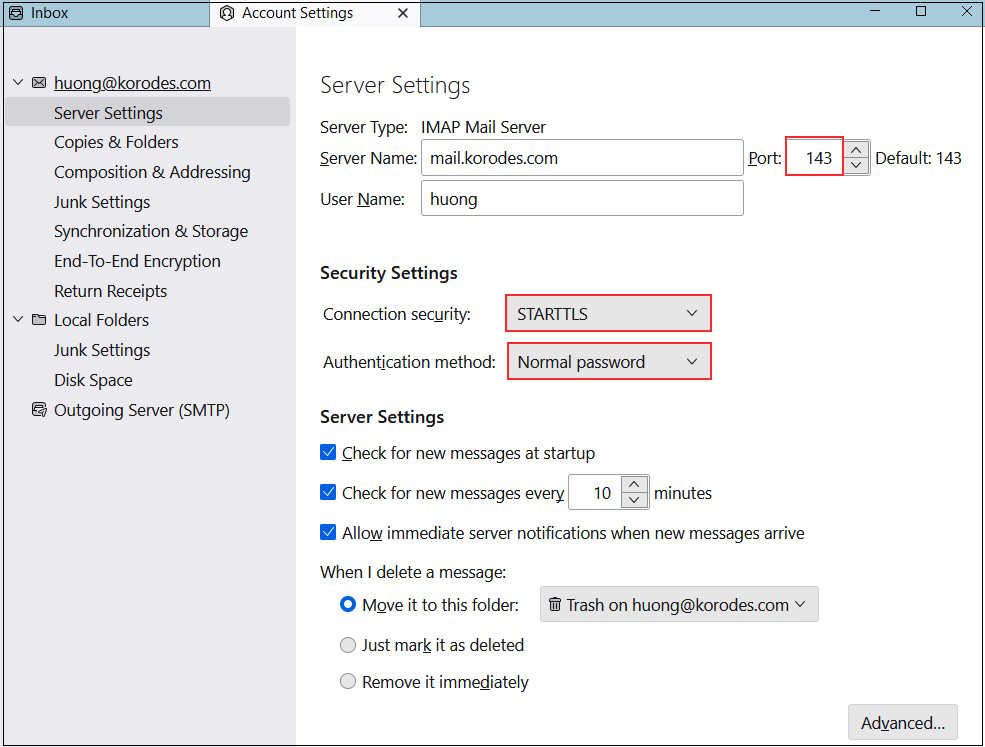
受信サーバー
Port : 143
Connection security : STARTTLS
Authentication method : Normal password
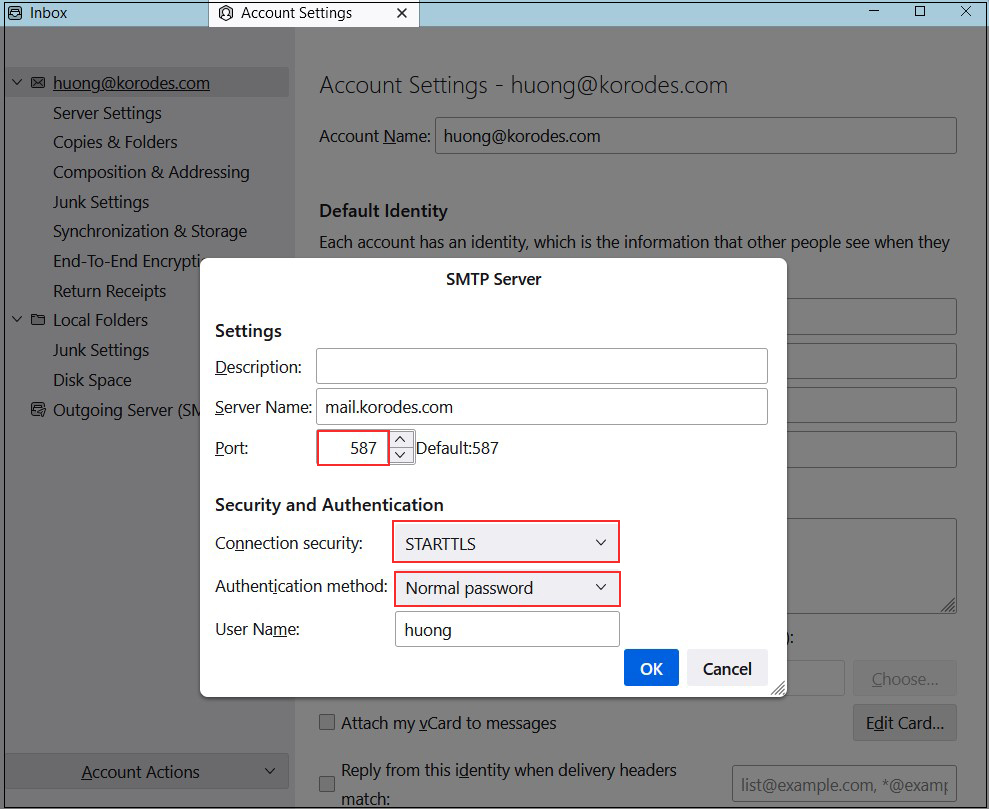
送信サーバー
Port : 587
Connection security : STARTTLS
Authentication method : Normal password