1.SSL証明書を取得する ( Let's Encrypt )
最新のopen sslをインストールしておく
# dnf install openssl-devel
1.1 事前準備
1.パッケージ管理システムSnappyインストール
Let’s EncryptのSSL証明書発行ツール「certbot」は2021年以降は「snap」を利用したインストールが推奨されていますので、まずSnapdをインストールします。(dnfまたはyumでの従来の方法でもインストールできます)

# dnf install epel-release
# dnf upgrade
# dnf -y install snapd
メインのスナップ通信ソケットを管理するsystemdユニットを有効化する
# systemctl enable --now snapd.socket
Created symlink /etc/systemd/system/sockets.target.wants/snapd.socket → /usr/lib/systemd/system/snapd.socket.
クラシックスナップのサポートを有効にする
# ln -s /var/lib/snapd/snap /snap
snapd のバージョンを最新にする
# snap install core
上記でエラーになる場合は、代わりに以下のコマンドを実行する(hello-world というパッケージがインストールされるのに伴い、core パッケージもインストールされます)
# snap install hello-world
hello-world 6.4 from Canonical✓ installed
core パッケージを更新
# snap refresh core
バージョン確認
# snap --version
snap          2.76-0.el9
snapd         2.76-0.el9
series        16
almalinux     9.8
kernel        5.14.0-687.19.1.el9_8.x86_64
architecture  amd64
ログアウトして再度ログインするか、システムを再起動して、snapのパスが正しく更新されていることを確認
2.certbot パッケージインストール
# snap install --classic certbot
certbot 5.6.0 from Certbot Project (certbot-eff✓) installed
/snap/bin/certbotへのシンボリックリンクを作成
# ln -s /snap/bin/certbot /usr/bin/certbot
確認する
# ls -la /usr/bin/certbot
lrwxrwxrwx 1 root root 17 Jul  2 08:48 /usr/bin/certbot -> /snap/bin/certbot

# ls -la /snap/bin/certbot
lrwxrwxrwx 1 root root 13 Jul  2 08:47 /snap/bin/certbot -> /usr/bin/snap
1.2 証明書の取得
# certbot certonly --webroot -w /var/www/html/[FQDN] -d [FQDN]
初回のみメールアドレスの登録と利用条件への同意が必要
受信可能なメールアドレスを指定
Saving debug log to /var/log/letsencrypt/letsencrypt.log
Enter email address or hit Enter to skip.
 (Enter 'c' to cancel): [mail address]

- - - - - - - - - - - - - - - - - - - - - - - - - - - - - - - - - - - - - - - -
Please read the Terms of Service at:
https://letsencrypt.org/documents/LE-SA-v1.7-June-04-2026.pdf
You must agree in order to register with the ACME server. Do you agree?
- - - - - - - - - - - - - - - - - - - - - - - - - - - - - - - - - - - - - - - -
(Y)es/(N)o: y

- - - - - - - - - - - - - - - - - - - - - - - - - - - - - - - - - - - - - - - -
Would you be willing, once your first certificate is successfully issued, to
share your email address with the Electronic Frontier Foundation, a founding
partner of the Let's Encrypt project and the non-profit organization that
develops Certbot? We'd like to send you email about our work encrypting the web,
EFF news, campaigns, and ways to support digital freedom.
- - - - - - - - - - - - - - - - - - - - - - - - - - - - - - - - - - - - - - - -
(Y)es/(N)o: y
Account registered.
Requesting a certificate for [FQDN]

Successfully received certificate.
Certificate is saved at: /etc/letsencrypt/live/[FQDN]/fullchain.pem
Key is saved at:         /etc/letsencrypt/live/[FQDN]/privkey.pem
This certificate expires on 2026-09-29.
These files will be updated when the certificate renews.
Certbot has set up a scheduled task to automatically renew this certificate in the background.

- - - - - - - - - - - - - - - - - - - - - - - - - - - - - - - - - - - - - - - -
If you like Certbot, please consider supporting our work by:
 * Donating to ISRG / Let's Encrypt:   https://letsencrypt.org/donate
 * Donating to EFF:                    https://eff.org/donate-le
- - - - - - - - - - - - - - - - - - - - - - - - - - - - - - - - - - - - - - - -
メッセージ中に記載の通り [/etc/letsencrypt/live/<FQDN>/] 配下に次の証明書が取得されている
・cert.pem ⇒ SSLサーバー証明書(公開鍵含む)
・chain.pem ⇒ 中間証明書
・fullchain.pem ⇒ cert.pem と chain.pem が結合されたファイル
・privkey.pem ⇒ 公開鍵に対する秘密鍵
取得済みの証明書を更新する
・有効期限が 30日未満の証明書を全て更新
・有効期限の残り日数に関わらず更新したい場合は [--force-renewal] を合わせて指定
# certbot [--force-renewal] renew
1.2 証明書を自動更新 (Let's Encrypt)
①登録前のテスト
まず以下の--dry-runオプションを使って自動更新をテストしてみる。このオプションでは、証明書は更新されずに動作確認のみ実施されるため、証明書の取得回数制限に引っかかる心配もない
# certbot renew --dry-run

Saving debug log to /var/log/letsencrypt/letsencrypt.log

- - - - - - - - - - - - - - - - - - - - - - - - - - - - - - - - - - - - - - - -
Processing /etc/letsencrypt/renewal/[FQDN].conf
- - - - - - - - - - - - - - - - - - - - - - - - - - - - - - - - - - - - - - - -
Account registered.
Simulating renewal of an existing certificate for [FQDN]

- - - - - - - - - - - - - - - - - - - - - - - - - - - - - - - - - - - - - - - -
Congratulations, all simulated renewals succeeded:
  /etc/letsencrypt/live/[FQDN]/fullchain.pem (success)
- - - - - - - - - - - - - - - - - - - - - - - - - - - - - - - - - - - - - - - -
②Snap版certbotをインストールすると、証明書自動更新機能も合わせてインストールされます
# systemctl list-timers | less

NEXT                        LEFT        LAST                        PASSED        UNIT                         ACTIVATES
Thu 2026-07-02 09:40:00 JST 6min left   Thu 2026-07-02 09:30:08 JST 3min 36s ago  sysstat-collect.timer        sysstat-collect.service
Thu 2026-07-02 09:41:16 JST 7min left   -                           -             dnf-makecache.timer          dnf-makecache.service
Thu 2026-07-02 09:55:00 JST 21min left  Thu 2026-07-02 09:25:08 JST 8min ago      pmlogger_check.timer         pmlogger_check.service
Thu 2026-07-02 09:55:10 JST 21min left  Thu 2026-07-02 09:25:18 JST 8min ago      pmlogger_farm_check.timer    pmlogger_farm_check.service
Thu 2026-07-02 09:58:00 JST 24min left  Thu 2026-07-02 09:28:08 JST 5min ago      pmie_check.timer             pmie_check.service
Thu 2026-07-02 09:58:10 JST 24min left  Thu 2026-07-02 09:28:18 JST 5min ago      pmie_farm_check.timer        pmie_farm_check.service
Thu 2026-07-02 15:50:00 JST 6h left     -                           -             snap.certbot.renew.timer     snap.certbot.renew.service
Fri 2026-07-03 00:00:00 JST 14h left    Thu 2026-07-02 08:39:50 JST 53min ago     logrotate.timer              logrotate.service
Fri 2026-07-03 00:00:00 JST 14h left    Thu 2026-07-02 08:39:50 JST 53min ago     mlocate-updatedb.timer       mlocate-updatedb.service
Fri 2026-07-03 00:00:00 JST 14h left    -                           -             sa-update.timer              sa-update.service
Fri 2026-07-03 00:00:00 JST 14h left    Thu 2026-07-02 08:39:50 JST 53min ago     unbound-anchor.timer         unbound-anchor.service
Fri 2026-07-03 00:07:00 JST 14h left    -                           -             sysstat-summary.timer        sysstat-summary.service
Fri 2026-07-03 00:08:00 JST 14h left    Thu 2026-07-02 08:40:23 JST 53min ago     pmie_daily.timer             pmie_daily.service
Fri 2026-07-03 00:10:00 JST 14h left    Thu 2026-07-02 08:40:25 JST 53min ago     pmlogger_daily.timer         pmlogger_daily.service
Fri 2026-07-03 08:54:38 JST 23h left    Thu 2026-07-02 08:54:38 JST 39min ago     systemd-tmpfiles-clean.timer systemd-tmpfiles-clean.service
Sun 2026-07-05 01:00:00 JST 2 days left Tue 2026-06-30 15:34:17 JST 1 day 17h ago raid-check.timer             raid-check.service

16 timers listed.
Pass --all to see loaded but inactive timers, too.
snap.certbot.renew.timer が登録されています
snap.certbot.renew.timer のユニットファイルを確認
# vi /etc/systemd/system/snap.certbot.renew.timer

[Unit]
# Auto-generated, DO NOT EDIT
Description=Timer renew for snap application certbot.renew
Requires=var-lib-snapd-snap-certbot-5603.mount
After=var-lib-snapd-snap-certbot-5603.mount
X-Snappy=yes

[Timer]
Unit=snap.certbot.renew.service
OnCalendar=*-*-* 06:56
OnCalendar=*-*-* 15:50

[Install]
WantedBy=timers.target
上記設定によるとOnCalenderパラメータで指定されている毎日6時56分と15時50分に更新を試みます(ただし、更新ごとにランダムに設定時刻が変更します)
snap.certbot.renew.serviceのユニットファイルを確認
# vi /etc/systemd/system/snap.certbot.renew.service

[Unit]
# Auto-generated, DO NOT EDIT
Description=Service for snap application certbot.renew
Requires=var-lib-snapd-snap-certbot-5603.mount
Wants=network.target
After=var-lib-snapd-snap-certbot-5603.mount network.target snapd.apparmor.service
X-Snappy=yes

[Service]
EnvironmentFile=-/etc/environment
ExecStart=/usr/bin/snap run --timer="00:00~24:00/2" certbot.renew
SyslogIdentifier=certbot.renew
Restart=no
WorkingDirectory=/var/snap/certbot/5603
TimeoutStopSec=30s
Type=oneshot
ただし、証明書を使用するWebサーバーの再起動は行われませんので、更新後に自動的に実行されるスクリプトを設定します
# vi /etc/letsencrypt/renewal-hooks/post/web_restart.sh

下記を記述
#!/bin/bash
systemctl restart httpd
2. Apache のhttps 化
下記をインストールしておく
# dnf -y install mod_ssl
2.1 ssl.conf ファイルの編集
# vi /etc/httpd/conf.d/ssl.conf
●43 行目 コメント解除して変更
DocumentRoot "/var/www/html/[FQDN]"
●44 行目 コメント解除して変更
ServerName [FQDN]:443
●85行目 コメントにしてその下に追加
#SSLCertificateFile /etc/pki/tls/certs/localhost.crt
SSLCertificateFile /etc/letsencrypt/live/[FQDN]/cert.pem
●93行目 コメントにしてその下に追加
#SSLCertificateKeyFile /etc/pki/tls/private/localhost.key
SSLCertificateKeyFile /etc/letsencrypt/live/[FQDN]/privkey.pem
●103行目 追加
SSLCertificateChainFile /etc/letsencrypt/live/[FQDN]/chain.pem
Apache を再起動します。
# systemctl restart httpd
Firewallでhttpsを許可する
# firewall-cmd --add-service=https --permanent
success
# firewall-cmd --reload
success
2.2 HTTP 通信を HTTPS へリダイレクト
バーチャルホスト設定ファイルに追記する
# vi /etc/httpd/conf.d/vhost.conf
<VirtualHost *:80>
下記追記
RewriteEngine On
RewriteCond %{HTTPS} off
RewriteRule ^(.*)$ https://%{HTTP_HOST}%{REQUEST_URI} [R=301,L]
DocumentRoot /var/www/html/[FQDN]
ServerName [FQDN]
ServerAdmin [email address]
ErrorLog logs/[FQDN].error_log
CustomLog logs/[FQDN].access_log combined
</VirtualHost>
<Directory "/var/www/html/[FQDN]>
Options FollowSymLinks
AllowOverride All
</Directory>
Apache再起動
# systemctl restart httpd
3. Mail サーバーにSSL/TLS(Let's Encrypt) の設定
3.1 メールサーバー用証明書の取得
メールサーバー用の証明書を取得するには一度web サーバーを止めてから行う
# systemctl stop httpd.service
# certbot certonly --standalone -d mail.[domain]

Saving debug log to /var/log/letsencrypt/letsencrypt.log
Requesting a certificate for mail.[domain]

Successfully received certificate.
Certificate is saved at: /etc/letsencrypt/live/mail.[domain]/fullchain.pem
Key is saved at:         /etc/letsencrypt/live/mail.[domain]/privkey.pem
This certificate expires on 2026-09-29.
These files will be updated when the certificate renews.
Certbot has set up a scheduled task to automatically renew this certificate in the background.

- - - - - - - - - - - - - - - - - - - - - - - - - - - - - - - - - - - - - - - -
If you like Certbot, please consider supporting our work by:
 * Donating to ISRG / Let's Encrypt:   https://letsencrypt.org/donate
 * Donating to EFF:                    https://eff.org/donate-le
- - - - - - - - - - - - - - - - - - - - - - - - - - - - - - - - - - - - - - - -
# systemctl start httpd.service
3.2 Postfixの設定
# vi /etc/postfix/main.cf
● 709, 715行目あたり : コメント化
#smtpd_tls_cert_file = /etc/pki/tls/certs/postfix.pem
#smtpd_tls_key_file = /etc/pki/tls/private/postfix.key
● 最終行に追記
smtpd_use_tls = yes
smtp_tls_mandatory_protocols = !SSLv2, !SSLv3
smtpd_tls_mandatory_protocols = !SSLv2, !SSLv3
smtpd_tls_cert_file = /etc/letsencrypt/live/mail.[domain]/fullchain.pem
smtpd_tls_key_file = /etc/letsencrypt/live/mail.[domain]/privkey.pem
smtpd_tls_session_cache_database = btree:${data_directory}/smtpd_scache
# vi /etc/postfix/master.cf
● 17-20行目 : コメント解除
submission inet n - n - - smtpd
-o syslog_name=postfix/submission
-o smtpd_tls_security_level=encrypt
-o smtpd_sasl_auth_enable=yes
# -o smtpd_tls_auth_only=yes
● 29-32行目 : コメント解除
smtps inet n - n - - smtpd
-o syslog_name=postfix/smtps
-o smtpd_tls_wrappermode=yes
-o smtpd_sasl_auth_enable=yes
# -o smtpd_reject_unlisted_recipient=no
3.3 Dovecotの設定
# vi /etc/dovecot/conf.d/10-ssl.conf
● 8行目:確認
ssl = yes
● 14,15行目:コメントにして、その下に下記証明書/鍵ファイル指定追加
ssl_cert = </etc/letsencrypt/live/mail.[domain]/fullchain.pem
ssl_key = </etc/letsencrypt/live/mail.[domain]/privkey.pem
firewallでPort 587を許可する
# firewall-cmd --add-port=587/tcp --permanent
# firewall-cmd --reload
postfix,dovecot再起動
# systemctl restart postfix dovecot
3.4 Thunderbirdの設定
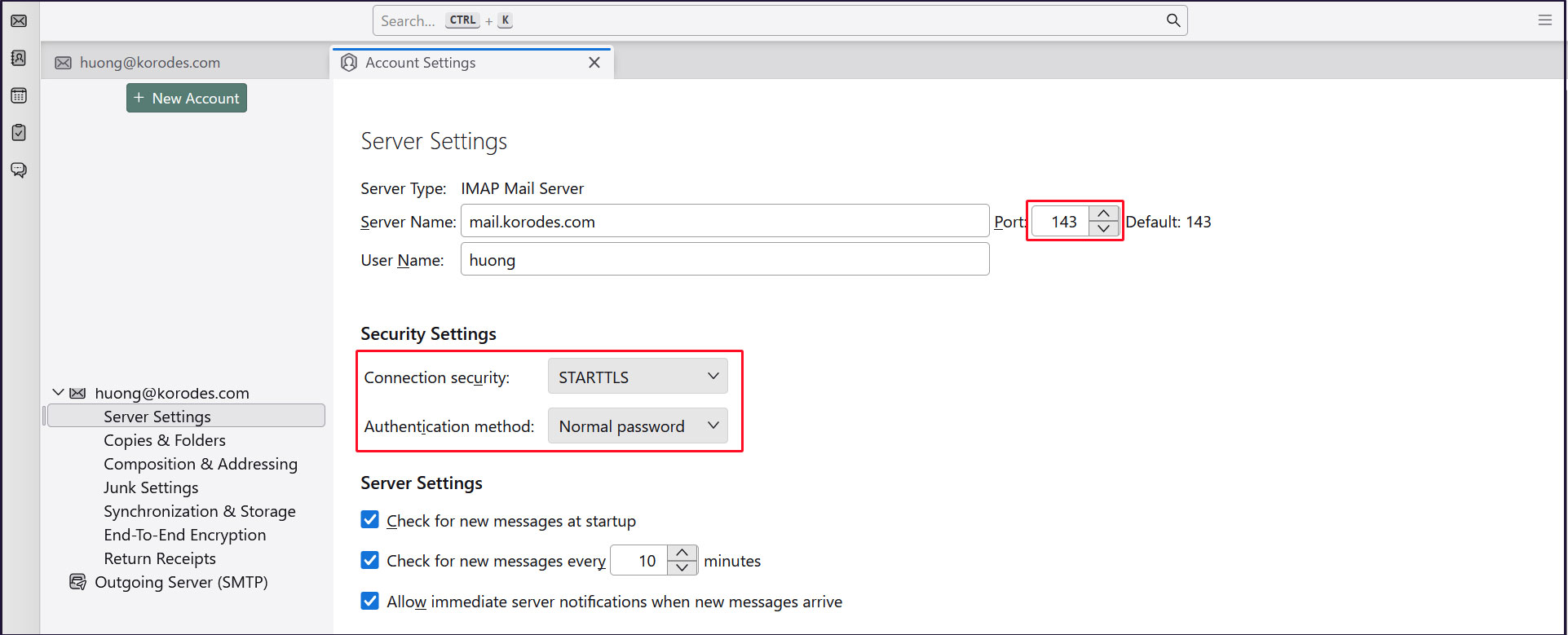
受信サーバー
Port : 143
Connection security : STARTTLS
Authentication method : Normal password
送信サーバー
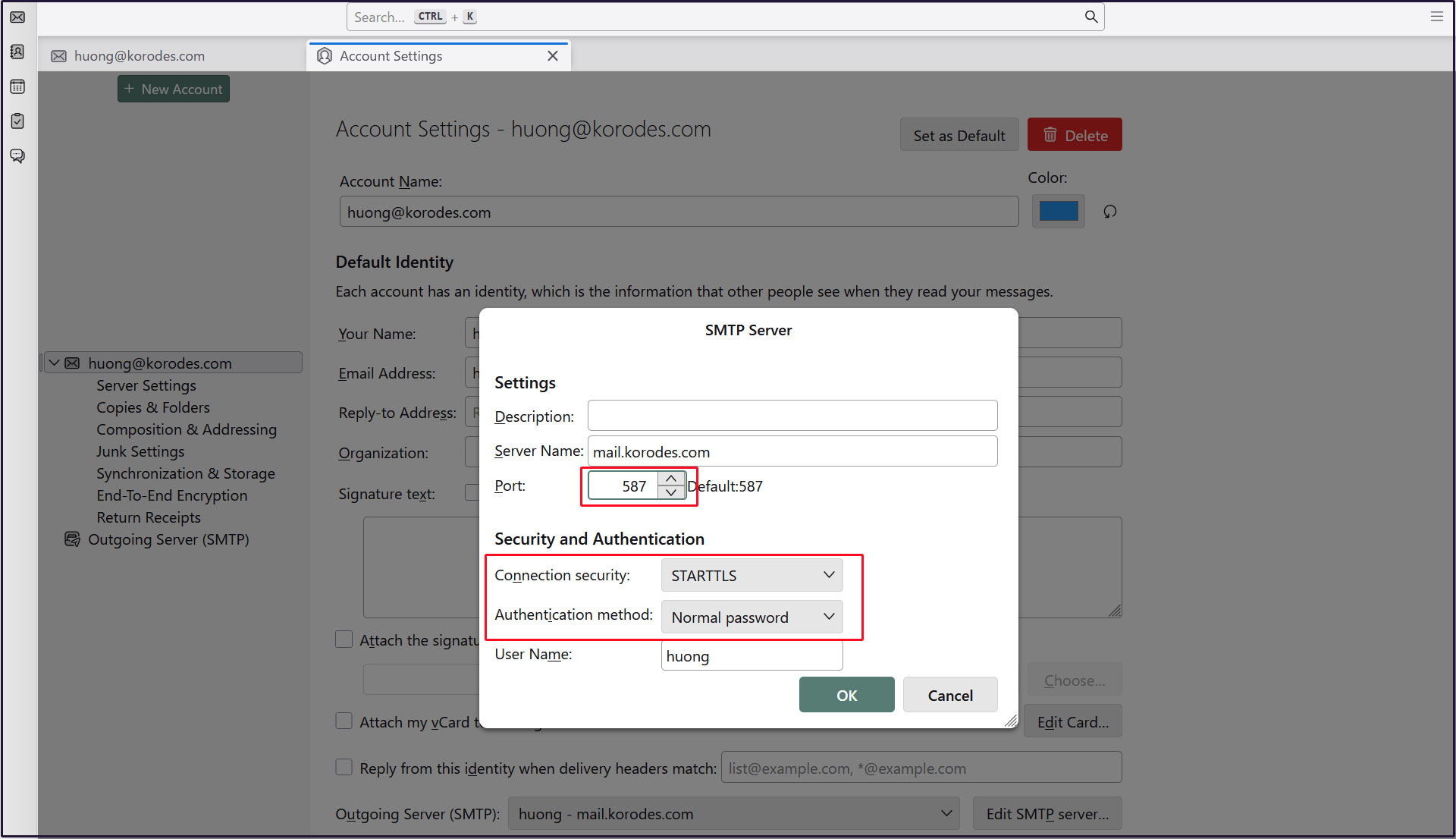
Port : 587
Connection security : STARTTLS
Authentication method : Normal password