Contents
Nagios Server
Nagios is an open-source monitoring solution that runs on Linux.
Nagios was developed by Ethan Galstad and first released in 1999. Subsequently, the project was refined as an open-source project by several contributors.。
Nagios is designed to periodically check critical parameters of networks, applications, or servers. These parameters include microprocessor load, number of running processes, log files, disk and memory usage, as well as many other services such as SMTP (Simple Mail Transfer Protocol), HTTP (Hypertext Transfer Protocol), and POP3 (Post Office Protocol 3).
To run Nagois, you need PHP, a database such as MySQL, and a web server such as Apache or Nginx. This time, we will proceed assuming all of these are already configured.
1.Nagios Install
|
1 |
# zypper -n install nagios |
2. Creating Nagios Web Users
Create a user account to access the Nagios Web dashboard. This user account is used for authentication.
The default user name is nagiosadmin, defined as the preferred user name within the /etc/nagios/cgi.cfg file.
|
1 2 3 4 |
# htpasswd -c /etc/nagios/htpasswd.users nagiosadmin New password: [password] Re-type new password: [again password] Adding password for user nagiosadmin |
Set ownership and permissions
|
1 2 |
# chown wwwrun:wwwrun /etc/nagios/htpasswd.users # chmod 640 /etc/nagios/htpasswd.users |
Restart Apache
|
1 |
# systemctl restart apache2 |
Open the HTTP service port in the firewall.
|
1 2 |
# firewall-cmd --add-service=http --permanent # firewall-cmd --reload |
Create the necessary directories and set ownership.
|
1 2 |
# mkdir /var/lib/nagios/rw/ # chown -R nagios:nagios /var/lib/nagios/rw/ |
Editing Nagios System Services
Add Type=single to [Service]
|
1 2 3 4 5 6 7 8 9 10 11 12 13 14 15 16 17 18 19 20 21 22 23 24 25 26 |
# vi /usr/lib/systemd/system/nagios.service 1 [Unit] 2 Description=Network Monitor Nagios 3 After=syslog.target network.target 4 5 [Service] 6 # for details of the additional system hardening configuration please see 7 # https://en.opensuse.org/openSUSE:Security_Features#Systemd_hardening_effor t 8 ProtectSystem=full 9 ProtectHome=true 10 ProtectHostname=true 11 ProtectKernelTunables=true 12 ProtectKernelModules=true 13 ProtectControlGroups=true 14 RestrictRealtime=true 15 # end of system hardening 16 ExecStartPre=/usr/sbin/nagios -v /etc/nagios/nagios.cfg 17 ExecStart=/usr/sbin/nagios -d /etc/nagios/nagios.cfg 18 ExecStopPost=/usr/bin/rm -f /var/spool/nagios/nagios.cmd 19 ExecReload=/usr/sbin/nagios -v /etc/nagios/nagios.cfg 20 ExecReload=kill -HUP $MAINPI 21 Type=single ←Add 22 [Install] 23 WantedBy=multi-user.target 24 Alias=monitoring_daemon.service |
Start and Enable Nagios Services
|
1 2 3 4 5 |
# systemctl daemon-reload # systemctl start nagios # systemctl enable nagios --now Created symlink '/etc/systemd/system/monitoring_daemon.service' → '/usr/lib/systemd/system/nagios.service'. Created symlink '/etc/systemd/system/multi-user.target.wants/nagios.service' → '/usr/lib/systemd/system/nagios.service'. |
Restart the system
|
1 |
# shutdown -r now |
Verify that the service is running
|
1 2 3 4 5 6 7 8 9 10 11 12 13 14 15 16 17 18 19 20 21 22 23 24 25 |
# systemctl status nagios ● nagios.service - Network Monitor Nagios Loaded: loaded (/usr/lib/systemd/system/nagios.service; enabled; preset: disabled) Active: active (running) since Thu 2025-10-09 21:00:20 JST; 2s ago Invocation: f228ddb94b3c48b1aff332fca95c2bd3 Process: 2346 ExecStartPre=/usr/sbin/nagios -v /etc/nagios/nagios.cfg (code=exited, status=0/SUCCESS) Process: 2348 ExecStart=/usr/sbin/nagios -d /etc/nagios/nagios.cfg (code=exited, status=0/SUCCESS) Main PID: 2349 (nagios) Tasks: 8 (limit: 9397) CPU: 88ms CGroup: /system.slice/nagios.service tq2349 /usr/sbin/nagios -d /etc/nagios/nagios.cfg tq2351 /usr/sbin/nagios --worker /var/lib/nagios/rw/nagios.qh tq2352 /usr/sbin/nagios --worker /var/lib/nagios/rw/nagios.qh tq2353 /usr/sbin/nagios --worker /var/lib/nagios/rw/nagios.qh tq2354 /usr/sbin/nagios --worker /var/lib/nagios/rw/nagios.qh tq2355 /usr/sbin/nagios -d /etc/nagios/nagios.cfg tq2356 /usr/lib/nagios/plugins/check_ping -H 127.0.0.1 -w 3000.0,80% -c 5000.0,100% -p 5 mq2357 /usr/bin/ping -4 -n -U -w 30 -c 5 127.0.0.1 Oct 09 21:00:20 Lepard nagios[2349]: qh: Socket '/var/lib/nagios/rw/nagios.qh' successfully initialized Oct 09 21:00:20 Lepard nagios[2349]: qh: core query handler registered Oct 09 21:00:20 Lepard nagios[2349]: qh: echo service query handler registered Oct 09 21:00:20 Lepard nagios[2349]: qh: help for the query handler registered |
3. Access the Nagios Web Interface
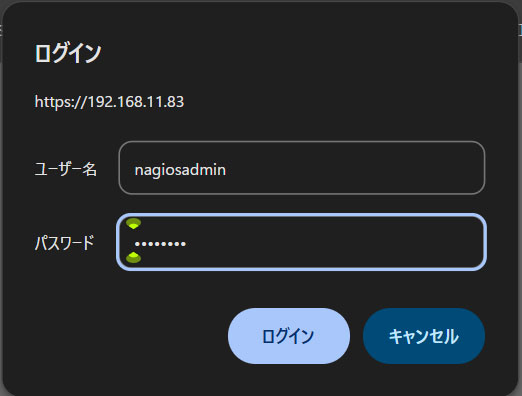
Access http://[IP_Address]/nagios/ in any browser. Enter nagiosadmin for [Username] and the password you specified when creating the user above for [Password], then click [Sign in].
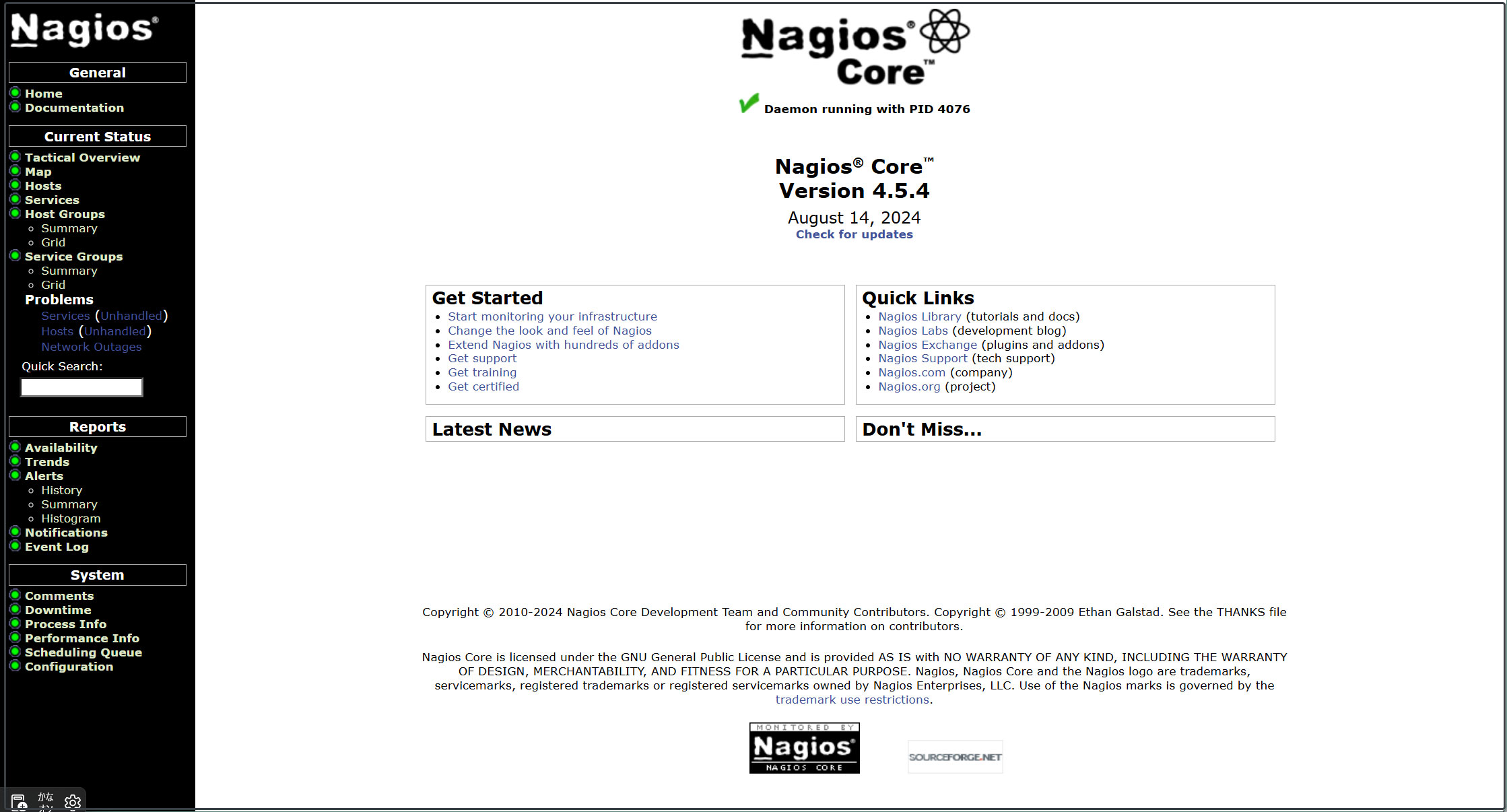
After successfully logging in, the following dashboard will be displayed.
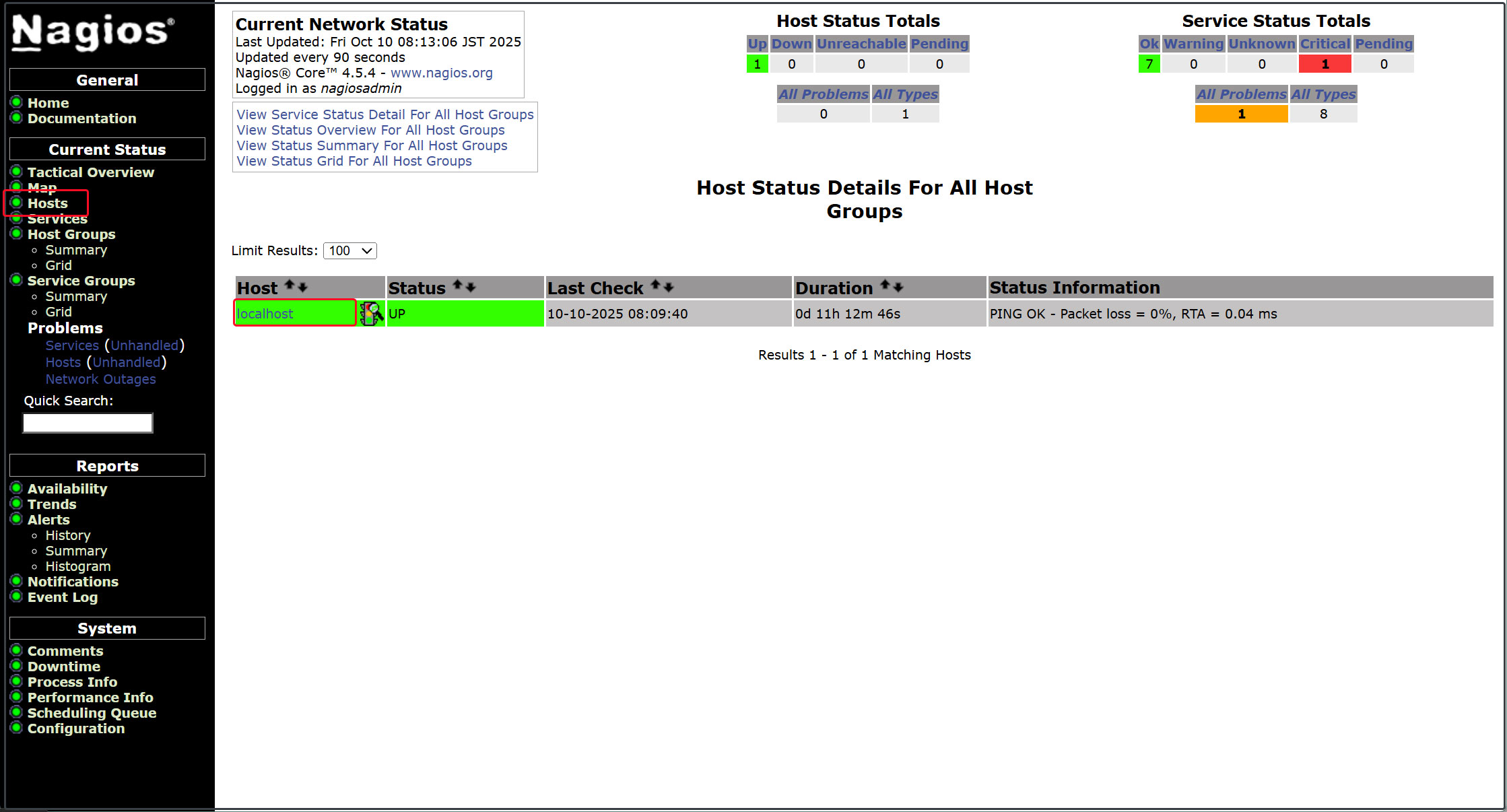
Display host availability
Click [Hosts] in the left menu
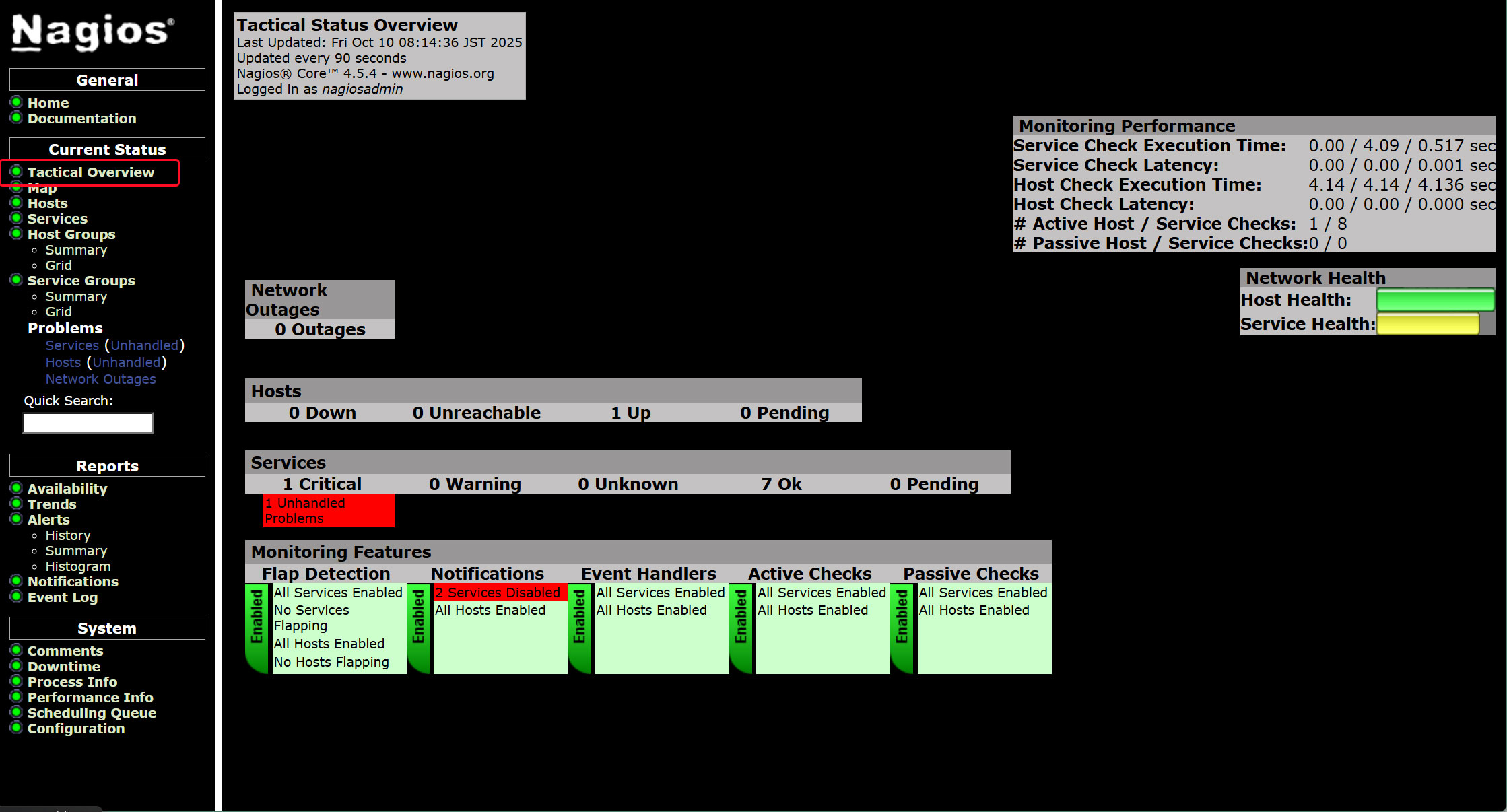
Click [Tactical Overview] in the left menu to view monitoring data.
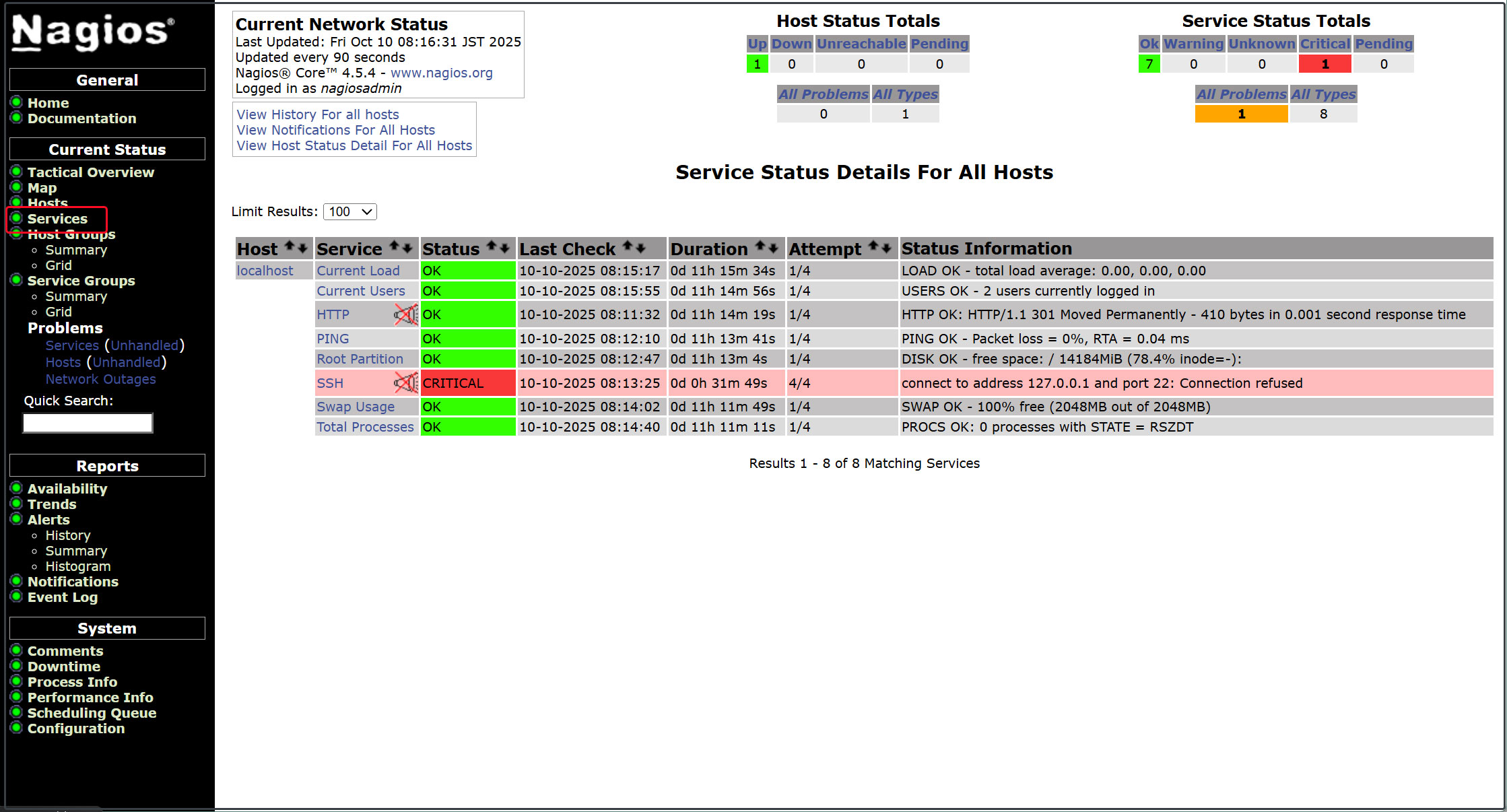
Click [Current Status] [Services] in the left menu.
4. Configuring the Nagios Agent
What is required to monitor agents
• Nagios plugins for data collection
• NRPE Agent that executes plugins
4.1 Nagios plugins
Nagios plugins are located in the /usr/lib/nagios/plugins directory. To list all plugins available on the system, list this directory.
|
1 |
# ls /usr/lib/nagios/plugins |
The following nagios-plugins are available:
|
1 2 3 4 5 6 7 8 |
check_breeze check_dns check_ide_smart check_mailq check_ntp_time check_real check_ssmtp negate check_by_ssh check_dummy check_ifoperstatus check_mrtg check_nwstat check_rpc check_swap urlize check_clamd check_file_age check_ifstatus check_mrtgtraf check_oracle check_rta_multi check_tcp utils.pm check_cluster check_flexlm check_imap check_nntp check_overcr check_sensors check_time utils.sh check_dhcp check_ftp check_ircd check_nntps check_ping check_simap check_udp check_dig check_host check_jabber check_nt check_pop check_smtp check_ups check_disk check_http check_load check_ntp check_procs check_spop check_users check_disk_smb check_icmp check_log check_ntp_peer check_procs_perf check_ssh check_wave |
4.2 Installing the Nagios NRPE Agent
|
1 |
# zypper -n install nrpe |
Version Check
|
1 2 3 |
# nrpe -V NRPE - Nagios Remote Plugin Executor Version: 4.1.1 |
Start the service and enable it
|
1 2 3 |
# systemctl enable --now nrpe.service Created symlink '/etc/systemd/system/multi-user.target.wants/nrpe.service' → '/usr/lib/systemd/system/nrpe.service'. |
Check the status of the NRPE agent
|
1 2 3 4 5 6 7 8 9 10 11 12 13 14 15 16 17 18 |
# systemctl status nrpe ● nrpe.service - Nagios Remote Plugin Executor Loaded: loaded (/usr/lib/systemd/system/nrpe.service; enabled; preset: disabled) Active: active (running) since Wed 2026-02-11 10:00:33 JST; 10s ago Invocation: cc7cefadd3754a94846689aabe0de3e6 Docs: http://www.nagios.org/documentation Main PID: 3037 (nrpe) Tasks: 1 (limit: 4558) CPU: 46ms CGroup: /system.slice/nrpe.service └─3037 /usr/sbin/nrpe -c /etc/nrpe.cfg -f Feb 11 10:00:33 Lepard systemd[1]: Started Nagios Remote Plugin Executor. Feb 11 10:00:33 Lepard nrpe[3037]: Starting up daemon Feb 11 10:00:33 Lepard nrpe[3037]: Server listening on 0.0.0.0 port 5666. Feb 11 10:00:33 Lepard nrpe[3037]: Server listening on :: port 5666. Feb 11 10:00:33 Lepard nrpe[3037]: Listening for connections on port 5666 Feb 11 10:00:33 Lepard nrpe[3037]: Allowing connections from: 127.0.0.1,::1 |
Open the NRPE port on the firewall
NRPE uses TCP port 5666 by default. If a firewall is in operation, open this port to allow external checks from the Nagios monitoring server.
|
1 2 |
# firewall-cmd --add-port=5666/tcp # firewall-cmd --reload |
Verify that port 5666/tcp is listening.
|
1 2 3 4 5 |
# ss -altnp | grep 5666 LISTEN 0 5 0.0.0.0:5666 0.0.0.0:* users:(("nrpe",pid=3037,fd=4)) LISTEN 0 5 [::]:5666 [::]:* users:(("nrpe",pid=3037,fd=5)) |
5. Add Monitoring Host
Add the following server as a host and configure it as a target for simple ping-based uptime monitoring.
OS : openSUSE15.6
IPアドレス : 192.168.11.85
5.1 Editing Configuration Files
|
1 2 3 |
# vi /etc/nagios/nagios.cfg Line 51 cfg_dir=/etc/nagios/servers # Uncomments |
5.2 Directory Creation
|
1 2 3 |
# mkdir /etc/nagios/servers # chgrp nagios /etc/nagios/servers # chmod 750 /etc/nagios/servers |
5.3 Create New Definition File
|
1 2 3 4 5 6 7 8 9 10 11 12 13 14 |
# vi /etc/nagios/servers/korodes.cfg define host { use linux-server host_name korodes alias korodes address 192.168.11.85 } define service { use generic-service host_name korodes service_description PING check_command check_ping!100.0,20%!500.0,60% } |
5.4 Nagios Server Restart
|
1 |
# systemctl restart nagios.service |
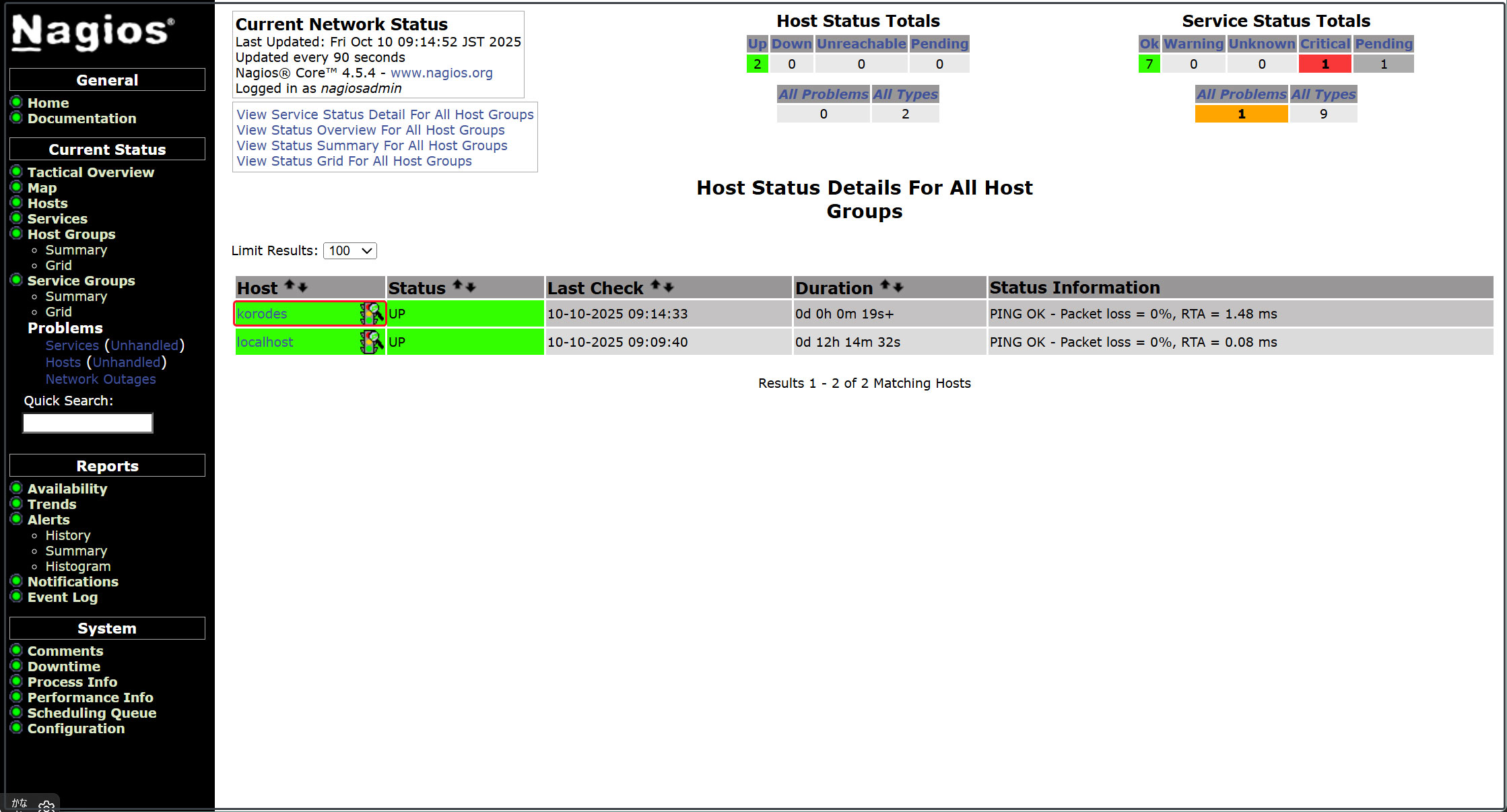
Log in to the Nagios server (http://[server IP address]/nagios) and view Hosts to see that the host has been added.
6. Add Monitoring Service
Add the monitoring service to the host added above.
OS : openSUSE15.6
IPアドレス : 192.168.11.85
6.1 Settings on the monitored server
6.1.1 Install the agent on the monitored host
Install nrpe and representative service plugins from EPEL
|
1 |
# zypper -n install nrpe |
6.1.2 Editing Configuration Files
# vi /etc/nrpe.cfg
Line 106行目 : Add hosts to allow connections (specify Nagios server)
allowed_hosts=127.0.0.1,::1,192.168.11.83
Line 122 : Allow command arguments
dont_blame_nrpe=1
Line 300-304 : Add as a comment
# command[check_users]=/usr/lib/nagios/plugins/check_users -w 5 -c 10
# command[check_load]=/usr/lib/nagios/plugins/check_load -r -w .15,.10,.05 -c .30,.25,.20
# command[check_hda1]=/usr/lib/nagios/plugins/check_disk -w 20% -c 10% -p /dev/hda1
# command[check_zombie_procs]=/usr/lib/nagios/plugins/check_procs -w 5 -c 10 -s Z
# command[check_total_procs]=/usr/lib/nagios/plugins/check_procs -w 150 -c 200
command[check_by_ssh]=/usr/lib/nagios/plugins/check_by_ssh $ARG1$
command[check_dhcp]=/usr/lib/nagios/plugins/check_dhcp $ARG1$
command[check_disk]=/usr/lib/nagios/plugins/check_disk $ARG1$
command[check_file_age]=/usr/lib/nagios/plugins/check_file_age $ARG1$
command[check_ftp]=/usr/lib/nagios/plugins/check_ftp $ARG1$
command[check_http]=/usr/lib/nagios/plugins/check_http $ARG1$
command[check_imap]=/usr/lib/nagios/plugins/check_imap $ARG1$
command[check_load]=/usr/lib/nagios/plugins/check_load $ARG1$
command[check_log]=/usr/lib/nagios/plugins/check_log $ARG1$
command[check_mysql]=/usr/lib/nagios/plugins/check_mysql $ARG1$
command[check_ntp]=/usr/lib/nagios/plugins/check_ntp $ARG1$
command[check_ntp_peer]=/usr/lib/nagios/plugins/check_ntp_peer $ARG1$
command[check_ntp_time]=/usr/lib/nagios/plugins/check_ntp_time $ARG1$
command[check_ping]=/usr/lib/nagios/plugins/check_ping $ARG1$
command[check_pop]=/usr/lib/nagios/plugins/check_pop $ARG1$
command[check_spop]=/usr/lib/nagios/plugins/check_spop $ARG1$
command[check_procs]=/usr/lib/nagios/plugins/check_procs $ARG1$
command[check_smtp]=/usr/lib/nagios/plugins/check_smtp $ARG1$
command[check_ssmtp]=/usr/lib/nagios/plugins/check_ssmtp $ARG1$
command[check_ssh]=/usr/lib/nagios/plugins/check_ssh $ARG1$
command[check_swap]=/usr/lib/nagios/plugins/check_swap $ARG1$
command[check_tcp]=/usr/lib/nagios/plugins/check_tcp $ARG1$
command[check_udp]=/usr/lib/nagios/plugins/check_udp $ARG1$
command[check_ups]=/usr/lib/nagios/plugins/check_ups $ARG1$
command[check_users]=/usr/lib/nagios/plugins/check_users $ARG1$
6.1.3 Enable and start the NRPE server
|
1 2 3 4 5 6 7 8 9 10 11 12 13 14 15 16 17 18 19 20 21 |
# systemctl enable --now nrpe # systemctl start nrpe # /systemctl status nrpe ● nrpe.service - Nagios Remote Plugin Executor Loaded: loaded (/usr/lib/systemd/system/nrpe.service; enabled; preset: disabled) Active: active (running) since Wed 2026-02-11 10:39:49 JST; 1min 0s ago Docs: http://www.nagios.org/documentation Main PID: 37038 (nrpe) Tasks: 1 (limit: 2250) CPU: 12ms CGroup: /system.slice/nrpe.service └─37038 /usr/sbin/nrpe -c /etc/nrpe.cfg -f Feb 11 10:39:49 Lion systemd[1]: Started Nagios Remote Plugin Executor. Feb 11 10:39:49 Lion nrpe[37038]: Starting up daemon Feb 11 10:39:49 Lion nrpe[37038]: Server listening on 0.0.0.0 port 5666. Feb 11 10:39:49 Lion nrpe[37038]: socket: Address family not supported by protocol Feb 11 10:39:49 Lion nrpe[37038]: Warning: Daemon is configured to accept command arguments from clients! Feb 11 10:39:49 Lion nrpe[37038]: Listening for connections on port 5666 Feb 11 10:39:49 Lion nrpe[37038]: Allowing connections from: 127.0.0.1,::1,192.168.11.83 |
6.1.4 Open NRPE ports 5666/tcp and 5666/udp on the firewall.
|
1 2 |
# firewall-cmd --add-port=5666/tcp --permanent # firewall-cmd --reload |
6.2 Nagios Server-Side Configuration
6.2.1 Installing the NRPE Plugin
|
1 |
# zypper install nagios-plugins-nrpe |
6.2.2 Check the Nagios plugin directory
|
1 |
# ls /usr/lib/nagios/plugins |
check_breeze check_dummy check_ifstatus check_nntp check_overcr check_simap check_ups check_by_ssh check_file_age check_imap check_nntps check_ping check_smtp check_users check_clamd check_flexlm check_ircd check_nrpe check_pop check_spop check_wave check_cluster check_ftp check_jabber check_nt check_procs check_ssh negate check_dhcp check_host check_load check_ntp check_procs_perf check_ssmtp nrpe_check_control check_dig check_http check_log check_ntp_peer check_real check_swap urlize check_disk check_icmp check_mailq check_ntp_time check_rpc check_tcp utils.pm check_disk_smb check_ide_smart check_mrtg check_nwstat check_rta_multi check_time utils.sh check_dns check_ifoperstatus check_mrtgtraf check_oracle check_sensors check_udp
6.2.3 Editing commands.cfg
|
1 2 3 4 5 6 7 |
# vi /etc/nagios/objects/commands.cfg # Add to the last line define command { command_name check_nrpe command_line $USER1$/check_nrpe -H $HOSTADDRESS$ -c $ARG1$ } |
6.2.4 Edit and add to the korodes.cfg file created when adding the host earlier.
This time, let's add HTTP, SSH, and FTP.
|
1 2 3 4 5 6 7 8 9 10 11 12 13 14 15 16 17 18 19 20 21 22 23 24 25 26 |
# vi /etc/nagios/servers/korodes.cfg # Add the following: # 'HTTP' command definition define service{ use local-service host_name korodes service_description HTTP check_command check_http } # 'SSH' command definition define service{ use local-service host_name korodes service_description SSH check_command check_ssh } # 'FTP' command definition define service{ use local-service host_name korodes service_description FTP check_command check_ftp } |
6.2.5 Nagios Restart
|
1 |
# systemctl restart nagios.service |
6.2.6 Access http://[Nagios Server IP Address]/nagios
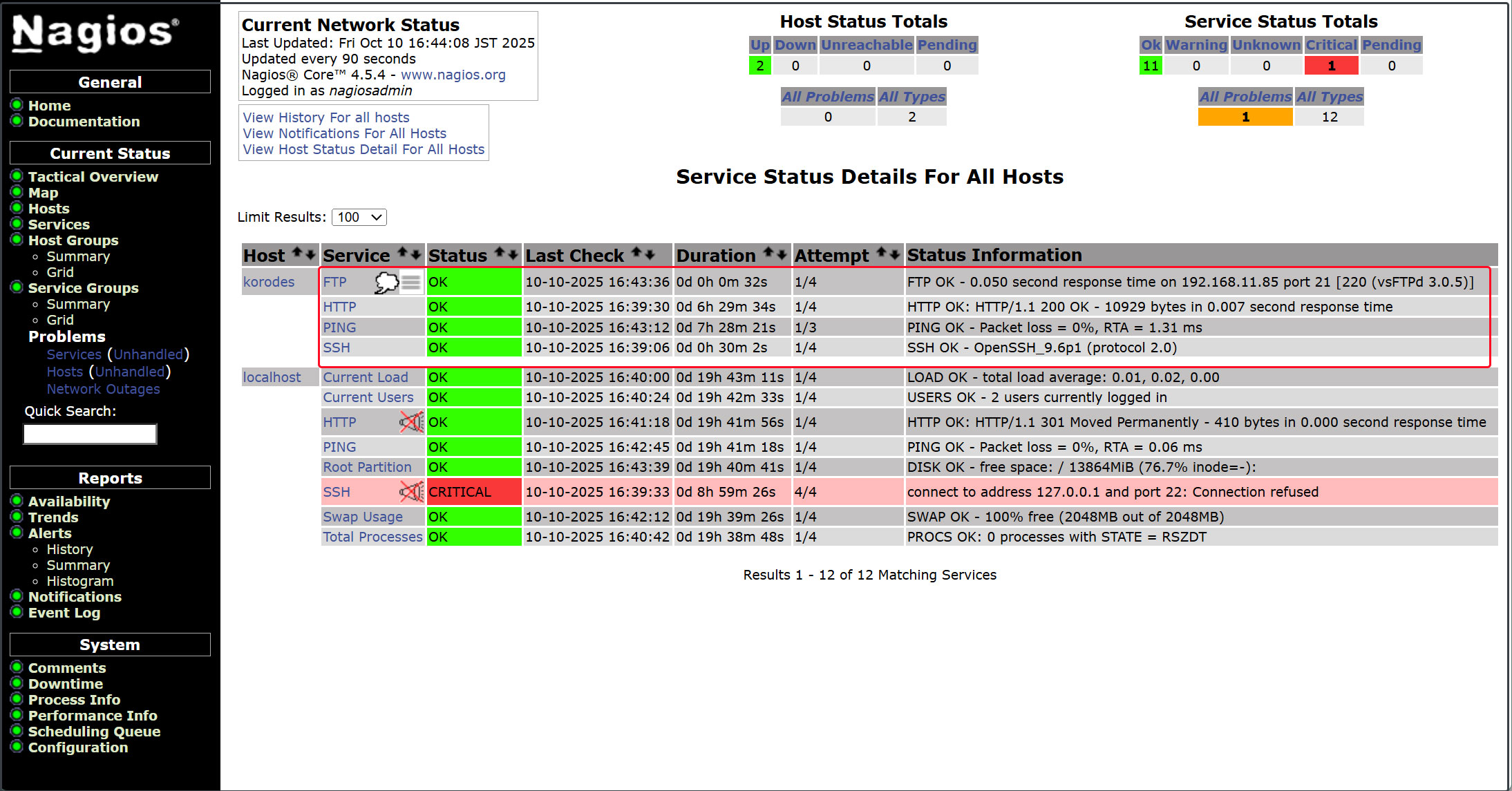
The newly added monitoring service has been added as shown in the figure below.