

Contents
1. Antivirus software Clamav installed
Install Clam AntiVirus, a free anti-virus software for Linux, as an anti-virus measure.
By installing this anti-virus software, you can not only scan the entire server for viruses, but also scan incoming and outgoing mail for viruses if you build and configure a mail server.。
1.1 Install
|
1 |
# apt -y install clamav clamav-daemon |
The clamav-related configuration files are installed in the /etc/clamav/ folder.
1.2 Virus Definition Update
|
1 |
# sed -i -e "s/^NotifyClamd/#NotifyClamd/g" /etc/clamav/freshclam.conf |
|
1 2 3 4 5 6 7 |
# systemctl stop clamav-freshclam # freshclam Fri Jan 23 13:57:18 2026 -> ClamAV update process started at Fri Jan 23 13:57:18 2026 Fri Jan 23 13:57:18 2026 -> daily.cvd database is up-to-date (version: 27888, sigs: 354839, f-level: 90, builder: svc.clamav-publisher) Fri Jan 23 13:57:18 2026 -> main.cvd database is up-to-date (version: 63, sigs: 3287027, f-level: 90, builder: tomjudge) Fri Jan 23 13:57:18 2026 -> bytecode.cvd database is up-to-date (version: 339, sigs: 80, f-level: 90, builder: nrandolp) |
|
1 |
# systemctl start clamav-freshclam |
Edit configuration file
|
1 2 3 4 |
# vi /etc/logrotate.d/clamav-freshclam create 640 clamav adm ↓ create 640 clamav clamav |
Automatic virus definition update confirmation
Ensure that the service is registered for automatic virus definition updates.
|
1 |
# service clamav-freshclam status |
It appears as follows
|
1 2 3 4 5 6 7 8 9 10 11 12 13 14 15 16 17 18 |
● clamav-freshclam.service - ClamAV virus database updater Loaded: loaded (/lib/systemd/system/clamav-freshclam.service; disabled; preset: enabled) Active: active (running) since Fri 2026-01-23 13:55:23 JST; 3min 10s ago Docs: man:freshclam(1) man:freshclam.conf(5) https://docs.clamav.net/ Main PID: 19931 (freshclam) Tasks: 1 (limit: 2256) Memory: 2.9M CPU: 11ms CGroup: /system.slice/clamav-freshclam.service └─19931 /usr/bin/freshclam -d --foreground=true Jan 23 13:55:23 Lepard systemd[1]: Started clamav-freshclam.service - ClamAV virus database updater. Jan 23 13:55:23 Lepard freshclam[19931]: Fri Jan 23 13:55:23 2026 -> ClamAV update process started at Fri Jan 23 13:55:23 2026 Jan 23 13:55:23 Lepard freshclam[19931]: Fri Jan 23 13:55:23 2026 -> daily.cvd database is up-to-date (version: 27888, sigs: 354839, f-level: 90, builder: svc.clamav-pu> Jan 23 13:55:23 Lepard freshclam[19931]: Fri Jan 23 13:55:23 2026 -> main.cvd database is up-to-date (version: 63, sigs: 3287027, f-level: 90, builder: tomjudge) Jan 23 13:55:23 Lepard freshclam[19931]: Fri Jan 23 13:55:23 2026 -> bytecode.cvd database is up-to-date (version: 339, sigs: 80, f-level: 90, builder: nrandolp) |
Logs are recorded in the file /var/log/clamav/freshclam.log.
1.3 Virus Check Confirmation
①Running manual virus checks
|
1 2 3 4 5 6 7 8 9 10 11 12 13 |
# clamscan --infected --remove --recursive /home ----------- SCAN SUMMARY ----------- Known viruses: 3627255 Engine version: 1.4.3 Scanned directories: 4 Scanned files: 7 Infected files: 0 Data scanned: 0.00 MB Data read: 0.00 MB (ratio 0.00:1) Time: 11.771 sec (0 m 11 s) Start Date: 2026:01:23 14:00:24 End Date: 2026:01:23 14:00:36 |
Infected files: 0, so no virus
②Virus detection by downloading test viruses
Download a harmless virus and test it for detection.
|
1 2 3 4 5 6 7 8 9 10 11 12 13 14 15 16 17 |
# wget https://secure.eicar.org/eicar.com.txt # clamscan --infected --remove --recursive /root/eicar.com.txt: Eicar-Test-Signature FOUND /root/eicar.com.txt: Removed. ----------- SCAN SUMMARY ----------- Known viruses: 3627255 Engine version: 1.4.3 Scanned directories: 2 Scanned files: 8 Infected files: 1 Data scanned: 0.02 MB Data read: 0.01 MB (ratio 2.00:1) Time: 8.377 sec (0 m 8 s) Start Date: 2026:01:23 14:02:54 End Date: 2026:01:23 14:03:02 |
As you can see, it notifies me of the virus by displaying “FOUND” and “Removed.” and “Infected files: 1”. The “--remove” option was added, so the test virus was removed.
1.4 Create a script file to do a full scan
①Create a script file storage directory (/opt/script) in advance.
|
1 |
# mkdir /opt/script |
②Create script file
|
1 |
# vi /opt/script/clam-full.sh |
Contents of clam-full.sh (new)
|
1 2 3 4 5 6 7 8 9 10 11 12 13 14 15 16 17 18 19 |
#!/bin/sh echo ========================================= date hostname clamscan / \ --infected \ --recursive \ --log=/var/log/clamav/clamscan.log \ --move=/var/log/clamav/virus \ --exclude-dir=^/boot \ --exclude-dir=^/sys \ --exclude-dir=^/proc \ --exclude-dir=^/dev \ --exclude-dir=^/var/log/clamav/virus if [ $? = 0 ]; then echo “virus undetected.” else echo “virus detection!!” fi |
③execute authorization
|
1 |
# chmod +x /opt/script/clam-full.sh |
④Create a folder for virus quarantine
If not, a runtime error will occur because the above script specifies it as an excluded directory.
|
1 |
# mkdir /var/log/clamav/virus |
⑤Script Execution
|
1 |
# /opt/script/clam-full.sh |
|
1 2 3 4 5 6 7 8 9 10 11 12 13 14 15 16 |
========================================= Fri Jan 23 02:05:08 PM JST 2026 Lepard ----------- SCAN SUMMARY ----------- Known viruses: 3627255 Engine version: 1.4.3 Scanned directories: 4231 Scanned files: 34411 Infected files: 0 Data scanned: 2469.60 MB Data read: 1544.88 MB (ratio 1.60:1) Time: 468.842 sec (7 m 48 s) Start Date: 2026:01:23 14:05:08 End Date: 2026:01:23 14:12:57 “virus undetected.” |
akes quite a long time to complete.
Logs are recorded in the /var/log/clamav/clamscan.log file.
⑤Scheduled virus scan execution with cron
|
1 2 |
# crontab -e 0 2 * * mon /opt/script/clam-full.sh >> /var/log/clamav/clamascan.log |
上記例では、毎週月曜日の夜中2時に定期的に実行。
2. Mail server installation
Postfix was developed as a Mail Transport Agent (MTA) to replace sendmail, and is a mail server that is highly compatible with sendmail, secure, easy to maintain, and fast.
In addition, since Postfix only functions as an SMTP server for sending mail, the POP server Dovecot for receiving mail will be installed separately in the latter half.
2.1 Postfix : Installation Configuration
①Install Postfix
Install Postfix and build an SMTP server; SMTP uses 25/TCP.
To prevent unauthorized mail relay, use the SASL function of Dovecot, described below, and configure Postfix so that authentication is also required for sending.
|
1 |
# apt -y install postfix sasl2-bin |
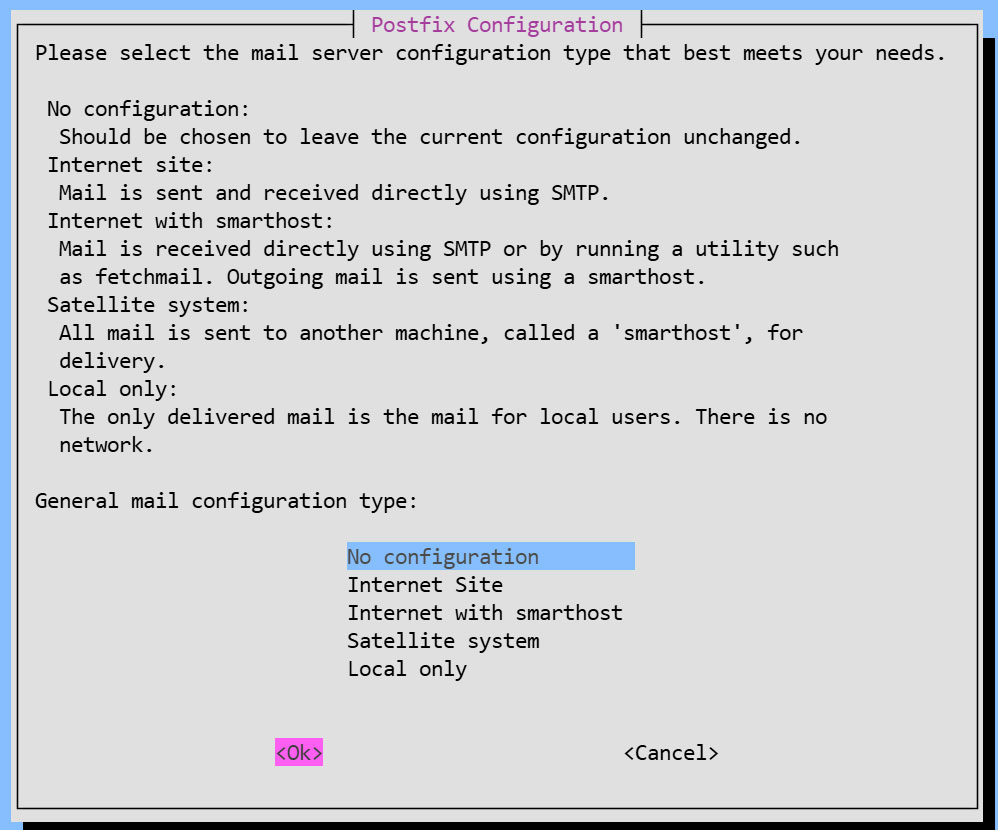
You will be asked to select general configuration settings, select "No configuration " to set them manually later
②Edit configuration file (main.cf)
|
1 2 |
# cp /usr/share/postfix/main.cf.dist /etc/postfix/main.cf # vi /etc/postfix/main.cf |
# Line 82:Uncomments
mail_owner = postfix
# Line 100:Add Hostname Specification
myhostname = mail.[Domain]
# Per Line 107:Domain Name Specification Addition
mydomain = [Domain]
# Per Line 127:Uncomments
myorigin = $mydomain
# Per Line 141:Uncomments
inet_interfaces = all
# Per Line 189:Uncomments
mydestination = $myhostname, localhost.$mydomain, localhost, $mydomain
# Per Line 232:Uncomments
local_recipient_maps = unix:passwd.byname $alias_maps
# Per Line 277:Uncomments
mynetworks_style = subnet
# Per Line 294:Self-Network Addendum
mynetworks = 127.0.0.0/8, 192.168.11.0/24
# Per Line 416:Uncomments
alias_maps = hash:/etc/aliases
# Per Line 427:Uncomments
alias_database = hash:/etc/aliases
# Per Line 449:Uncomments
home_mailbox = Maildir/
# Per Line 585:Add a comment and append it below
#smtpd_banner = $myhostname ESMTP $mail_name (Debian/GNU)
smtpd_banner = $myhostname ESMTP
# Per Line 659:Add
sendmail_path = /usr/sbin/postfix
# Per Line 664:Add
newaliases_path = /usr/bin/newaliases
# Per Line 669:Add
mailq_path = /usr/bin/mailq
# Per Line 675:Add
setgid_group = postdrop
#Per Line 679:Commenting
#html_directory =
# Per Line 683:Commenting
#manpage_directory =
# Per Line 688:Commenting
#sample_directory =
# Per Line 692:Commenting
#readme_directory =
#Add to the last line
#Disable the SMTP VRFY command
disable_vrfy_command = yes
#Request the HELO command from the client
smtpd_helo_required = yes
#Limit sent and received email size to 10MB
message_size_limit = 10485760
#Limit mailbox size to 1GB
mailbox_size_limit = 1073741824
#SMTP Authentication Settings
smtpd_sasl_type = dovecot
smtpd_sasl_path = private/auth
smtpd_sasl_auth_enable = yes
smtpd_sasl_security_options = noanonymous
smtpd_sasl_local_domain = $myhostname
smtpd_recipient_restrictions = permit_mynetworks, permit_auth_destination, permit_sasl_authenticated, reject
③Edit configuration file (master.cf)
|
1 |
# vi /etc/postfix/master.cf |
Line 19,22 : Uncomments
submission inet n - y - - smtpd
# -o syslog_name=postfix/submission
# -o smtpd_tls_security_level=encrypt
-o smtpd_sasl_auth_enable=yes
# -o smtpd_tls_auth_only=yes
Reflect settings, restart
|
1 2 |
# newaliases # systemctl restart postfix |
2.2 Dovecot : Installation Configuration
①Install Dovecot
Install Dovecot and build a POP/IMAP server, using 110/TCP for POP and 143/TCP for IMAP.
|
1 |
# apt -y install dovecot-core dovecot-pop3d dovecot-imapd |
②Configure Dovecot to provide SASL functionality for Postfix
|
1 2 3 |
# vi /etc/dovecot/dovecot.conf Line 30:Uncomment listen = *, :: |
|
1 2 3 4 5 |
# vi /etc/dovecot/conf.d/10-auth.conf Line 10:Uncomment and change (also allow plain text authentication) disable_plaintext_auth = no Line 100:add auth_mechanisms = plain login |
|
1 2 3 |
# vi /etc/dovecot/conf.d/10-mail.conf Line 30:Change to Maildir format mail_location = maildir:~/Maildir |
|
1 2 3 4 5 6 7 8 |
# vi /etc/dovecot/conf.d/10-master.conf Line 107-109:Uncommented and added # Postfix smtp-authi unix_listener /var/spool/postfix/private/auth { mode = 0666 user = postfix group = postfix } |
③Reflect settings, reboot
|
1 |
# systemctl restart dovecot |
2.3 Email User Account Registration
egister a user account for e-mail.
This setting is for when a user account on the OS is also used for e-mail.
If you want to use mail with a user account on the OS, no additional configuration is required, just register the OS user
①Mail client installed
|
1 |
# apt -y install mailutils |
②Mailboxes are set to refer to Maildir
|
1 |
# echo 'export MAIL=$HOME/Maildir/' >> /etc/profile.d/mail.sh |
2.4 Opening Ports
|
1 2 3 4 |
# ufw allow pop3 # ufw allow imap # ufw allow smtp # ufw reload |
2.5 operation check ①
①Send test mail to yourself [mail (user name)@(host name)].
user name : huong
|
1 2 3 4 5 6 7 8 |
# su - huong $ mail huong@localhost # Cc Cc: # Subject: Test Mail # This is the first mail. |
Ctrl + D key to exit the main text
Check incoming mail
|
1 2 3 4 5 6 7 8 9 10 11 12 13 14 15 16 17 18 19 20 |
$ mail "/home/huong/Maildir/": 1 message 1 new >N 1 huong Fri Jan 23 05:38 13/427 Test Mail ? 1 Return-Path: <huong@Lepard> X-Original-To: huong@localhost Delivered-To: huong@localhost Received: by mail.korodes.com (Postfix, from userid 1000) id D57C260590; Fri, 23 Jan 2026 14:38:15 +0900 (JST) To: <huong@localhost> Subject: Test Mail User-Agent: mail (GNU Mailutils 3.15) Date: Fri, 23 Jan 2026 14:38:15 +0900 Message-Id: <20260123053815.D57C260590@mail.korodes.com> From: huong <huong@Lepard> This is the first mail. ? q Saved 1 message in /home/huong/mbox Held 0 messages in /home/huong/Maildir/ |
2.6 operation check ②
Set up and confirm your account in Mozilla Thunderbird (for OS user huong as mail user)
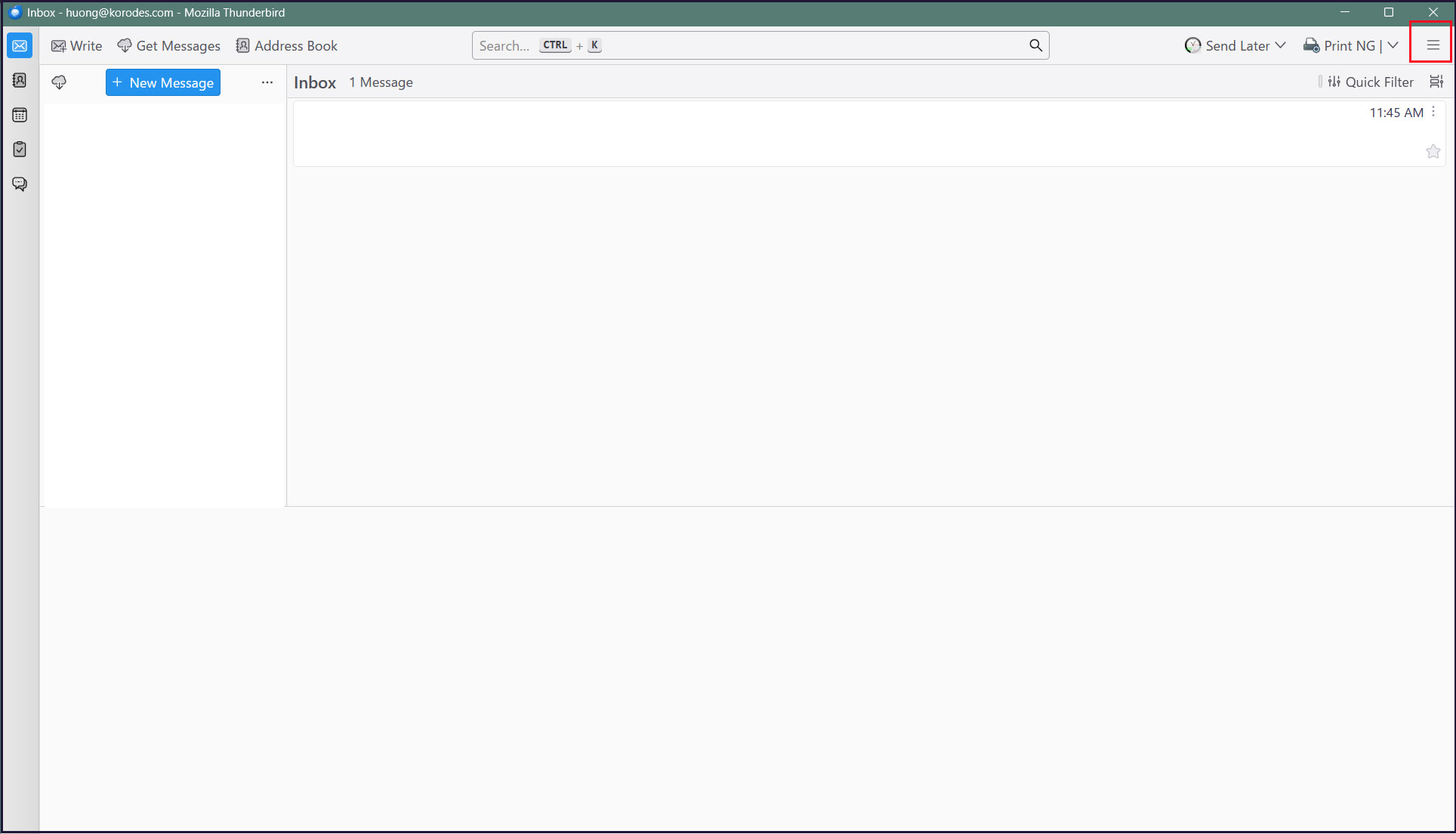
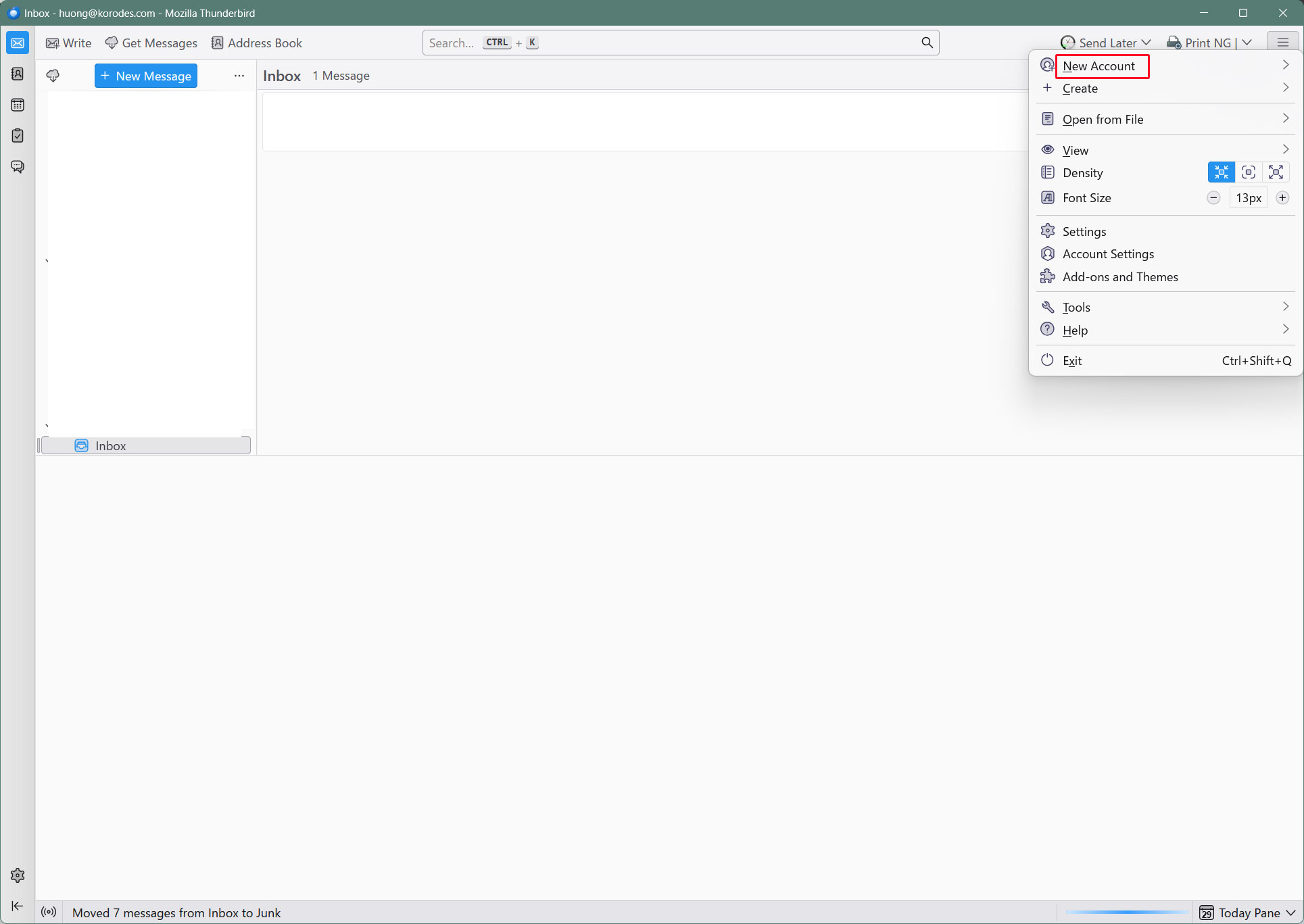
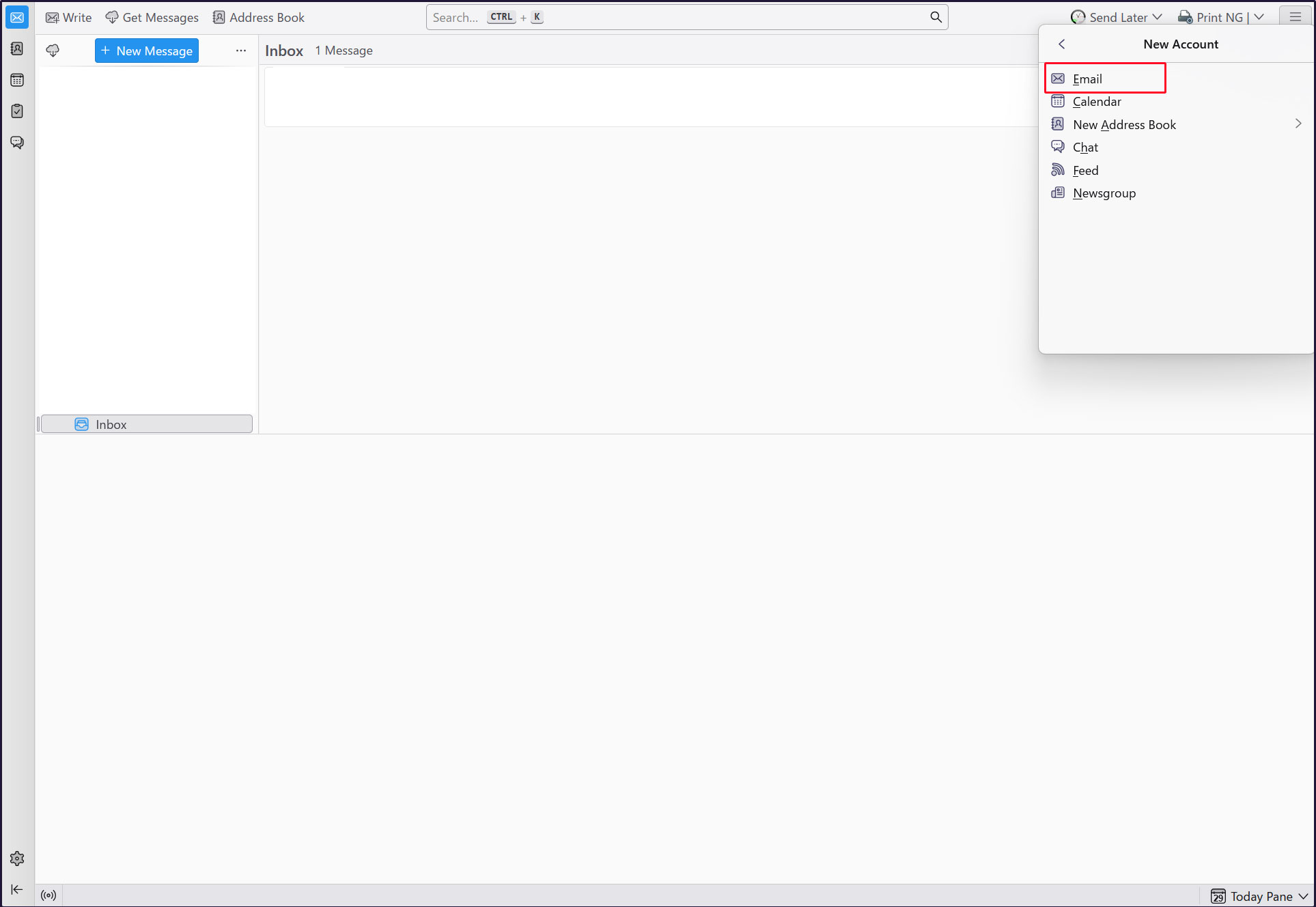
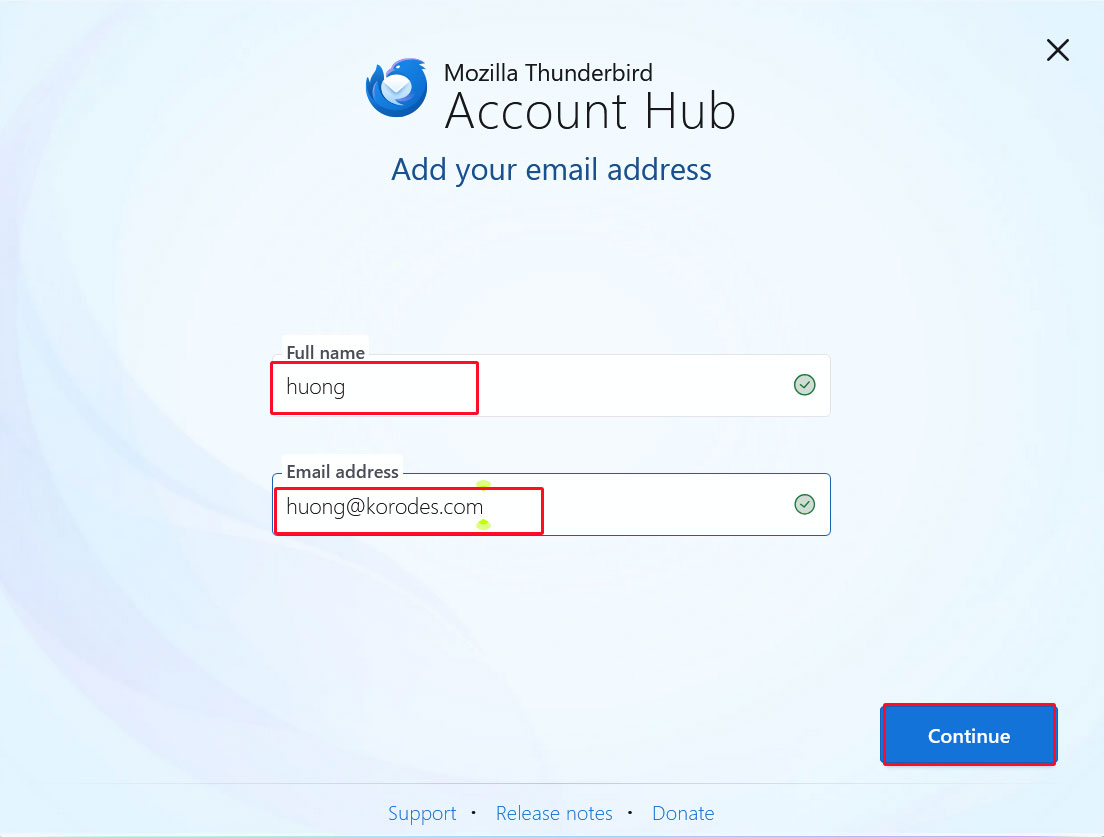
Start Thunderbird and click [New Account][Email] in the [Three] button-menu in the upper right corner.
Full name : any name
Email address : huong@<domain-name>
Enter the information and click "Continue".
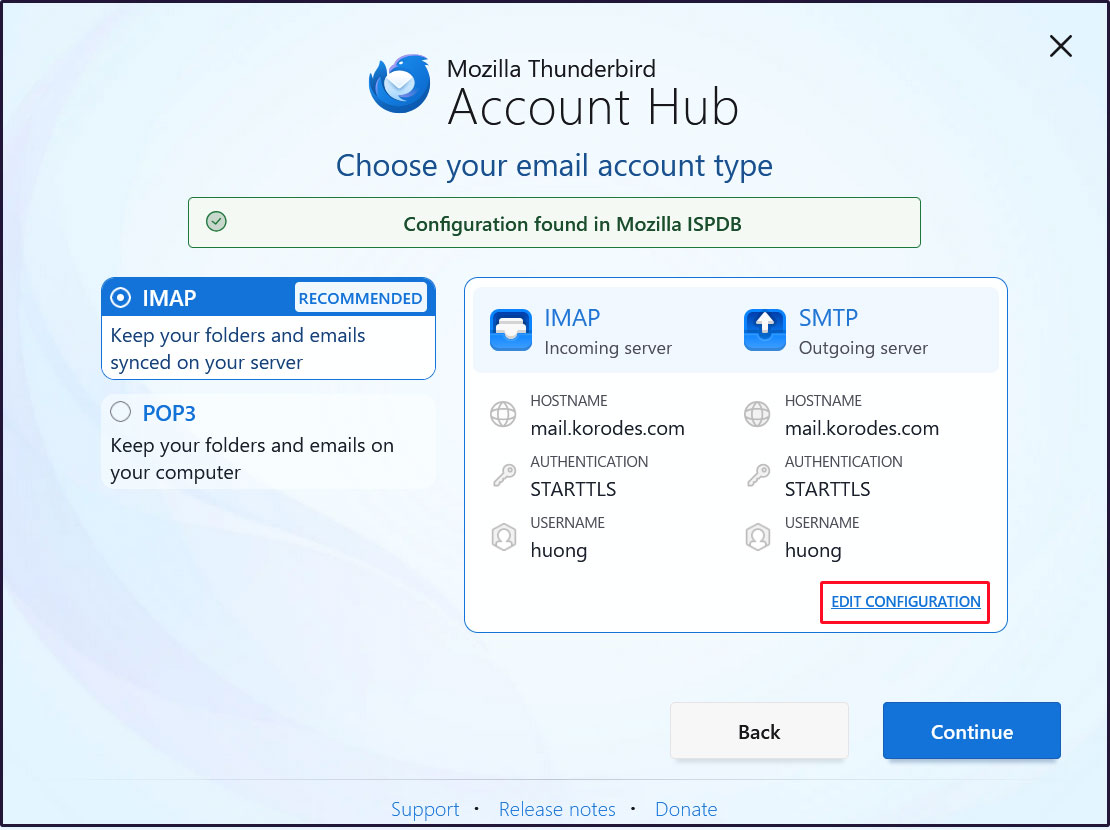
Click on [EDIT CONFIGURATION]
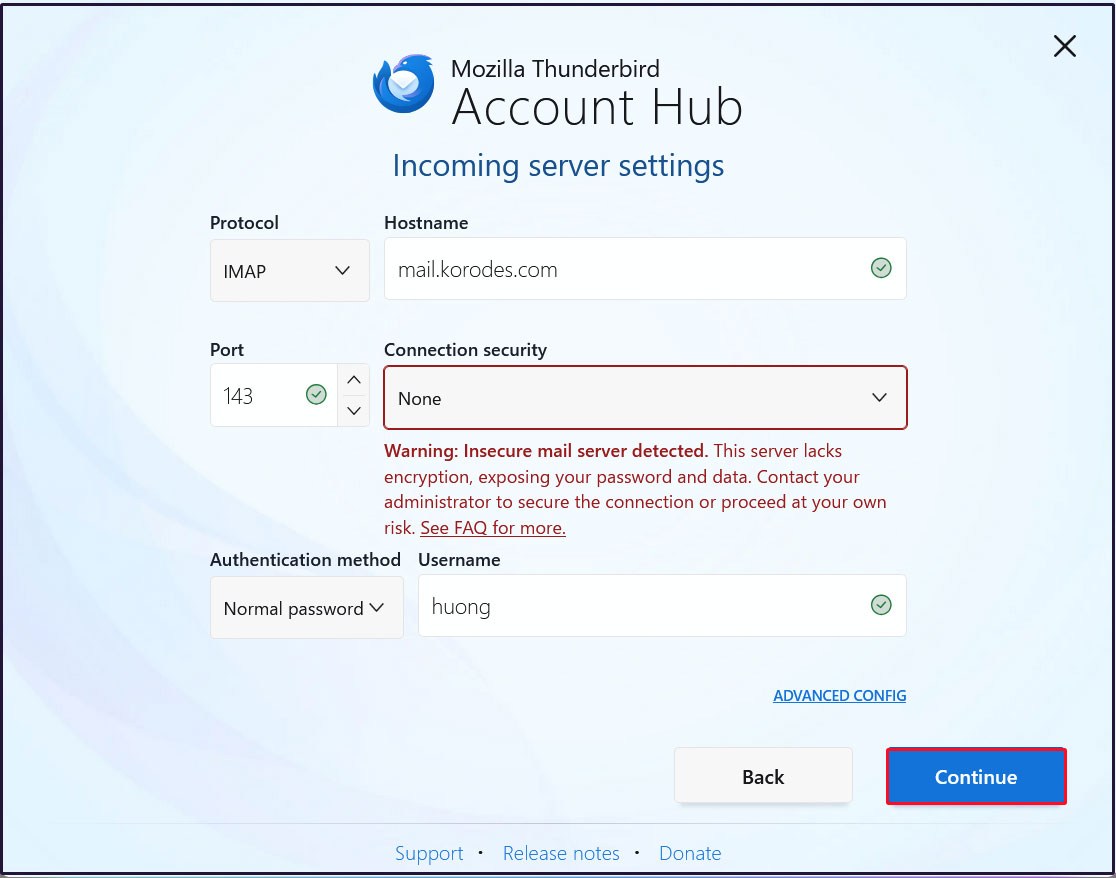
Incoming Server Settings
Set [Connection security] to [None] and click [Continue].
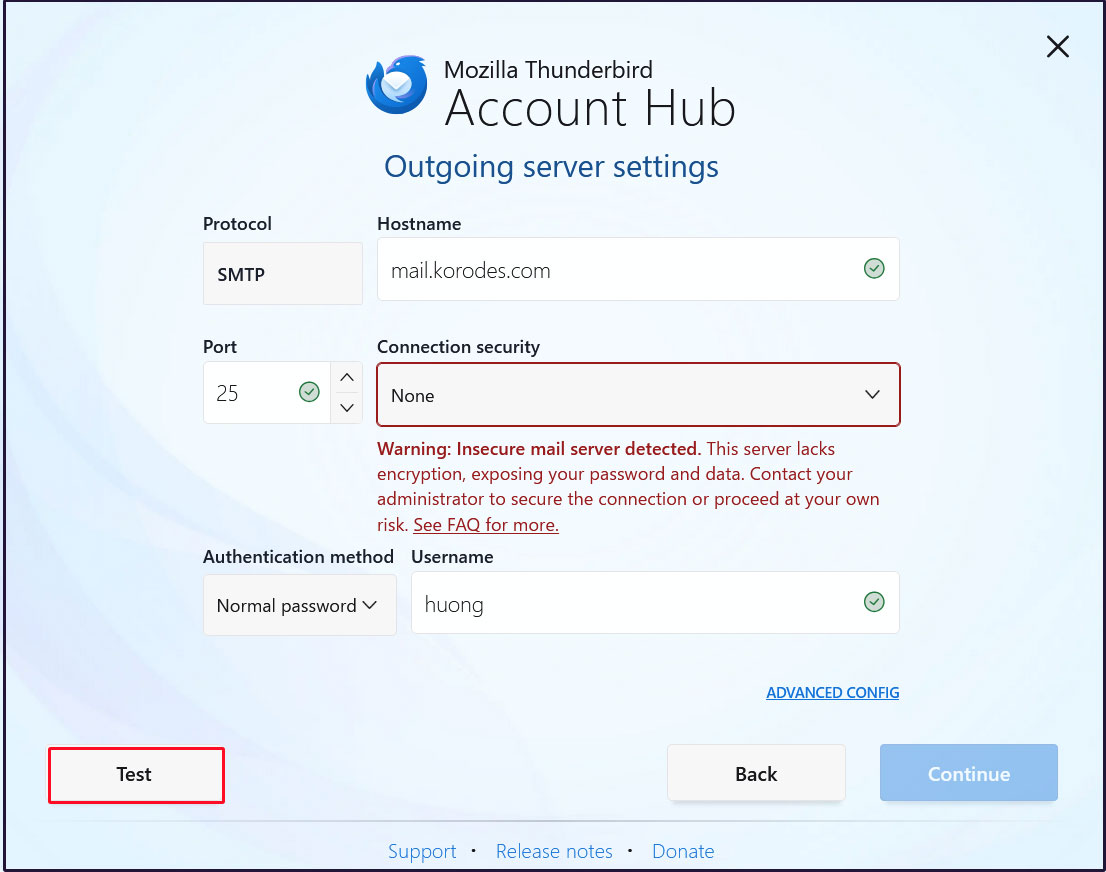
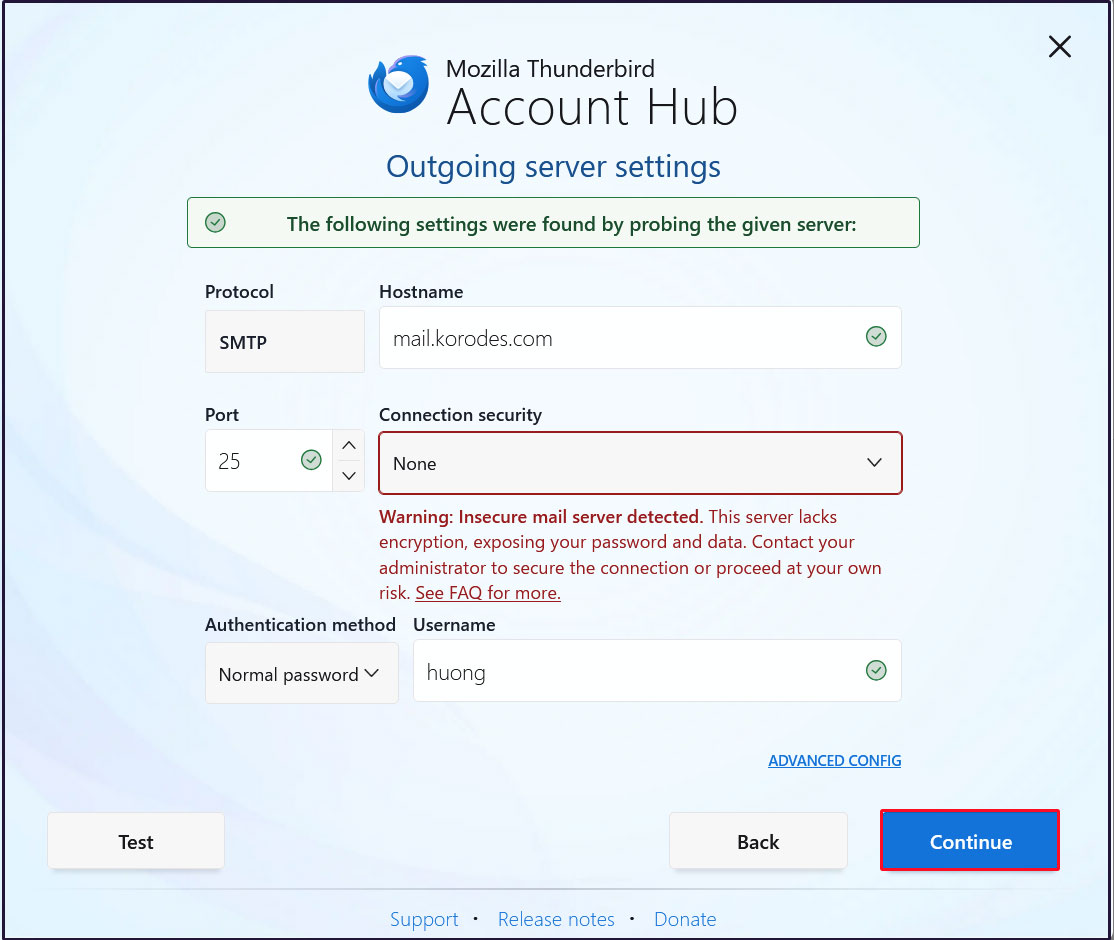
Outgoing Server Settings
Set [Connection security] to [None] and click [Test].
Click [Continue]
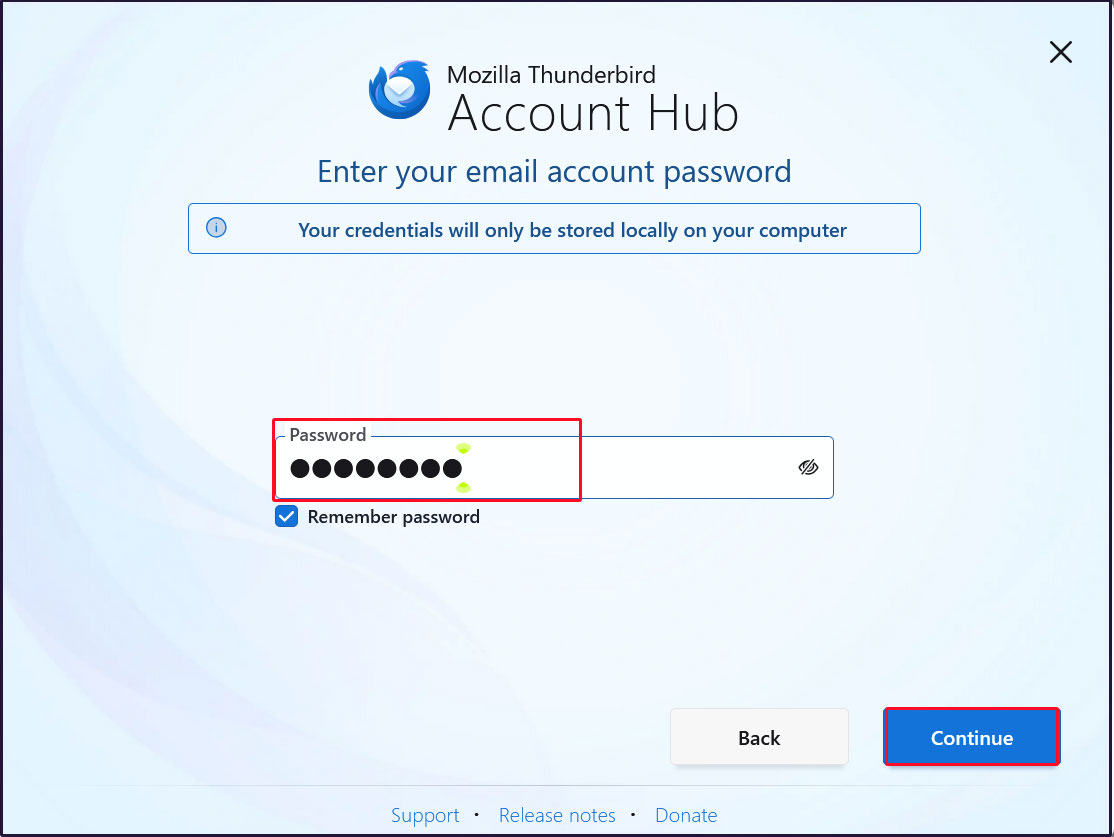
Enter the [user's password] in the "Password" field and click "Continue"
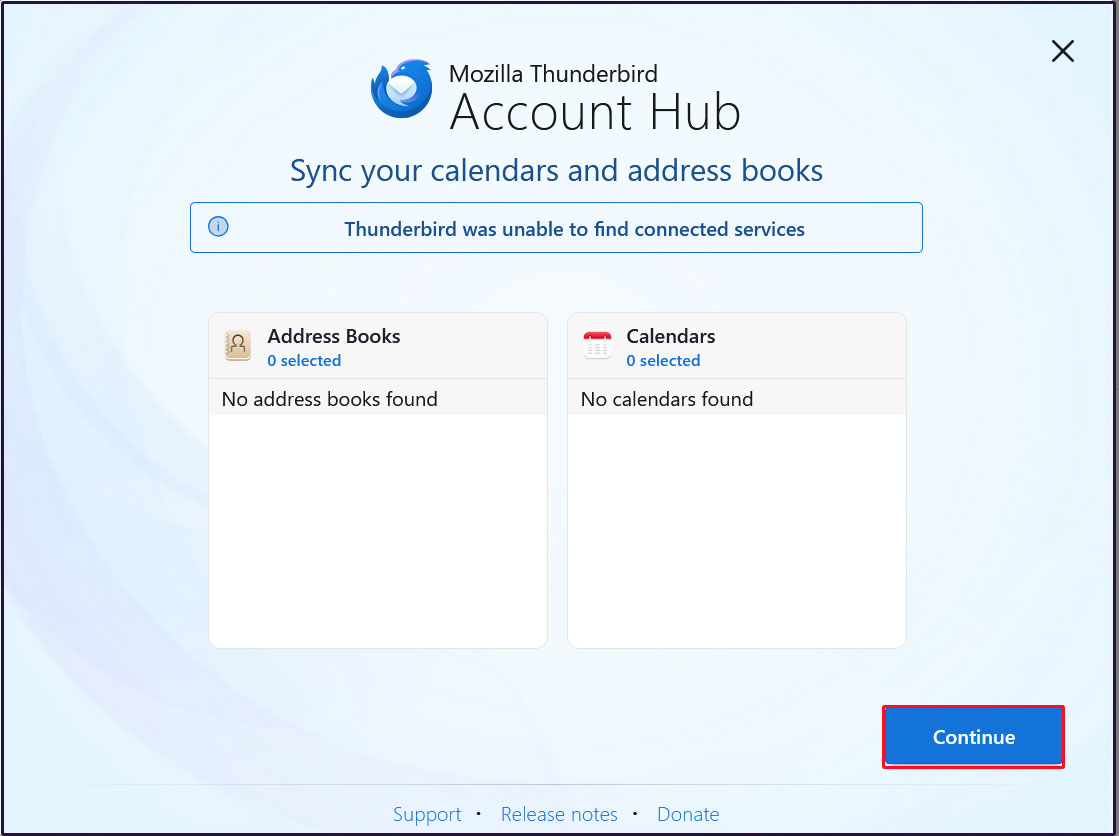
Click [Continue]
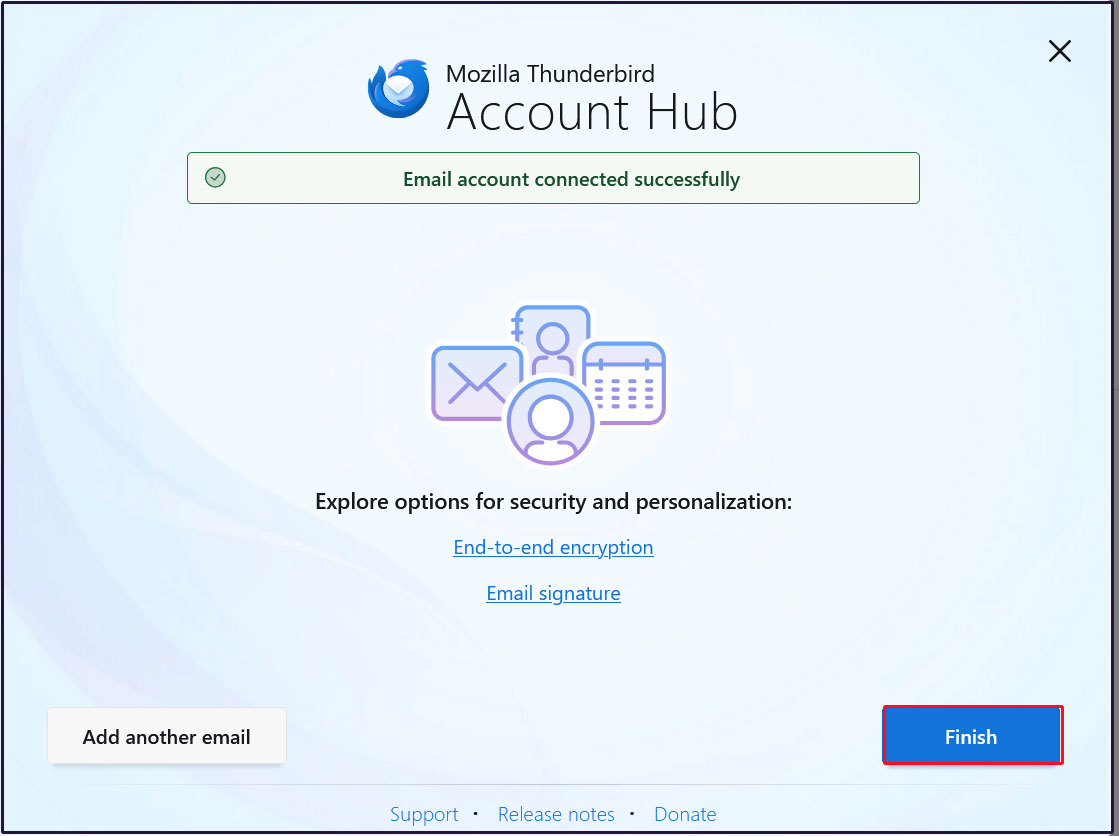
Click "Finish" when the email account has been successfully created.
3 Applied ClamAV to mail server Postfix
Set up Postfix and Clamav to work together to scan incoming and outgoing mail in real time.
①Install Amavisd and Clamav Daemon and start Clamav Daemon
|
1 |
# apt -y install clamav-daemon amavisd-new |
If the server is not using a fully qualified domain name (FQDN) as the hostname, Amavis may fail to start. Also, since the OS hostname may change, set a valid hostname directly in the Amavis configuration file
|
1 2 3 4 5 6 7 8 9 10 |
# vi /etc/amavis/conf.d/05-node_id use strict; # $myhostname is used by amavisd-new for node identification, and it is # important to get it right (e.g. for ESMTP EHLO, loop detection, and so on) . chomp($myhostname = `hostname --fqdn`); # To manually set $myhostname, edit the following line with the correct Full y # Qualified Domain Name (FQDN) and remove the # at the beginning of the line . # $myhostname = "mail.<domain name>"; 1; # ensure a defined return |
②Virus Scan Enable
|
1 2 3 4 5 |
# vi /etc/amavis/conf.d/15-content_filter_mode #Line 13-14 : Uncomment and enable virus scan @bypass_virus_checks_maps = ( \%bypass_virus_checks, \@bypass_virus_checks_acl, \$bypass_virus_checks_re); |
③Register your own domain name
|
1 |
# echo '<yourDomain>' > /etc/mailname |
④Edit configuration file (Main.cf)
|
1 2 3 |
# vi /etc/postfix/main.cf Add to last line content_filter=smtp-amavis:[127.0.0.1]:10024 |
⑤Edit configuration file (master.cf)
|
1 |
# vi /etc/postfix/master.cf |
Editorial content
|
1 2 3 4 5 6 7 8 9 10 11 12 13 14 15 16 17 18 19 |
# Add all the following lines to the last line smtp-amavis unix - - n - 2 smtp -o smtp_data_done_timeout=1200 -o smtp_send_xforward_command=yes -o disable_dns_lookups=yes 127.0.0.1:10025 inet n - n - - smtpd -o content_filter= -o local_recipient_maps= -o relay_recipient_maps= -o smtpd_restriction_classes= -o smtpd_client_restrictions= -o smtpd_helo_restrictions= -o smtpd_sender_restrictions= -o smtpd_recipient_restrictions=permit_mynetworks,reject -o mynetworks=127.0.0.0/8 -o strict_rfc821_envelopes=yes -o smtpd_error_sleep_time=0 -o smtpd_soft_error_limit=1001 -o smtpd_hard_error_limit=1000 |
⑥Settings reflect
|
1 2 3 |
# usermod -G clamav amavis # usermod -G amavis clamav # systemctl restart clamav-daemon amavis postfix |
When you send an e-mail to yourself on Thuderbird, etc., it is successful if you see the following message in the header of the incoming e-mail.
X-Mozilla-Status: 0001
X-Mozilla-Status2: 00000000
Return-Path: xxxxx@xxxxxxx.com
X-Original-To: xxxxx@xxxxxxx.com
Delivered-To: xxxxx@xxxxxxx.com
Received: from localhost (localhost [127.0.0.1])
by mail.xxxxxxx.com (Postfix) with ESMTP id D2C87A002F
for xxxxx@xxxxxxx.com; Fri, 23 Jan 2026 14:52:21 +0900 (JST)
X-Virus-Scanned: Debian amavis at xxxxxxx.com
Received: from mail.xxxxxxx.com ([127.0.0.1])
by localhost (mail.xxxxxxx.com [127.0.0.1]) (amavis, port 10024) with ESMTP
id pdZKQYgBYANB for xxxxx@xxxxxxx.com;
Fri, 23 Jan 2026 14:52:21 +0900 (JST)
Received: from [192.168.11.8] (buffalo.setup [192.168.11.1])
by mail.xxxxxxx.com (Postfix) with ESMTPA id B9081A001F
for xxxxx@xxxxxxx.com; Fri, 23 Jan 2026 14:52:21 +0900 (JST)
Message-ID: c8d2d46a-313a-46b6-a95e-ba341e819f7f@xxxxxxx.com
Date: Fri, 23 Jan 2026 14:52:22 +0900
MIME-Version: 1.0
User-Agent: Mozilla Thunderbird
From: xxxxx xxxxx@xxxxxxx.com
Content-Language: en-US
To: xxxxx xxxxx@xxxxxxx.com
Content-Type: text/plain; charset=UTF-8; format=flowed
Content-Transfer-Encoding: 7bit
Send yourself an email with the body text "X5O!P%@AP[4\PZX54(P^)7CC)7}$EICAR-STANDARD-ANTIVIRUS-TEST-FILE!$H+H*" and verify that the email is discarded and does not arrive.
4 Apply spam checks to the mail server
Using SpamAssassin and procmail for spam checking
4.1 spamassassin installation
①Install
|
1 2 3 |
# apt update # apt upgrade # apt -y install spamassassin spamass-milter |
②SpamAssassin Configuration
|
1 2 3 4 |
# vi /etc/mail/spamassassin/v310.pre Remove the # at the beginning of line 24. loadplugin Mail::SpamAssassin::Plugin::DCC |
➂SpamAssassin Configuration File Update Script
|
1 |
# vi /opt/script/spamassassin-update.sh |
#!/bin/bash
cd /etc/mail/spamassassin
wget -q https://github.com/kittyfreak/spamassassin_user_prefs/archive/refs/heads/main.zip
[ $? -ne 0 ] && exit
unzip main.zip >/dev/null 2>&1
[ $? -ne 0 ] && exit
rm -f main.zip
mv spamassassin_user_prefs-main/user_prefs .
rm -rf spamassassin_user_prefs-main
diff user_prefs user_prefs.org > /dev/null 2>&1
if [ $? -ne 0 ]; then
cp user_prefs local.cf
echo "report_safe 0" >> local.cf
echo "rewrite_header Subject SPAM" >> local.cf
if [ -f /etc/init.d/spamd ]; then
/etc/init.d/spamd restart > /dev/null
else
systemctl restart spamd > /dev/null
fi
fi
cp user_prefs user_prefs.org
Grant the spamassassin-update script execution permissions and run it.
|
1 2 |
# chmod 700 /opt/script/spamassassin-update.sh # /opt/script/spamassassin-update.sh |
Verify that the SpamAssassin configuration file (local.cf) has been created with the current date in the /etc/mail/spamassassin directory.
※ Install unzip beforehand
|
1 2 3 4 5 6 7 8 9 10 11 12 13 14 15 16 17 18 19 20 21 |
# ls -l /etc/mail/spamassassin/ total 1660 -rw-r--r-- 1 root root 1292 Feb 8 2025 65_debian.cf -rw-r--r-- 1 root root 1644 Feb 8 2025 init.pre -rw-r--r-- 1 root root 500630 Jan 23 15:55 local.cf -rw-r--r-- 1 root root 127072 Jan 23 15:55 main.zip.1 -rw-r--r-- 1 root root 118 Feb 8 2025 sa-compile.pre drwxr-xr-x 2 root root 4096 Jan 23 14:47 sa-update-hooks.d -rw-r--r-- 1 root root 500588 Apr 30 2023 user_prefs -rw-r--r-- 1 root root 500588 Jan 23 15:55 user_prefs.org -rw-r--r-- 1 root root 2257 Jan 23 15:53 v310.pre -rw-r--r-- 1 root root 1163 Feb 8 2025 v312.pre -rw-r--r-- 1 root root 2411 Feb 8 2025 v320.pre -rw-r--r-- 1 root root 1232 Feb 8 2025 v330.pre -rw-r--r-- 1 root root 1015 Feb 8 2025 v340.pre -rw-r--r-- 1 root root 1310 Feb 8 2025 v341.pre -rw-r--r-- 1 root root 1514 Feb 8 2025 v342.pre -rw-r--r-- 1 root root 1261 Feb 8 2025 v343.pre -rw-r--r-- 1 root root 1477 Feb 8 2025 v400.pre -rw-r--r-- 1 root root 1118 Feb 8 2025 v401.pre |
Set up a cron job to automatically run the script that updates the SpamAssassin configuration file daily.
|
1 2 |
# crontab -e 0 2 * * * /opt/script/spamassassin-update.sh > /dev/null 2>&1 |
④SpamAssassin Milter Startup and Automatic Startup Configuration
|
1 2 3 4 5 |
# systemctl start spamass-milter # systemctl enable spamass-milter spamass-milter.service is not a native service, redirecting to systemd-sysv-install. Executing: /usr/lib/systemd/systemd-sysv-install enable spamass-milter |
- Create a directory named ".Spam" in Maildir format for storing spam emails
- Creation must be performed by the target user.
|
1 2 3 4 5 6 7 |
# su - <user name> $ cd ~ Create a directory named ".Spam" $ cd Maildir $ /usr/bin/maildirmake.dovecot .Spam $ su - Password: |
4.2 Preparing Procmail
①Installing Procmail
|
1 |
# apt -y install procmail |
If installed, the following result will be returned.
|
1 2 |
# which procmail /usr/bin/procmail |
②Procmail Configuration
Entering settings in /etc/procmailrc, which controls all mail filtering, will apply them to all users.
When written in the individual user's mail filter file, /home/[user]/.procmailrc, the filter applies only to that user.
This time, to apply it to all users, we will write it in /etc/procmailrc.
|
1 |
# vi /etc/procmailrc |
#Set the path
PATH=/bin:/usr/bin:/usr/local/bin
#Mailbox Settings
MAILDIR=$HOME/Maildir
DEFAULT=$MAILDIR/
#Specify the output location for Procmail log files
LOGFILE=$MAILDIR/procmaillog
#Specify the path to the lock file
LOCKFILE=$HOME/.lockmail
#If the mail header does not contain an "X-Spam-***" entry, SpamAssassin will be launched.
:0fw
*!^X-Spam.*
|spamassassin
#If the email header contains the entry "X-Spam-Status: Yes", the email will be stored in the ".Spam" directory.
:0
*^X-Spam-Status: Yes
$MAILDIR/.Spam/
4.3 Postfix Configuration
① Editing main.cf
|
1 2 3 4 |
# vi /etc/postfix/main.cf Line 477 : Uncomments mailbox_command = /usr/bin/procmail |
②Reflecting Settings and Launching
|
1 2 |
# systemctl start spamd # systemctl restart postfix |
4.4 Learning about spam emails
Teach the system to recognize all contents within every user's ".Spam" directory as spam email.
①Learning about spam emails
|
1 2 |
# /usr/bin/sa-learn --spam /home/*/Maildir/.Spam/cur Learned tokens from 0 message(s) (0 message(s) examined). |
②Learning regular emails
|
1 2 |
# /usr/bin/sa-learn --ham /home/*/Maildir/cur Learned tokens from 4 message(s) (4 message(s) examined). |
③Create a script and register it with Cron
Name the file something like "spam-learns.sh" and place it under /opt/scripts.
After saving the script, grant it executable permissions using chmod 750 spam-learns.sh.
|
1 |
# vi /opt/script/spam-learns.sh |
#! /bin/sh
#Learning about spam emails
/usr/bin/sa-learn --spam /home/*/Maildir/.Spam/cur
#Learning regular emails
/usr/bin/sa-learn --ham /home/*/Maildir/cur
#If you want to force the deletion of the contents of the spam email storage directory, add the following line:
/bin/rm -f /home/*/Maildir/.Spam/cur
|
1 |
# chmod 750 /opt/script/spam-learns.sh |
Once spam-learns.sh is created, create the definition file directly under /lib/systemd/system. Name it with a .service extension, such as spam-learns.service.
Define the Type as simple.
|
1 2 |
# cd /lib/systemd/system # vi spam-learns.service |
Description=demo sample node.js program [Service]
Type=simple
ExecStart= /opt/script/spam-learns.sh
Restart=always [Install]
WantedBy=multi-user.target
|
1 2 |
# crontab -e 0 4 * * * /opt/script/spam-learns.sh |
|
1 2 |
# systemctl enable spam-learns Created symlink '/etc/systemd/system/multi-user.target.wants/spam-learns.service' → '/usr/lib/systemd/system/spam-learns.service'. |
④If you send an empty email to yourself using Thunderbird or similar software and see a message like the following in the received email header, it means the process was successful.
X-Mozilla-Status: 0001
X-Mozilla-Status2: 00000000
Return-Path: xxxxx@xxxxxxx.com
X-Spam-Checker-Version: SpamAssassin 4.0.1 (2024-03-25) on Lepard
X-Spam-Level: **
X-Spam-Status: No, score=2.3 required=13.0 tests=ALL_TRUSTED,
CONTENT_TYPE_PRESENT,EMPTY_MESSAGE autolearn=no autolearn_force=no
version=4.0.1
X-Original-To: xxxxx@xxxxxxx.com
Delivered-To: xxxxx@xxxxxxx.com
Received: from localhost (localhost [127.0.0.1])
by mail.xxxxxxx.com (Postfix) with ESMTP id A92E760609
for xxxxx@xxxxxxx.com; Fri, 23 Jan 2026 16:05:19 +0900 (JST)
X-Virus-Scanned: Debian amavis at xxxxxxx.com
Received: from mail.xxxxxxx.com ([127.0.0.1])
by localhost (mail.xxxxxxx.com [127.0.0.1]) (amavis, port 10024) with ESMTP
id QG9ltnq7dRlj for xxxxx@xxxxxxx.com;
Fri, 23 Jan 2026 16:05:19 +0900 (JST)
-----------------------------------------------------------------------
Subject:
⑤Spam Check Confirmation
Confirm that when you send an email with the subject line "XJSC4JDBQADN1.NSBN32IDNENGTUBE-STANDARD-ANTI-UBE-TEST-EMAILC.34X" to yourself, the email is not delivered and is instead filtered into the Spam folder.
The header displays as follows:
Check the emails under /home/[user]/Maildir/.Spam/new/
Return-Path: xxxxx@xxxxxxx.com
X-Spam-Checker-Version: SpamAssassin 4.0.1 (2024-03-25) on Lepard
X-Spam-Flag: YES
X-Spam-Level:*********************************************
X-Spam-Status: Yes, score=1001.8 required=13.0 tests=ALL_TRUSTED,
CONTENT_TYPE_PRESENT,GTUBE,HTML_MESSAGE,MPART_ALT_DIFF,
MULTIPART_ALTERNATIVE autolearn=no autolearn_force=no version=4.0.1
X-Spam-Report:
* 0.1 ALL_TRUSTED Passed through trusted hosts only via SMTP
* 1000 GTUBE BODY: Generic Test for Unsolicited Bulk Email
* 0.1 MULTIPART_ALTERNATIVE Multipart/alternative
* -0.1 CONTENT_TYPE_PRESENT exists:Content-Type
* 1.0 HTML_MESSAGE BODY: HTML included in message
* 0.7 MPART_ALT_DIFF BODY: HTML and text parts are different
X-Original-To: xxxxx@xxxxxxx.com
Delivered-To: xxxxx@xxxxxxx.com
