

シェルの変更(rootユーザーで作業する)
「root」ユーザのシェルが「sh」なので、「bash」へ変更
|
1 2 3 4 5 6 7 |
# echo $SHELL /bin/sh # chsh root のシェルを変更します。 新しいシェル [/bin/sh]: /bin/bash シェルを変更しました |
ログオンしなおして確認
|
1 2 |
# echo $SHELL /bin/bash |
パッケージ管理プログラム「xbps」
1. xbps自体を更新
|
1 2 3 |
# xbps-install -Suvy [*] Updating repository `https://repo.jing.rocks/voidlinux/current/x86_64-repodata' ... SSL certificate subject doesn't match host repo.jing.rocks ERROR: [reposync] failed to fetch file `https://repo.jing.rocks/voidlinux/current/x86_64-repodata': Operation not permitted |
上記の通りエラーとなる
不思議なことに間違ったコマンドを一度入力してから再度正式なコマンドで更新するとできる
|
1 2 3 4 |
# xbps-install -uy xbps Package 'xbps' not found in repository pool. # xbps-install -Suvy |
上記でもエラーが出る場合[00-repository-main.conf]を [/etc/xbps.d/]にコピーする
|
1 |
# cp /usr/share/xbps.d/00-repository-main.conf /etc/xbps.d/ |
再度アップデートを実行
|
1 2 3 |
# xbps-install -Suvy [*] Updating repository `https://repo-default.voidlinux.org/current/x86_64-repodata' ... x86_64-repodata: 2060KB [avg rate: 1472KB/s] Found xbps-0.60.6_1 in repository https://repo-default.voidlinux.org/current The 'xbps' package must be updated, please run `xbps-install -u xbps` # xbps-install -u xbps |
2. xbpsの利用
2.1 リポジトリを追加
Void Linux にはフリー ソフトウェアのみが含まれており、フリーでないソフトウェアをインストールする場合は、次の追加のリポジトリをインストールする必要があります。
|
1 |
# xbps-install -S void-repo-nonfree void-repo-multilib-nonfree |
リポジトリのリストをクエリする
|
1 |
# xbps-query -L |
2.2 パッケージリストを更新
|
1 |
# xbps-install -Su |
オプション -S (--sync)オプション -u (--update)
2.3 パッケージの検索
|
1 2 3 4 5 6 7 8 9 10 11 12 13 14 15 16 17 |
# xbps-query -Rs curl [-] coeurl-0.3.1_1 Simple async wrapper around CURL for C++ [-] coeurl-devel-0.3.1_1 Simple async wrapper around CURL for C++ - development files [-] curl-8.17.0_1 Client that groks URLs [-] curlftpfs-0.9.2_6 A FTP filesystem based on cURL and FUSE [-] curlpp-0.8.1_1 C++ wrapper for libcURL [-] curlpp-devel-0.8.1_1 C++ wrapper for libcURL - development files [-] grpcurl-1.9.3_1 Command-line tool for interacting with gRPC servers [-] httpstat-1.1.0_4 It's like curl -v, with colours [-] kurly-1.2.2_5 Alternative to the widely popular curl program [*] libcurl-8.17.0_1 Multiprotocol file transfer library [-] libcurl-devel-8.17.0_1 Multiprotocol file transfer library - development files [-] mpdas-0.4.5_2 MPD AudioScrobbler written in C++ using libcurl [-] perl-WWW-Curl-4.17_15 WWW::Curl - Perl extension interface for libcurl [-] python3-curl-7.45.7_2 Python3 interface to cURL library [-] ruby-ethon-0.12.0_8 Lightweight wrapper around libcurl [-] websocat-1.13.0_2 Netcat, curl and socat for WebSockets |
「curl」が含まれるすべてのパッケージが表示されるオプション -R (--repository)----リポジトリ モードを有効オプション -s (--search)----検索を有効
2.4 インストールされているパッケージの検索
現在インストールされている、名前に curl を含むすべてのパッケージを検索
|
1 2 |
# xbps-query -l | grep curl ii libcurl-8.17.0_1 Multiprotocol file transfer library |
オプション -l (--list-pkgs)
2.5 パッケージのインストールと更新-S(--sync) オプションをつけて xbps-install コマンドを実行
curlをインストールする場合
|
1 2 3 4 5 6 7 8 9 10 11 12 13 14 15 16 17 18 19 20 21 22 23 24 25 26 27 28 29 |
# xbps-install -S curl [*] Updating repository `https://repo-default.voidlinux.org/current/x86_64-repodata' ... x86_64-repodata: 2061KB [avg rate: 1800KB/s] Name Action Version New version Download size curl install - 8.17.0_1 259KB Size to download: 259KB Size required on disk: 636KB Space available on disk: 18GB Do you want to continue? [Y/n] y [*] Downloading packages curl-8.17.0_1.x86_64.xbps.sig2: 512B [avg rate: 9434KB/s] curl-8.17.0_1.x86_64.xbps: 259KB [avg rate: 302KB/s] curl-8.17.0_1: verifying RSA signature... [*] Collecting package files curl-8.17.0_1: collecting files... [*] Unpacking packages curl-8.17.0_1: unpacking ... [*] Configuring unpacked packages curl-8.17.0_1: configuring ... curl-8.17.0_1: installed successfully. 1 downloaded, 1 installed, 0 updated, 1 configured, 0 removed, 0 on hold. |
2.6 パッケージの削除
xbps-remove でパッケージをシステムから削除します。コマンドに -R (--recursive) オプションを追加すると、パッケージによってインストールされた不要な依存関係が一緒に削除されます
curlを削除する場合
|
1 2 3 4 5 6 7 8 9 10 11 12 13 |
# xbps-remove -R curl Name Action Version New version Download size curl remove 8.17.0_1 - - Size freed on disk: 636KB Space available on disk: 18GB Do you want to continue? [Y/n] y Removing `curl-8.17.0_1' ... Removed `curl-8.17.0_1' successfully. 0 downloaded, 0 installed, 0 updated, 0 configured, 1 removed, 0 on hold. |
2.7 パッケージの詳細を表示-R (--repository) オプションを追加して詳細を表示する
curlパッケージに関する詳細情報を表示する場合
|
1 2 3 4 5 6 7 8 9 10 11 12 13 14 15 16 17 18 19 20 21 22 23 24 25 26 27 28 |
# xbps-query -R curl architecture: x86_64 build-options: http3 idn psl ssh ssl zstd ~gnutls ~gssapi ~ldap ~rtmp changelog: https://curl.se/changes.html filename-sha256: 64bafce017ead17ccedbd55af267917dfceefa771307b64f975ef7978f506792 filename-size: 259KB homepage: https://curl.se installed_size: 636KB license: MIT maintainer: Érico Nogueira <ericonr@disroot.org> pkgname: curl pkgver: curl-8.17.0_1 provides: cmd:curl-8.17.0_1 cmd:wcurl-8.17.0_1 repository: https://repo-default.voidlinux.org/current run_depends: ca-certificates>=0 glibc>=2.41_1 libcurl>=8.17.0_1 zlib>=1.2.3_1 shlib-requires: libc.so.6 libcurl.so.4 libz.so.1 short_desc: Client that groks URLs source-revisions: curl:ca204ae3c00 sourcepkg: curl |
2.8 キャッシュのクリア
パッケージをインストール、アップグレードで新しい pkg をダウンロードするたびに、「/var/cache/xbps」に保存されます。
キャッシュされたパッケージをすべて削除する
|
1 |
# xbps-remove -yo |
日本語フォントインストールおよび日本語入力設定
1. 日本語フォントインストール
次のフォントをインストールする
・noto-fonts-cjk
・noto-fonts-emoji
・noto-fonts-ttf-extra
・font-firacode
|
1 |
# xbps-install -S noto-fonts-cjk noto-fonts-emoji noto-fonts-ttf-extra font-firacode |
2. 日本語入力環境 (fcitx5-mozc) のインストール
|
1 2 |
# xbps-install xprop fcitx5 fcitx5-mozc fcitx5-configtool # xbps-install fcitx5-gtk fcitx5-gtk+2 fcitx5-gtk+3 fcitx5-gtk4 fcitx5-qt fcitx5-qt5 fcitx5-qt6 |
|
1 2 3 4 5 6 7 8 9 |
# sh cat << 'EOF' >> /etc/environment export LANG="ja_JP.UTF-8" export XMODIFIERS="@im=fcitx5" export XMODIFIER="@im=fcitx5" export GTK_IM_MODULE=fcitx5 export QT_IM_MODULE=fcitx5 export DefaultIMModule=fcitx5 EOF |
ログオンしなおすと豆腐状態であったものが日本語が表示されている
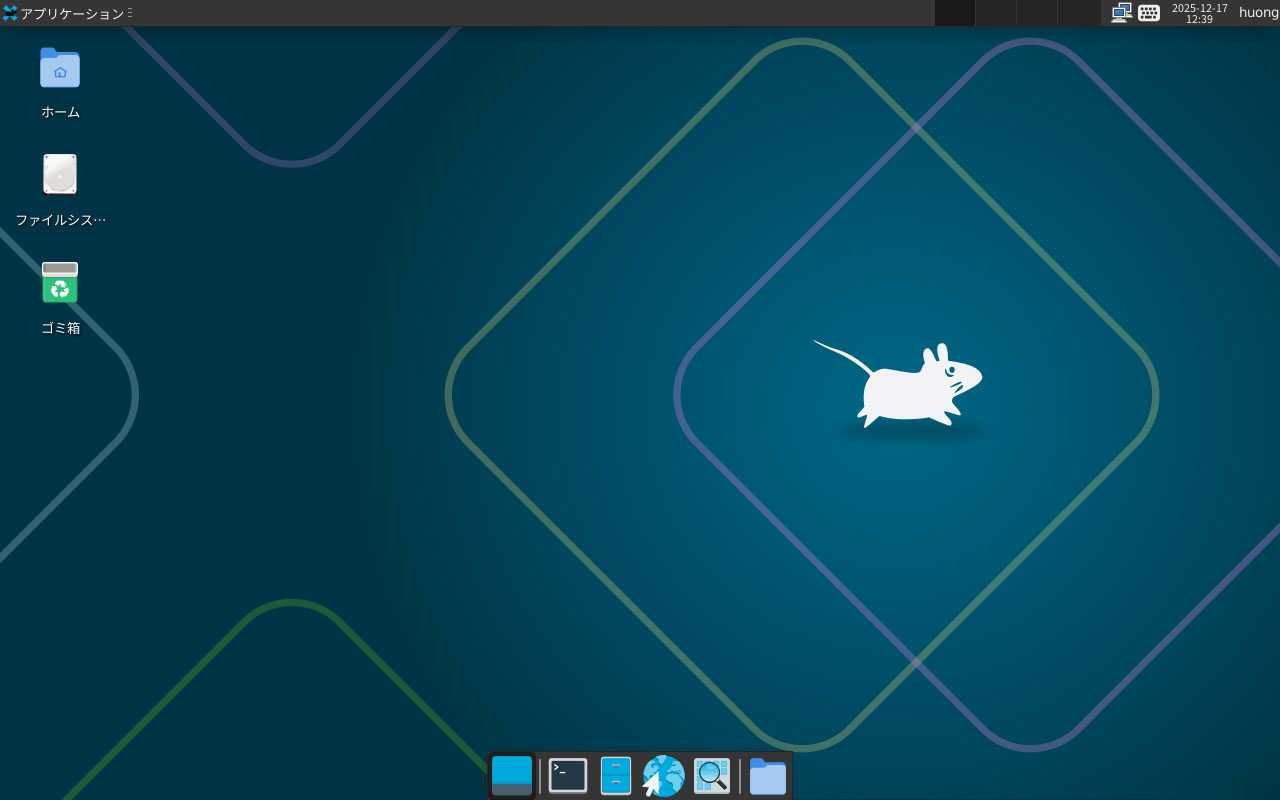
キーボードの設定
[設定][Fcitx設定]を開く
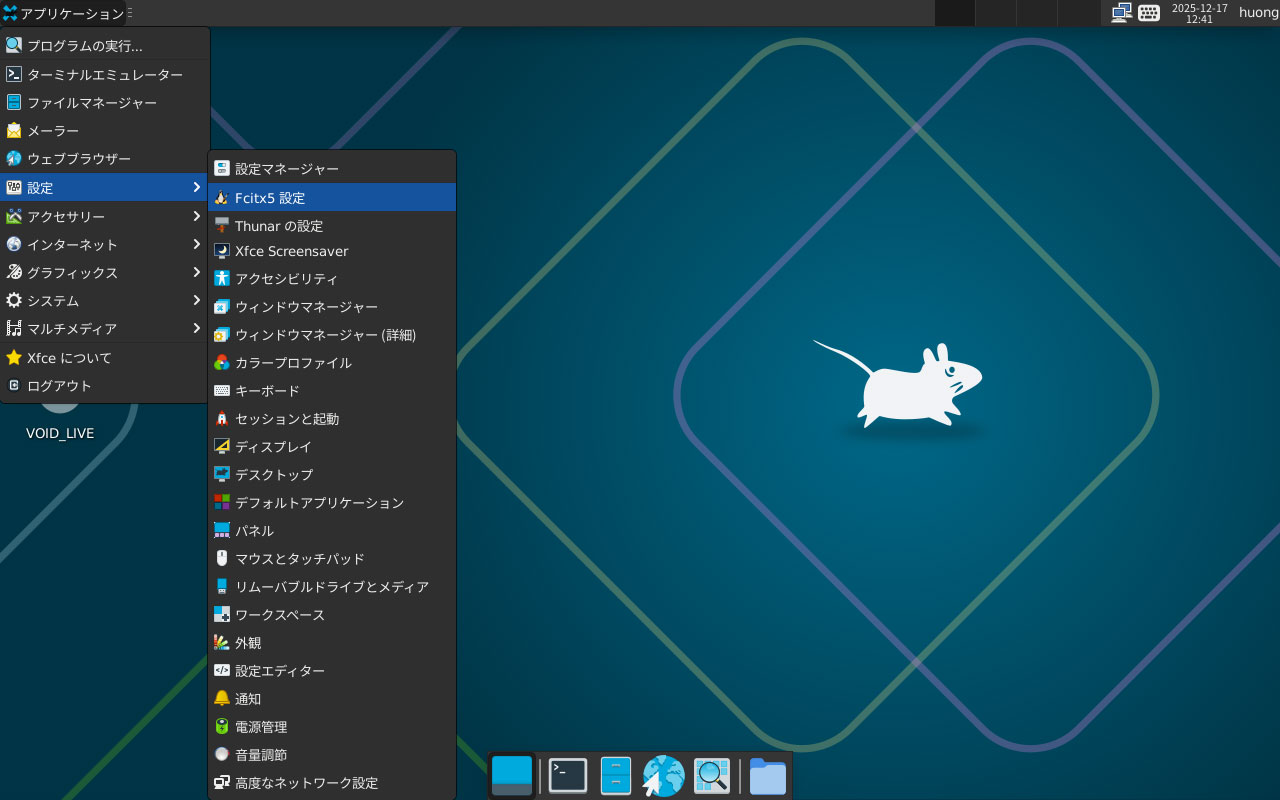
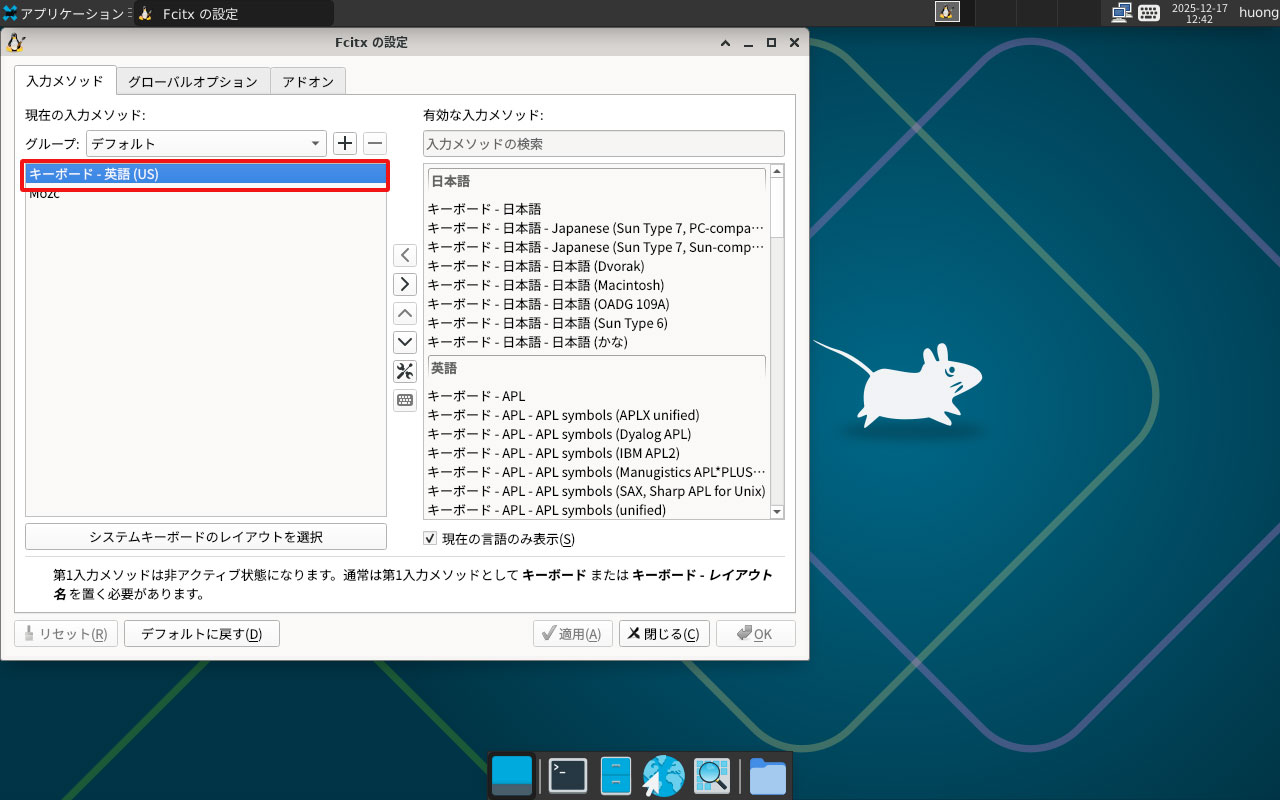
英語キーボードを削除する
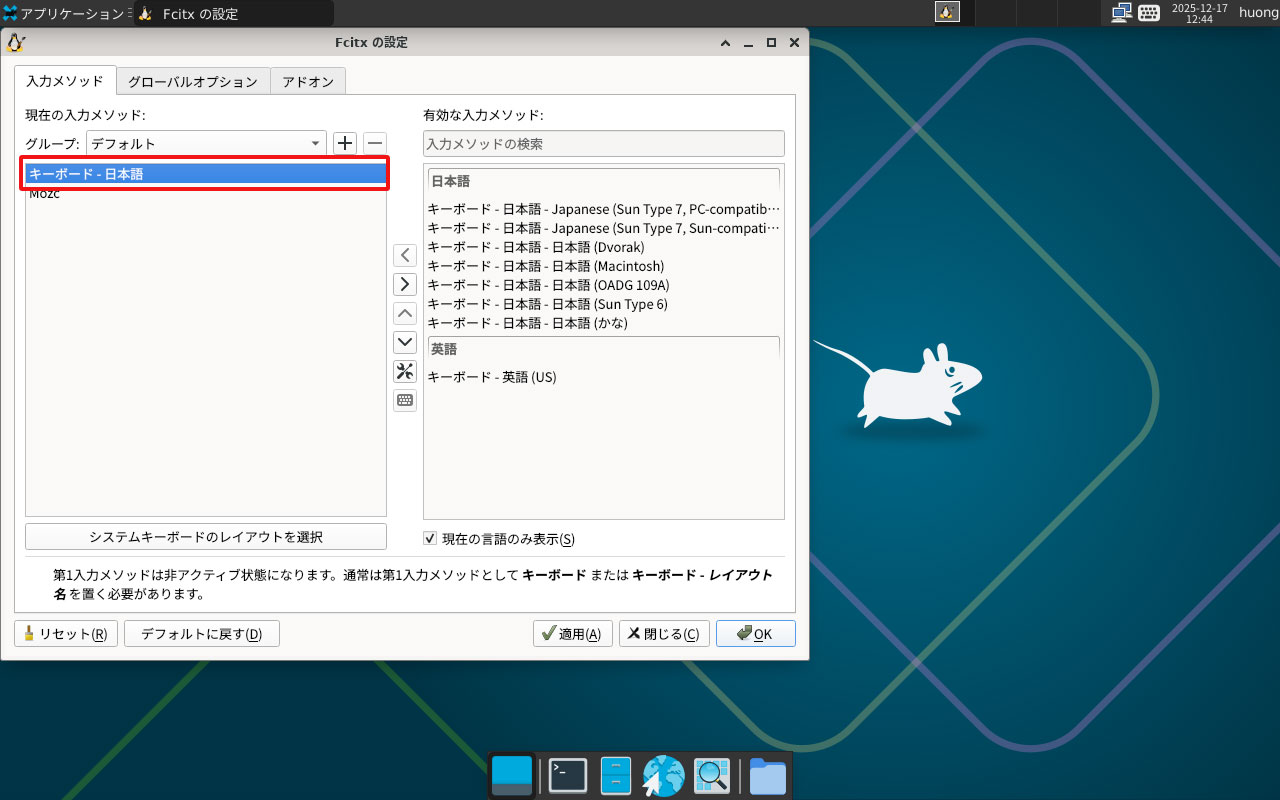
右ペインより日本語キーボードを追加する
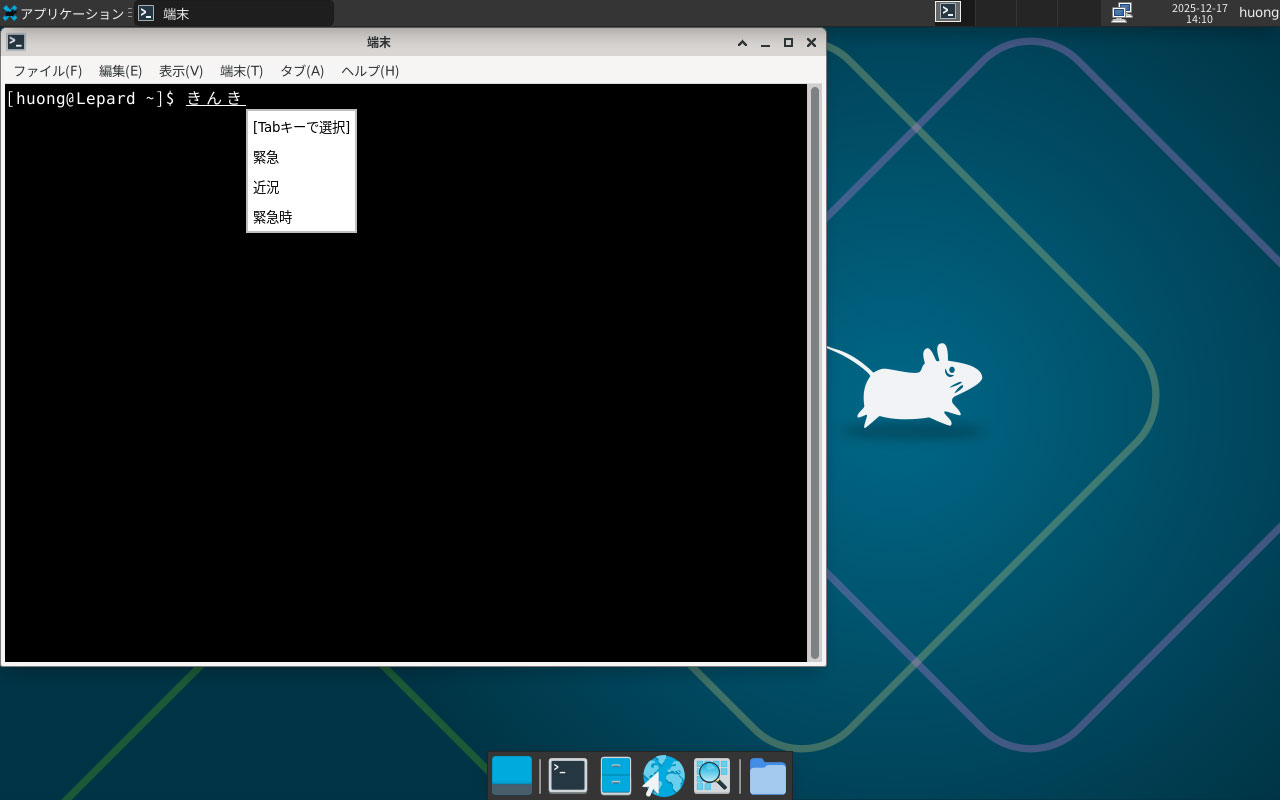
端末を起動し確認する入力の切り替えは[Ctrl+Space]もしくは[半角/全角]キーで行う
固定IPアドレス設定
起動時に静的ネットワークを設定するには /etc/rc.local ファイルに下記を追加する
事前にインターフェース名を確認する
|
1 |
# ip a |
/etc/rc.local ファイル編集
今回はIPアドレス :192.168.11.83に設定する
|
1 2 3 4 5 6 |
# vi /etc/rc.local 下記を追記する ip link set dev <インターフェース名> up ip addr add 192.168.1.83/24 brd + dev <インターフェース名> ip route add default via 192.168.11.1 |
システムを再起動すると反映される
