Contents
オープンソースの統合監視ソフトウェア「Nagios Server」
Nagiosは、Linux 上で実行するオープンソースの監視ソリューションです。
Nagiosは、 Ethan Galstadによって開発され、 1999 年に最初にリリースされました。その後、このプロジェクトは、いくつかの貢献者によってオープンソース プロジェクトとして改良されました。
Nagiosは、ネットワーク、アプリケーション、またはサーバーの重要なパラメーターを定期的にチェックするように設計されています。これらのパラメータには、マイクロプロセッサの負荷、実行中のプロセス数、ログ ファイル、ディスクおよびメモリの使用量の他、SMTP (Simple Mail Transfer Protocol)、HTTP (Hypertext Transfer Protocol)、POP3 ( Post Office Protocol 3)の他の多くのサービスもチェックできます。
Nagoisを実行するにはPHP、MySQLなどのデータベース、ApacheやNginxなどのWebサーバーが必要です。今回はこれらすべてが構成済みという前提で進めます。
1.Nagios インストール
|
1 |
# zypper -n install nagios |
2. Nagios Web ユーザーの作成
Nagios Web ダッシュボードにアクセスするためのユーザー アカウントを作成する。このユーザーアカウントは、認証に使用される。
ユーザーのデフォルト名はnagiosadminで、/etc/nagios/cgi.cfgファイル内に優先ユーザー名として定義されています。
|
1 2 3 4 |
# htpasswd -c /etc/nagios/htpasswd.users nagiosadmin New password: [password] Re-type new password: [again password] Adding password for user nagiosadmin |
所有権と権限を設定
|
1 2 |
# chown wwwrun:wwwrun /etc/nagios/htpasswd.users # chmod 640 /etc/nagios/htpasswd.users |
Apache を再起動
|
1 |
# systemctl restart apache2 |
ファイアウォールで HTTP サービスポートを解放します
|
1 2 |
# firewall-cmd --add-service=http --permanent # firewall-cmd --reload |
必要なディレクトリーを作成し所有権を設定する
|
1 2 |
# mkdir /var/lib/nagios/rw/ # chown -R nagios:nagios /var/lib/nagios/rw/ |
nagios sysytemdサービスの編集
[Service]にType=forkingを追加する
|
1 2 3 4 5 6 7 8 9 10 11 12 13 14 15 16 17 18 19 20 21 22 23 24 25 26 |
# vi /usr/lib/systemd/system/nagios.service 1 [Unit] 2 Description=Network Monitor Nagios 3 After=syslog.target network.target 4 5 [Service] 6 # for details of the additional system hardening configuration please see 7 # https://en.opensuse.org/openSUSE:Security_Features#Systemd_hardening_effor t 8 ProtectSystem=full 9 ProtectHome=true 10 ProtectHostname=true 11 ProtectKernelTunables=true 12 ProtectKernelModules=true 13 ProtectControlGroups=true 14 RestrictRealtime=true 15 # end of system hardening 16 ExecStartPre=/usr/sbin/nagios -v /etc/nagios/nagios.cfg 17 ExecStart=/usr/sbin/nagios -d /etc/nagios/nagios.cfg 18 ExecStopPost=/usr/bin/rm -f /var/spool/nagios/nagios.cmd 19 ExecReload=/usr/sbin/nagios -v /etc/nagios/nagios.cfg 20 ExecReload=kill -HUP $MAINPI 21 Type=single ←追加 22 [Install] 23 WantedBy=multi-user.target 24 Alias=monitoring_daemon.service |
Nagios サービスを開始と有効
|
1 2 3 4 5 |
# systemctl daemon-reload # systemctl start nagios # systemctl enable nagios --now Created symlink '/etc/systemd/system/monitoring_daemon.service' → '/usr/lib/systemd/system/nagios.service'. Created symlink '/etc/systemd/system/multi-user.target.wants/nagios.service' → '/usr/lib/systemd/system/nagios.service'. |
システムを再起動
|
1 |
# shutdown -r now |
サービスが実行しているか確認
|
1 2 3 4 5 6 7 8 9 10 11 12 13 14 15 16 17 18 19 20 21 22 23 24 25 |
# systemctl status nagios ● nagios.service - Network Monitor Nagios Loaded: loaded (/usr/lib/systemd/system/nagios.service; enabled; preset: disabled) Active: active (running) since Thu 2025-10-09 21:00:20 JST; 2s ago Invocation: f228ddb94b3c48b1aff332fca95c2bd3 Process: 2346 ExecStartPre=/usr/sbin/nagios -v /etc/nagios/nagios.cfg (code=exited, status=0/SUCCESS) Process: 2348 ExecStart=/usr/sbin/nagios -d /etc/nagios/nagios.cfg (code=exited, status=0/SUCCESS) Main PID: 2349 (nagios) Tasks: 8 (limit: 9397) CPU: 88ms CGroup: /system.slice/nagios.service tq2349 /usr/sbin/nagios -d /etc/nagios/nagios.cfg tq2351 /usr/sbin/nagios --worker /var/lib/nagios/rw/nagios.qh tq2352 /usr/sbin/nagios --worker /var/lib/nagios/rw/nagios.qh tq2353 /usr/sbin/nagios --worker /var/lib/nagios/rw/nagios.qh tq2354 /usr/sbin/nagios --worker /var/lib/nagios/rw/nagios.qh tq2355 /usr/sbin/nagios -d /etc/nagios/nagios.cfg tq2356 /usr/lib/nagios/plugins/check_ping -H 127.0.0.1 -w 3000.0,80% -c 5000.0,100% -p 5 mq2357 /usr/bin/ping -4 -n -U -w 30 -c 5 127.0.0.1 Oct 09 21:00:20 Lepard nagios[2349]: qh: Socket '/var/lib/nagios/rw/nagios.qh' successfully initialized Oct 09 21:00:20 Lepard nagios[2349]: qh: core query handler registered Oct 09 21:00:20 Lepard nagios[2349]: qh: echo service query handler registered Oct 09 21:00:20 Lepard nagios[2349]: qh: help for the query handler registered |
3. Nagios Web インターフェイスにアクセス
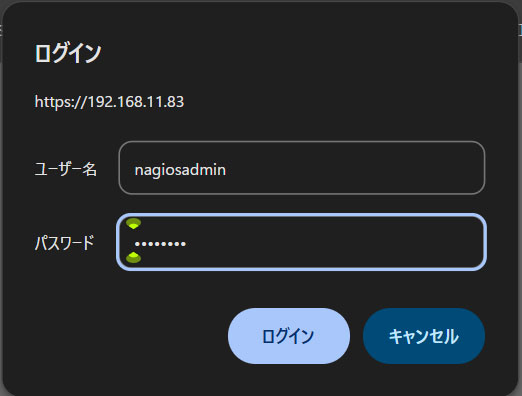
任意のブラウザで http://[IP_Address]/nagios/にアクセスし[Username]にnagiosadmin、[Password]には上記でユーザーを作成したとき指定したパスワードを入力し、[Sign in]
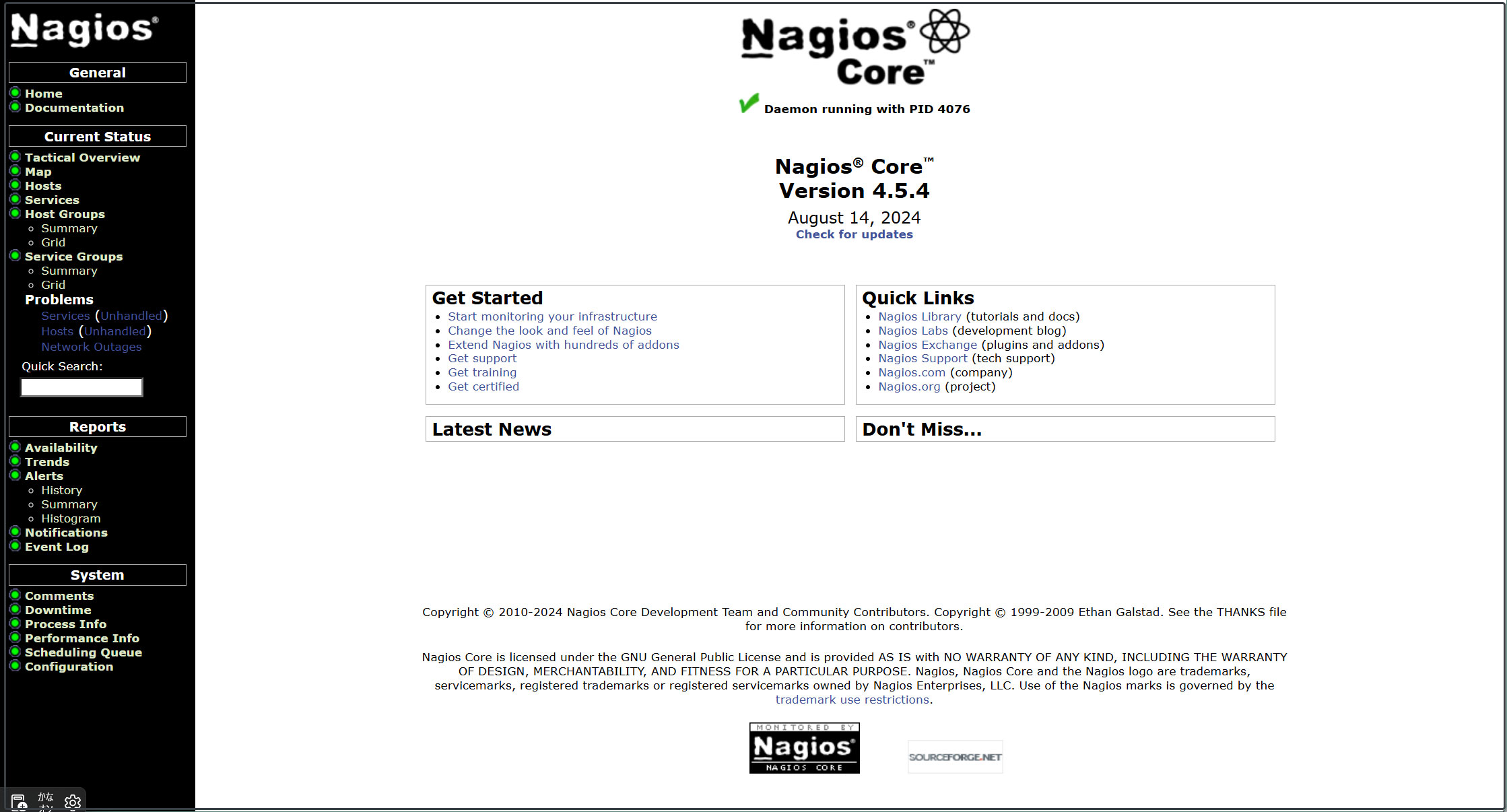
ログインに成功すると、以下のダッシュボードが表示されます。
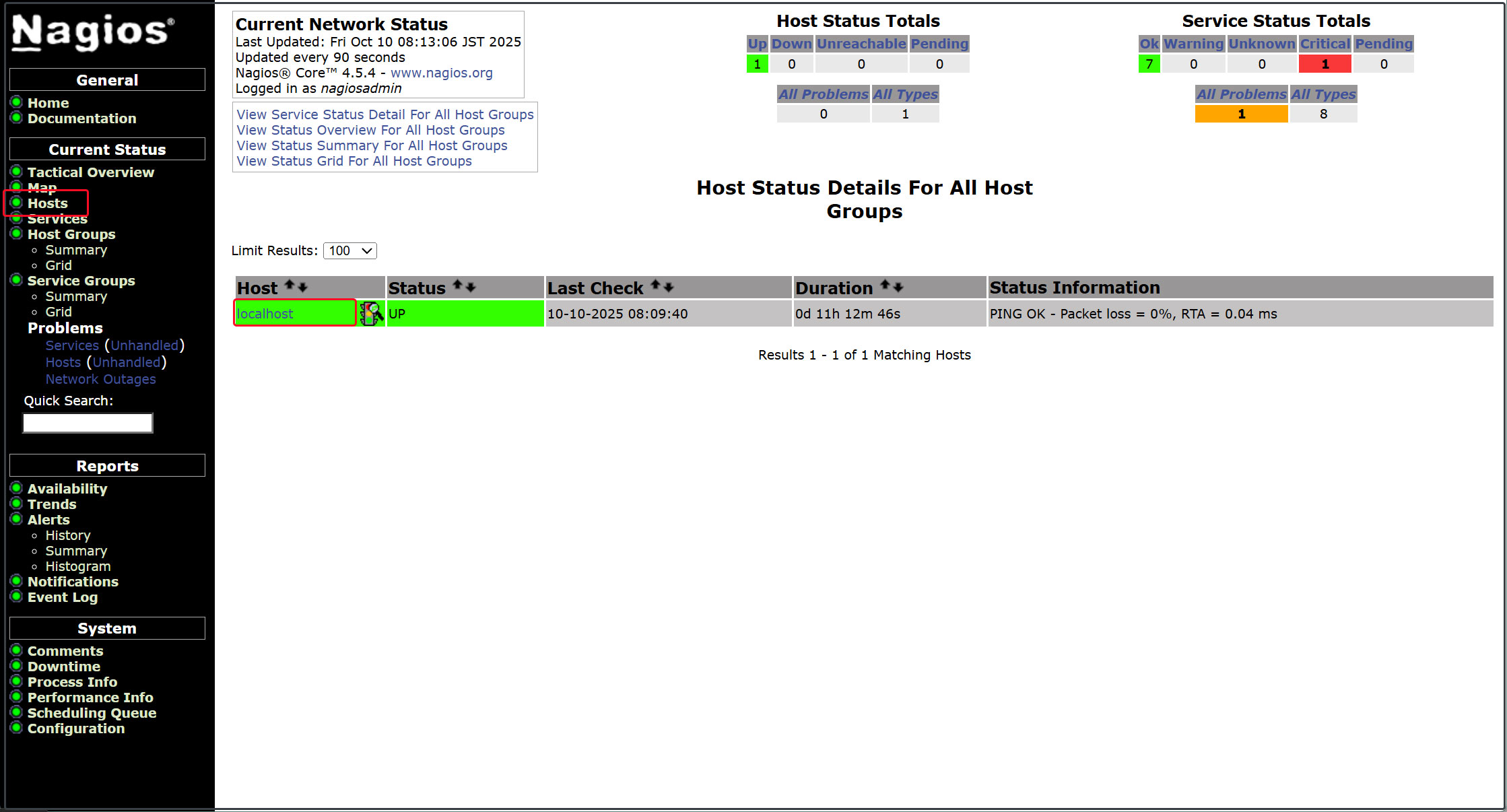
ホストの可用性を表示
左メニューの[Hosts]をクリック
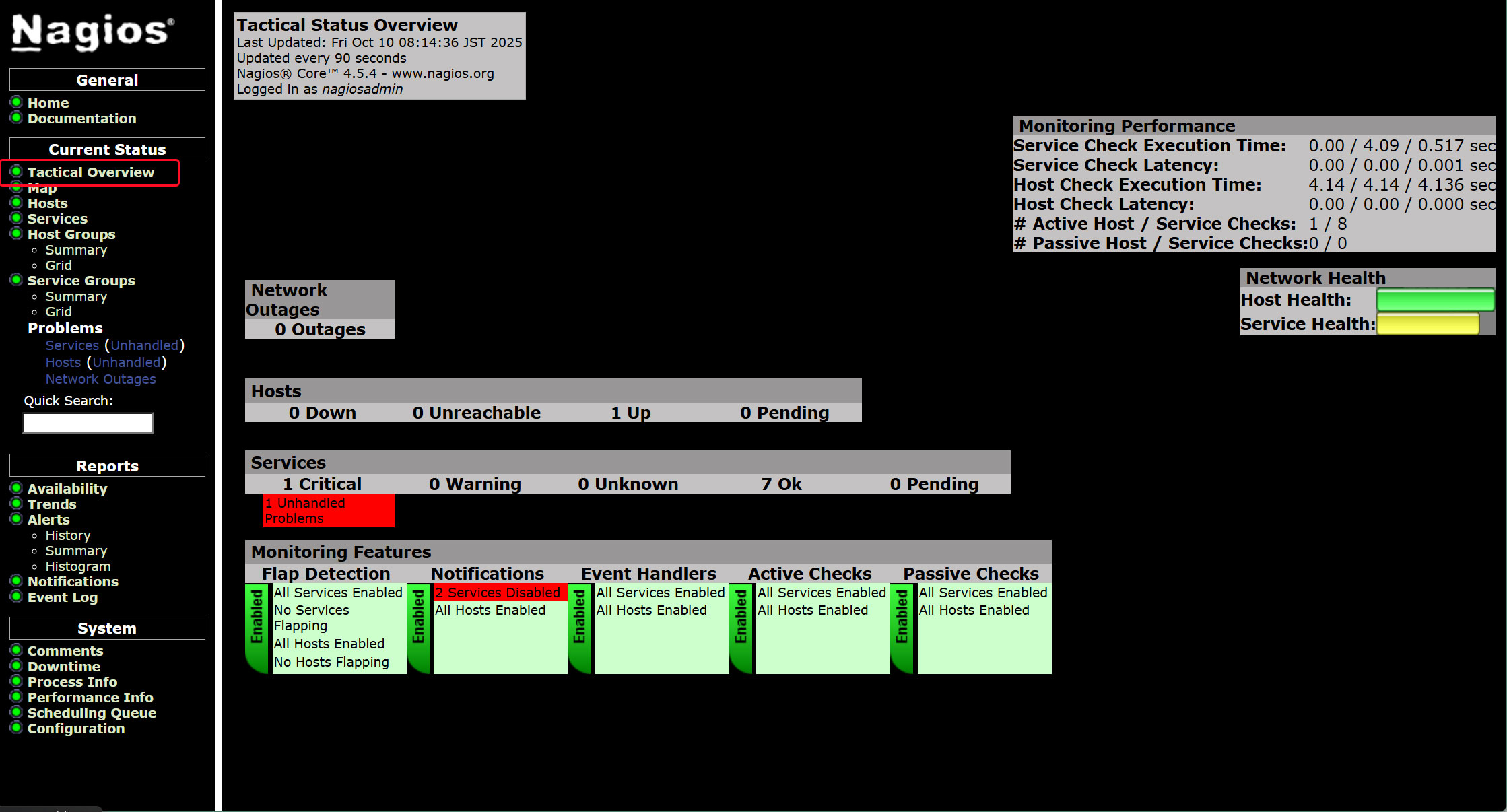
左メニューの [Tactical Overview] をクリックすると監視データを閲覧できる
左メニューの [Current Status] [Services] をクリック
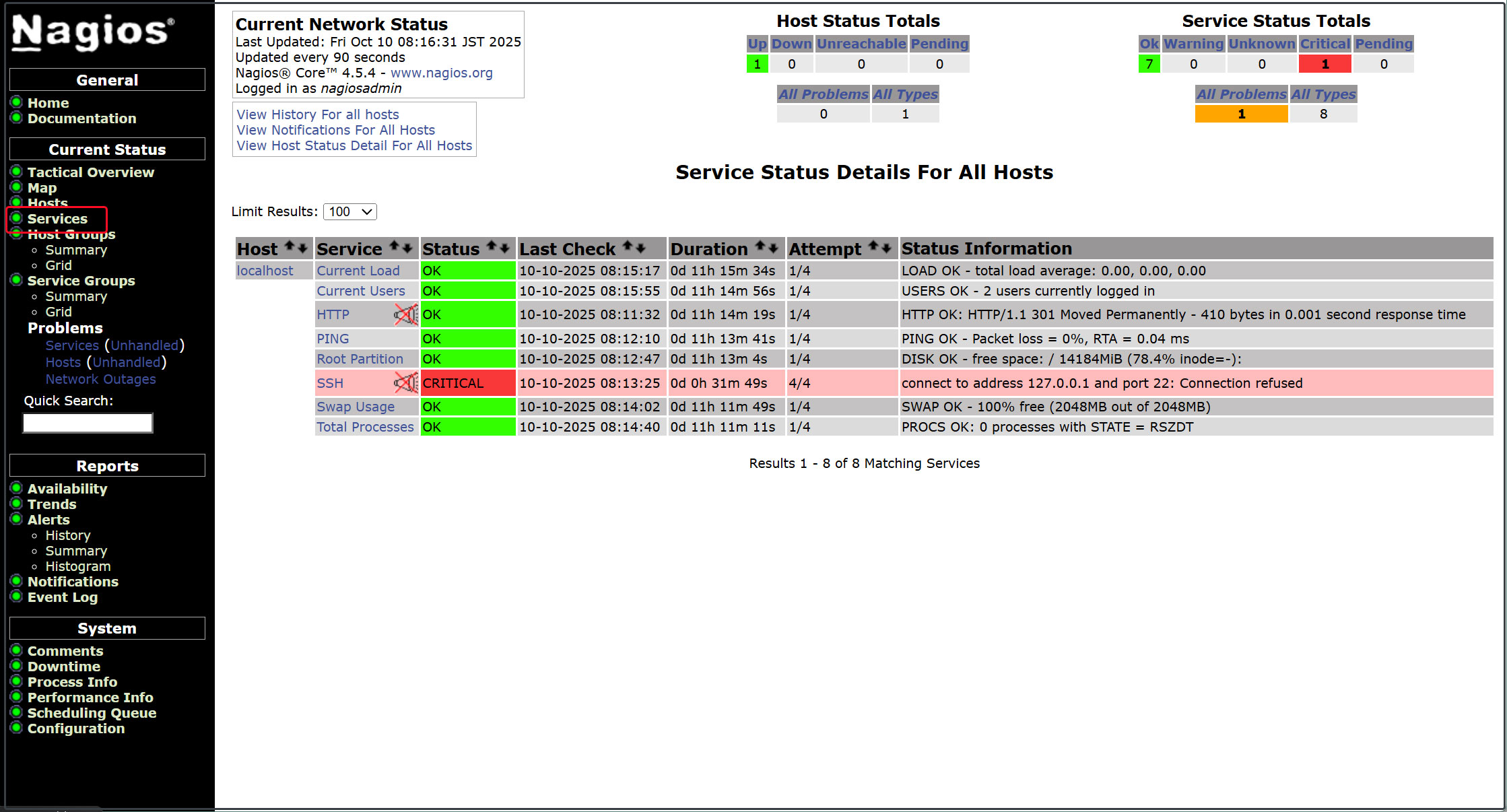
4. Nagios エージェントの構成
エージェントを監視するために必要なもの
• データ収集用のNagios plugins
• プラグインを実行するNRPE Agent
4.1 Nagios plugins
Nagios プラグインは、/usr/lib/nagios/plugins ディレクトリにあります。システム内で使用可能なすべてのプラグインを表示するには、このディレクトリをリストします。
|
1 |
# ls /usr/lib/nagios/plugins |
下記のとおりnagios-pluginsが利用可能である
|
1 2 3 4 5 6 7 8 |
check_breeze check_dns check_ide_smart check_mailq check_ntp_time check_real check_ssmtp negate check_by_ssh check_dummy check_ifoperstatus check_mrtg check_nwstat check_rpc check_swap urlize check_clamd check_file_age check_ifstatus check_mrtgtraf check_oracle check_rta_multi check_tcp utils.pm check_cluster check_flexlm check_imap check_nntp check_overcr check_sensors check_time utils.sh check_dhcp check_ftp check_ircd check_nntps check_ping check_simap check_udp check_dig check_host check_jabber check_nt check_pop check_smtp check_ups check_disk check_http check_load check_ntp check_procs check_spop check_users check_disk_smb check_icmp check_log check_ntp_peer check_procs_perf check_ssh check_wave |
4.2 Nagios NRPE Agentのインストール
|
1 |
# zypper -n install nrpe |
バージョン確認
|
1 2 3 |
# nrpe -V NRPE - Nagios Remote Plugin Executor Version: 4.1.1 |
サービスを開始して有効にする
|
1 2 3 |
# systemctl enable --now nrpe.service Created symlink '/etc/systemd/system/multi-user.target.wants/nrpe.service' → '/usr/lib/systemd/system/nrpe.service'. |
NRPEエージェントのステータスを確認
|
1 2 3 4 5 6 7 8 9 10 11 12 13 14 15 16 17 18 |
# systemctl status nrpe ● nrpe.service - Nagios Remote Plugin Executor Loaded: loaded (/usr/lib/systemd/system/nrpe.service; enabled; preset: disabled) Active: active (running) since Wed 2026-02-11 10:00:33 JST; 10s ago Invocation: cc7cefadd3754a94846689aabe0de3e6 Docs: http://www.nagios.org/documentation Main PID: 3037 (nrpe) Tasks: 1 (limit: 4558) CPU: 46ms CGroup: /system.slice/nrpe.service └─3037 /usr/sbin/nrpe -c /etc/nrpe.cfg -f Feb 11 10:00:33 Lepard systemd[1]: Started Nagios Remote Plugin Executor. Feb 11 10:00:33 Lepard nrpe[3037]: Starting up daemon Feb 11 10:00:33 Lepard nrpe[3037]: Server listening on 0.0.0.0 port 5666. Feb 11 10:00:33 Lepard nrpe[3037]: Server listening on :: port 5666. Feb 11 10:00:33 Lepard nrpe[3037]: Listening for connections on port 5666 Feb 11 10:00:33 Lepard nrpe[3037]: Allowing connections from: 127.0.0.1,::1 |
ファイアウォールでNRPEのポートを開く
NRPEはデフォルトでTCP 5666ポートを使用します。ファイアウォールが動作している場合は、Nagiosモニタリングサーバーからの外部チェックを許可するために、このポートを開きます。
|
1 2 |
# firewall-cmd --add-port=5666/tcp # firewall-cmd --reload |
ポート5666/tcpがリッスンされているか確認
|
1 2 3 4 5 |
# ss -altnp | grep 5666 LISTEN 0 5 0.0.0.0:5666 0.0.0.0:* users:(("nrpe",pid=3037,fd=4)) LISTEN 0 5 [::]:5666 [::]:* users:(("nrpe",pid=3037,fd=5)) |
5. 監視ホストの追加
下記サーバーをホストに追加し、 単純なPing による死活監視対象として設定
OS : openSUSE15.6
IPアドレス : 192.168.11.85
5.1 設定ファイル編集
|
1 2 3 |
# vi /etc/nagios/nagios.cfg 51行目 cfg_dir=/etc/nagios/servers コメント解除 |
5.2 ディレクトリー作成
|
1 2 3 |
# mkdir /etc/nagios/servers # chgrp nagios /etc/nagios/servers # chmod 750 /etc/nagios/servers |
5.3 定義ファイル新規作成
|
1 2 3 4 5 6 7 8 9 10 11 12 13 14 |
# vi /etc/nagios/servers/korodes.cfg define host { use linux-server host_name korodes alias korodes address 192.168.11.85 } define service { use generic-service host_name korodes service_description PING check_command check_ping!100.0,20%!500.0,60% } |
5.4 Nagiosサーバー再起動
|
1 |
# systemctl restart nagios.service |
Nagios サーバーにログイン(http://[サーバーIPアドレス]/nagios)しHostsを見るとホストが追加されている
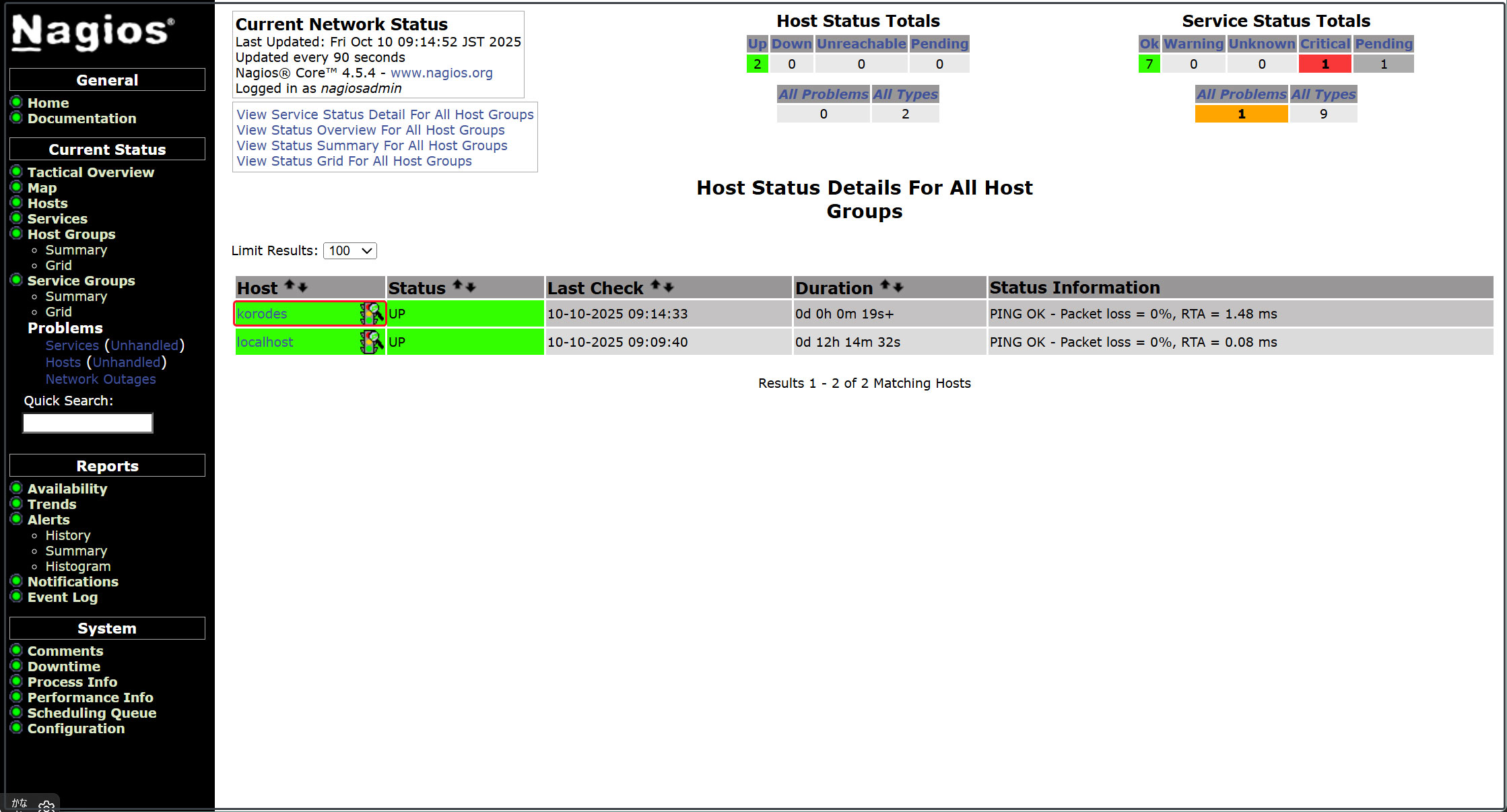
6. 監視サービスの追加
上記で追加したホストに監視サービスを追加する
OS : openSUSE15.6
IPアドレス : 192.168.11.85
6.1 監視対象サーバー側の設定
6.1.1 監視対象ホストにエージェントをインストール
EPEL から nrpe 及び代表的なサービスプラグインをインストール
|
1 |
# zypper -n install nrpe |
6.1.2 設定ファイル編集
# vi /etc/nrpe.cfg
106行目 : 接続を許可するホストを追記 (Nagios サーバーを指定)
allowed_hosts=127.0.0.1,::1,192.168.11.83
122行目 : コマンドの引数を許可
dont_blame_nrpe=1
300-304行目コメントにし、追加
# command[check_users]=/usr/lib/nagios/plugins/check_users -w 5 -c 10
# command[check_load]=/usr/lib/nagios/plugins/check_load -r -w .15,.10,.05 -c .30,.25,.20
# command[check_hda1]=/usr/lib/nagios/plugins/check_disk -w 20% -c 10% -p /dev/hda1
# command[check_zombie_procs]=/usr/lib/nagios/plugins/check_procs -w 5 -c 10 -s Z
# command[check_total_procs]=/usr/lib/nagios/plugins/check_procs -w 150 -c 200
command[check_by_ssh]=/usr/lib/nagios/plugins/check_by_ssh $ARG1$
command[check_dhcp]=/usr/lib/nagios/plugins/check_dhcp $ARG1$
command[check_disk]=/usr/lib/nagios/plugins/check_disk $ARG1$
command[check_file_age]=/usr/lib/nagios/plugins/check_file_age $ARG1$
command[check_ftp]=/usr/lib/nagios/plugins/check_ftp $ARG1$
command[check_http]=/usr/lib/nagios/plugins/check_http $ARG1$
command[check_imap]=/usr/lib/nagios/plugins/check_imap $ARG1$
command[check_load]=/usr/lib/nagios/plugins/check_load $ARG1$
command[check_log]=/usr/lib/nagios/plugins/check_log $ARG1$
command[check_mysql]=/usr/lib/nagios/plugins/check_mysql $ARG1$
command[check_ntp]=/usr/lib/nagios/plugins/check_ntp $ARG1$
command[check_ntp_peer]=/usr/lib/nagios/plugins/check_ntp_peer $ARG1$
command[check_ntp_time]=/usr/lib/nagios/plugins/check_ntp_time $ARG1$
command[check_ping]=/usr/lib/nagios/plugins/check_ping $ARG1$
command[check_pop]=/usr/lib/nagios/plugins/check_pop $ARG1$
command[check_spop]=/usr/lib/nagios/plugins/check_spop $ARG1$
command[check_procs]=/usr/lib/nagios/plugins/check_procs $ARG1$
command[check_smtp]=/usr/lib/nagios/plugins/check_smtp $ARG1$
command[check_ssmtp]=/usr/lib/nagios/plugins/check_ssmtp $ARG1$
command[check_ssh]=/usr/lib/nagios/plugins/check_ssh $ARG1$
command[check_swap]=/usr/lib/nagios/plugins/check_swap $ARG1$
command[check_tcp]=/usr/lib/nagios/plugins/check_tcp $ARG1$
command[check_udp]=/usr/lib/nagios/plugins/check_udp $ARG1$
command[check_ups]=/usr/lib/nagios/plugins/check_ups $ARG1$
command[check_users]=/usr/lib/nagios/plugins/check_users $ARG1$
6.1.3 nrpeサーバー有効化、起動
|
1 2 3 4 5 6 7 8 9 10 11 12 13 14 15 16 17 18 19 20 21 |
# systemctl enable --now nrpe # systemctl start nrpe # /systemctl status nrpe ● nrpe.service - Nagios Remote Plugin Executor Loaded: loaded (/usr/lib/systemd/system/nrpe.service; enabled; preset: disabled) Active: active (running) since Wed 2026-02-11 10:39:49 JST; 1min 0s ago Docs: http://www.nagios.org/documentation Main PID: 37038 (nrpe) Tasks: 1 (limit: 2250) CPU: 12ms CGroup: /system.slice/nrpe.service └─37038 /usr/sbin/nrpe -c /etc/nrpe.cfg -f Feb 11 10:39:49 Lion systemd[1]: Started Nagios Remote Plugin Executor. Feb 11 10:39:49 Lion nrpe[37038]: Starting up daemon Feb 11 10:39:49 Lion nrpe[37038]: Server listening on 0.0.0.0 port 5666. Feb 11 10:39:49 Lion nrpe[37038]: socket: Address family not supported by protocol Feb 11 10:39:49 Lion nrpe[37038]: Warning: Daemon is configured to accept command arguments from clients! Feb 11 10:39:49 Lion nrpe[37038]: Listening for connections on port 5666 Feb 11 10:39:49 Lion nrpe[37038]: Allowing connections from: 127.0.0.1,::1,192.168.11.83 |
6.1.4 ファイアウォールでNRPEのポート5666/tcp,5666/udpを開く
|
1 2 |
# firewall-cmd --add-port=5666/tcp --permanent # firewall-cmd --reload |
6.2 Nagios サーバー側の設定
6.2.1 nrpeプラグインのインストール
|
1 |
# zypper install nagios-plugins-nrpe |
6.2.2 nagiosプラグインディレクトリーを確認
|
1 |
# ls /usr/lib/nagios/plugins |
check_breeze check_dummy check_ifstatus check_nntp check_overcr check_simap check_ups check_by_ssh check_file_age check_imap check_nntps check_ping check_smtp check_users check_clamd check_flexlm check_ircd check_nrpe check_pop check_spop check_wave check_cluster check_ftp check_jabber check_nt check_procs check_ssh negate check_dhcp check_host check_load check_ntp check_procs_perf check_ssmtp nrpe_check_control check_dig check_http check_log check_ntp_peer check_real check_swap urlize check_disk check_icmp check_mailq check_ntp_time check_rpc check_tcp utils.pm check_disk_smb check_ide_smart check_mrtg check_nwstat check_rta_multi check_time utils.sh check_dns check_ifoperstatus check_mrtgtraf check_oracle check_sensors check_udp
6.2.3 commands.cfg編集
|
1 2 3 4 5 6 7 |
# vi /etc/nagios/objects/commands.cfg # 最終行に追記 define command { command_name check_nrpe command_line $USER1$/check_nrpe -H $HOSTADDRESS$ -c $ARG1$ } |
6.2.4 先ほどホスト追加したときに作成した korodes.cfg を編集追加する
今回はHTTP、SSH、FTP を追加してみる
|
1 2 3 4 5 6 7 8 9 10 11 12 13 14 15 16 17 18 19 20 21 22 23 24 25 26 |
# vi /etc/nagios/servers/korodes.cfg # 以下を追加する # 'HTTP' command definition define service{ use local-service host_name korodes service_description HTTP check_command check_http } # 'SSH' command definition define service{ use local-service host_name korodes service_description SSH check_command check_ssh } # 'FTP' command definition define service{ use local-service host_name korodes service_description FTP check_command check_ftp } |
6.2.5 Nagios 再起動
|
1 |
# systemctl restart nagios.service |
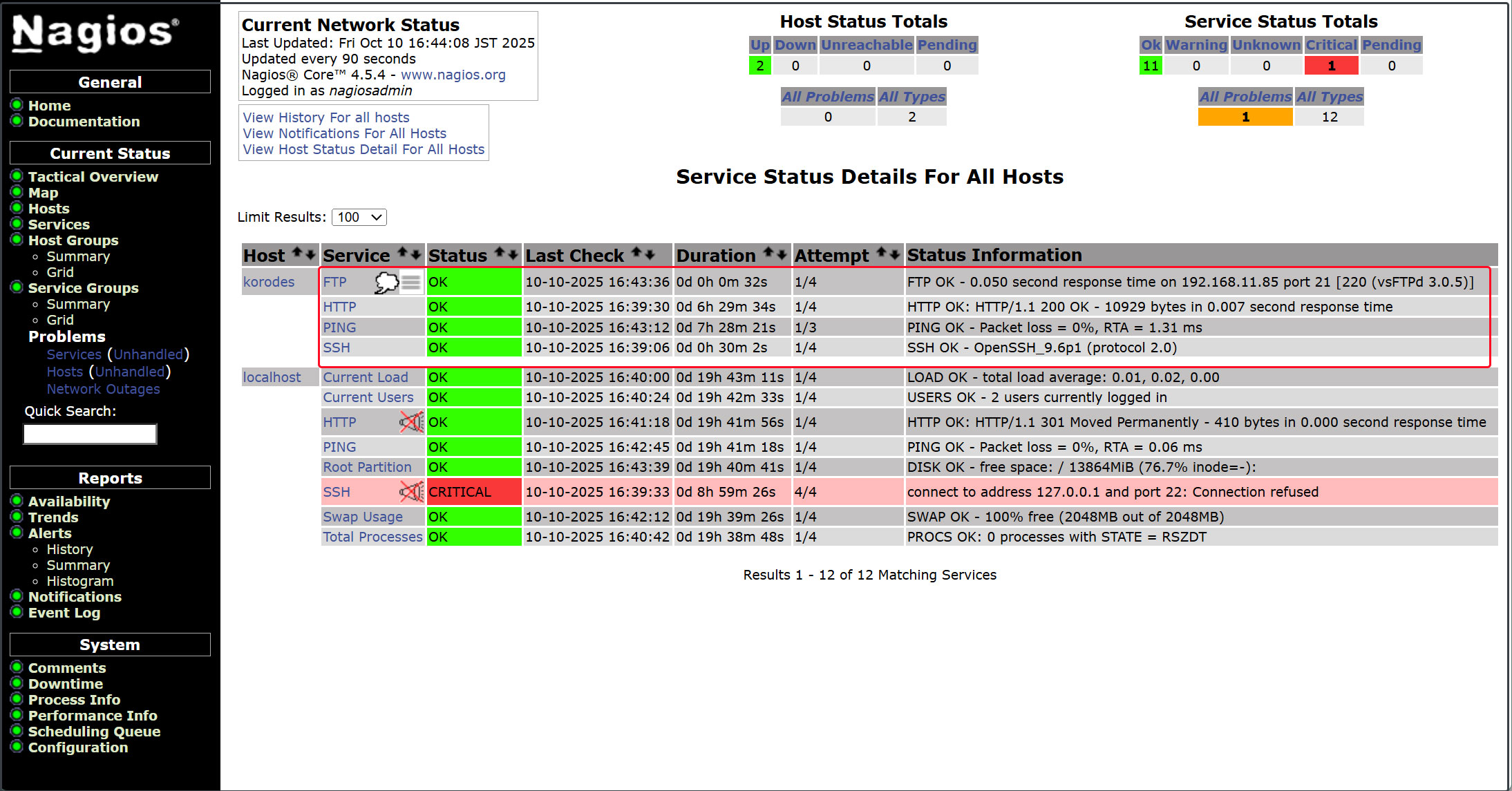
6.2.6 http://[Nagios Server IP Address]/nagios にアクセスする
下図のように新しく追加した監視サービスが追加されている